












Create 3D Phone Pop-Out Posters with GPT Image 2.5
Learn how to generate 3D phone pop-out posters with GPT Image 2.5, using five reference-based scenes, composition tips, and ready-to-use English prompts.
How to Create a 3D Phone Pop Out Poster with GPT Image 2.5
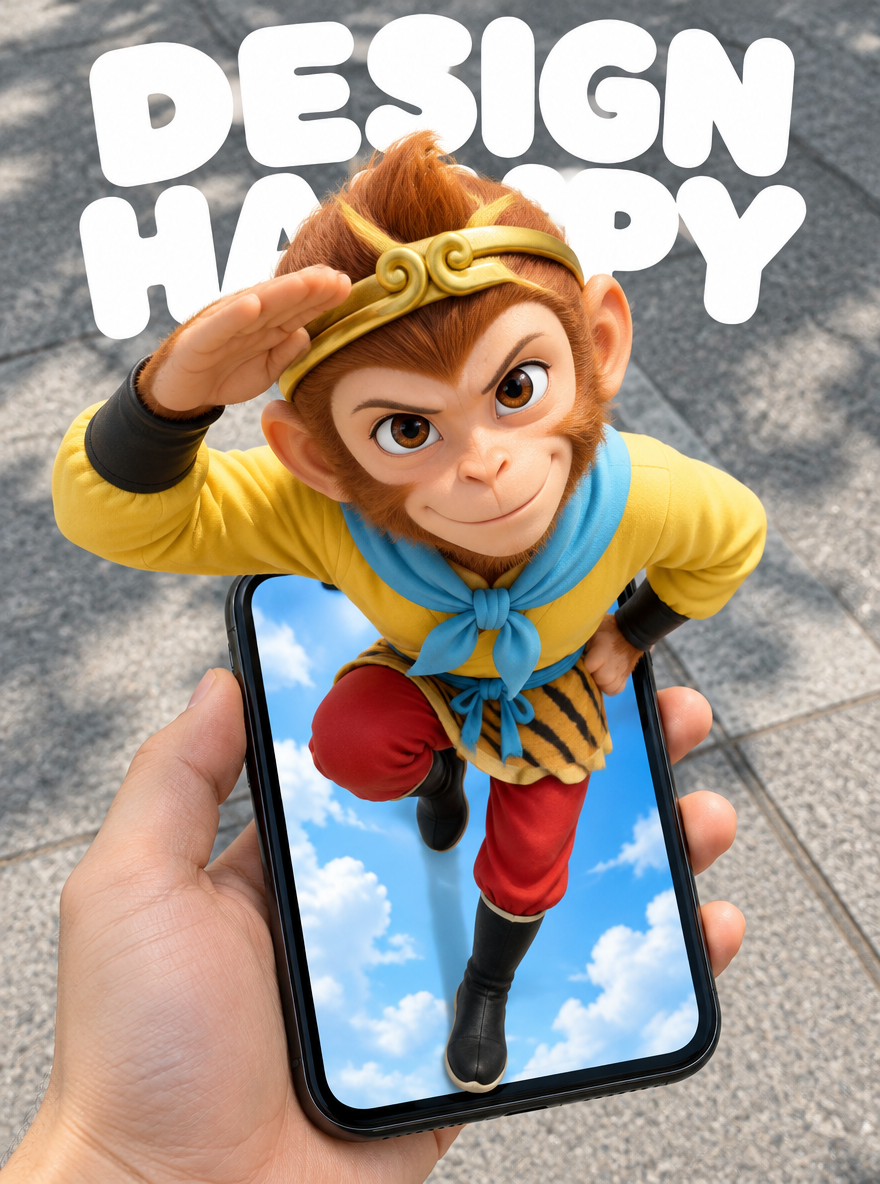
The Monkey King's head and shoulders extend beyond the phone frame, while his red trouser legs remain inside a sky-filled screen. The hand holding the phone belongs to a different space: a real pavement. Those three layers turn a flat display into the illusion of a doorway.
This tutorial is for designers and fashion content creators making social media posters. It includes five images generated with WeShop GPT Image 2.5 Flare and English versions of the prompts used for each one. The goal is not simply to place a person inside a phone. It is to preserve a reference pose while making one continuous figure cross the screen boundary.
Five Phone Pop Out Scenes
| 1 — Monkey King Hero | 2 — Blue Hair Summer Fashion |
|---|---|
 |  |
| 3 — Man on a Red Ladder | 4 — Floral Dress in a Meadow |
|---|---|
 |  |
| 5 — Streetwear and Headphones |
|---|
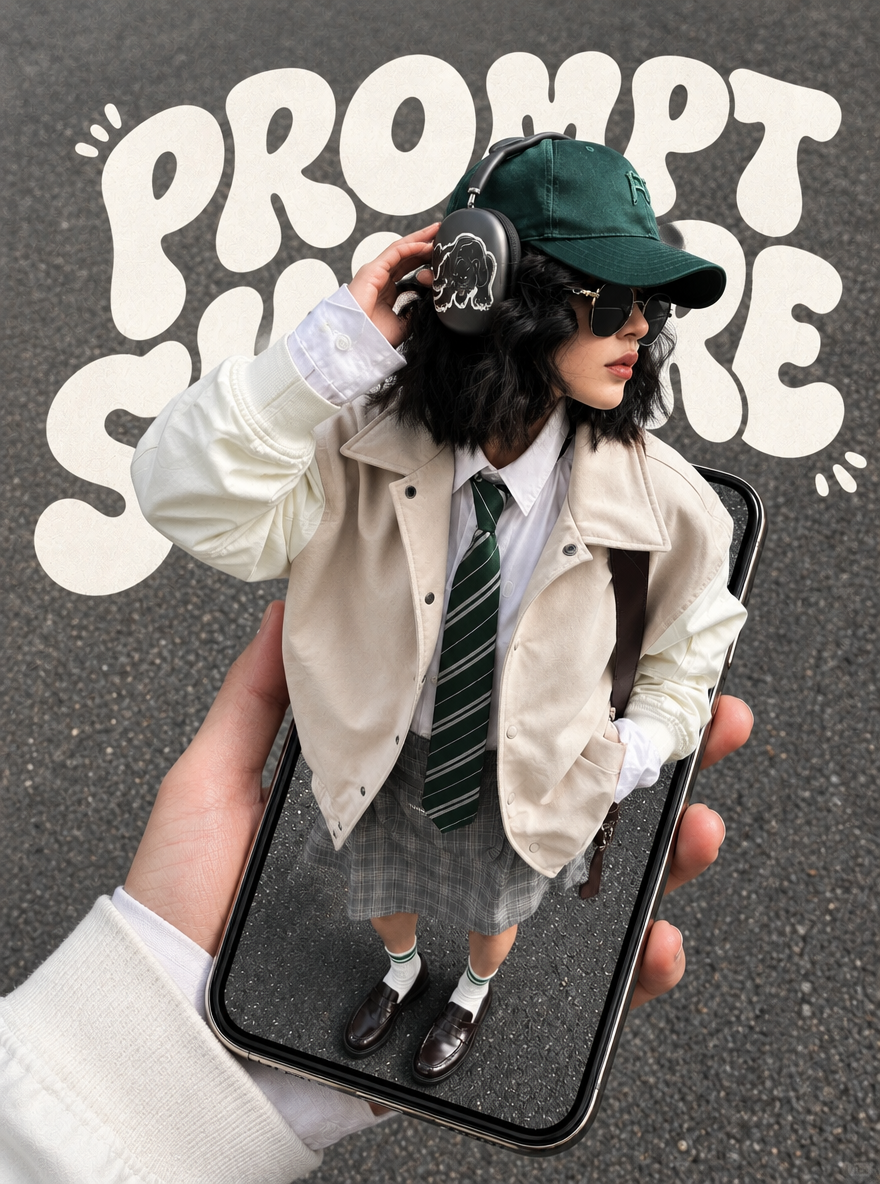 |
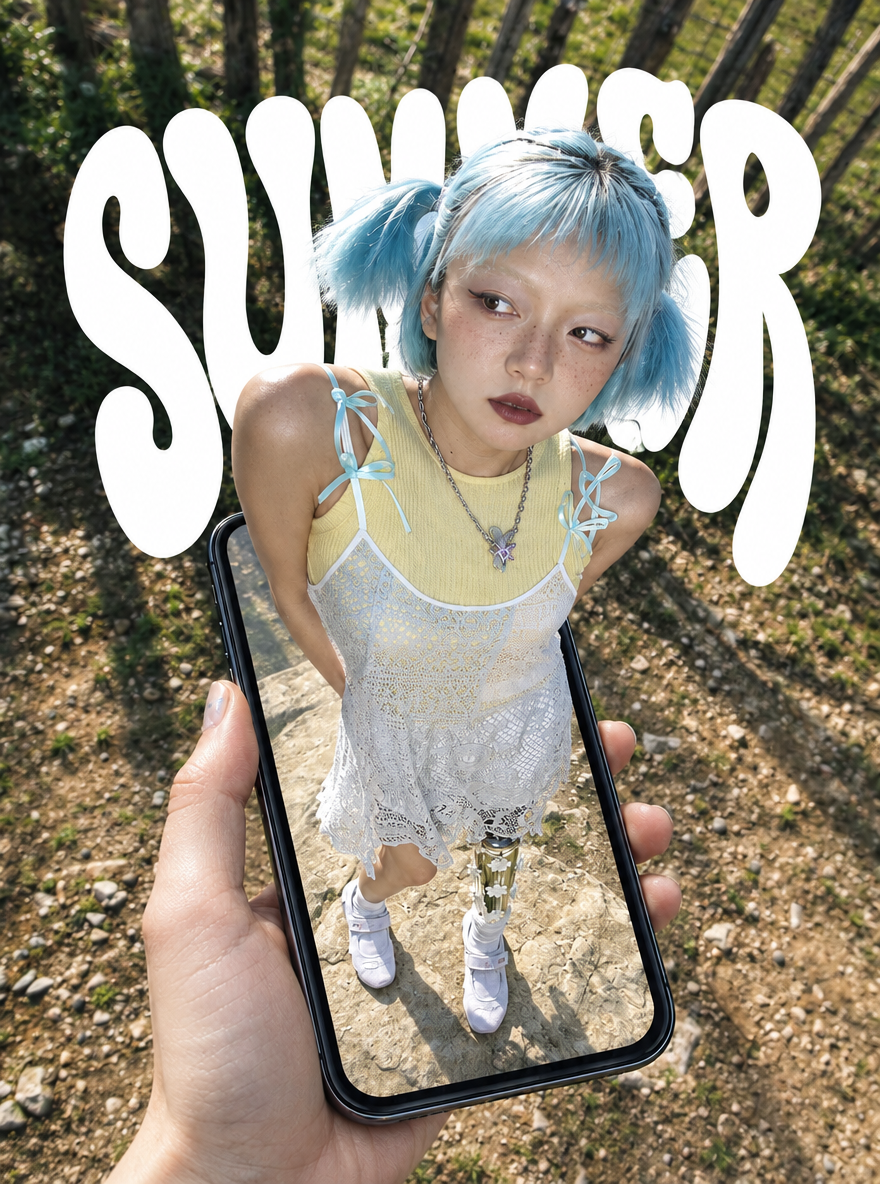
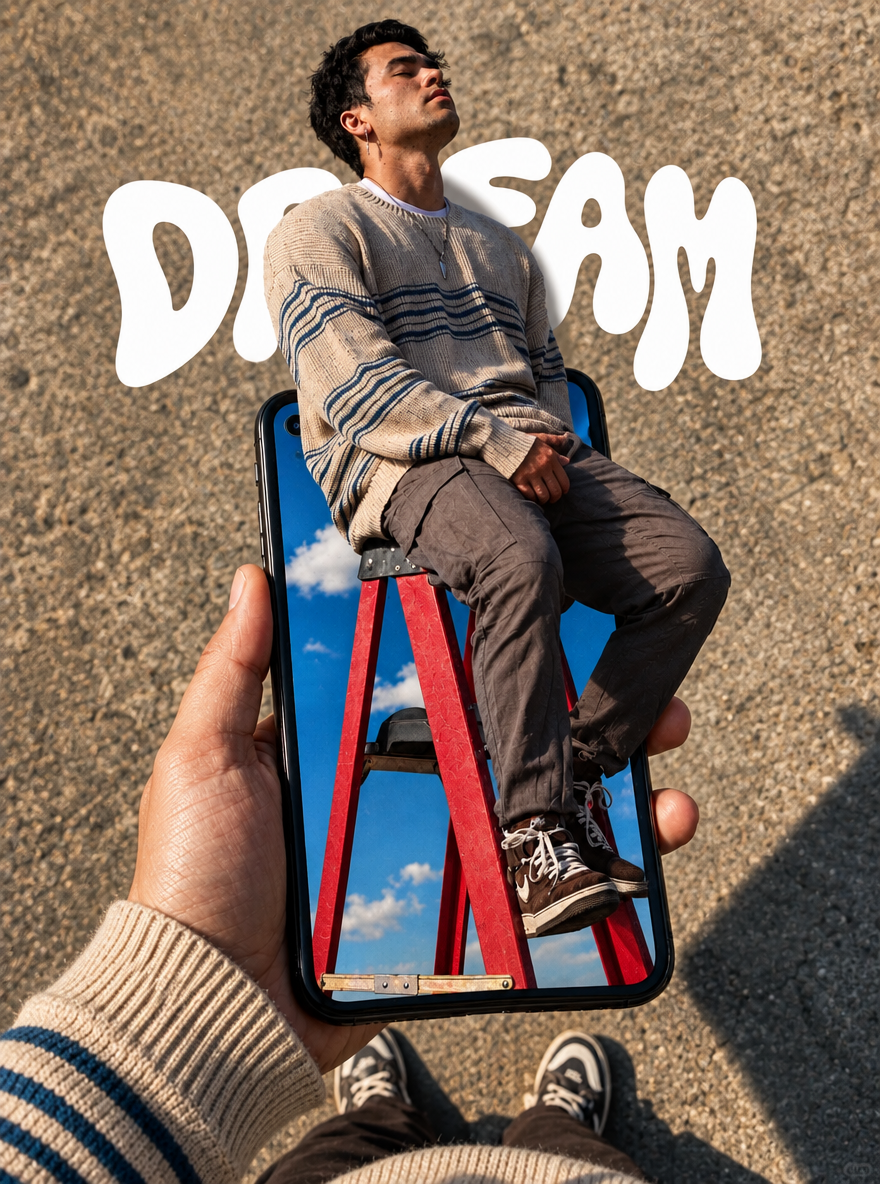
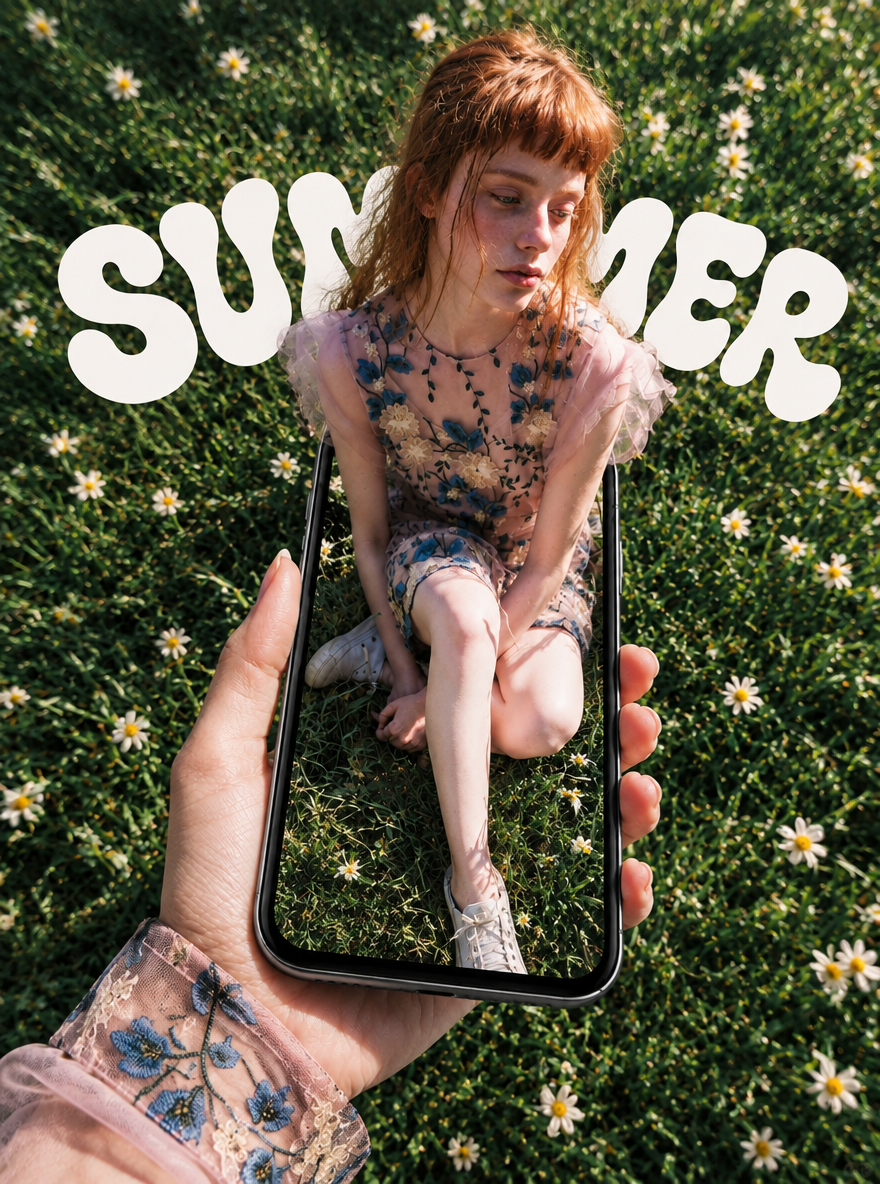
The Monkey King is the hero visual. The other four scenes feature blue-haired fashion styling, a red ladder, a floral dress in a meadow, and streetwear with headphones. Every image above is a newly generated AI result, not an image from the original post.
Make the Screen a Doorway
The phone frame establishes the illusion. The head and shoulders sit in front of it, the legs recede into the screen, and parts of the frame remain visible alongside the body. These specific overlaps are easier to describe and evaluate than style words such as “3D” or “surreal.”
A top-down viewpoint adds a sense of distance. The head and shoulders close to the camera should appear larger, while the feet farther away appear smaller. The body must still connect naturally. Describe the pose, the position of the hand holding the phone, and the phone's tilt together to keep the perspective coherent.
There are two background treatments in this set. The Monkey King and the man on the ladder contrast real ground with a blue sky inside the screen. The fashion scenes use similar woodland, grass, or asphalt textures inside and outside the phone. The first treatment emphasizes a portal; the second emphasizes a figure emerging from a continuous scene.
Place large lettering behind the figure. DESIGN HAPPY, SUMMER, DREAM, and PROMPT SHARE act as poster elements, with parts of the letters hidden by the subject. If the text carries information that must be readable, check it separately or add it during final layout.
Prepare a Reference and Generate
Choose a reference that clearly shows the pose, clothing, and silhouette. Generate each scene separately after selecting the hero visual. Do not mix five different poses into a single prompt. Confirm that you have the necessary rights to use your reference material.
This set was generated through the official WeShop OpenAPI, not by clicking Generate on the website. Each reference was uploaded to the image asset endpoint, and its returned URL was included in params.images. To recreate the idea in the WeShop GPT Image tool, use the corresponding reference and prompt as a starting point. Check the model and setting labels in the current interface.
| Setting Used for This Set | Actual Value |
|---|---|
| Model | GPT Image 2.5 Flare, gpt-image-2.5-flare |
| Agent | gpt-image, v1.0 |
| Input | One reference image and one complete prompt per scene |
| Requested aspect ratio | 3:4 |
| Requested image size | 1K |
| Quality | low |
| Images per run | 1 |
| Actual dimensions of all five outputs | 880 × 1184 pixels |
3:4 and 1K are request settings, not promises of exact file dimensions. The actual pixel dimensions listed here were read from the generated files. Upload, run, polling, and model parameters are documented in the official WeShop API reference.
Upload the corresponding reference, enter the complete prompt, explicitly select the model, and submit once. Wait for that run to finish rather than repeatedly submitting while it is running. Check the screen overlap first, then inspect hands, body connections, props, and lettering.
English Prompts for Each Scene
The English prompts below are translations of the Chinese prompts used to generate this set. They preserve the pose, composition, styling, and constraints of those instructions. Each complete block is intended to be used with its corresponding reference image. These are newly written prompts based on visual analysis, not the source creator's original prompts; a new run may produce a different result.
1 Monkey King Hero
Preserve the raised arm and bent knee, while replacing the exterior background with real pavement.
Using the reference image as the basis, create a vertical 3:4 POV surreal phone pop-out poster. The main character is the Monkey King, Sun Wukong. Preserve the classic animated design shown in the reference: a monkey face, golden headband, yellow top, light-blue scarf, red trousers, and black boots. Keep the original pose: one arm raised and bent beside the head, the other hand at the waist, one leg lifted with the knee bent, and the other leg extending toward the bottom of the phone screen. Do not change the pose to ordinary standing or swinging a staff.

Use a first-person, top-down, wide-angle viewpoint. A hand enters from the lower left holding a black iPhone XR. Place the slightly tilted phone in the lower half of the composition, with its entire body visible and a realistic size relative to the hand. The character's head and shoulders are closer to the camera and appear larger, while the lower body becomes smaller with distance, creating strong foreshortening.

The phone screen is a doorway into another space. The Monkey King's head, shoulders, chest, and raised arm clearly extend outside the screen, overlapping the phone's top edge and parts of its side edges; the legs extend into the space inside the screen. Keep the entire body continuous and complete. Use frame occlusion, contact shadows, and depth inside the screen to create a clear 3D pop-out illusion. This must not look like a flat image displayed on the phone or a separate figure floating above it.

Outside the phone, show a real urban sidewalk with gray concrete, natural daylight, and soft shadows. Inside the phone screen, retain a bright blue sky and white clouds, creating a contrast between a virtual world and the real ground. Render the hand and phone with photographic realism. Preserve the Monkey King's classic animated outlines and colors while adding dimensional shading and depth.

At the top of the composition, retain large rounded white lettering that reads exactly "DESIGN" and "HAPPY" on two lines. Keep the lettering behind the character, naturally overlapped by the head and shoulders, without covering the face, gesture, or phone.

Make the image clean, playful, and visually striking as a social media poster. Show only one Monkey King, one hand holding the phone, and one phone. Do not add other characters, interface buttons, or extra text. Avoid duplicate limbs, malformed fingers, disconnected body parts, incorrect perspective, and conflicting light directions.
2 Blue Hair Summer Fashion
Use the leaning head and shoulders to strengthen the screen overlap, while retaining the yellow, white, and light-blue outfit palette.
Use the pose and composition of the input reference to create a vertical 3:4 POV surreal fashion photography phone pop-out poster. The subject is a clearly adult young woman with short light-blue twin ponytails, freckles, and a silver necklace. She wears a pale-yellow tank top layered beneath a white lace slip dress, light-blue ribbon bows on the shoulder straps, and white sneakers. Preserve her leaning upper body, hands held behind her back, and slightly turned head. Use a top-down, wide-angle view from the phone holder's perspective, with the head and shoulders appearing larger and the feet smaller with distance.

A realistic hand enters from the lower left holding a black iPhone XR, with a naturally proportioned, fully visible rounded body. The woman's head, shoulders, and chest emerge from the phone screen as a spatial doorway, overlapping the phone's top edge. Her legs and feet below the skirt remain deeper inside the screen. Keep one continuous, complete figure. Use frame occlusion, consistent daylight, contact shadows, and depth inside the screen to create the 3D pop-out illusion. Do not simply paste a complete flat photograph onto the screen, and do not generate a second person or phone.

The exterior background is a real sunlit woodland path with soil, gravel, tree trunks, and deep-green vegetation. Keep the ground inside the screen compatible with the exterior woodland in lighting and color. Use high-quality photographic realism with clear skin, hair, lace, and phone-glass details and a striking social media fashion aesthetic. Retain enormous rounded white lettering reading "SUMMER" in the upper background, behind the subject and naturally overlapped by her head and shoulders. Keep the upright phone and shoes fully visible. Do not add extra text or interface elements. Avoid malformed hands, duplicate limbs, disconnected body parts, and inconsistent shadows.
3 Man on a Red Ladder
The seated pose and red ladder provide depth cues. The sky inside the phone contrasts with the sandy ground outside it.
Use the seated pose and phone composition in the input reference to generate a vertical 3:4 photographic POV phone pop-out poster. An adult man with short black hair and a silver earring wears a beige sweater with dark-blue horizontal stripes, gray-brown trousers, and brown lace-up sneakers. He sits on a red stepladder with his hands resting together between his legs, his head tilted upward, and his eyes closed in a relaxed pose. Preserve the seated pose from the reference; do not make him stand.

Use a first-person, downward-looking viewpoint. A hand wearing a matching striped knit sleeve enters from the lower left and holds a black iPhone XR. Place the fully visible, realistically proportioned phone in the lower half of the frame. The man's head, shoulders, chest, and parts of his thighs clearly extend beyond the screen boundary and overlap the top edge of the phone. The red ladder and lower legs occupy the space inside the screen, with a continuous body and a structurally plausible ladder. Use wide-angle foreshortening, contact shadows, phone-frame occlusion, and the ladder's depth to create the 3D pop-out effect. Do not make this a flat photograph inside the screen or a separate figure floating in midair.

Outside the screen, show real rough sandy-colored pavement. The phone holder's shoes may appear slightly along the bottom edge. Inside the screen, show a vivid blue sky and white clouds, contrasting with the real ground. Use warm daylight, natural fabric textures, and clear hand and phone details. Retain rounded white lettering reading "DREAM" in the upper background behind the man. Do not add extra text, other people, phone interface elements, or watermarks. Avoid extra fingers, misaligned legs and feet, a disconnected ladder, and excessive cropping of the phone.
4 Floral Dress in a Meadow
Keep the grass and daisies similar inside and outside the screen, and repeat the floral detail in the sleeve of the hand holding the phone.
Use the reference image for the seated pose, phone composition, and color palette to generate a vertical 3:4 POV surreal photography poster. The subject is a clearly adult red-haired woman with short orange-red bangs and naturally loose hair. She wears a pink short-sleeved floral embroidered dress and light-colored casual shoes. She sits on the grass with her legs bent and crossed, one lower leg extending toward the bottom of the frame, her hands near her knees, and her gaze softly directed down and to the side. Preserve the reference pose in a natural, nonsexual fashion editorial photograph.

Use a first-person, top-down, wide-angle view. A hand wearing a matching pink floral sleeve enters from the lower left holding a black iPhone XR. Keep the entire phone body visible and realistically sized relative to the hand. The woman's head, shoulders, and upper body extend beyond the phone screen and overlap its top edge, while her lower body remains inside the screen. Keep one continuous figure. Use front-to-back frame occlusion, daylight, contact shadows, and foreshortening to establish a strong 3D pop-out illusion through the screen doorway. This must not look like a flat screenshot or a floating figure.

Show natural green grass and small white daisies both inside and outside the phone. Keep the textures consistent while maintaining a clear difference in depth. Use angled warm sunlight, realistic skin and embroidered fabric details, and natural shadows. Retain rounded white lettering reading "SUMMER" in the upper background behind the subject. Do not add extra text, interface elements, or people. Avoid malformed fingers, fused legs, duplicate faces, disconnected body parts, and an incorrect phone frame.
5 Streetwear and Headphones
The hand touching the headphones crosses the phone edge. The green cap and tie tie the outfit palette together.
Using the input reference, create a vertical 3:4 POV surreal street-fashion photography phone pop-out poster. The subject is a clearly adult young woman with short wavy black hair, a dark-green baseball cap, black sunglasses, and large black over-ear headphones. She wears an off-white sleeveless jacket over a white shirt, a green diagonally striped tie, a gray plaid skirt, white ankle socks, and black loafers. Preserve the pose with one hand raised beside the headphones, the other hand in a pocket, and her head turned to the side.

Use a first-person, high-angle, downward-looking wide-angle view. A realistic hand in a white sleeve enters from the lower left holding a black iPhone XR. Place the slightly tilted phone in the lower half of the frame, with its entire rounded frame visible and its size appropriate to the hand. The subject's head, shoulders, chest, and raised arm extend dimensionally outside the screen and overlap the phone's top and side edges. Her legs and feet below the skirt recede into the phone. Keep one continuous figure, with a larger head close to the camera and smaller feet farther away. Use phone-edge occlusion, contact shadows, and realistic light to establish the 3D pop-out illusion. Do not make this a flat portrait inside the screen or a complete floating figure.

Use real gray fine-grained asphalt for the background, with matching pavement inside the screen. Maintain consistent soft natural light and detailed clothing, headphones, and phone-glass textures. In the upper background, place large rounded white lettering that reads exactly "PROMPT" and "SHARE" on two lines. Keep the lettering behind the subject and naturally overlapped by the head and shoulders. Do not add other text, watermarks, phone interface elements, a second person, or a second phone. Avoid duplicate fingers, broken headphones, abnormal legs and feet, and incorrect perspective.
Check the Generated Results
All five results preserve the main overlap between the figure and the phone frame. Their poses and outfits remain close to their respective references. The Monkey King image creates the intended contrast between real pavement and a sky-filled screen, although the right arm is slightly cropped. Adjust the framing before using it for a cover that requires wider safe margins.
The phone hardware is not an exact product reproduction. Although the prompts specify an iPhone XR, the ladder image shows an inaccurate punch-hole camera. These images demonstrate the visual effect; they should not be treated as accurate iPhone XR product photographs.
Some lettering is hidden behind the figures. This supports the poster's layering but does not guarantee complete readability. Check essential text before publishing. A reference can help preserve a pose and appearance, but it does not establish verified identity or exact reproduction of every clothing detail.
Create Your Phone Pop Out Poster
Start with one clear pose. Specify which parts of the figure extend outside the screen and which remain inside it.