












Turn One Product Photo Into Two Commercial Shoots with Nano Banana 2.1
Learn how to turn a single perfume packshot into dark botanical and warm sunlit campaigns while preserving product shape, materials, color, and label structure.
Turn One White-Background Product Photo Into Two Commercial Shoots with Nano Banana 2.1
Changing a background is easy. Keeping the product unchanged while the set, lighting, props, reflections, and mood all change is the real commercial-photography challenge. If the bottle proportions, cap material, liquid color, or label structure drift, an attractive result can still be unusable.
we called Nano Banana 2.1 through the WeShop API. We first created a fictional, unbranded perfume packshot, then used it as a strict product reference for two new campaigns: a dark botanical luxury scene and a warm sunlit editorial. Both outputs retained the main product structure while delivering clearly different art directions.
Final Results
| Dark Botanical Campaign | Warm Sunlit Campaign |
|---|---|
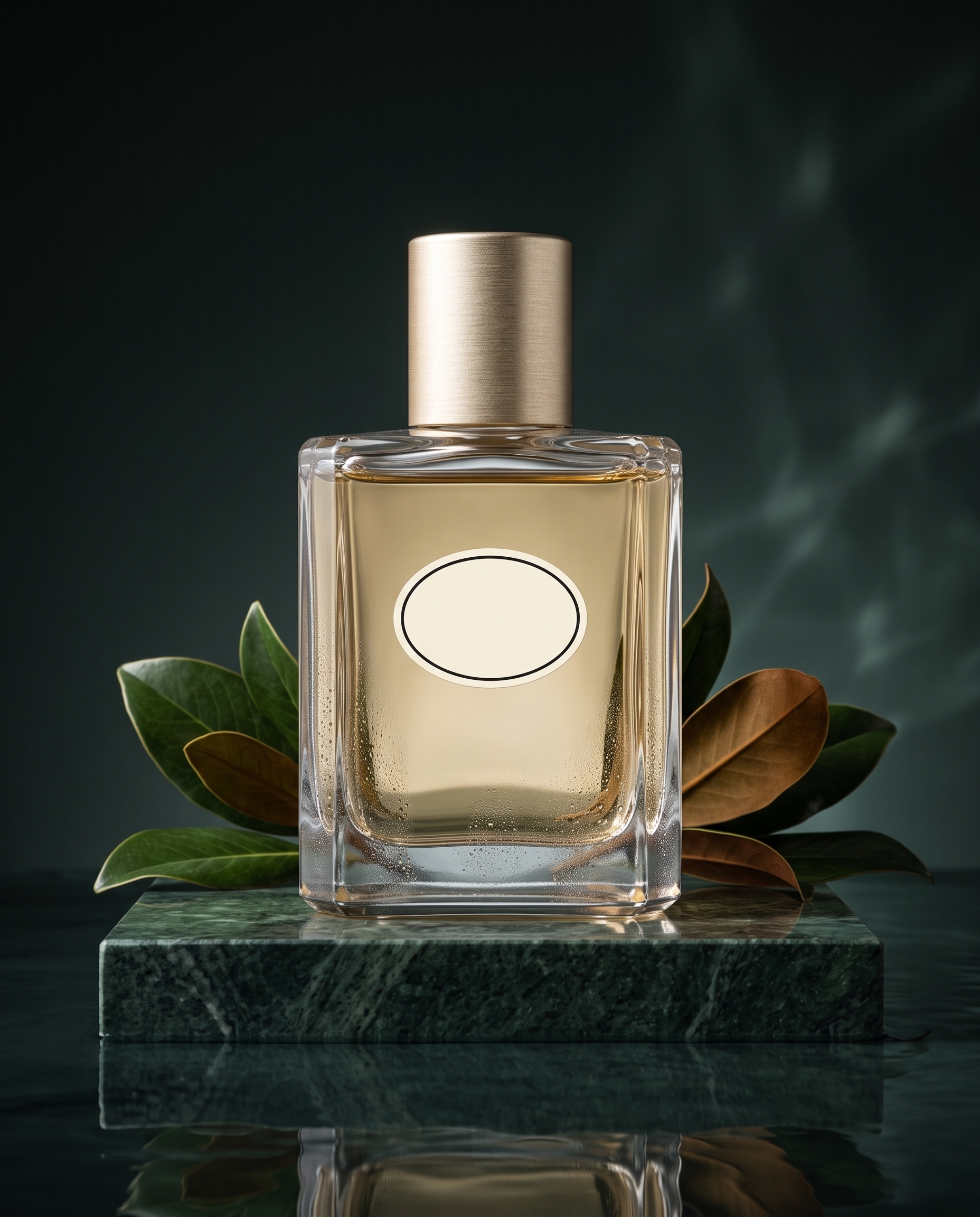 | 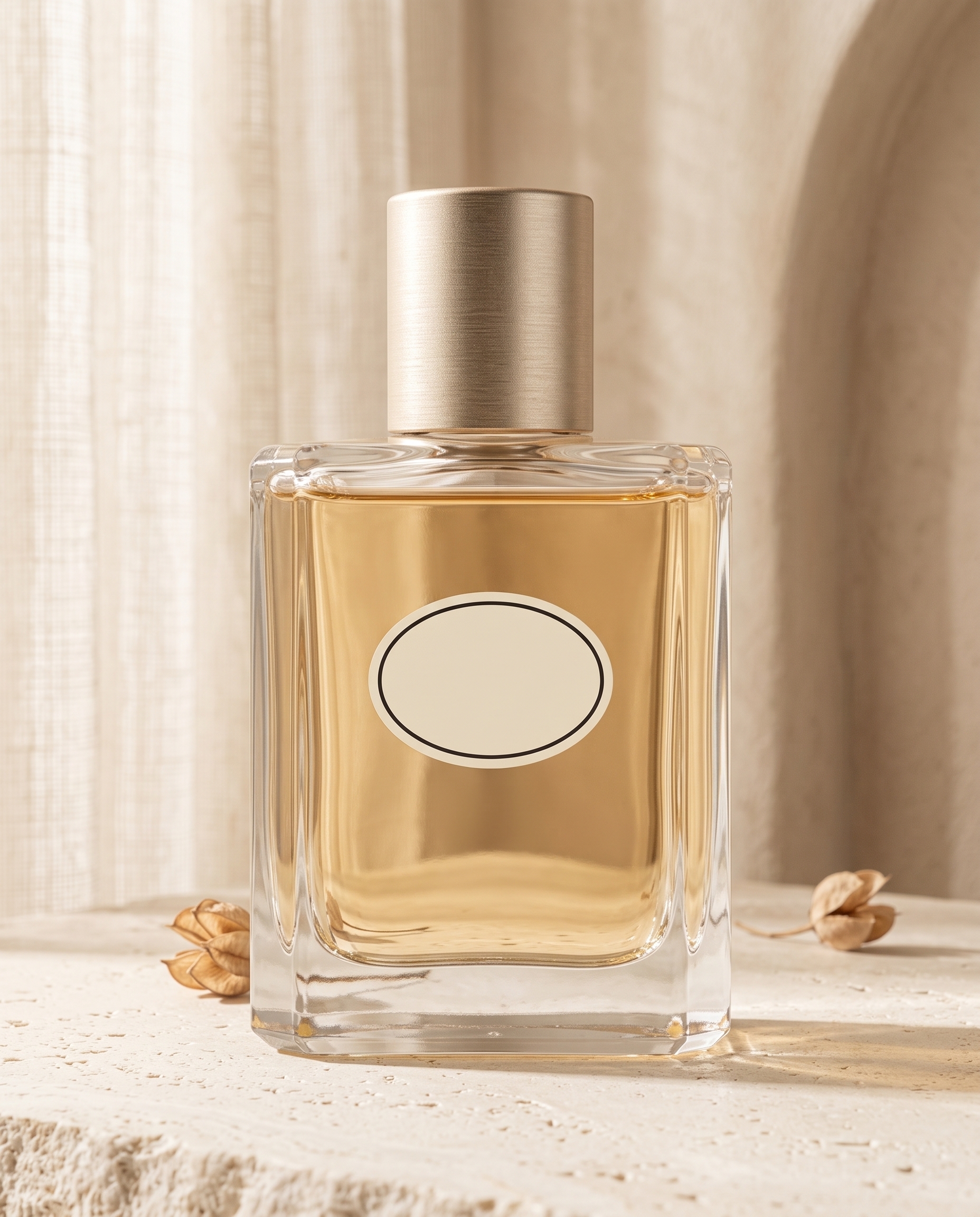 |
The two images start from the same reference but create different commercial positions. In both, the product remains recognizable through its rectangular transparent-glass body, softly chamfered corners, pale amber liquid, cylindrical champagne-gold cap, and blank oval label.
Why This Task Fits Nano Banana 2.1
This is not ordinary text-to-image generation. The model must interpret a new creative direction while resisting the urge to redesign the product.
The workflow relies on reference-based editing, instruction following, and product consistency. A useful prompt needs more than a description of the new scene: it must list the product attributes that cannot change and clearly limit the transformation to the environment, props, and lighting.
Step 1: Prepare a Clear Product Reference
The source is a fictional perfume photographed against pure white. The simple setup makes the silhouette, glass thickness, cap, liquid, and label easy to inspect after editing.
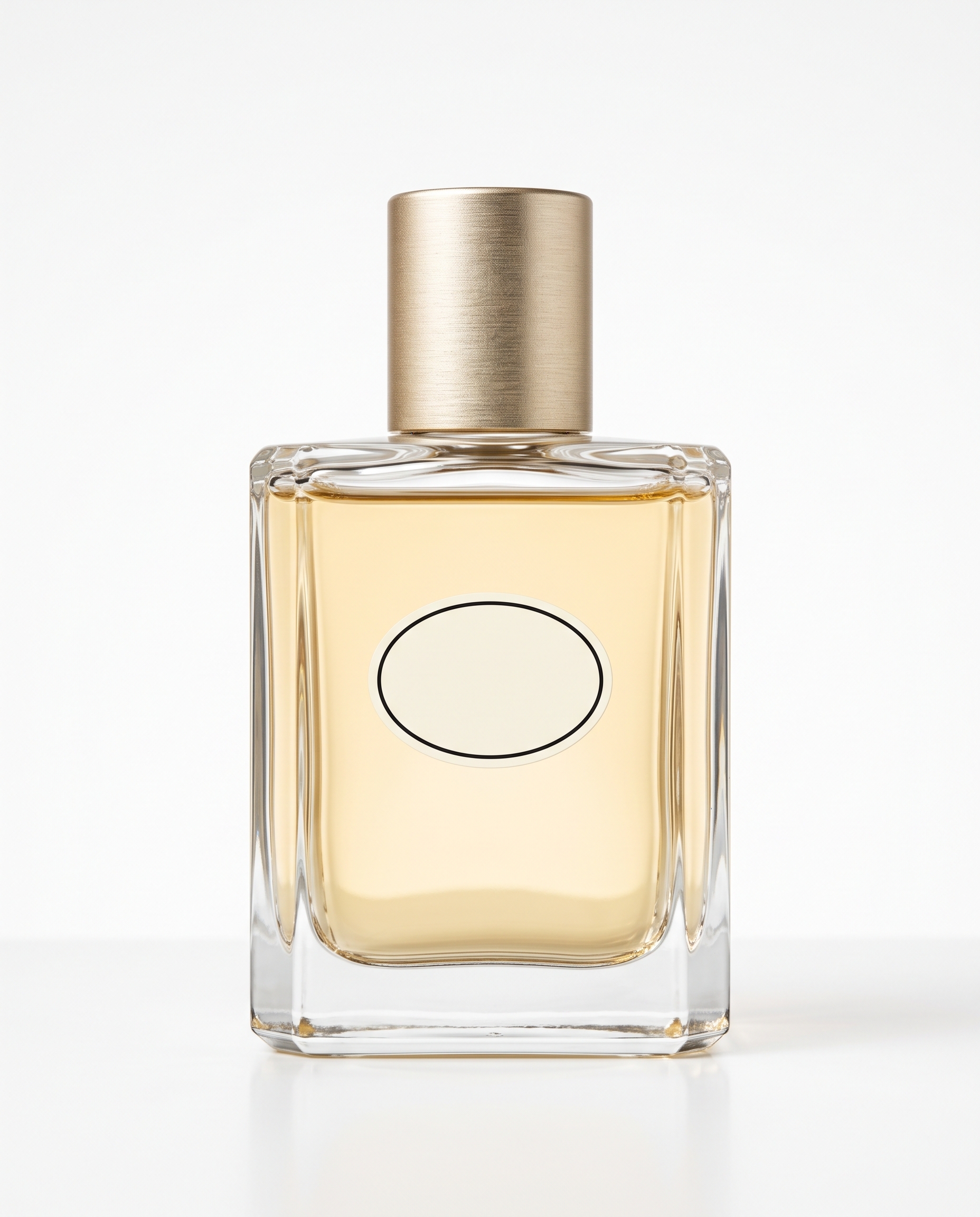
Five visual anchors were locked:
- A heavy rectangular transparent-glass body.
- Softly chamfered corners.
- Pale amber liquid.
- A brushed champagne-gold cylindrical cap.
- A blank ivory oval label with a thin black border.
For a real product, use a high-resolution image with a complete, unobstructed subject, readable packaging, and enough detail to verify small components.
Scene 1: Dark Botanical Luxury
The first output uses forest-green stone, magnolia leaves, a shallow reflective surface, and dramatic side light to create a premium fragrance direction.
Use the uploaded perfume packshot as a strict product reference. Preserve the exact same bottle geometry, chamfered glass corners, pale amber liquid, champagne-gold cylindrical cap, blank oval ivory label, proportions and camera-facing orientation.

Place this single bottle on a dark forest-green travertine pedestal in a premium botanical campaign. Add a few controlled magnolia leaves behind the product, a shallow reflective water surface, soft moving water caustics on the background, and restrained condensation beads on the glass. Dramatic side light with precise highlights and a realistic contact shadow, luxury fragrance advertising, highly photorealistic commercial product photography.

Do not redesign the bottle, alter the cap, add text, add a second bottle, cover the label, add hands, logos or watermark.
What the Result Preserved
The bottle, cap, liquid, and oval label structure remain intact. The leaves stay behind the product instead of covering the label, while condensation and the reflective surface respond credibly to the scene lighting.
The generated leaves and moisture are creative styling elements, not evidence of real ingredients or fragrance notes. Product claims should never be inferred from generated props.
Scene 2: Warm Minimal Morning Light
The second output shifts to cream limestone, a curved plaster wall, and soft sunlight through sheer curtains.
Use the uploaded perfume packshot as a strict product reference. Preserve the exact same bottle shape, transparent glass, chamfered corners, pale amber liquid, champagne-gold cylindrical cap, blank oval ivory label, scale and front-facing orientation.

Create a warm minimal morning campaign: the single bottle stands on pale cream limestone beside a curved plaster wall, with soft sunlight through sheer curtains producing elegant linear shadows. Add only two small dried seed pods placed behind and away from the label. Refined beige and honey palette, realistic glass reflections, subtle contact shadow, premium editorial commercial photography.

Do not redesign or distort the product, change the liquid color, add readable text, duplicate the bottle, add hands, logos or watermark.
What Changed and What Stayed Stable
The product remains front-facing with the same core structure. The background becomes warmer and more domestic, while the cap finish, liquid, and label remain recognizable.
The liquid appears slightly more golden because of the warmer environment and transmitted light. For a real campaign, packaging and product colors should still be checked against approved product references or color standards.
A Reusable Product Recontextualization Formula
Use the uploaded product image as a strict reference.

Preserve the exact [product shape], [packaging structure], [colors], [materials], [label position], [camera angle], and [product count].

Only change the environment to [new setting]. Add [limited props]. Use [lighting direction and photography style]. Create realistic contact shadows and reflections between the product and the surface.

Do not redesign the product, modify the label, add another product, cover the subject, or introduce unrequested text, logos, people, or watermarks.
The order matters: lock the product first, describe the creative scene second, and finish with prohibited changes. This is easier to audit than leading with atmosphere and adding “keep the product unchanged” at the end.
Commercial Photography Types That Fit This Workflow
| Category | Suitable Use |
|---|---|
| Beauty and fragrance | Change pedestals, plants, water, lighting, and color mood |
| Food and beverage | Build breakfast, chilled, seasonal, or outdoor scenes while checking packaging text |
| Small appliances | Test home environments while checking ports, buttons, and product count |
| Jewelry and accessories | Explore surfaces and highlight directions while checking shape and hardware |
| Social advertising | Expand one packshot into several visual directions for early creative testing |
Quality Checklist
- Compare the product silhouette, proportions, and quantity with the source.
- Inspect caps, pumps, ports, labels, and decorative components.
- Check whether environment light has changed approved packaging colors.
- Confirm the product contacts the surface instead of floating.
- Make sure props do not cover labels or imply false product information.
- Inspect glass, metal, plastic, and liquid for believable material behavior.
- Check for invented text, logos, watermarks, or duplicated products.
Practical Limitations
This test demonstrates two scene changes for one simple fictional perfume. It does not prove that dense real-world packaging will remain perfectly accurate. Small regulatory copy, reflective flexible packaging, intricate mechanisms, and highly detailed labels require stricter review.
If the product begins to drift, reduce the number of props and add the affected component to the preservation list. Avoid changing the environment, camera angle, product pose, and packaging design in the same generation.
Final Takeaway
Nano Banana 2.1 turned one clean packshot into two clearly different commercial photography directions while preserving the perfume’s main identifying features. Its most useful role is to accelerate visual exploration, followed by human review of product fidelity, color, and copy.
You can try it directly using the tool on the right.
Test Two Campaign Directions From One Product Photo
Upload a clear packshot in WeShop Nano Banana, lock the product structure, then describe the environment, props, and lighting.