












Turn One Casting Photo Into a Fashion Editorial with Nano Banana 2.1
Learn how to turn one casting reference into rooftop and hotel fashion editorials while keeping the same model identity, hairstyle, and cobalt-blue outfit.
Creating one attractive AI fashion image is relatively easy. Keeping the same model, hairstyle, proportions, and outfit after changing the location, pose, and lighting is much harder. Once identity or garment details drift, the images stop working as one campaign.
We created a studio casting reference featuring a cobalt-blue suit, then generated two editorials: a blue-hour city rooftop and a warm retro hotel corridor. Despite the radically different environments, both results retained the model and the main outfit details.
Source and Results
| Casting Reference | Blue-Hour Rooftop | Retro Hotel Corridor |
|---|---|---|
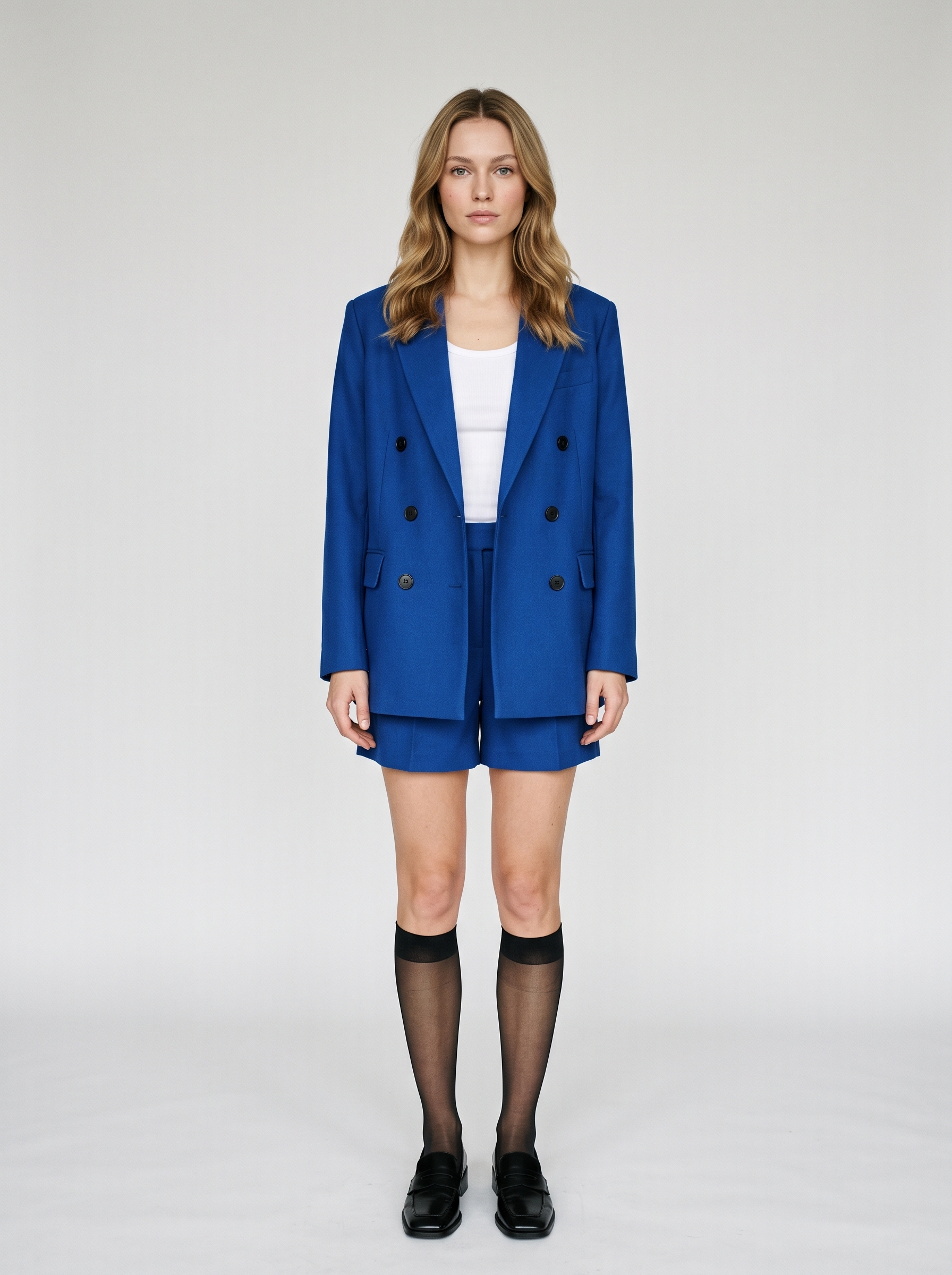 | 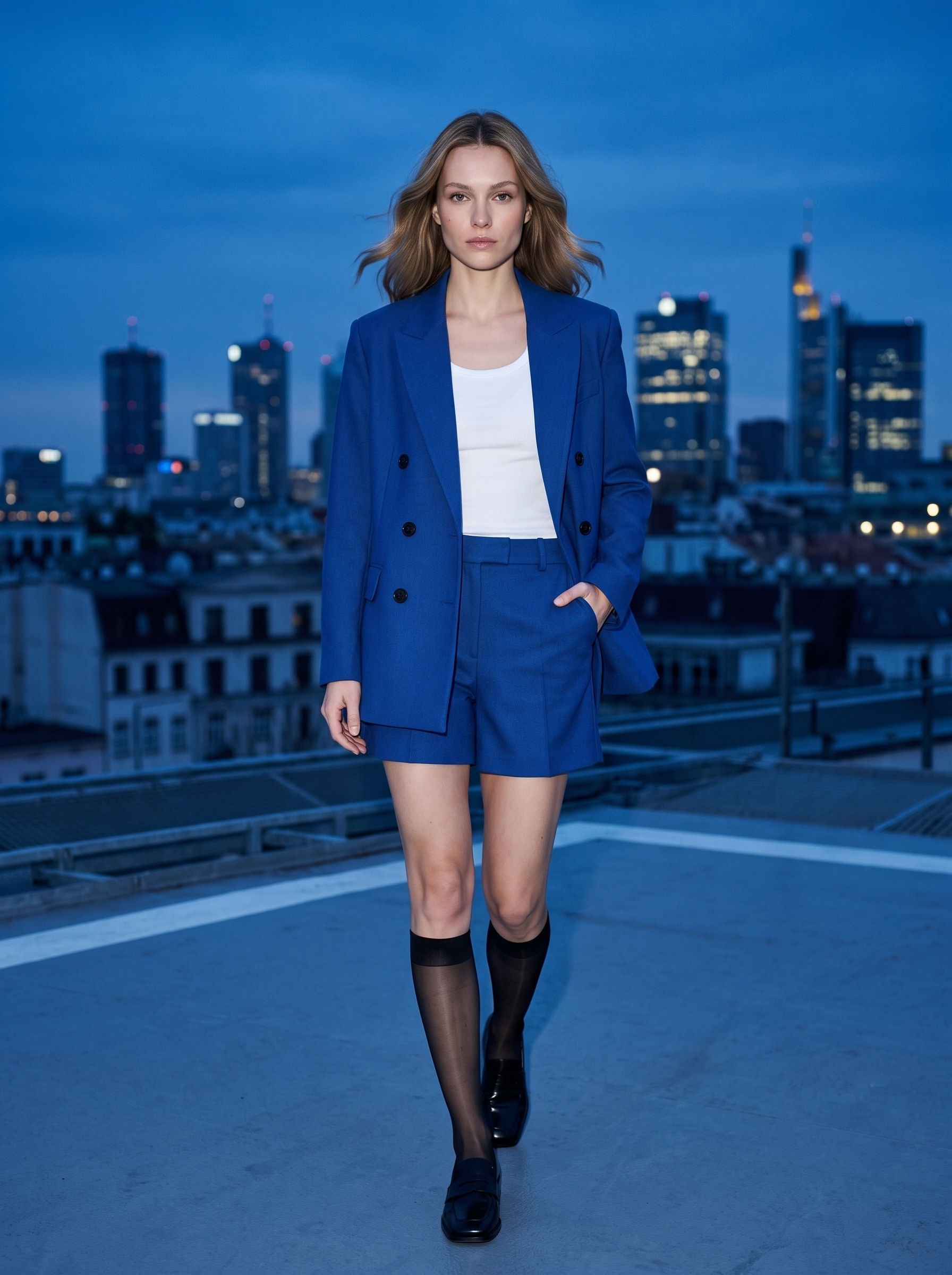 | 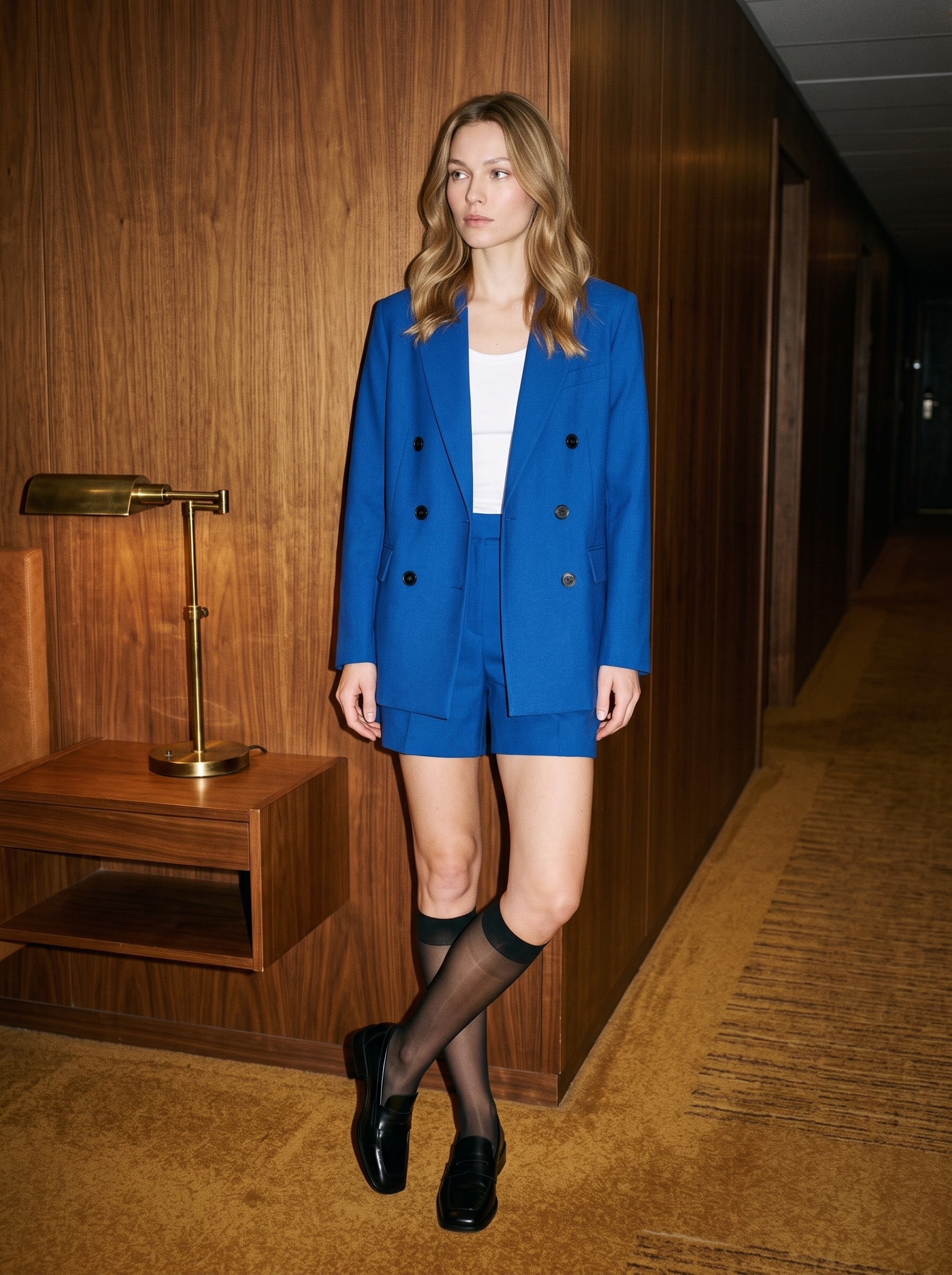 |
The model moves from a neutral studio to cool outdoor light and a warm interior. Her pose changes from standing to walking and leaning, while the oval face, light eyes, dark-blonde waves, cobalt suit, white tank, black socks, and loafers remain visually connected.
Step 1: Build a Reusable Casting Reference
The casting image uses a seamless light-gray background, neutral full-body framing, and even studio light. This makes facial identity, hair, proportions, and the complete outfit easy to inspect.
The identity and styling anchors are:
- An adult European female model with an oval face and light gray eyes.
- Shoulder-length, center-parted dark-blonde waves.
- Natural skin texture and healthy slender proportions.
- An oversized cobalt-blue double-breasted blazer.
- Six matte black buttons.
- Matching high-waisted shorts and a white ribbed tank.
- Sheer black knee-high socks and black square-toe loafers.
Countable details such as six buttons make garment drift easier to detect across scenes.
Scene 1: Blue-Hour City Rooftop
Create a full-body fashion editorial using the uploaded model image as the strict identity and outfit reference.

Preserve the exact same adult woman, facial identity, oval face, light gray eyes, shoulder-length center-parted dark-blonde waves, skin tone, body proportions, cobalt-blue six-button double-breasted blazer, matching tailored shorts, white ribbed tank, sheer black knee-high socks and black square-toe loafers.

Place her on a modern city rooftop at blue hour, walking slowly toward the camera with one hand in a pocket. Cool skyline, subtle wind in the hair and blazer hem, direct on-camera flash balanced with the blue ambient sky, crisp contemporary magazine photography, realistic anatomy and fabric.

Do not change her face, age, hairstyle, outfit construction, button count, colors or shoes. No extra person, no bag, no text, no logo, no watermark.
What the Result Preserved
The rooftop image keeps the model’s main facial structure, hair color and length, and complete blue outfit. Walking and wind introduce natural movement without turning the suit into a different blue garment.
Expression and facial shadows change under the mixed flash and ambient light. Identity should therefore be judged by proportions and recognizable structure, not by identical pixel color.
Scene 2: Retro Hotel Corridor
Create a full-body fashion editorial using the uploaded model image as the strict identity and outfit reference.

Preserve the exact same adult woman, facial identity, oval face, light gray eyes, shoulder-length center-parted dark-blonde waves, skin tone, body proportions, cobalt-blue six-button double-breasted blazer, matching tailored shorts, white ribbed tank, sheer black knee-high socks and black square-toe loafers.

Place her in a warm 1970s-inspired hotel corridor with walnut wall panels and muted amber carpet. She leans lightly against the wall, legs naturally crossed, looking past the camera. Hard frontal flash, deep warm ambient shadows, slightly imperfect compact-camera framing, premium fashion editorial realism.

Do not change her face, hairstyle, outfit construction, button count, colors or shoes. No extra person, no bag, no readable text, no logo, no watermark.
What Changed and What Stayed Stable
The hotel result replaces cool outdoor light with walnut panels, amber carpet, and hard frontal flash. The cobalt suit remains the visual center, and the model is still recognizable despite the sideward gaze and crossed-leg pose.
Warm ambient light makes the hair appear more golden and changes the skin temperature. Identity consistency does not mean identical color under every lighting setup; real projects should define how much lighting variation is acceptable.
A Reusable Identity and Outfit Lock
Use the uploaded casting photo as the strict identity and outfit reference.

Preserve the same adult model’s [face shape], [eyes], [nose and lip proportions], [skin tone], [hairstyle], [hair length], and [body proportions].

Preserve the outfit’s exact [category], [color], [silhouette], [button count], [neckline], [length], [fabric], [shoes], and [accessories].

Only change the [location], [pose], and [photographic lighting].

Do not beautify or replace the person. Do not redesign the garment or change its colors, construction, and countable details. Do not add another person, brand text, or watermark.
What Commonly Drifts in AI Fashion Images
Face and Perceived Age
Different lighting can change the eyes, nose bridge, and jaw. List concrete identity attributes instead of relying only on “the same model.”
Hairstyle
Wind should create strand movement, not a new haircut. Lock the length, color, parting, and overall shape while allowing controlled motion.
Garment Construction
Matching color does not mean matching clothing. Check the lapels, buttons, pockets, sleeves, hem, waistline, and fabric. For a real SKU, upload a clear garment image as an additional reference.
Shoes, Hands, and Full-Body Anatomy
Do not stop reviewing after checking the face. Shoes, sock edges, hands, and garment boundaries are common failure points in full-body outputs.
Fashion Content That Fits This Workflow
- Multi-location campaigns with one model.
- Lookbooks and new-arrival content.
- Editorial concept previews.
- Cohesive social media image series.
- Location and lighting tests before a physical shoot.
- Styling development for fictional characters.
When the images are intended to sell a real garment, a merchandising team should compare the output with the actual product. Fabric weight, color, print scale, and fit cannot be approved from visual similarity alone.
Quality Checklist
- Do all three images clearly show the same person?
- Are hair color, length, parting, and wave pattern stable?
- Are the cobalt color, oversized silhouette, and six buttons preserved?
- Do the shorts, tank, socks, and shoes remain the same?
- Have perceived height, shoulder width, or leg proportions drifted?
- Are the hands, legs, shoes, and garment edges anatomically credible?
- Does the new location support the fashion story without overpowering the outfit?
Final Takeaway
Nano Banana 2.1 expanded one information-rich casting photo into two contrasting editorial scenes while preserving the model and styling. The more reliable production method is to approve one identity reference first, then generate and inspect one new scene at a time.
You can try it directly using the tool on the right.
Expand One Casting Photo Into a Fashion Campaign
Lock the model and outfit in WeShop Nano Banana, then change one location, pose, and lighting direction at a time.