












AI Clothes Changer: Combine Outfit, Model, and Background References
Learn how to create a controlled AI fashion image by assigning separate outfit, adult model, and background references, then using a clear three-image prompt.
AI Image Generator: AI Clothes Changer with Outfit, Model, and Background References with GPT Image 2.5
One image decides what the model wears. A second image decides who wears it. A third image decides where the final photograph takes place.
In the generated result, the short-haired model wears the charcoal coat, black top, oversized trousers, and silver sneakers from the clothing reference while standing against the pale wall and stone steps from the location image.
Instead of asking AI to “change the clothes” and letting it redesign the entire photograph, this workflow gives each reference image a specific responsibility.
This tutorial uses WeShop AI GPT Image as an AI Clothes Changer to combine a clothing image, an adult model photo, and a background reference into one fashion visual.
Only use your own images or photographs of adult models you have permission to use.
What You Need for This AI Clothes Changer Workflow
Prepare three reference images:
- A full-body image showing the complete target outfit
- A clear photograph of the adult model
- A location image showing the desired background and composition
Each reference controls a different part of the generated image.
| Reference | Controls | Should Not Control |
|---|---|---|
| Figure 1 | Clothing, footwear, layering, and silhouette | Model identity or final background |
| Figure 2 | Face, hairstyle, skin tone, and identity | Clothing or location |
| Figure 3 | Background, composition, lighting, and subject placement | Final model identity or outfit |
This separation is important because a background reference may contain another person, outfit, handbag, sunglasses, or accessories.
If the prompt does not define the purpose of each image, those unwanted details may appear in the generated result.
Step 1: Upload the Clothing Reference
Figure 1 is the clothing reference.
It establishes the complete outfit that should appear in the final image:
- Charcoal full-length coat
- Black crew-neck top
- Oversized dark gray pleated trousers
- Silver sneakers
- Loose, low-saturation silhouette
- Layering between the coat, top, and trousers
| Clothing Reference — Figure 1 |
|---|
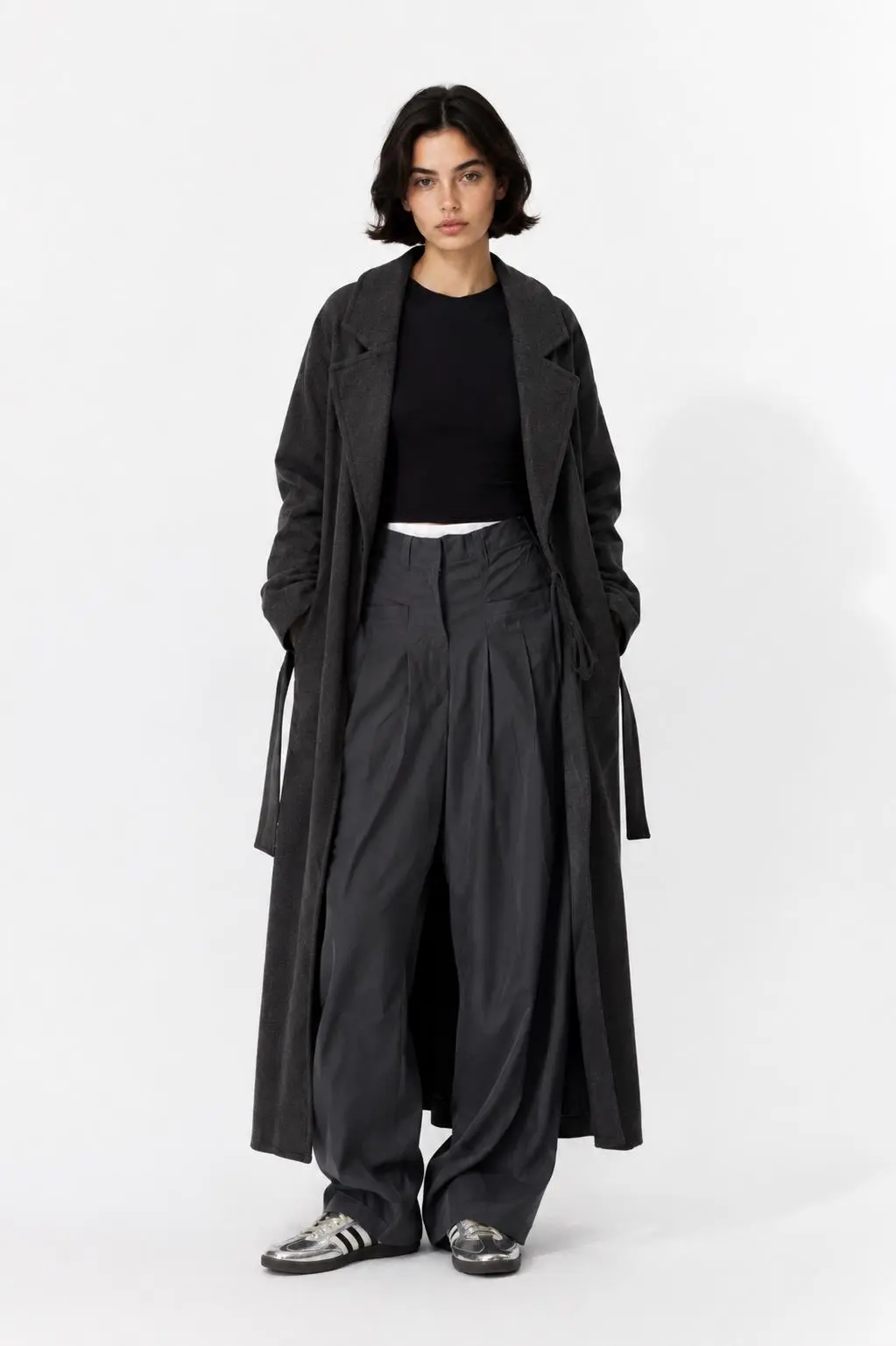 |
| Figure 1 controls the outfit, footwear, garment proportions, and overall styling. |
The person in this image is not the identity reference. The final model’s face and hairstyle should come from Figure 2.
This distinction prevents the AI Clothes Changer from simply reproducing the original fashion photograph.
Step 2: Upload the Adult Model Reference
Figure 2 is the identity reference.
It provides the model’s visible characteristics:
- Short black hairstyle
- Facial structure
- Eyes, nose, and lips
- Skin tone
- Natural makeup
- Minimal, composed fashion aesthetic
| Adult Model Reference — Figure 2 |
|---|
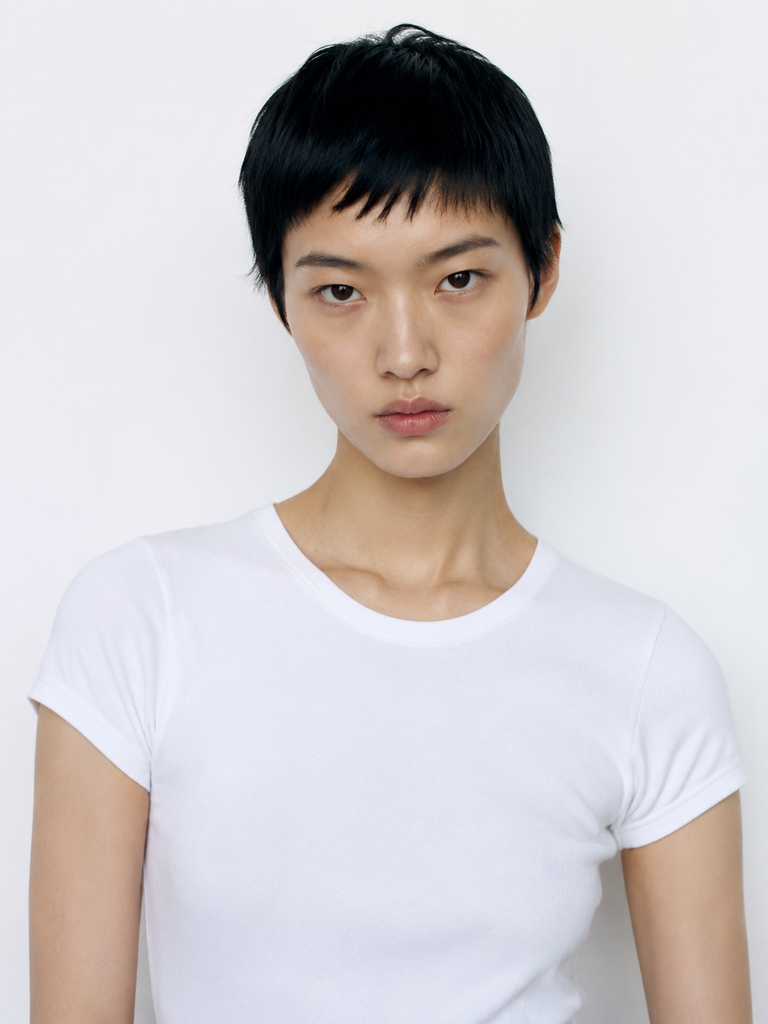 |
| Figure 2 supplies the adult model’s facial identity, short hairstyle, skin tone, and overall appearance. |
Because the reference only shows the model’s upper body, the AI must infer the missing body, full-length pose, and fit of the clothing.
The result should therefore be treated as a creative AI composite rather than an accurate representation of the real person’s body or actual clothing.
Step 3: Upload the Background Reference
Figure 3 controls the environment and basic composition.
The useful visual information includes:
- Pale exterior wall
- Dark wooden doorway
- Gray stone steps
- Full-body vertical framing
- Subject placement beside the wall
- Soft outdoor daylight
- Restrained street-style atmosphere
| Background Reference — Figure 3 |
|---|
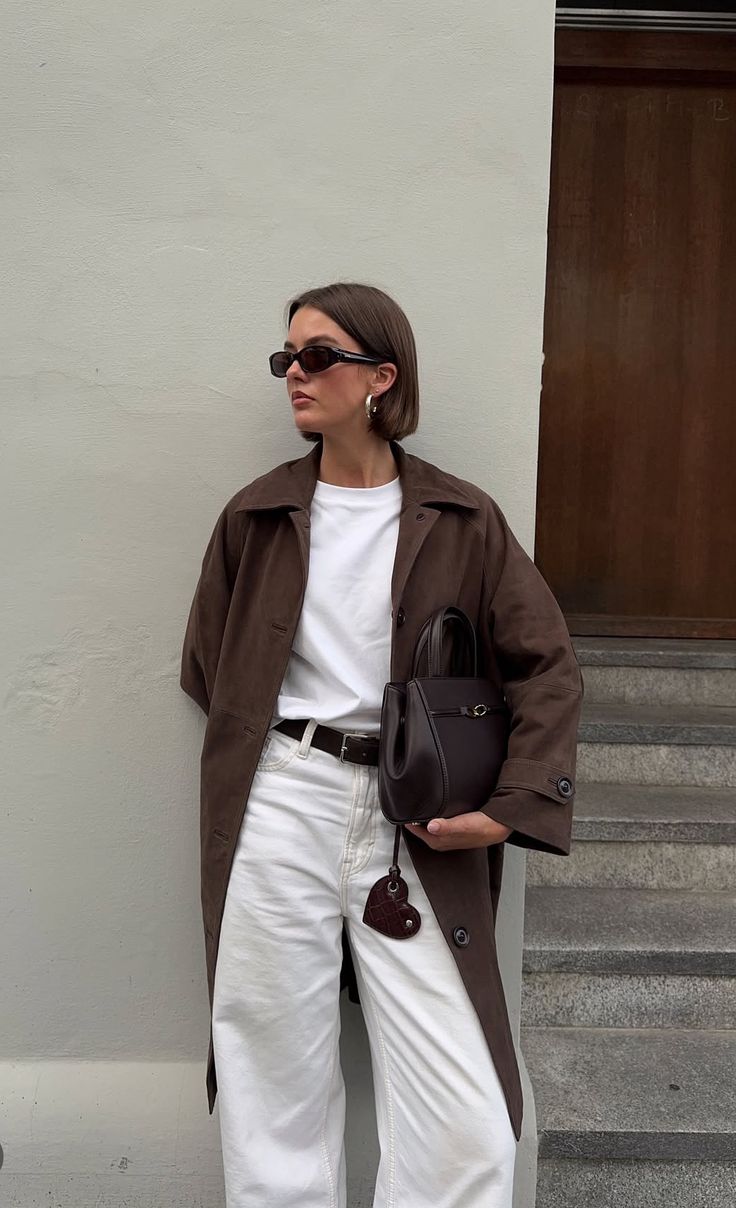 |
| Figure 3 supplies the architectural background, camera composition, natural light, and subject placement. |
The person already visible in Figure 3 should not become the final model.
Her face, outfit, sunglasses, earrings, handbag, and other personal details should be ignored unless they are intentionally requested.
Step 4: Enter the Three-Image Prompt
The shortest version of the prompt describes the relationship between the three references.
Simple Prompt
The model in Figure 2 is wearing the clothes from Figure 1 and standing against the background of Figure 3.
This communicates the basic goal, but it leaves several decisions to the model:
- Which facial details must come from Figure 2?
- Which clothing details must be preserved from Figure 1?
- Should Figure 3 control only the environment?
- Should accessories from Figure 3 be copied?
- Which parts of the composition may change?
A more structured prompt gives the AI Clothes Changer clearer boundaries.
Copy-Ready Prompt
Use Figure 1 as the clothing reference, Figure 2 as the adult model identity reference, and Figure 3 as the background and composition reference.

Create a full-body vertical street-style photograph in which the adult model from Figure 2 is wearing the complete outfit from Figure 1 and standing in the architectural setting from Figure 3.

Preserve the model’s short black hairstyle, recognizable facial features, skin tone, and natural proportions from Figure 2.

Preserve the charcoal long coat, black top, oversized dark gray pleated trousers, silver sneakers, garment layering, and loose silhouette from Figure 1.

Preserve the pale exterior wall, dark wooden doorway, stone steps, natural daylight, camera perspective, and subject placement from Figure 3.

Use Figure 3 only for the environment and composition. Do not copy the original person, clothing, sunglasses, earrings, handbag, or other personal accessories from Figure 3.

Keep the result photorealistic, with realistic fabric folds, accurate hands and feet, natural contact shadows, and coherent body proportions.

Do not add logos, text, watermarks, extra garments, unrelated accessories, or new design details.
This version assigns one clear role to each image:
- Figure 1 controls the clothing
- Figure 2 controls the model
- Figure 3 controls the background and composition
It also prevents the sunglasses, jewelry, handbag, and original clothing in the location reference from being copied unintentionally.
Step 5: Generate the AI Clothes Changer Image
Open WeShop AI GPT Image and add the references in the same order used by the prompt:
- Upload Figure 1 as the clothing reference.
- Upload Figure 2 as the adult model reference.
- Upload Figure 3 as the background reference.
- Paste the three-image prompt.
- Generate the full-body vertical result.
Feature availability may vary, so follow the current status and controls shown on the tool page.
You can try it directly using the tool on the right.
If the first result incorrectly inherits sunglasses, jewelry, a handbag, or other styling from Figure 3, continue with a focused correction instead of rewriting the entire scene.
Keep the current model, outfit, pose, background, lighting, and composition unchanged.

Remove the sunglasses, earrings, handbag, and any other accessories copied from Figure 3.

The model’s face and hairstyle must continue to follow Figure 2, while the complete outfit must continue to follow Figure 1.
This follow-up instruction identifies the unwanted elements while protecting the parts that are already correct.
Step 6: Review the Generated Result
The final image combines information from all three references.
| AI-Generated Result — Figure 4 |
|---|
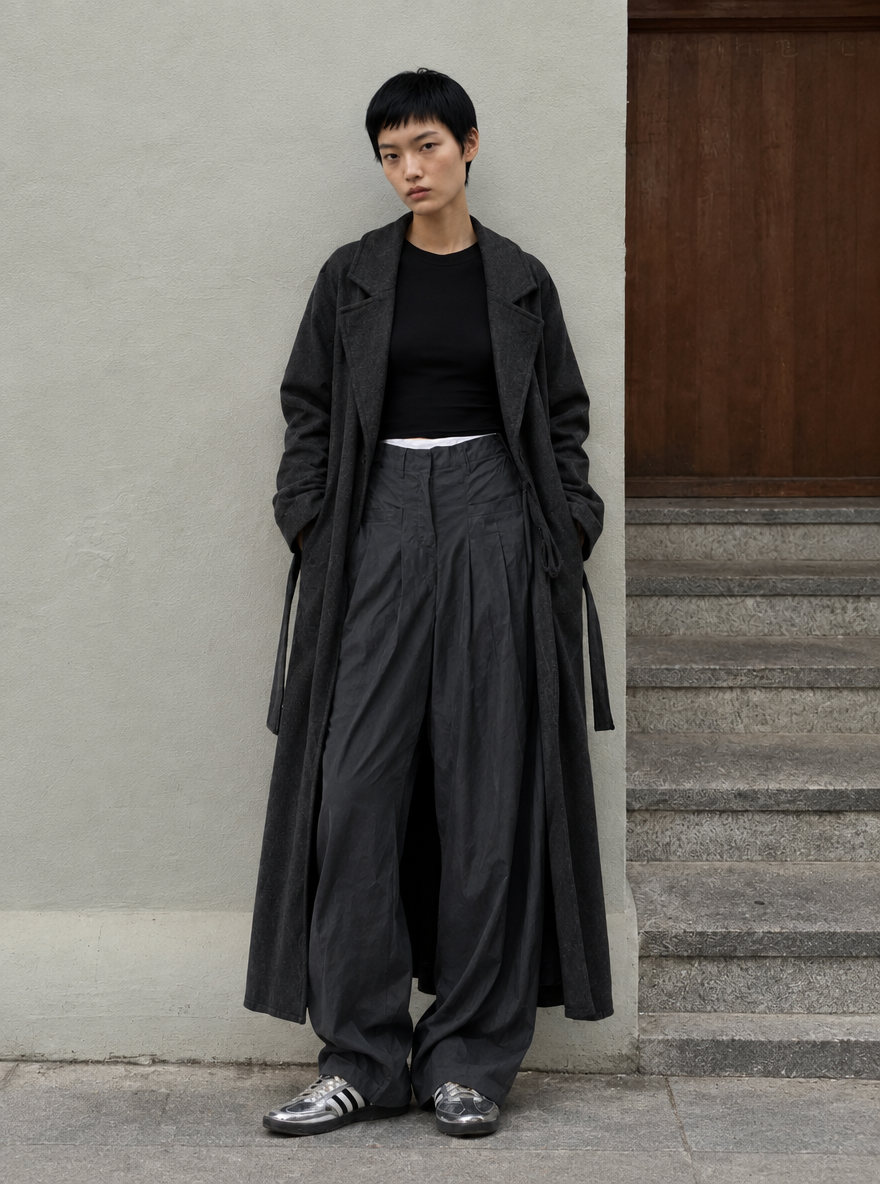 |
| The generated result combines the outfit from Figure 1, the adult model identity from Figure 2, and the architectural setting from Figure 3. |
The completed image preserves several recognizable elements:
- The short black hairstyle and primary facial appearance come from Figure 2.
- The charcoal coat, black top, oversized trousers, and silver sneakers come from Figure 1.
- The pale wall, wooden doorway, stone steps, and subject position come from Figure 3.
- The final composition remains a full-body vertical street-style photograph.
The result also demonstrates a common issue with multiple-reference image generation: a location reference can influence more than the background.
Accessories such as sunglasses may carry over from Figure 3 even when the intended model and clothing come from different images. If an accessory is not part of the target styling, explicitly exclude it in the main prompt or remove it through a focused second edit.
Why “Change the Clothes” Is Not Specific Enough
A basic instruction such as “change the clothes” forces the image model to make too many decisions.
It must guess:
- Which outfit to use
- Which person to preserve
- Where the person should stand
- What the final environment should look like
- Whether accessories should remain
- Which visual details may be redesigned
The three-reference workflow separates these decisions.
The clothing image defines the fashion product. The model image defines the person. The background image defines the location and composition. The prompt then explains how those references should work together.
This approach can support:
- Fashion product images
- Shopify clothing visuals
- Lookbook concepts
- Social media outfit content
- Model and location experiments
- Pre-production fashion concepts
- Ecommerce campaign drafts
For sales imagery, manually compare the generated clothing with the real product. Check its length, color, material, construction, closures, and accessories before presenting the image as a product representation.
Turn Three References into One Controlled Fashion Image
An effective AI Clothes Changer prompt answers three questions: who is wearing the outfit, what are they wearing, and where is the photograph taking place?
Figure 1, Figure 2, and Figure 3 answer those questions separately. GPT Image 2.5 then combines them into a single fashion visual while the prompt defines which details should remain isolated.
That division of responsibility turns three unrelated reference images into a more controlled, reusable fashion-content workflow.