









Kling 4.0 Pet Swap: Replace a Dog with Your Cat in a Video
Replace a dog with your cat in a video using Kling 4.0 Reference. Follow the tested image-plus-video prompt, settings and shot-by-shot checks.
A pet swap needs more than a convincing opening portrait. The replacement animal must survive changes in framing, a hand touching its head, and a much smaller pocket shot. This Kling 4.0 Reference test combines one cat photograph with an existing dog video to carry those actions into a newly generated cat sequence.
Source video — official demonstration input
New AI-generated result
Give the cat photograph and source video different jobs
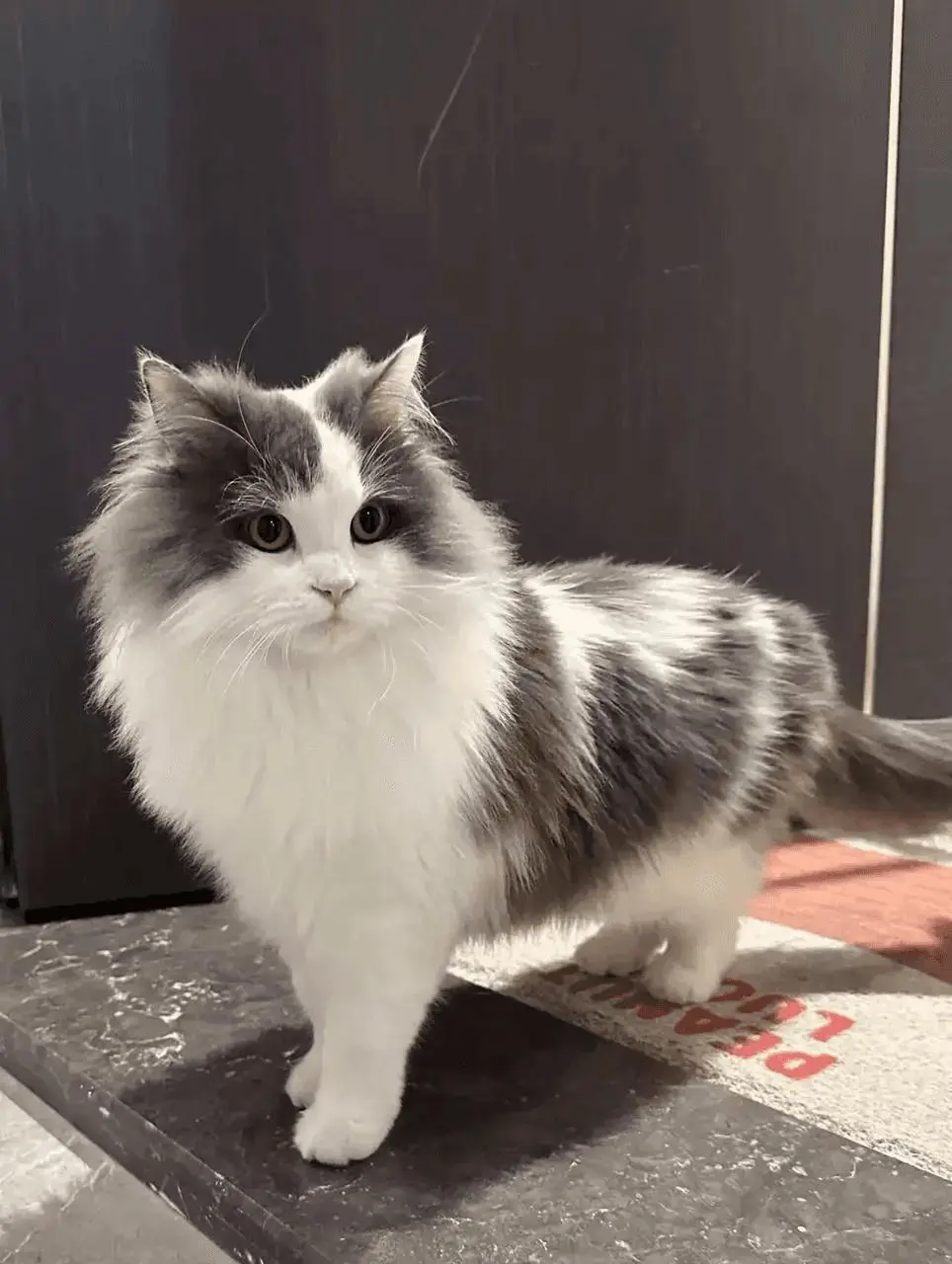
Use a clear cat photograph for appearance and a video for the actions and shot order. The reference cat has a white face blaze and fluffy chest, gray crown and patches, and pointed ears. The source video supplies the white studio, seated portrait, head stroke, and clothing-pocket reveal. Both inputs are necessary: a cat image alone cannot tell the model which original edits and interactions to follow.
The reference materials are distributed with the WeShop Kling 4.0 examples and Kling’s official demonstrations. The result above is a new generation made for this tutorial on November 11, 2026. Use references you are authorized to use when adapting the workflow.
Write the roles and action order before generating
Name the animal to replace, describe the replacement using visible features, then specify what the source video controls. The prompt explicitly asks for feline ears and muzzle rather than a dog-shaped animal with cat-colored fur. It also calls out the human hand and pocket interaction because those are the moments where the replacement must fit another object.
Edit Video 1 by replacing the dog throughout with the gray-and-white long-haired cat from Image 1. Image 1 supplies only the cat appearance: white face blaze, fluffy white chest, gray crown and gray patches, pointed ears and long coat. Video 1 supplies the original shot order, white background, human hand interaction, camera changes and timing. Adapt the small-animal motions to a cat rather than keeping a canine snout or ears. Show the same cat facing the camera, receiving a gentle stroke on the head, and peeking from the clothing pocket when those events occur in the source. Preserve the surrounding person, clothing, white studio and framing as closely as possible. No duplicate cat, dog-cat hybrid, added scene, captions or logos. Keep one consistent cat across the entire clip.Load the references in Kling 4.0 Reference
Choose Kling 4.0 Reference. Add the cat photograph as Image 1 and the original dog clip as Video 1. Paste the complete prompt below. Keep the source video attached when replacing the photograph; otherwise you are asking for a new pet scene without its action reference.
Open Kling on WeShop and use the tested settings:
| Setting | Recorded value |
|---|---|
| Model | Kling 4.0 Reference |
| Image references | 1 |
| Video references | 1 |
| Duration | 14s |
| Resolution | 720p |
| Aspect ratio | 16:9 |
| Quantity | 1 |
Inspect the complete generated sequence
The selected output shows:
- A gray-and-white cat replaces the original dog across the visible shot sequence
- The clip includes a seated portrait, a hand stroking the head, and the cat peeking from a shirt pocket
- The white studio and human hand/clothing interaction remain recognizable
- The selected output does not visibly show a dog-cat hybrid
Watch the entire clip rather than choosing it from a single attractive frame. This test used one selected output and does not measure repeatability across multiple runs.
Fur markings and body shape are reconstructed rather than pixel-preserved. Pocket scale and contact should be checked before reuse. One output does not establish identity consistency or a success rate across repeated generations.
Refine the part that did not follow the prompt
If the result keeps a canine snout, describe the cat anatomy more clearly and simplify competing style requests. If the pocket appearance loses the cat markings, check whether the reference actually shows those features. A close face photograph may be insufficient for a full body. Begin with this short, simple source before trying many cuts, heavy occlusion, or several animals.
Reuse the example with your own references
Replace the cat image with a photograph you are authorized to use, keep one animal in the source, and review every shot. Pay particular attention to the hand crossing the ears and to the paws meeting the pocket edge.
You can try it directly using the tool on the right.