












Kling 4.0 Visual Storytelling: Turn an Image Board into a Sequence
Turn a five-panel image board into an ordered Kling 4.0 video. Follow the prompt, reference preparation and checks for a connected visual sequence.
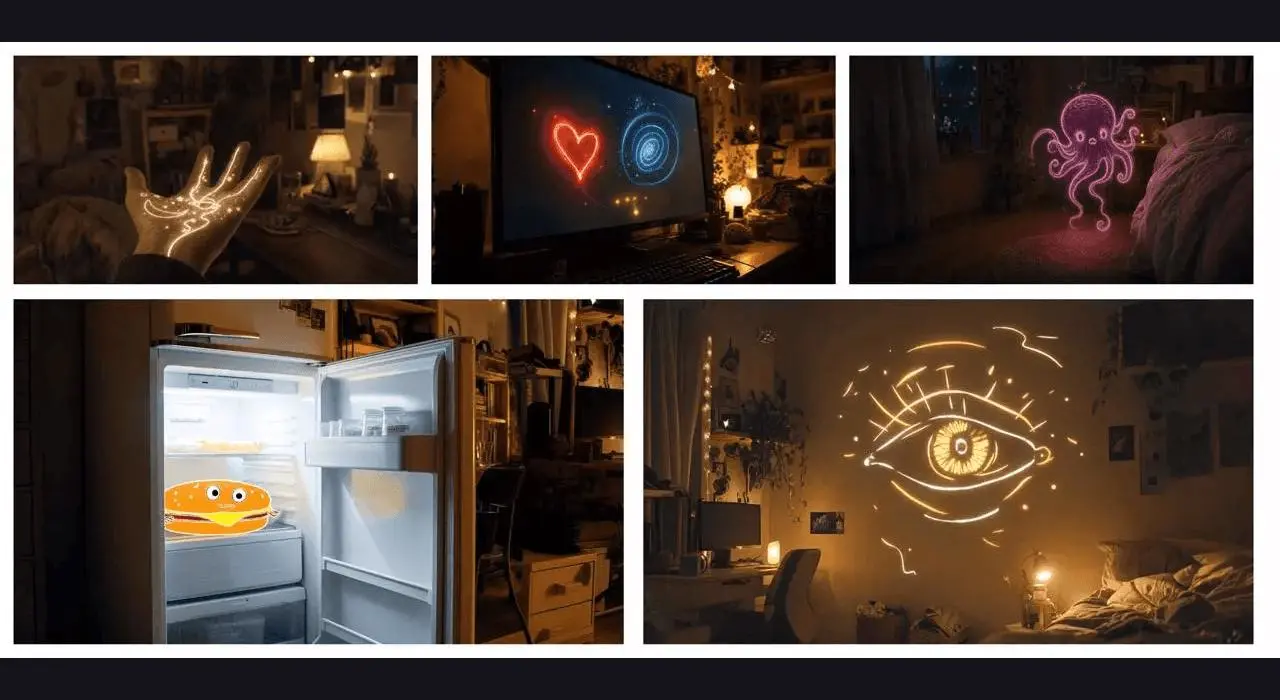
An image board can describe events instead of a layout to reproduce. This Kling 4.0 Reference test turns five bedroom panels into a twenty-second sequence: a glowing hand, a monitor, a purple creature, a refrigerator hamburger, and a golden eye. A traveling spark connects the events without showing the source grid.
New AI-generated result
Translate the board into five ordered events
Use the complete five-panel board as one reference image. Identify what each panel contributes and write the order in words. Here the bedroom, bed and warm night lighting provide common context, while each panel supplies a different magical event. The source board was padded above and below to meet the image-upload aspect-ratio requirement without cropping away a panel.
The reference materials are distributed with the WeShop Kling 4.0 examples and Kling’s official demonstrations. The result above is a new generation made for this tutorial on November 11, 2026. Use references you are authorized to use when adapting the workflow.
Write the roles and action order before generating
Give the model a recurring connector that can travel from one event to the next. The golden spark leaves the hand, approaches the monitor, continues toward the creature and refrigerator, and leads into the final eye. That repeated visual cue makes the sequence easier to follow even when the camera viewpoint changes. A numbered order alone specifies chronology; the connector also supplies a visual relationship.
Treat the supplied five-panel image board as ordered visual guidance, not as a collage to display. Create a connected magical bedroom sequence at night with warm practical light and continuous golden light trails. Begin on an open hand traced with golden lines. A golden spark leaves the hand and travels toward the computer monitor showing a red heart and blue spiral. Let the light become a small purple ribbon creature near the bed, then guide the camera toward the open refrigerator with a smiling cartoon hamburger. Finish with one large golden line-drawn eye hovering above the bed. Keep the same room, bed and warm night lighting. Use camera movement and the traveling spark to connect the events. Give each major event time to read. No visible panels, reference-board borders, montage grid, duplicate rooms, subtitles or logos.Load the references in Kling 4.0 Reference
Select Kling 4.0 Reference and upload the padded board as Image 1. Paste the complete prompt, then choose twenty seconds, 720p and 16:9. Keep the board in the reference inputs rather than asking for it as the first frame. Give each major event enough time to become recognizable before adding extra events.
Open Kling on WeShop and use the tested settings:
| Setting | Recorded value |
|---|---|
| Model | Kling 4.0 Reference |
| Image references | 1 |
| Video references | 0 |
| Duration | 20s |
| Resolution | 720p |
| Aspect ratio | 16:9 |
| Quantity | 1 |
Inspect the complete generated sequence
The selected output shows:
- Five visual states occur in order: glowing hand, heart/spiral monitor, purple creature, refrigerator hamburger, golden eye
- Golden sparks and trails connect the separate visual events
- The bedroom uses a recognizable warm night palette
- No visible reference-board grid or panel borders appear in the sampled sequence
Watch the entire clip rather than choosing it from a single attractive frame. This test used one selected output and does not measure repeatability across multiple runs.
The purple creature resembles an octopus rather than a ribbon. The sequence uses cuts and reconstructed viewpoints; it is not one physically continuous camera path. Room details and object geometry vary between shots.
Refine the part that did not follow the prompt
If the model renders the board itself, explicitly prohibit panels, borders, split screens and grids. If an event is missing, simplify the camera instructions and state that event using the visible object. The purple creature in this result resembles an octopus rather than a ribbon, so a very specific creature design needs a clearer reference or a separate shot. Room details also vary across cuts; this is a connected visual story rather than an exact architectural walkthrough.
Reuse the example with your own references
Replace the board with your own ordered panels and choose one recurring object, color or light effect to connect them. Review the order of every event as well as the opening and ending frames. The selected output follows the five broad states, while exact room geometry and a single continuous camera path are not established.
You can try it directly using the tool on the right.