












Replace a Person in Your Video with Comatozze: Kling 4.0 Guide & Prompt
Watch the 22-second Comatozze metro AI edit, compare before and after, and replace a performer in your own video using Kling 4.0 and the exact prompt.
Use Kling 4.0 Reference to replace the main person in your uploaded video with Comatozze. Add your clip and a Comatozze portrait as the identity reference; the name alone does not supply the face. Watch the 22-second Comatozze metro AI edit below, compare the source and result, then reuse the exact prompt with your own video.
AI-generated character edit
This is an AI-generated edit, not documentary footage of Comatozze in the station. One important limit is visible: the output changes the clothing, even though the submitted prompt asks to keep the original top and blue jeans.
Assign the portrait to identity and the video to action
The workflow separates the replacement subject from the scene she moves through. The uploaded portrait guides the face and long hair. The metro video provides the original foreground performance, handheld viewpoint, station layout and sequence of movements.
| Input | Intended role |
|---|---|
@Image1: the selected portrait | Replacement identity, facial features and hair |
@Video1: the metro clip | Foreground action, framing, turns, platform movement and background |
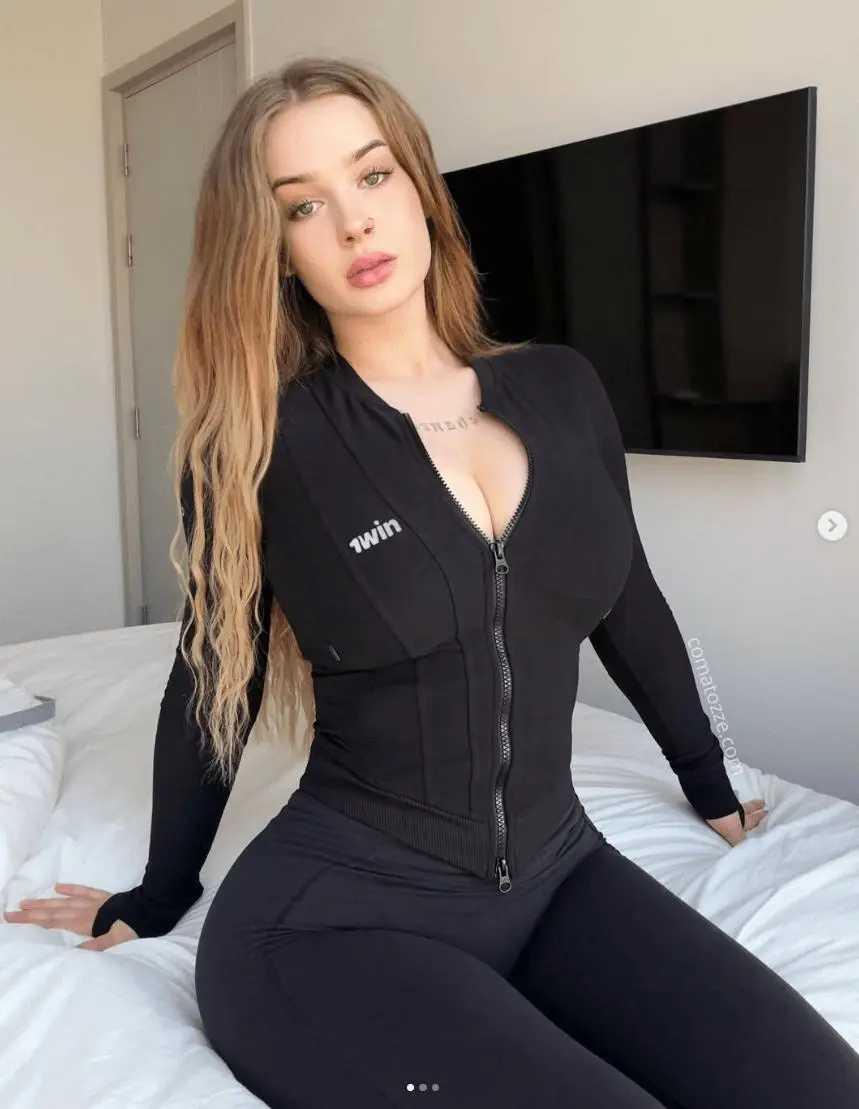
Comatozze is the name used for this supplied case. The actual generation is guided by the attached image; it does not depend on the model recognizing a name from text. Use a portrait and video you have permission to reuse, and label shared results as AI edits.
Identify the foreground performer before replacing anyone
The source contains a main performer and incidental people around the train. The prompt identifies the target by visible clothing: the person wearing a black long-sleeved hooded top and blue jeans. It then limits the replacement to that person.
This is more precise than “replace the person in the video.” The identity reference should follow the foreground performer through front views, profiles, turns and faster movement, while the source remains the guide for the camera and station.
The prompt also asks to preserve the hand-held ticket/card and wired earphones. Treat those small objects as inspection points, not details automatically certified by a successful generation status.
Use the recorded 22-second Kling 4.0 settings
Open Kling on WeShop, select Kling 4.0 Reference, and attach both files. Check that Image 1 is the intended portrait and Video 1 is the metro clip before generating.
| Setting | Selected case value |
|---|---|
| Model | Kling 4.0 Reference |
| Duration | 22s |
| Resolution | 1080p |
| Aspect ratio | 9:16 |
| Quantity | 1 |
| Reference inputs | One image and one video |
The WeShop Kling 4.0 model page describes its Reference workflow. Select the duration in the controls as well as describing the intended sequence in the prompt. Check the current credit quote in your task before generating.
The result shown here comes from the task's second execution, which uses the portrait pictured above. The first execution used a different image. If you are refining a task, check the references attached to the particular result you keep rather than assuming every execution has identical inputs.
Reuse the original metro character-replacement prompt
The exact submitted prompt is below. It explicitly separates identity, source clothing, action and camera instructions. That makes the difference between the request and the output easy to evaluate.
Edit @Video1 by replacing ONLY the main foreground performer, the person wearing a black long-sleeved hooded top and blue jeans, with the adult woman in @Image1. Use @Image1 for identity and hair only: match her facial structure, eyes, eyebrows, nose, lips, skin tone and light-brown/dark-blonde hair throughout frontal views, profiles, head turns, close-ups and motion blur. Keep the same recognizable reference woman throughout the entire clip, including the ticket barrier shot and the later walking/running shot. Remove the original performer's facial features and short brown hairstyle. Do not copy the reference photo's outdoor scene, pose, watermark or neckline.Keep the main performer's source outfit: an opaque black long-sleeved hoodie/top, blue jeans, belt and shoes, fitted naturally to the reference woman with realistic proportions. She remains fully clothed from beginning to end, with the top securely covering the torso and jeans covering the hips; no undressing or body emphasis. Keep small source accessories where visible, including wired earphones and the ticket/card in her hand. Do not introduce a new outfit, bag, sunglasses or jewelry from the reference photo.
Follow the exact source performance, step timing and camera motion over all 22 seconds: facing the camera and gesturing, turning toward the ticket gates, using the ticket/card and interacting with the gate, walking back toward the lens, lip movements and expressions, playful stepping, then moving quickly along the platform with the same arm swings, turns and body position, before exiting the frame as the camera pans away. Maintain the same position and apparent scale in each shot. Preserve the original edits, handheld camera path, motion blur, lighting changes, subway station architecture, platform, signs, railings, train, posters, doors and background perspective. Leave any incidental bystanders unchanged; replace only the main performer. Correct anatomy, hands and object contact; naturally moving hair and fabric; consistent identity through every shot. No new scenes, no camera redesign, no captions, watermarks, new people or special effects. Keep the original soundtrack and exact action timing.
Two details need interpretation when reusing it. The instruction excluding the photo's “outdoor scene” is inherited wording; the selected portrait shown here is indoors. Update background exclusions to fit your own photo. The lines requesting the original soundtrack and exact timing are also instructions, not verified audio results: preview audio and lip movement separately.
Compare the metro sequence and the wardrobe drift
Metro action reference
Generated character edit
The selected output follows the broad sequence of the source: an approach toward the camera, turns beside the train, gestures by the poster wall, faster movement along the platform and an exit from view. The replacement has the reference-guided long hair and facial appearance within a recognizable station scene.
Clothing was not preserved as requested. The source performer wears blue jeans and a black hooded top. The generated performer wears black trousers and a fitted black zip-front top influenced by the portrait. The neckline and overall silhouette also differ from the source. This case demonstrates character recasting; it does not demonstrate reliable isolation of identity from reference clothing.
| Checkpoint | What to inspect |
|---|---|
| Opening approach | Replacement face, hair and position as the subject gets closer |
| Turn toward the train | Profile and back-view continuity, especially hair covering the face |
| Hand-held objects | Card/phone shapes, earphone cables, fingers and object contact |
| Gestures by the wall | Face continuity as the head and shoulders change direction |
| Fast platform movement | Subject position, camera tracking and motion blur |
| Background | Bystanders, train, signs and poster shapes that should remain recognizable |
Review the whole clip rather than accepting the cover frame. The visible match in scene and action does not establish exact face fidelity, unchanged signage, flawless hands or frame-for-frame background preservation.
Refine the part your result actually changes
If the wrong person changes, identify the target with clothing, position and action. If the image's room replaces the station, state that the image supplies the person while the video supplies the environment and camera. Confirm the video is actually attached; a written station description is not the same reference input.
If keeping the source outfit is essential, do not approve this particular result for that requirement. You can try an identity crop that contains less clothing and retain a short, explicit outfit-preservation instruction, but that adjustment was not tested in this case. Compare the next result against the source again.
Try a portrait-guided Comatozze metro edit
The reusable setup is the portrait plus the original metro clip, with a clearly named foreground target and the recorded 22-second settings. Use it for a character recast where you can review and accept the wardrobe interpretation. Keep the source video visible during inspection so that changes to identity, clothes, objects and background are judged separately.
You can try it directly using the tool on the right.