












Kling 4.0 Comatozze Edit: Match Face and Outfit from Photos
Create a Comatozze street edit with Kling 4.0 Reference. Use two photos for the face and black dress, and a video for gestures, camera and setting.
The key to this Kling 4.0 Comatozze video edit is deciding which reference controls each part of the result. Two photos supply the replacement character's appearance and black dress. A street-performance video supplies the gestures, timing, camera movement and setting.
This WeShop case uses Kling 4.0 Reference to replace the foreground performer across a 15-second vertical clip. The practical goal is a complete character and wardrobe replacement: carry the photo's person and outfit into an existing performance while keeping the scene recognizable.
AI-generated character edit
Let photos decide the person and the wardrobe
An image-plus-video request can contain competing visual instructions. The source video shows a man in a white polo shirt, dark trousers and a green sweater tied around his waist. The photos show the intended replacement character in a fitted black sleeveless dress. Unless the prompt assigns those references separate jobs, the original clothing may compete with the photo's outfit.
The opening instruction in this case resolves that conflict explicitly: the image controls both face and outfit; the video controls actions, camera, timing and street environment. That hierarchy is the most useful part to reuse for your own character edit.
| Input | Role in this case | What to avoid copying |
|---|---|---|
| Image 1: wider portrait | Face, long wavy hair, body appearance and black dress | The portrait's rooftop background |
| Image 2: closer portrait | A closer view of the same facial identity | A second character or a competing outfit |
| Video 1: street performance | Gesture sequence, head turns, approach to the lens, camera and street setting | The original performer's face, polo shirt and green sweater |
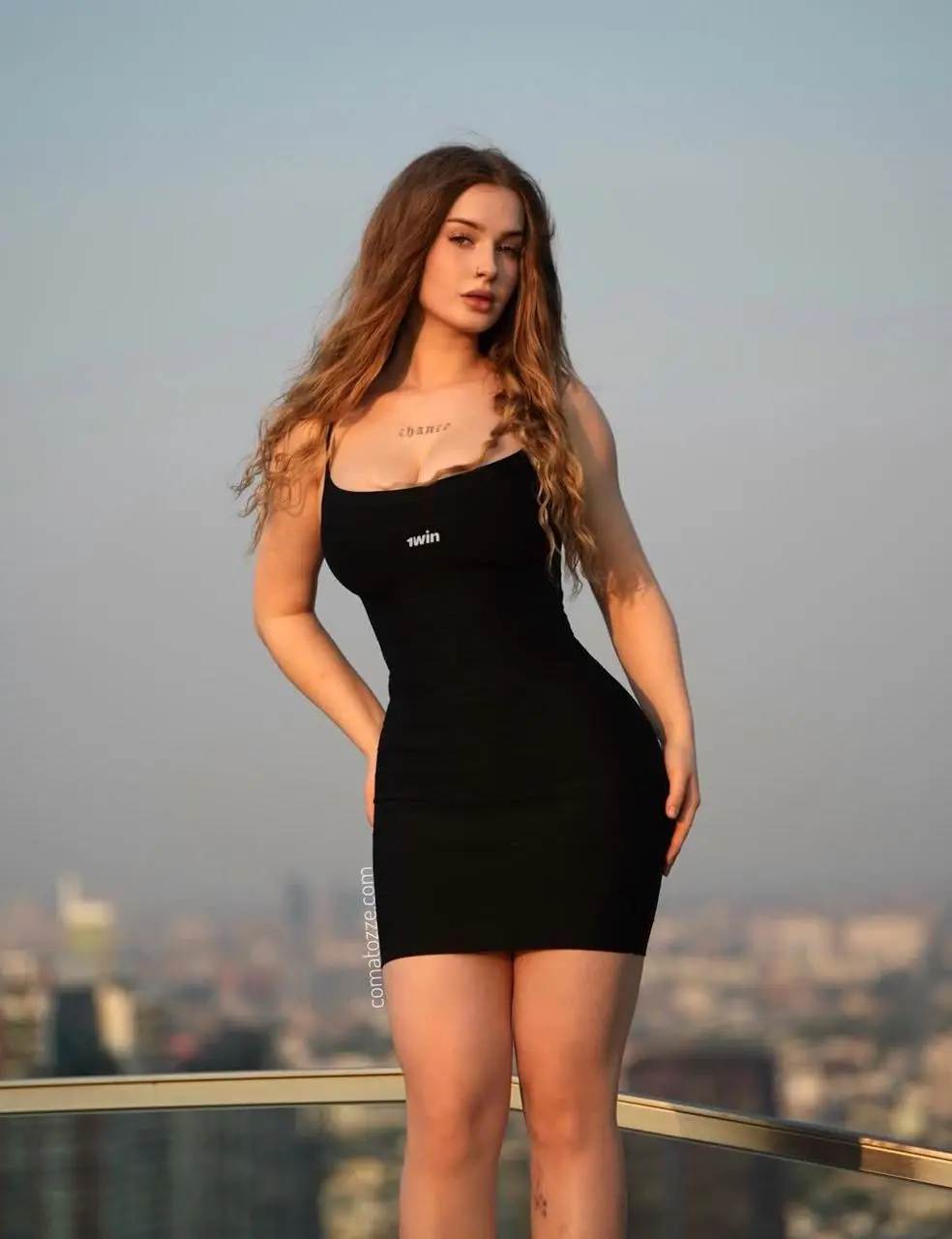
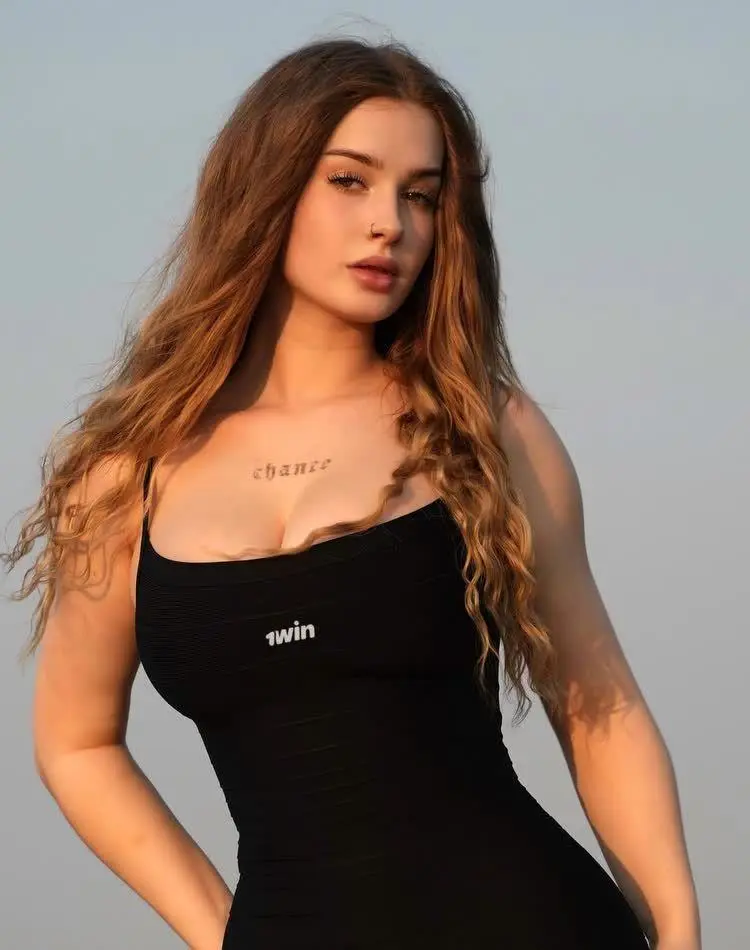
The second image is a tighter view of the same photo set. It reinforces the intended face; it does not introduce another wardrobe. When adapting the workflow, use clear references that agree about the person's appearance and the outfit you want.
Compare the street reference with the generated edit
Street performance reference
Generated character edit
The source and output follow a recognizable sequence: an opening lean toward the lens, sideways looks, expressive arm movements, a turn away, and a smiling close approach. The generated foreground character has long hair and a black dress through the sampled sequence. The white polo and tied green sweater are replaced, while the city intersection, crosswalk and building layout remain recognizable.
Those observations support using this result as a character-and-wardrobe replacement example. They do not establish perfect facial likeness, pixel-identical background preservation or flawless motion in every frame. The dress's broad shape and color transfer more clearly than its tiny printed chest lettering. Treat small marks, hands, facial proportions during turns and hair occlusions as review points.
Audio fidelity and exact lip synchronization were not independently reviewed for this case. The prompt asks for the original mouth-motion rhythm; that instruction is a target, not a verified audio result. Label the finished clip as AI-generated when sharing it, and use references you have permission to use.
Recreate the edit in WeShop Kling
- Open Kling on WeShop and select Kling 4.0 Reference, matching the model used in this case.
- Add the wider portrait as Image 1, the closer portrait as Image 2, and the street-performance clip as Video 1. Confirm the uploaded inputs before generating.
- State the reference hierarchy first. Give the photos authority over the replacement identity and outfit, then assign movement and scene to the video.
- Describe the outfit's visible structure and name the source clothes that must disappear. Here, that means black shoulder straps, a short black dress and no white polo or green sweater.
- Match this case's recorded settings: 9:16, 15 seconds, 1080p, one output. These are the settings of this example, rather than a claim about every available model setting.
- Generate, then compare the beginning, the side turns, the back-facing moment and the final close-up against both references.
The reference video already provides a performance. Avoid adding unrelated camera moves, scene changes or new actions when the purpose is to transfer that existing sequence.
Copy the original face-and-outfit prompt
The following is the complete prompt used for this output. Replace its subject-specific appearance and outfit descriptions when using your own photos; retain the clear division between photo authority and video authority.
The reference IMAGE is the authority for BOTH the main character's FACE AND OUTFIT. The reference VIDEO is the authority ONLY for the actions, camera, timing and street environment. Replace the original foreground man completely with the adult woman from reference image 1, wearing the SAME BLACK DRESS FROM IMAGE 1 for the entire video. Reference image 2 is a closer crop of the same woman for facial identity. This is a full character and wardrobe replacement, not a change of hairstyle on the original man.FACE AND HAIR: Faithfully reproduce the woman in images 1 and 2: her facial proportions, eye shape and eyebrows, nose, full lips, jawline, natural skin tone and skin texture, and long wavy light-brown hair with lighter ends. The final frontal close-up must look like the woman in the reference image, not a feminized version of the original male performer. Maintain her identity across profile views, head turns, smiles and mouth movements. Use her natural adult female body proportions. Do not retain any facial features or short hairstyle of the man in the video.
WARDROBE: Reproduce the image 1 outfit: a fitted BLACK SLEEVELESS MINI DRESS with shoulder straps, a low rounded/square neckline, horizontally ruched fabric and a short hem above the knees. Keep the dress black, opaque and properly worn throughout all movements. Match the reference dress silhouette, neckline, strap placement, fabric texture and fit. Preserve the small white chest mark from the reference dress if visible. No white polo shirt, no shirt collar, no short polo sleeves, no navy trousers, no green sweater tied at the waist, no green fabric, no earbuds and no watch from the original man. The same black dress remains on the woman from the first frame through the final frame, including all waist-up and close-up shots. When a lower-body view is visible, show the bare legs consistent with the reference dress; use simple black shoes if feet enter frame. Do not change her outfit to match the man in the video.
PERFORMANCE AND CAMERA: Follow reference video 1's complete 15-second performance in order at normal speed. Transfer the man's gestures, body sway, sideways glances, expressive arm movements, leaning toward and away from the lens, and final smiling approach onto the referenced woman in her black dress. Preserve the original mouth-motion rhythm as closely as possible without inventing dialogue. Follow the original camera framing, movement, perspective and subject position. Long hair and the black dress move naturally with her performance. Keep the original city intersection, sidewalks, crosswalk, buildings, overcast outdoor light, traffic and background pedestrians. The photographed rooftop must not appear. Replace only the foreground performer; leave background people unchanged. Do not copy the original man's face or outfit at any point. One continuous photorealistic vertical 9:16 smartphone shot, 15 seconds. Stable identity, natural anatomy, coherent hands and fingers, physically plausible dress motion, correct occlusion and matching ambient light. No added cuts, people, captions or watermarks.
This prompt separates face and hair, wardrobe, and performance into specific instructions. The exclusions are tied to visible conflicts in the source clip. For another video, replace those exclusions with that video's actual clothing and accessories instead of keeping irrelevant details.
Review the moments where references compete
Check the final frontal close-up against the closer photo for facial drift. Check the shoulder straps, neckline and hem during turns for wardrobe changes. Watch the foreground hands and hair as they pass over the body, and compare nearby pedestrians where the replacement overlaps them. A recognizable street does not prove that every background person is unchanged.
If the original outfit returns, make the clothing hierarchy explicit and remove contradictory wording. If the portrait background appears, state that the video alone controls the environment. If the face shifts during turns, use consistent identity references and review another result before sharing. These are troubleshooting directions, not guarantees that one wording change will fix every output.
For a different reference conflict, see the Comatozze metro video edit, which documents a result where the photo's clothing influenced the output despite a request to keep the source wardrobe. The street case here intentionally assigns wardrobe to the photos from the start.
Try the photo-led street edit
Reuse this example when your goal is to bring a photo's character and outfit into an existing short performance. Replace the two portraits with consistent references, keep or replace the motion clip, and update the prompt to match the actual inputs.
You can try it directly using the tool on the right.