












How to Make the Viral Instagram Stretchy Cheese Effect with AI
Learn how to design and animate a stretchy cheese pull across an Instagram-style post using GPT Image for the first frame and MiniMax H3 for motion.
|
INPUT FRAME
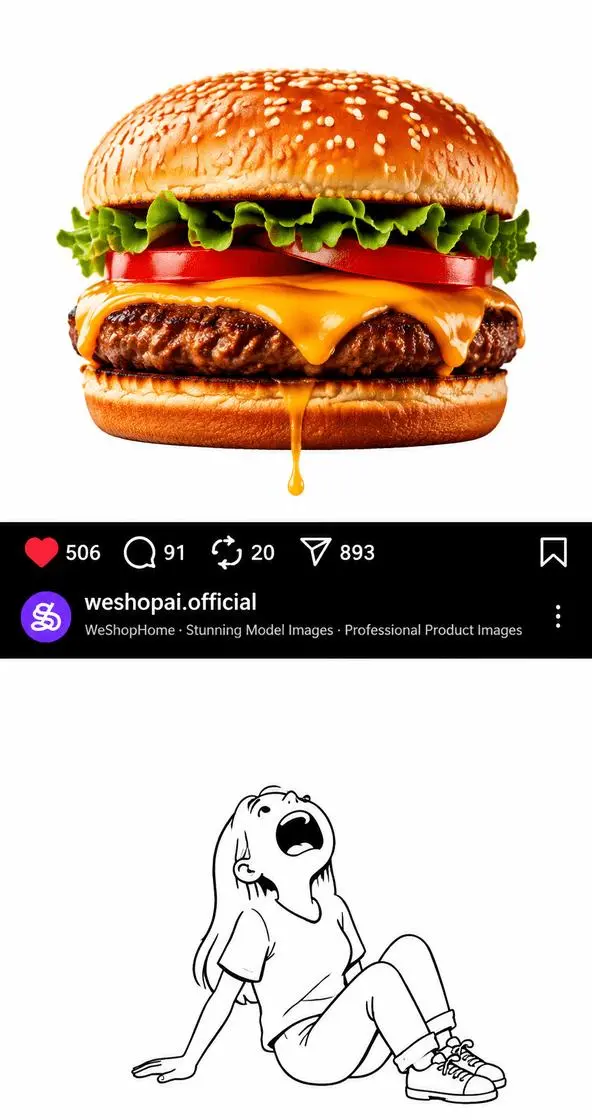
First frame: A static Instagram-style composition prepared for the cheese-pull animation.
|
FINAL VIDEO
Final effect: The cheese stretches across the Instagram UI and reaches the cartoon character below.
|
Some Instagram effects stop people for one simple reason: they make a flat post feel like it has real physical depth.
This stretchy cheese example works exactly like that. A burger sits at the top, an Instagram-style post UI divides the middle, and a cartoon character sits at the bottom with her mouth open. Then the cheese stretches downward, crosses the interface, and lands right in the character’s mouth.
The effect is funny, satisfying, and surprisingly easy to reproduce when you split it into two parts:
If you want to make a similar Instagram stretchy cheese effect, this is the fastest reproducible workflow.
What You Need
-
WeShop GPT Image
https://www.weshop.ai/apps/gpt-image -
WeShop MiniMax H3
https://www.weshop.ai/apps/free-minimax-h3
You will use GPT Image to design the layout, then use MiniMax H3 to animate only the cheese.
Step 1: Build the First Frame in GPT Image
Open GPT Image first:
https://www.weshop.ai/apps/gpt-image
The goal here is not to generate the full cheese-pull effect yet.
Instead, you need a static first frame with three clearly separated sections:
- a realistic cheeseburger at the top
- an Instagram-style post UI in the middle
- a black-and-white cartoon character at the bottom
The most important detail is alignment.
The small cheese droplet under the burger and the cartoon character’s open mouth should sit on almost the same vertical axis. That invisible straight path is what lets MiniMax H3 extend the cheese cleanly in the next step.
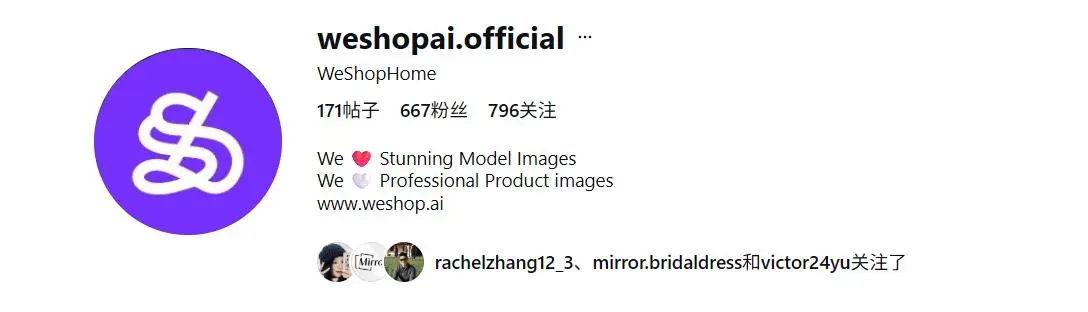
Reference: WeShop Instagram Account Identity
Use this reference to guide the account styling inside the Instagram-style post section:
GPT Image Prompt
Create a vertical 9:16 viral social-media meme image designed as the first frame of a future AI video effect.

The composition contains three vertically stacked sections:

1. A realistic cheeseburger at the top
2. An Instagram-style post interface in the middle
3. A black-and-white cartoon character at the bottom

The entire composition sits on a clean white background with a polished social-media-post aesthetic.

TOP SECTION

Place a large photorealistic cheeseburger centered on a pure white background.

The burger should look highly appetizing and commercially photographed, with:

- glossy golden sesame seed bun
- melted orange cheddar cheese
- grilled beef patty
- tomato
- green lettuce
- toasted bottom bun

At the exact lower-center area of the burger, create ONE very small hanging drop of melted orange cheddar cheese.

The cheese drop should be:

- short
- glossy
- thick and sticky
- naturally attached to the burger
- pointing straight downward

Do NOT create a long cheese strand.

This image represents the first frame BEFORE the cheese starts stretching.

MIDDLE SECTION — INSTAGRAM-STYLE POST UI

Directly beneath the burger image, create a clean black Instagram-style interaction area spanning the full width.

The first black row contains social engagement controls.

From left to right:

- red heart icon with “506”
- white comment icon with “91”
- white repost icon with “20”
- white paper-plane share icon with “893”
- white bookmark icon aligned to the far right

Below the engagement controls, create an Instagram-style account information row.

WESHOP ACCOUNT IDENTITY

Create a recognizable WeShop-branded Instagram account identity.

Use:

- a purple circular WeShop profile avatar
- a white stylized WeShop logo inside the purple avatar
- Instagram username: “weshopai.official”
- account display name: “WeShopHome”
- clean, professional AI ecommerce brand appearance

Show a circular purple WeShop avatar on the left.

Next to it place the bold white username:

“weshopai.official”

Below it, smaller light-gray text:

“WeShopHome · Stunning Model Images · Professional Product Images”

Add a vertical three-dot menu icon on the far right.

This should look like the account-information section of an Instagram post, not a full Instagram profile page.

BOTTOM SECTION

Below the black Instagram interface, return to a pure white background.

Place a simple black-and-white cartoon line drawing of a young woman sitting casually on the floor.

She is:

- leaning backward on one arm
- sitting with relaxed bent legs
- tilting her head strongly upward
- looking upward
- opening her mouth widely

Her open mouth should be clearly visible.

Use simple bold black outlines with minimal detail, similar to a playful internet meme illustration.

CRITICAL ALIGNMENT

The small hanging cheese drop underneath the burger and the center of the cartoon woman's open mouth must be positioned on almost exactly the SAME VERTICAL AXIS.

Imagine an invisible straight vertical line running:

burger
↓
small cheese drop
↓
Instagram interface
↓
empty white area
↓
cartoon woman's open mouth

Leave enough space between the Instagram interface and the cartoon woman's mouth for a future long cheese-stretch animation.

If the cheese were stretched straight downward, it should naturally pass across the Instagram interface and enter directly into the cartoon woman's open mouth.

IMPORTANT FIRST-FRAME RULE

This is the completely STATIC FIRST FRAME.

The cheese has NOT started stretching yet.

Only show a very short cheese drop attached to the burger.

Do NOT show:

- a long cheese strand
- cheese reaching the Instagram interface
- cheese reaching the character
- liquid splashes
- multiple cheese strands
- falling droplets
- motion blur

Vertical 9:16 composition.
Viral Instagram Reel visual-effect aesthetic.
Clean white background.
No room background.
No real human model.
No phone.
No additional decorative objects.
GPT Image Result
This is the generated first frame used as the MiniMax H3 input:
At this stage, the image should already make the future motion obvious. The viewer should feel that if the cheese keeps stretching downward, it will naturally pass through the Instagram UI and reach the character’s mouth.
Step 2: Animate the Cheese in MiniMax H3
Now open MiniMax H3:
https://www.weshop.ai/apps/free-minimax-h3
Upload the first frame you generated in GPT Image.
The key idea is simple: animate only the cheese.
Do not try to animate the whole layout. The burger, the UI, the text, the icons, and the cartoon character should remain as still as possible. The visual joke works because one single element breaks the boundary of the post while everything else stays frozen.
You can try it directly using the tool on the right.
MiniMax H3 Prompt
Animate this image into a short 2.7-second visual-effect video.

Keep the entire composition completely static.

Do not move the camera.
Do not zoom.
Do not move the burger.
Do not move the social media interface.
Do not move or animate the cartoon woman.
Do not distort the text, icons, or layout.

Animate ONLY the small melted-cheese droplet attached to the bottom of the burger.

The small cheese droplet begins stretching continuously downward under gravity.

It develops into ONE long, continuous strand of glossy melted cheddar cheese.

The cheese must remain physically connected to the burger throughout the entire animation.

The strand gradually extends downward along the existing vertical alignment.

The cheese strand stretches straight downward from the burger and passes visually IN FRONT OF the Instagram-style interface, including the engagement row and the WeShop account information row.

The Instagram UI itself remains perfectly static and undistorted behind the cheese strand.

The cheese behaves as if it exists on a foreground layer above the social-media interface.

It then continues downward through the white space toward the cartoon woman's open mouth.

The cheese should behave like extremely stretchy melted cheddar:

- sticky
- elastic
- glossy
- viscous
- thicker near the burger
- gradually thinner toward the lower end
- smooth continuous stretching
- subtle natural wobble caused by gravity

Do not make it behave like water.

Do not break the cheese strand.

Do not create separate falling droplets.

Do not generate multiple strands.

Do not splash the cheese.

Do not melt or deform the burger.

The trajectory should remain almost perfectly vertical.

By the end of the animation, the tip of the stretched cheese enters or touches the center of the cartoon woman's open mouth.

The final frame should show one continuous cheese strand visually connecting the burger above to the cartoon woman's mouth below.

Motion timing:

0–0.4 seconds:
The image remains almost completely still. The small cheese droplet begins to elongate.

0.4–1.4 seconds:
The cheese stretches downward and crosses the black social-media interface.

1.4–2.3 seconds:
The strand continues extending through the lower white space toward the open mouth.

2.3–2.7 seconds:
The cheese reaches the mouth and settles slightly while remaining connected to the burger.

No cuts.
No transitions.
No camera movement.
Everything except the cheese remains frozen.
Why This Instagram Effect Works So Well
This is not just a food animation.
It works because it creates a visual contradiction.
The Instagram post UI should divide the composition into separate blocks. But the cheese ignores that boundary and behaves like a real object in physical space. That is what makes the effect feel playful and “scroll-stopping.”
So if your result feels weak, the problem is usually not the cheese texture. It is usually one of these:
- the first frame is not vertically aligned
- the cheese path is too diagonal
- too many parts of the image are moving
- the interface deforms during the stretch
The cleaner and more static the layout is, the better this effect looks.
Troubleshooting Tips
If the result is close but not clean enough, try these fixes:
1. The cheese becomes multiple strands
Add stronger wording like:
Generate only one continuous cheese strand.
2. The UI or text starts warping
Reinforce:
The Instagram interface remains perfectly static and undistorted.
3. The cartoon character moves too much
Add:
Do not animate the cartoon woman.
Everything except the cheese remains frozen.
4. The strand misses the mouth
This usually means the first frame needs better vertical alignment. Go back to GPT Image and place the cheese droplet and the mouth on a straighter shared axis.
Final Result
Here is the final MiniMax H3 video result:
This final effect turns a simple static Instagram-style composition into a short, satisfying animated visual that feels perfect for Reels, meme content, and AI effect showcases.
Final Takeaway
To make a strong Instagram cheese pull effect, do not start by chasing animation.
Start by designing the right still image.
Once the first frame clearly establishes the burger, the Instagram UI, the empty vertical path, and the open mouth below, MiniMax H3 can turn that setup into a clean viral animation with just one moving element.
If you want a repeatable formula, remember it like this:
Build the path in GPT Image. Animate the path in MiniMax H3.
That is the easiest way to create this kind of viral Instagram stretchy cheese effect with AI.