












Animate a Comatozze GTA 6 Inspired Main Menu
Create a Comatozze menu-to-game transition with Wan 3.0 using two reference frames and the source tutorial’s menu, confirmation and third-person timing.
The reference video animates a game interface as a sequence: hold the menu, confirm the selected option, then enter a third-person scene. This Comatozze adaptation uses an approved menu and a rear-view HUD frame as the actual starting and ending image inputs to Wan 3.0.
This is an unofficial AI-edited fan concept. Comatozze and Rockstar Games are not presented as endorsing it. The artwork, fictional controls and generated scenes do not demonstrate actual game features.
Generated output: a 15-second menu-to-game fan concept, not recorded gameplay.
Approve both sides of the menu-to-game transition
The first frame is a dedicated menu generated with the Comatozze portrait in Seedream 5.0 Pro. It preserves the reference tutorial’s right-side character, left-side menu and tropical dusk. The second frame comes from the companion third-person HUD workflow. Both must show the same clothing, hair and game-rendered setting before you attempt a transition.
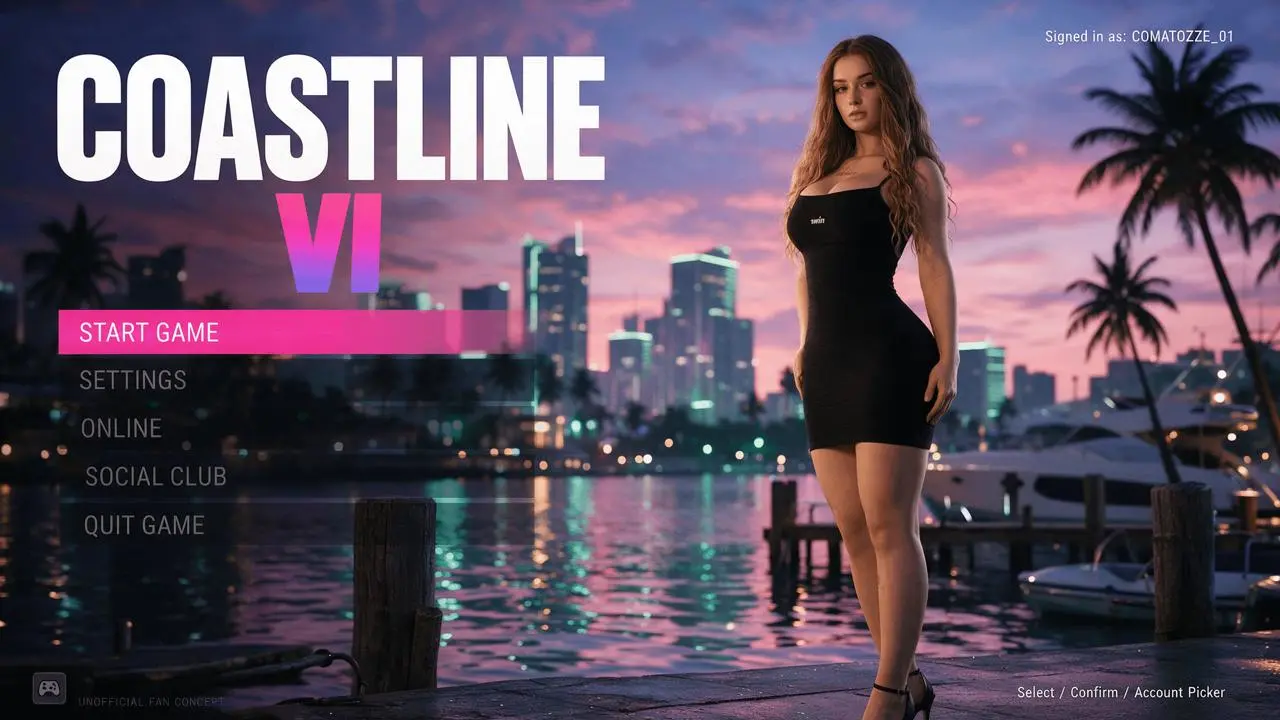
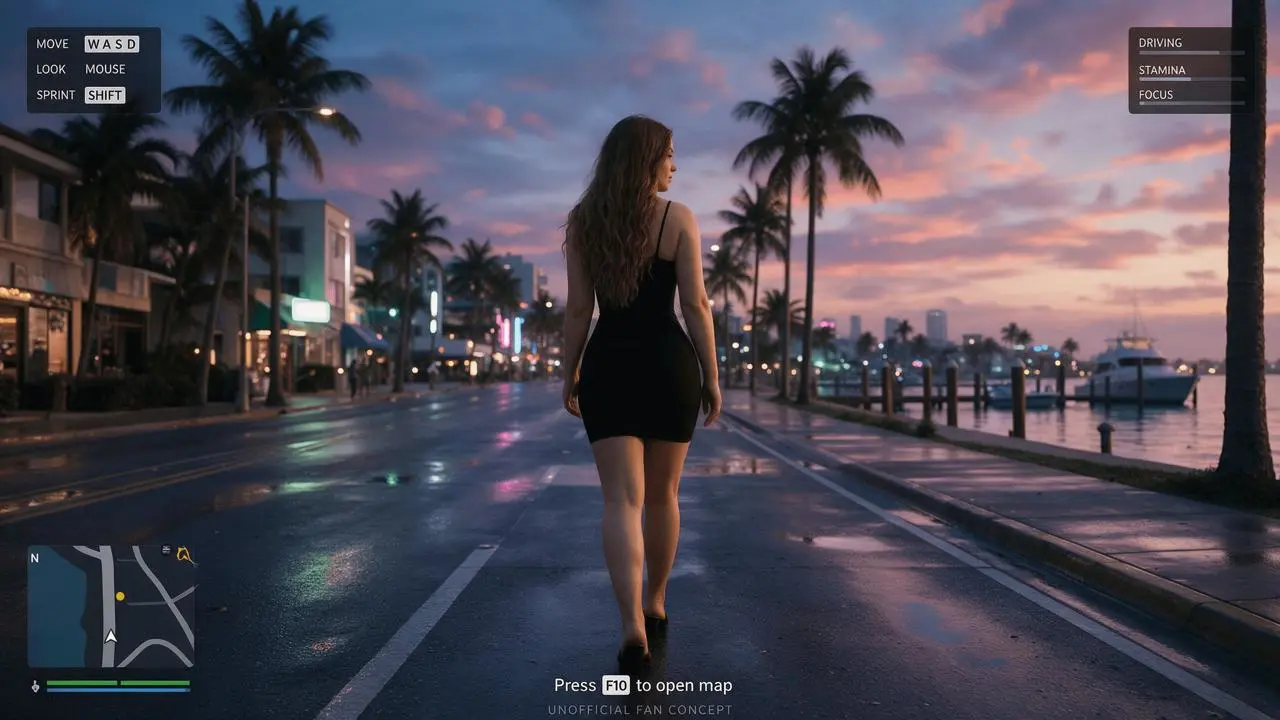
Follow the source’s menu, confirmation and entry rhythm
The adapted motion prompt allocates the first four seconds to the menu and seconds four to six to confirmation and a dark transition. The remainder asks for a rear-follow camera and a few natural steps toward the final frame. This timing comes from the prompt visible in the tutorial; the actual output must still be checked because generated video may compress, reinterpret or reorder the requested events.
Generate the menu-to-game sequence
-
Open Wan on WeShop and select Wan 3.0 I2V. Attach the menu as the first image and the approved third-person HUD still as the last image. Use the image-input controls rather than only describing these frames.
-
Set 15 seconds, 1080P, adaptive aspect ratio and generated audio off. These are this adaptation’s tested settings. The original tutorial uses a different video model and its settings are not claimed as Wan results.
-
Paste the motion prompt and generate. Play the entire clip, checking the menu interval, transition, character continuity, HUD appearance and ending. Compare the final output with both supplied frames.
The keyframe was generated with Seedream 5.0 Pro using this separate image prompt:
Use the supplied portrait to design a original GTA 6 inspired title-screen fan concept. The attached photograph is the identity reference for Comatozze: preserve the recognizable face, long wavy light-brown hair, skin tone, black sleeveless dress and adult proportions. Keep the original clothing coverage. Complete the unseen lower legs and footwear plausibly; those are invented details. Only one main character. Do not replace her face or turn her into an unrelated person. A humid tropical coastal city at dusk: peach-pink and violet-blue sunset clouds, a distant skyline with soft neon, palms, wooden marina pilings, yachts and water carrying pink and teal reflections. Rich but controlled colors, realistic skin and fabric, believable high-quality contemporary AAA game graphics rather than comic art, illustration, anime or a photographic poster. Put the standing woman on the right half, head and shoes inside the image, body slightly turned and face calmly looking near the viewer; leave the left side free for controls. On the upper left place a bold stacked white COASTLINE VI title with a pink-to-purple VI accent. Beneath it place five evenly spaced translucent dark menu rows with exactly START GAME, SETTINGS, ONLINE, SOCIAL CLUB, QUIT GAME. Highlight only START GAME with a bright pink horizontal selection bar. Small upper-right status: Signed in as: COMATOZZE_01. Small lower-right control hint: Select / Confirm / Account Picker. A tiny original square controller emblem at bottom left. Keep the figure clear of the menu. Horizontal 16:9, full-screen game-interface concept with no monitor or phone frame. No collage, no duplicate person, no extra limbs, no plastic skin, no exaggerated eyes. Clear contemporary translucent UI. Add a small UNOFFICIAL FAN CONCEPT caption; this is an AI fan concept, not a real game screenshot or endorsement.
Then the actual video step used:
Create a 15-second original tropical open-world game-interface fan video using image 1 as the exact starting menu and image 2 as the final third-person scene. Keep Comatozze recognizable through the reference face, long light-brown hair and black sleeveless dress, without changing clothing coverage. Follow this timing from the reference tutorial: 0-4 seconds, hold the main menu, with only subtle character breathing, water reflections and palm movement; preserve all menu lettering and the pink START GAME selected row. 4-6 seconds, confirm START GAME, briefly fade the interface through a dark transition, then push smoothly into the game world. 6-15 seconds, settle into the behind-the-character camera view of image 2 and follow the same woman taking a few natural steps forward along the damp coastal boulevard, ending close to the supplied final composition. The menu disappears only after confirmation; the third-person HUD appears during the gameplay-style segment. Keep the same tropical dusk, city geometry and game-rendered character; no outfit swap, no new people in the foreground, no abrupt cuts or face morphing. This is a fabricated fan-concept video, not playable or captured gameplay. No speech or soundtrack.
What the selected clip actually shows
The 15-second output begins with the COASTLINE VI menu and pink START GAME row, then changes into a rear-follow coastal scene. Hair, black dress and the dusk palette remain broadly consistent. The ending resembles the supplied third-person reference frame.
The menu is still visible at the five-second sample, so the requested 4-6-second timing should not be read as an exact edit. In the later scene, extra HUD panels and a second minimap appear, and some small labels become malformed. This is a concept transition rather than production-ready interface animation.
You can try it directly using the tool on the right.
The reusable generator is the Wan 3.0 image-to-video step and starts from the menu keyframe. Replace that input with your own approved menu image.
Check event order as well as character continuity
If the menu dissolves too soon or the scene enters from an unexpected angle, shorten the requested action and reduce competing motion. A dark transition can hide a camera change, but it does not prove that every intermediate frame is geometrically continuous. For strict editorial timing, make separate approved shots and assemble them in an editor; that is a proposed alternative rather than the one-pass generation shown here.
Questions about this workflow
Does this create a real game login or playable sequence?
No. It exports an AI fan-concept video with generated interface graphics and no game integration.
Are the original tutorial’s model and resolution used here?
No. This adaptation uses Wan 3.0 I2V, 15 seconds and 1080P, with two actual frame inputs. It does not claim a 4K or source-model test.
For a different interface task, follow Create a Comatozze GTA 6 Inspired Main Menu.
Try your own reference in Wan and start with the same restrained layout before adding detail.