












Create a Comatozze GTA 6 Inspired Main Menu
Create a Comatozze GTA 6 inspired main menu from a photo, then animate menu selection with a tested 10-second Wan 3.0 workflow.
A sunset portrait becomes a game title screen when the character, title and controls each have their own space. This Comatozze GTA 6 inspired main-menu example uses a real image reference and GPT Image 2.5 Flare on WeShop to build that arrangement in one generated still.
This is an unofficial AI-edited fan concept. Comatozze and Rockstar Games are not presented as endorsing it. The artwork, fictional controls and generated scenes do not demonstrate actual game features.
Separate the character from the menu
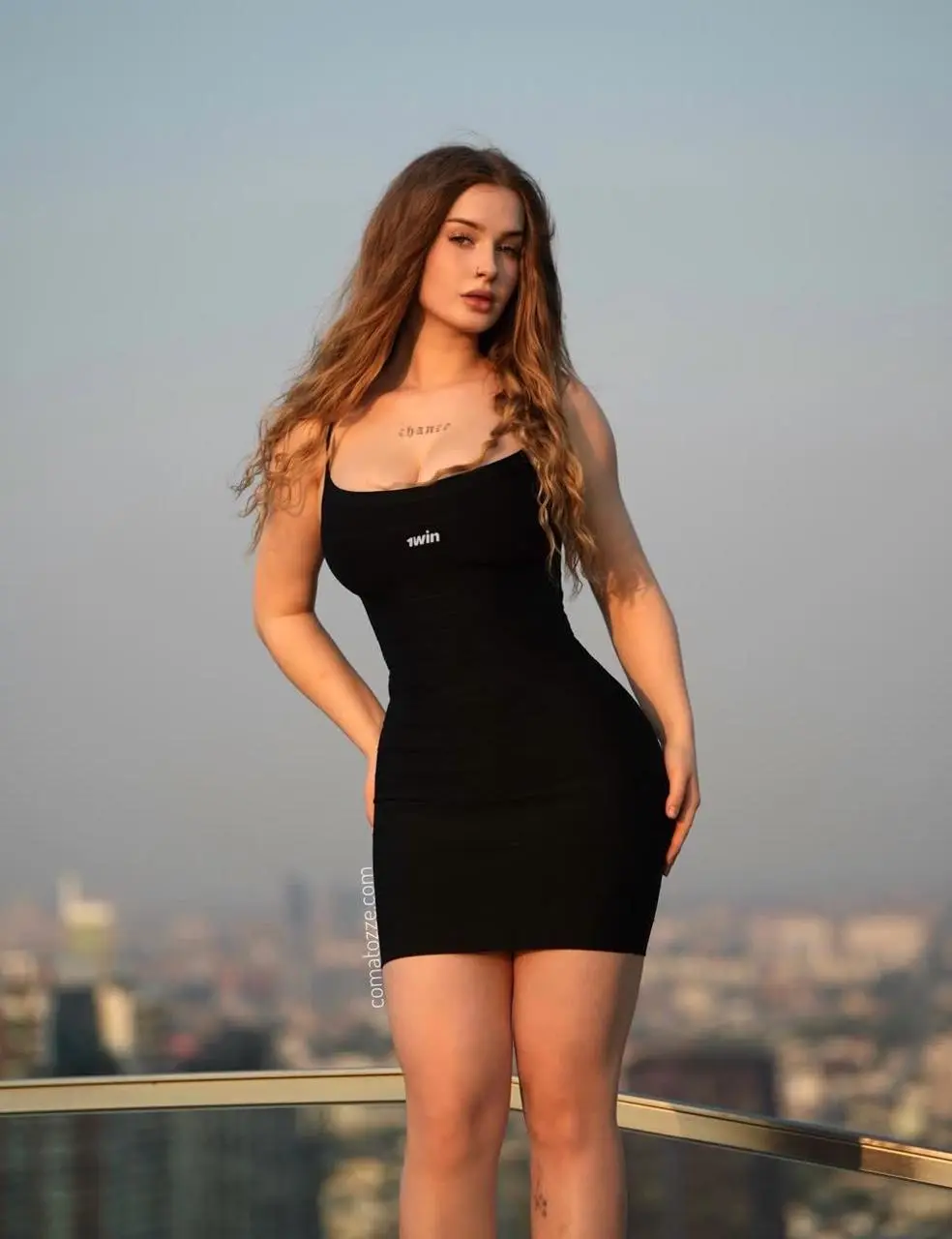
Start with a clear portrait that shows the face and hairstyle you want to retain. This test uses the Comatozze reference shown below: long wavy light-brown hair and a black sleeveless dress. The original portrait does not show a complete standing body, so the generated stance, lower legs and shoes are creative completions. A full-body reference of your own would constrain those details more directly.
Give each part of the title screen one job
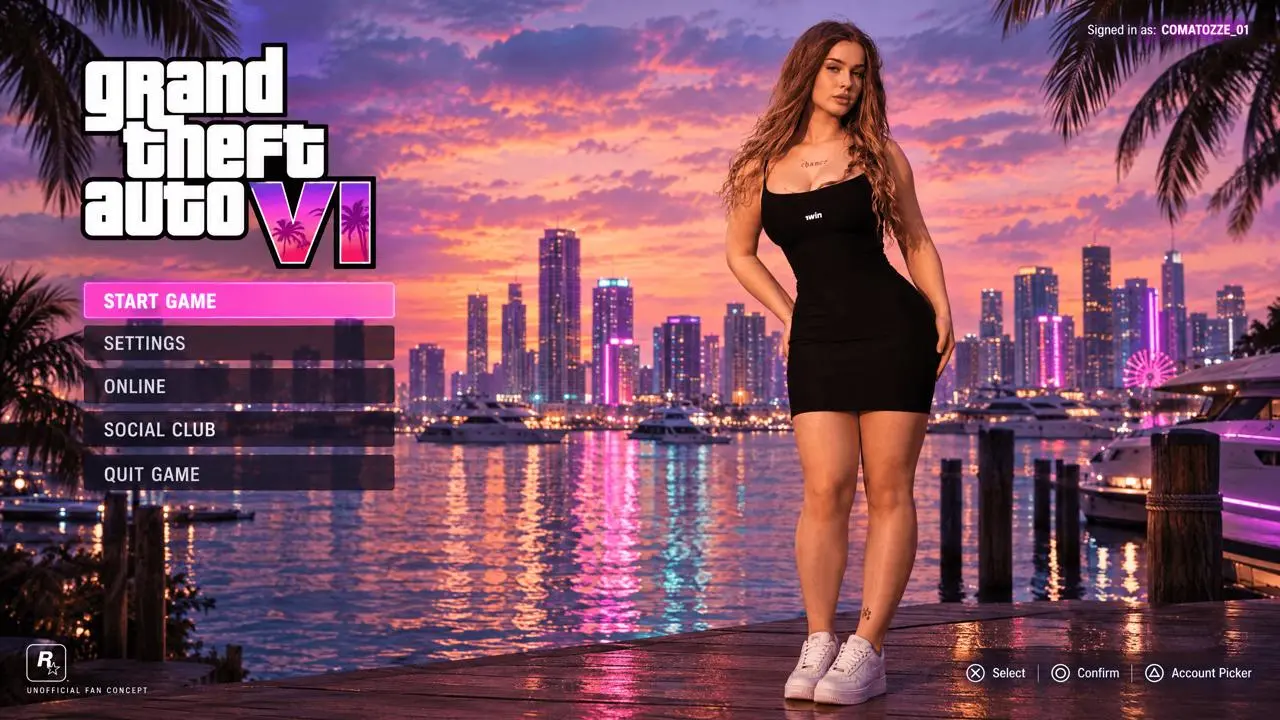
The reference tutorial puts a full standing character on the right, a bold game-style title at upper left and a five-row menu below. This adaptation keeps that structure, a pink selected START GAME row, a small signed-in status and lower-corner control hints. Its tropical dusk uses pink-violet clouds and reflected city light rather than the earlier warm daylight treatment. The GTA VI title is part of an explicitly unofficial fan concept.
Generate the reference-guided interface
-
Open GPT Image on WeShop, choose GPT Image 2.5 Flare and upload the Comatozze portrait as a real image input. The source tutorial separates layout instructions from identity instructions; this adapted prompt describes the layout in text and uses one portrait for identity.
-
Set 16:9, 2K, High quality and one image. Paste the adapted prompt below. The source recording shows a different resolution setting; this test uses the CLI-supported 2K setting and makes no 4K claim.
-
Generate and inspect the face, full-figure completion, five menu labels, pink START GAME highlight and small corner text. Check that the character does not cover the menu.
Use the supplied portrait to design a GTA 6 inspired title-screen fan concept. The attached photograph is the identity reference for Comatozze: preserve the recognizable face, long wavy light-brown hair, skin tone, black sleeveless dress and adult proportions. Keep the original clothing coverage. Complete the unseen lower legs and footwear plausibly; those are invented details. Only one main character. Do not replace her face or turn her into an unrelated person. A humid tropical coastal city at dusk: peach-pink and violet-blue sunset clouds, a distant skyline with soft neon, palms, wooden marina pilings, yachts and water carrying pink and teal reflections. Rich but controlled colors, realistic skin and fabric, believable high-quality contemporary AAA game graphics rather than comic art, illustration, anime or a photographic poster. Put the standing woman on the right half, head and shoes inside the image, body slightly turned and face calmly looking near the viewer; leave the left side free for controls. On the upper left place a bold stacked white GTA VI title with a pink-to-purple VI accent. Beneath it place five evenly spaced translucent dark menu rows with exactly START GAME, SETTINGS, ONLINE, SOCIAL CLUB, QUIT GAME. Highlight only START GAME with a bright pink horizontal selection bar. Small upper-right status: Signed in as: COMATOZZE_01. Small lower-right control hint: Select / Confirm / Account Picker. A tiny original square controller emblem at bottom left. Keep the figure clear of the menu. Horizontal 16:9, full-screen game-interface concept with no monitor or phone frame. No collage, no duplicate person, no extra limbs, no plastic skin, no exaggerated eyes. Clear contemporary translucent UI. Add a small UNOFFICIAL FAN CONCEPT caption; this is an AI fan concept, not a real game screenshot or endorsement.
What the selected output actually shows
The revised still follows the reference tutorial closely: a reference-based Comatozze character stands on the right, a stacked GTA VI fan title sits at upper left, and five dark menu rows sit beneath it. START GAME has a bright pink selected state. Pink-violet sky and neon reflections carry the coastal dusk setting, with signed-in text and control hints at the corners.
The generated white sneakers and standing pose are creative completions rather than details recovered from the cropped portrait. A small game-like emblem was also synthesized. The result is unofficial AI fan art, not evidence of Comatozze appearing in the actual game.
You can try it directly using the tool on the right.
The reusable generator includes the reference image. Replace it with your own photo and revise the descriptive identity cues before generating.
Refine hierarchy before adding more decoration
If the character overlaps the buttons, move her farther right in the prompt and make the left panel wider. If the scene reads as a poster, explicitly request a vertical button stack and a selected row. For production UI, typeset labels as separate editable elements after approving the artwork; a generated still cannot supply clickable controls or reliable localization.
Simulate selection in the main menu
The approved menu image becomes the first frame of a short selection sequence. The motion prompt asks the cursor and pink highlight to move between existing rows while keeping the character and lettering in place.
- Open Wan on WeShop and choose Wan 3.0 I2V. Attach the final interface image shown above as the first-frame input.
- Set 10 seconds, 1080P, Adaptive aspect ratio, one output and Generate Audio: false.
- Paste the tested motion prompt below, generate, and play the complete clip. Check the simulated interaction as well as text, character and panel stability.
Animate the exact supplied image as a 10-second simulated game-interface interaction. Use it as the actual first frame, preserving its composition, Comatozze character, pink-violet tropical dusk, typography and panel geometry. 0-2 seconds: hold the supplied main-menu layout. 2-4 seconds: a small white game-menu cursor moves from START GAME down to SETTINGS and the pink selection bar follows to SETTINGS. 4-6 seconds: move the same cursor down to ONLINE and highlight only ONLINE. 6-8 seconds: move back up to START GAME and restore its pink highlight. 8-10 seconds: hold START GAME selected with a brief soft confirmation pulse. Keep every menu word exactly unchanged; only move the cursor and selected-row highlight. The woman keeps the same standing pose, with subtle breathing; water reflections move gently. Locked full-screen 16:9 game presentation, with no browser or monitor frame. No cuts, no scene replacement, no letter morphing, no added HUD. This is an AI-generated interface interaction concept, not a recording of a playable game. No speech, music or sound.
Generated interaction video — 10 seconds at 1080P, starting from this article’s exact final image.
The selected clip visibly changes the pink highlight between the existing menu rows. A white cursor appears, ONLINE is selected in the middle of the sequence, and the highlight returns to START GAME near the end. The marina and character remain the same scene.
The character shifts her stance slightly, and the selection timing does not exactly match every requested second. The clip demonstrates a simulated menu response rather than deterministic UI behavior.
You can try it directly using the tool on the right.
At this section, the right-hand tool uses the approved interface image as the video input. Replace it with your own finished still before generating another interaction.
Questions about this workflow
Can this become a playable GTA 6 menu?
The output is a visual concept. It does not change GTA 6 files, add a character to the game or produce functioning menu code.
Can I replace the reference with my own photo?
Yes. Replace the image input and update the hair, outfit and identity description to match it. Review the new likeness rather than assuming the saved example guarantees identity fidelity.
For a different interface task, follow Put Comatozze in a GTA 6 Inspired Third-Person HUD.
Try your own reference in GPT Image on WeShop and start with the same restrained layout before adding detail.