












Put Comatozze in a GTA 6 Inspired Third-Person HUD
Turn a Comatozze photo into a GTA 6 inspired third-person HUD, then animate forward character movement with Wan 3.0.
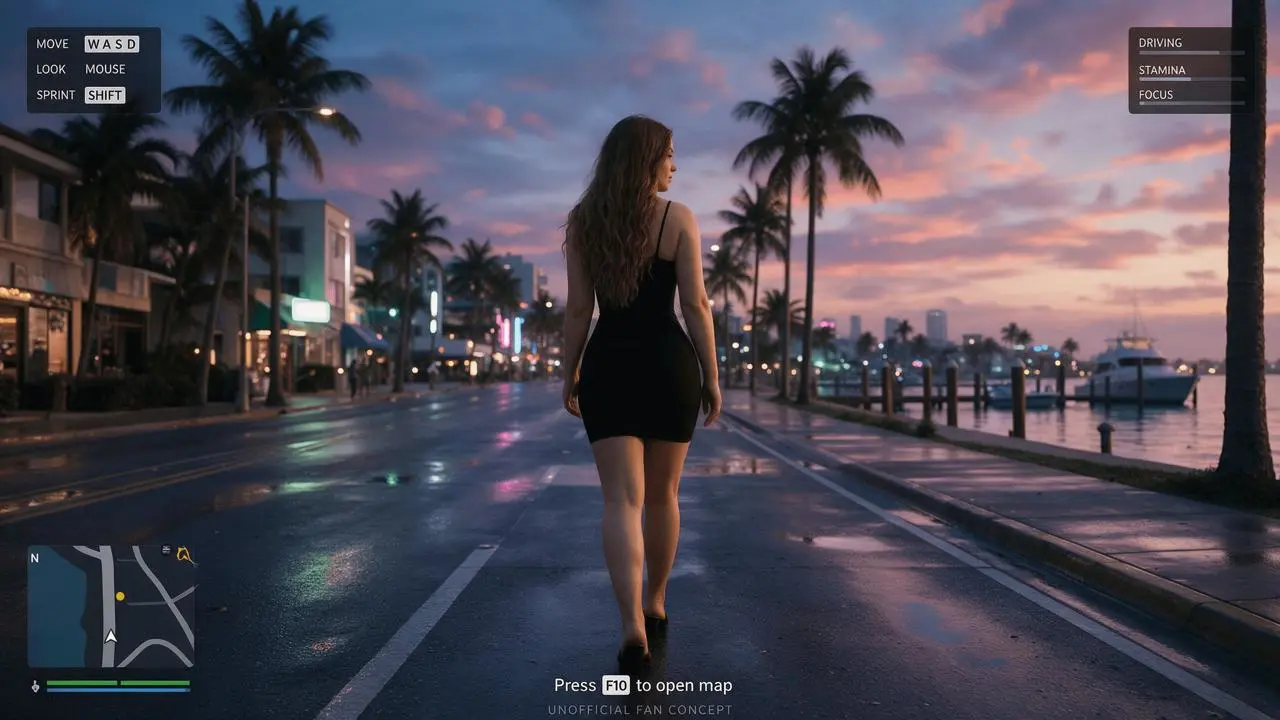
The reference tutorial describes a camera behind the character, slightly offset, with information grouped into three corners. This Comatozze adaptation keeps that third-person structure and tropical dusk treatment while replacing the source’s weapon-related content with a peaceful street-walking concept.
This is an unofficial AI-edited fan concept. Comatozze and Rockstar Games are not presented as endorsing it. The artwork, fictional controls and generated scenes do not demonstrate actual game features.
Choose the camera before describing the HUD
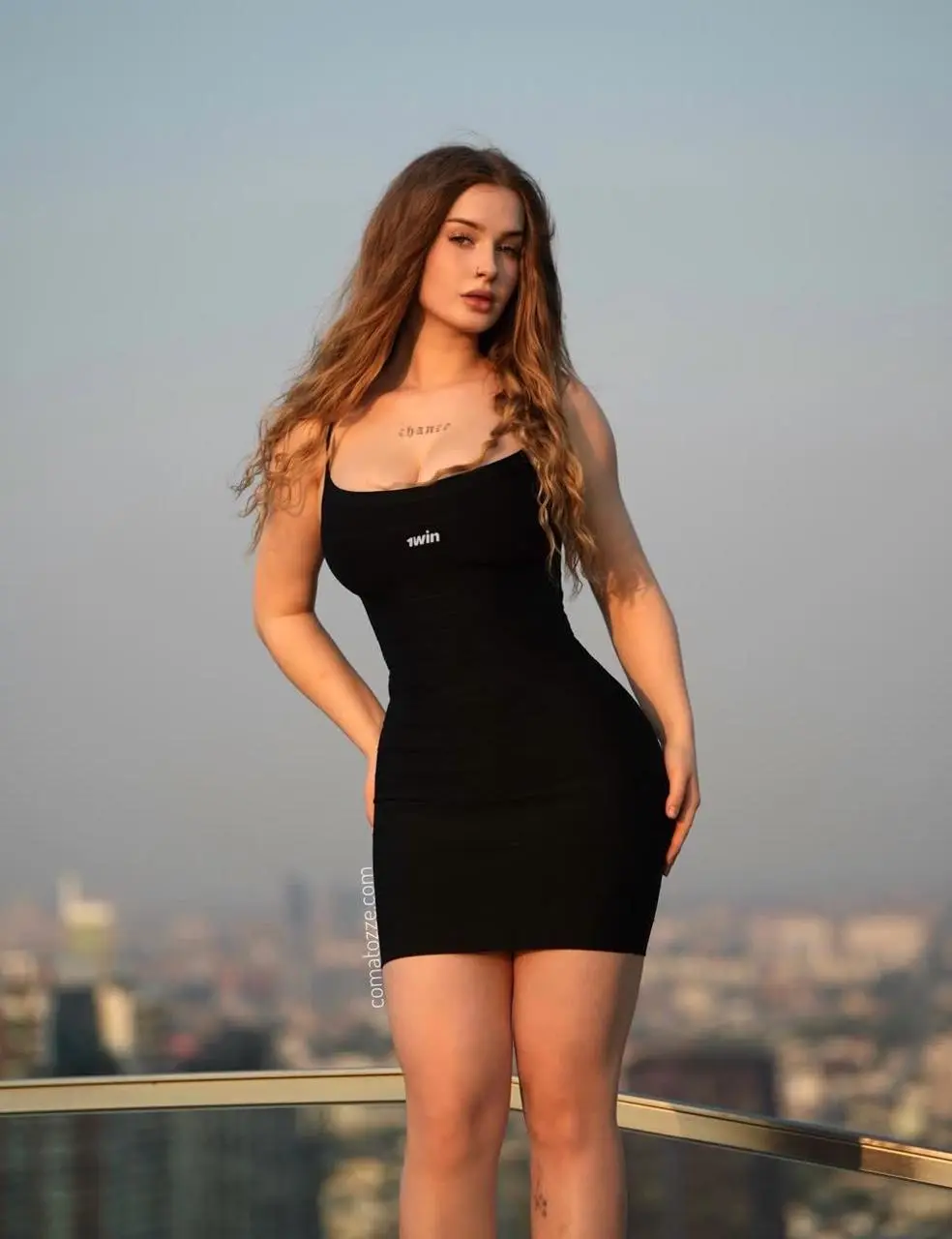
Use the reference photo for the character’s visible hair, clothing and proportions. In a rear view, the face is not available as strong identity evidence; the result can only carry recognizable styling cues from the photo. The back of the outfit and unseen footwear are generated interpretations. Keep that distinction when describing likeness.
Keep information at the edge of the scene
The adapted HUD follows the source’s layout logic: control help at upper left, a compact attribute panel at upper right, and the minimap with health and armor bars at lower left. A small bottom prompt leaves the central road visible. The invented controls and bars are visual interface elements, not instructions for operating GTA 6.
Generate the reference-guided interface
-
Choose Seedream 5.0 Pro on WeShop, attach the Comatozze reference and select 16:9, 2K and one image.
-
Keep the source-derived camera constraints explicit: view from behind, slightly offset, complete shoulders and legs, a slight side profile rather than a front-facing portrait. Describe the dusk boulevard after the character.
-
Generate and inspect the camera, body silhouette and road before checking the three corner panels. The money value from the earlier exploratory version is not part of this revised prompt.
Use the supplied portrait to create a GTA 6 inspired third-person open-world game still. The attached photograph is the identity reference for Comatozze: preserve the recognizable face, long wavy light-brown hair, skin tone, black sleeveless dress and adult proportions. Keep the original clothing coverage. Complete the unseen lower legs and footwear plausibly; those are invented details. Only one main character. Do not replace her face or turn her into an unrelated person. The camera follows behind the character, slightly above waist level and offset to the left, showing her complete back, shoulders, legs and the road ahead. She faces away from the camera in a natural walking stance, head only slightly turned enough for a small side profile; do not turn it into a front-facing portrait. A humid tropical coastal city at dusk: peach-pink and violet-blue sunset clouds, a distant skyline with soft neon, palms, wooden marina pilings, yachts and water carrying pink and teal reflections. Rich but controlled colors, realistic skin and fabric, believable high-quality contemporary AAA game graphics rather than comic art, illustration, anime or a photographic poster. Replace the marina foreground with a damp palm-lined coastal boulevard, sidewalks, low-rise buildings and street reflections, with a clear route into the distance. HUD arrangement follows the reference tutorial: a compact dark control-help box at upper left containing MOVE WASD, LOOK MOUSE, SPRINT SHIFT; a compact dark information panel at upper right with DRIVING, STAMINA, FOCUS and simple thin bars; a small road minimap at bottom left with a white player arrow, N marker, one yellow waypoint, green health bar and blue armor bar below. Bottom-center prompt: Press F10 to open map. Keep all overlays away from the main body and central road. No shooting, no combat. Horizontal 16:9, full-screen game-interface concept with no monitor or phone frame. No collage, no duplicate person, no extra limbs, no plastic skin, no exaggerated eyes. Clear contemporary translucent UI. Add a small UNOFFICIAL FAN CONCEPT caption; this is an AI fan concept, not a real game screenshot or endorsement.
What the selected output actually shows
The revised output shows a rear-follow view of the character on a damp coastal boulevard at pink-violet dusk. Control help sits at upper left, an attribute panel at upper right, and a minimap with green and blue status bars at lower left. The center remains open and the bottom prompt reads Press F10 to open map.
Only a small side profile is visible, so this is not a strong facial-likeness test. The minimap includes extra tiny symbols and the drawn map is not verified against the surrounding road layout. The F10 prompt is fictional interface copy.
You can try it directly using the tool on the right.
The reusable generator includes the reference image. Replace it with your own photo and revise the descriptive identity cues before generating.
Correct a portrait camera or crowded overlay
If the character faces the viewer, strengthen “view from behind” and remove portrait-oriented language such as eye contact or expressive face. If the map grows too large, ask for a compact corner panel and protect the central walking space. A visually convincing minimap is still an invented graphic; it does not encode navigable streets or synchronize with the surrounding scene.
Animate third-person movement with the HUD
Use the approved rear-view image as the first frame, then animate a short forward movement with the camera following the character. The image establishes the HUD layout; the video tests whether it remains stable during movement.
- Open Wan on WeShop and choose Wan 3.0 I2V. Attach the final interface image shown above as the first-frame input.
- Set 10 seconds, 1080P, Adaptive aspect ratio, one output and Generate Audio: false.
- Paste the tested motion prompt below, generate, and play the complete clip. Check the simulated interaction as well as text, character and panel stability.
Animate the exact supplied image as a 10-second simulated game-interface interaction. Use it as the actual first frame, preserving its composition, Comatozze character, pink-violet tropical dusk, typography and panel geometry. 0-2 seconds: hold the supplied rear-view game scene. 2-8 seconds: simulate holding the forward movement control: the same woman takes several slow natural steps down the boulevard, and the third-person camera follows behind at a constant distance and height. Her black dress and long hair remain consistent. The minimap player arrow makes one small forward movement; health, armor, control-help and attribute panels stay fixed. 8-10 seconds: the character slows to a stop. Preserve one minimap only. Do not add panels, icons or words; do not turn her to face camera. Locked full-screen 16:9 game presentation, with no browser or monitor frame. No cuts, no scene replacement, no letter morphing, no added HUD. This is an AI-generated interface interaction concept, not a recording of a playable game. No speech, music or sound.
Generated interaction video — 10 seconds at 1080P, starting from this article’s exact final image.
The selected clip moves the character forward along the coastal road while the camera follows from behind. The corner control and attribute panels stay in their original regions, and the lower-left minimap changes as the character advances. The final moment settles into a standing pose.
The minimap is regenerated during motion: road shapes and small arrow symbols change. It is not a map driven by actual game coordinates. Inspect the small labels and body outline before using the clip in a finished edit.
You can try it directly using the tool on the right.
At this section, the right-hand tool uses the approved interface image as the video input. Replace it with your own finished still before generating another interaction.
Questions about this workflow
Does the minimap match a real GTA 6 location?
No. The map, route and objective are fictional elements generated for a fan concept.
Does a rear-view result verify facial likeness?
No. Use a front-facing character screen if the reader needs to judge facial similarity. This test evaluates third-person composition and reference-based styling.
For a different interface task, follow Design a Comatozze Game Character Selection Screen.
Try your own reference in Seedream on WeShop and start with the same restrained layout before adding detail.