












Try a New Hair Color in a Photo with Seedream 5.0 Pro
Preview a new hair color with Seedream 5.0 Pro. Use a copper recoloring prompt and compare hairstyle, roots, eyebrows, skin tone, and lighting.
Trying copper hair should not silently give you a new haircut or lighter eyebrows. This Seedream 5.0 Pro tutorial changes the hair color of an attached portrait while asking to retain the waves, parting and length. The generated preview is a way to explore a look, with an explicit check for changes outside the hair.
| Reference input | Generated result |
|---|---|
 | 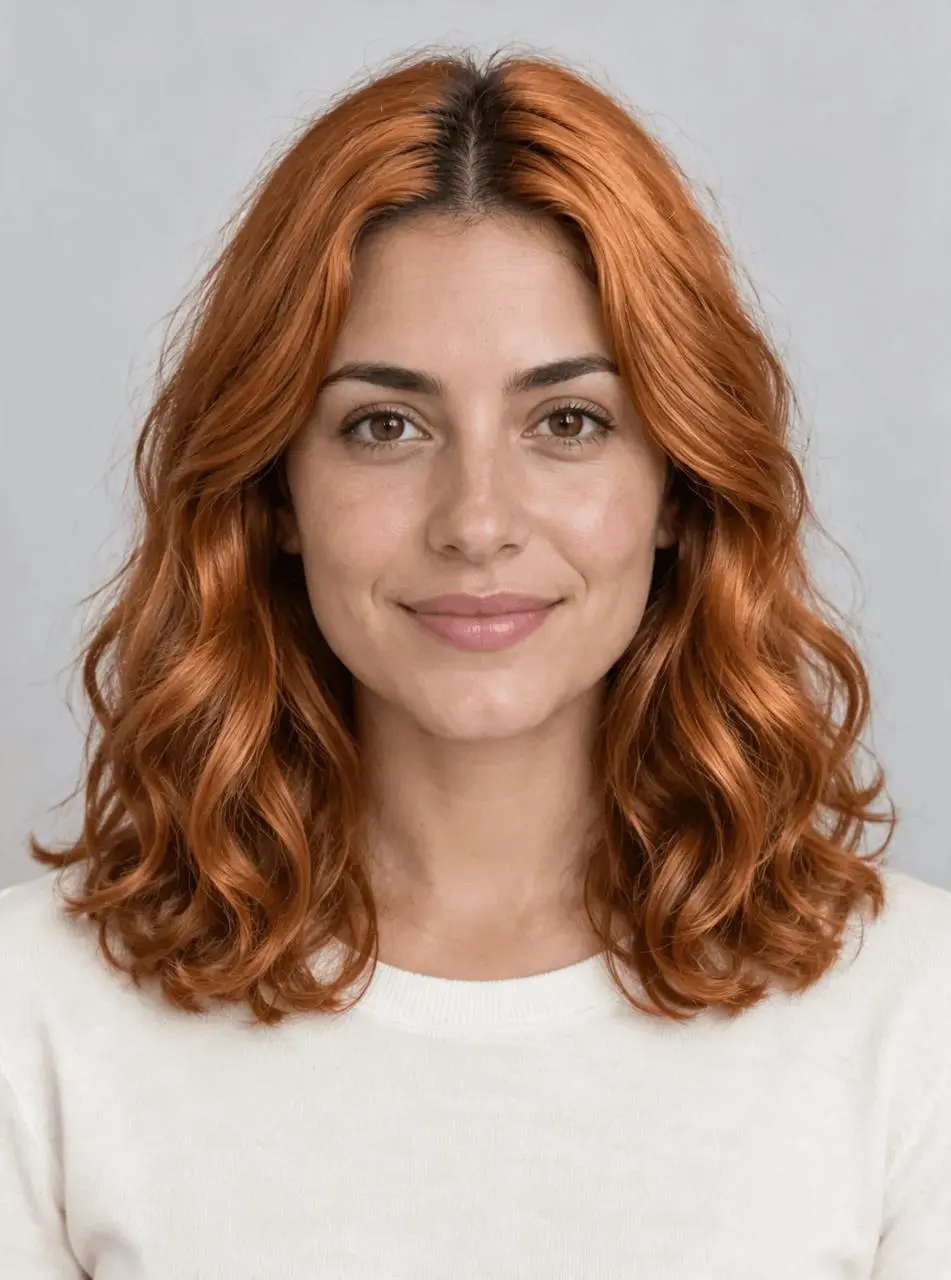 |
Hair color preview without a haircut. The displayed result was generated from the actual reference image.
Start with visible hair and neutral lighting
Choose a portrait that shows the full hairstyle around the head and shoulders. Avoid a strong color filter if your goal is to compare a shade. The example starts with dark brown shoulder-length waves, a middle part, a cream top and a gray background. Those features make it possible to judge the requested color separately from a haircut, a new outfit or a global lighting change.
The source image is synthetic and was created specifically for this demonstration. Use your own suitable image or a reference you are authorized to edit.
Describe the shade and the root treatment
The prompt requests soft natural copper with subtly darker roots. That is a visual description, not a hair-dye formula or a calibrated salon color code. Ask for one coherent shade first; highlights, color placement and a haircut would add separate decisions to the same generation.
Protect the hairstyle and the surrounding portrait
Specify length, parting, wave pattern, volume, hairline and flyaways. Name the eyebrows separately so the model does not recolor them along with the scalp hair. Keep the face, skin tone, top and background in the preserve list, then verify those instructions against the result.
Run the reference-image edit in WeShop
- Open Seedream 5.0 Pro on WeShop.
- Upload the original through the reference-image control. Confirm the thumbnail is attached; a description of the photo alone is not an image edit.
- Select the model and settings below, paste the prompt, and generate one image.
- Open the result at full size and compare both the requested change and the elements you wanted to retain.
| Setting | Tested value |
|---|---|
| Tool | Seedream 5.0 Pro on WeShop |
| Exact model mode | Seedream_50_Pro |
| Actual reference input | One attached image |
| Requested aspect ratio | auto |
| Requested image size | 2K |
| Quantity | 1 |
| Returned dimensions | 1760 × 2368 pixels |
Copy the exact tested prompt
Edit image 1 to preview a soft natural copper hair color. Change only the scalp hair from dark brown to warm copper with subtly darker natural roots. Keep the same shoulder-length wavy hairstyle, middle part, hairline, wave pattern, volume, length and flyaways. Preserve the adult woman face, facial structure, expression, skin tone, eyes, dark eyebrows, makeup, cream top, gray background, lighting and framing. Do not cut hair, add bangs, change eyebrows, alter age, smooth skin, add jewelry, text or logos.
The tool on the right loads this selected result with its original reference and generation setup. You can try it directly using the tool on the right. Replace the reference with your own and adjust the scene-specific wording.
Inspect the actual result
Dark brown scalp hair changes to warm copper, while the eyebrows remain broadly dark and the cream top and gray background keep their main colors.
The middle part and shoulder-length waves are recognizable, but strand patterns and curl edges are redrawn. The result is a color preview rather than the original photo with a perfectly isolated color mask.
Individual waves, flyaways and facial texture can change. The copper tone is not a calibrated dye match and does not predict a real salon result. No additional shades or repeated-run reliability were tested.
The example was generated on October 28, 2026. It is one selected output, not a measured success rate, an exact-preservation guarantee or a model comparison. Requested settings and returned file measurements are reported separately.
Use the preview to discuss a look, not guarantee a dye result
For another shade, start again from the original image and change only the color description. That avoids carrying an unnoticed face or haircut change through a chain of edits. Bring a selected preview as a visual conversation aid if useful, while recognizing that real color depends on the starting hair and the actual coloring process. This single example does not test those physical outcomes.
Frequently asked questions
Can I try blonde or pastel hair with the same structure?
Replace the target shade and keep the hairstyle constraints. The displayed copper output is the tested case; other shades are suggested adaptations rather than additional verified examples.
Will the original hairstyle remain exactly unchanged?
Generative editing can redraw strands and alter wave detail. Compare the hairline, part, length and face at full size. Treat the result as a preview rather than a pixel-identical recoloring mask.
For broader editing ideas, see Top 10 Prompts for Photo Editing That Actually Work. Start with the loaded example, change one part of the brief, and compare the result with the source before using it.