












Remove a Tattoo from a Photo with GPT Image 2.5
Remove a tattoo from a photo with GPT Image 2.5. Use a targeted forearm edit and check skin texture, arm shape, hands, and surrounding clothing.
To remove a tattoo from a photo, the brief should target the ink without redesigning the arm. This GPT Image 2.5 Sunburst example removes a simple black line-art tattoo from an attached portrait and checks the skin fill against the surrounding light and texture. It is a photo-editing demonstration, not a prediction of real tattoo-removal treatment.
| Reference input | Generated result |
|---|---|
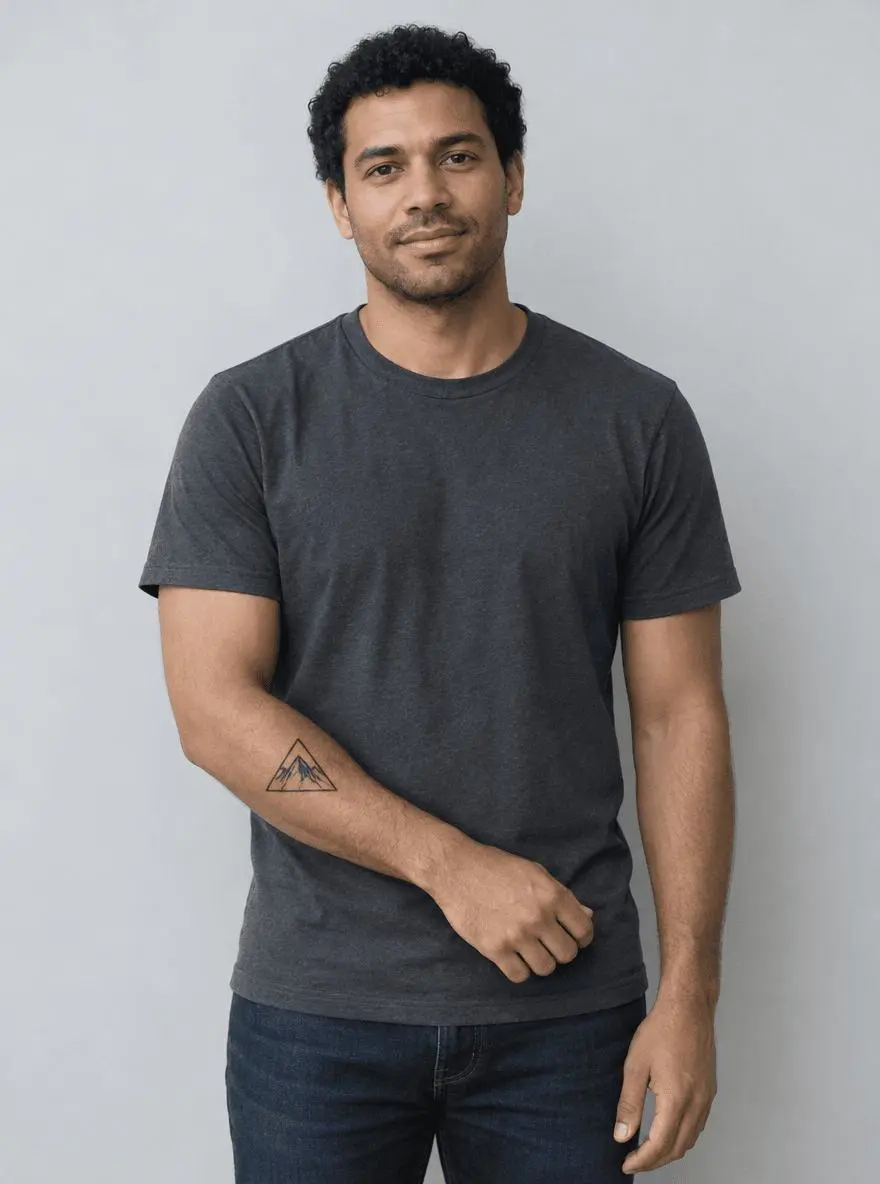 | 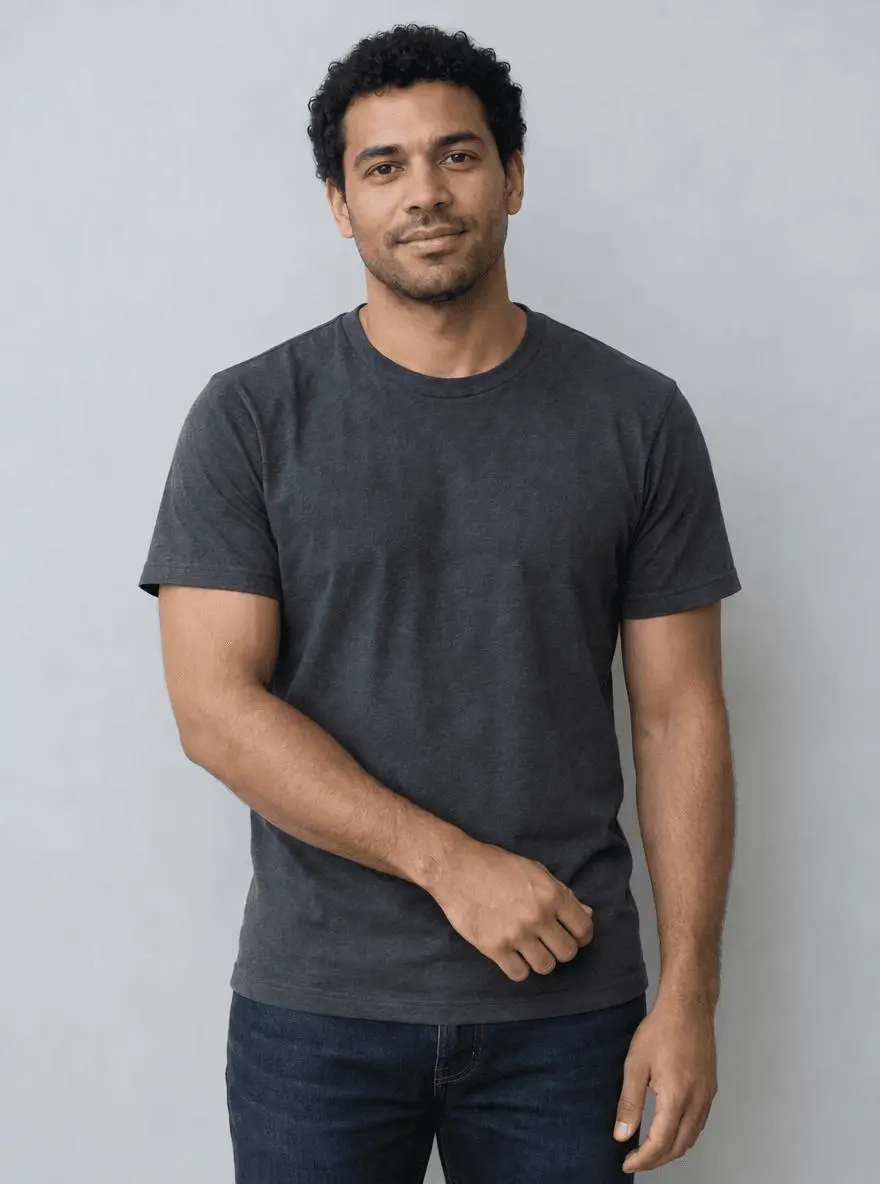 |
Local tattoo removal in a photograph. The displayed result was generated from the actual reference image.
Identify the tattoo by location and appearance
The synthetic source has one black mountain-triangle tattoo on the forearm crossing the waist. That location and shape make the target easier to identify than a vague instruction such as “clean up his skin.” Start with an unobstructed view and a visible skin area around the tattoo. An arm partly covered by clothing or crossed by another object requires additional reconstruction and is outside this test.
The source image is synthetic and was created specifically for this demonstration. Use your own suitable image or a reference you are authorized to edit.
Limit the change to the ink area
Ask for natural-looking skin consistent with the nearby tone, fine texture, light and shadow. Keep the instruction local. “Make the arm flawless” could invite broad smoothing, changes in muscle shape or an entirely different skin finish.
Protect the arm silhouette and nearby hands
State that the arm position, fingers, clothing, face and crop should remain. Compare those details with the source after generation. A result can remove the tattoo successfully while still changing a wrist edge or hand, so disappearance of the ink is only one acceptance check.
Run the reference-image edit in WeShop
- Open GPT Image 2.5 Sunburst on WeShop.
- Upload the original through the reference-image control. Confirm the thumbnail is attached; a description of the photo alone is not an image edit.
- Select the model and settings below, paste the prompt, and generate one image.
- Open the result at full size and compare both the requested change and the elements you wanted to retain.
| Setting | Tested value |
|---|---|
| Tool | GPT Image 2.5 Sunburst on WeShop |
| Exact model mode | gpt-image-2.5-sunburst |
| Actual reference input | One attached image |
| Requested aspect ratio | 3:4 |
| Requested image size | 1K |
| Quality | medium |
| Quantity | 1 |
| Returned dimensions | 880 × 1184 pixels |
Copy the exact tested prompt
Edit image 1. Remove only the black mountain-triangle line-art tattoo on the visible forearm crossing in front of the waist. Fill its area with natural-looking skin consistent with the surrounding skin tone, fine texture, light and shadows. Preserve the same adult man, face, hair, expression, arm shape, arm position, fingers, charcoal T-shirt, jeans, gray wall, framing and lighting. Do not alter muscles, smooth the entire arm, add a sleeve, change clothing, add another tattoo, text or logos.
The tool on the right loads this selected result with its original reference and generation setup. You can try it directly using the tool on the right. Replace the reference with your own and adjust the scene-specific wording.
Inspect the actual result
The black triangular mountain tattoo disappears from the forearm. The crossed-arm pose, charcoal shirt, jeans and gray background remain recognizable.
Skin now fills the target area without a replacement symbol. Fine skin texture is synthesized, so the clean-looking area should still be checked against neighboring texture and light.
This is generated replacement skin, not restoration of hidden original pixels. Fine arm texture and body details can be redrawn; compare the hand and wrist too. The image edit says nothing about real-world tattoo-removal results.
The example was generated on October 28, 2026. It is one selected output, not a measured success rate, an exact-preservation guarantee or a model comparison. Requested settings and returned file measurements are reported separately.
Inspect the replacement skin before using the photo
Look for a blurred patch, mismatched skin tone, repeated texture, missing arm hair or a discontinuity in the shadow. If you need to adjust one area precisely, a masked retouching workflow may give more direct control than regenerating the whole image. Preserve the original file and describe the edited image accurately when the change matters to viewers.
Frequently asked questions
Is the skin under the tattoo recovered?
No. The replacement is synthesized from surrounding visual context. It is not evidence of the exact skin texture that would exist without the tattoo.
Does this show what laser removal would look like?
No. It demonstrates a creative image edit only. The output should not be used as a treatment forecast.
For broader editing ideas, see Top 10 Prompts for Photo Editing That Actually Work. Start with the loaded example, change one part of the brief, and compare the result with the source before using it.