












Remove Glare from Glasses in a Photo with GPT Image 2.5
Reduce glare from glasses in a photo with GPT Image 2.5. See the actual reference-based edit and learn what to check in eyes, lenses, and frames.
A bright window reflection across eyeglass lenses can distract from an otherwise usable portrait. The useful instruction is to reduce the reflection while keeping the glasses, eye color and expression. This GPT Image 2.5 Sunburst example starts with partly visible eyes; any newly visible detail is a generative reconstruction, not proof that the camera captured it behind the glare.
| Reference input | Generated result |
|---|---|
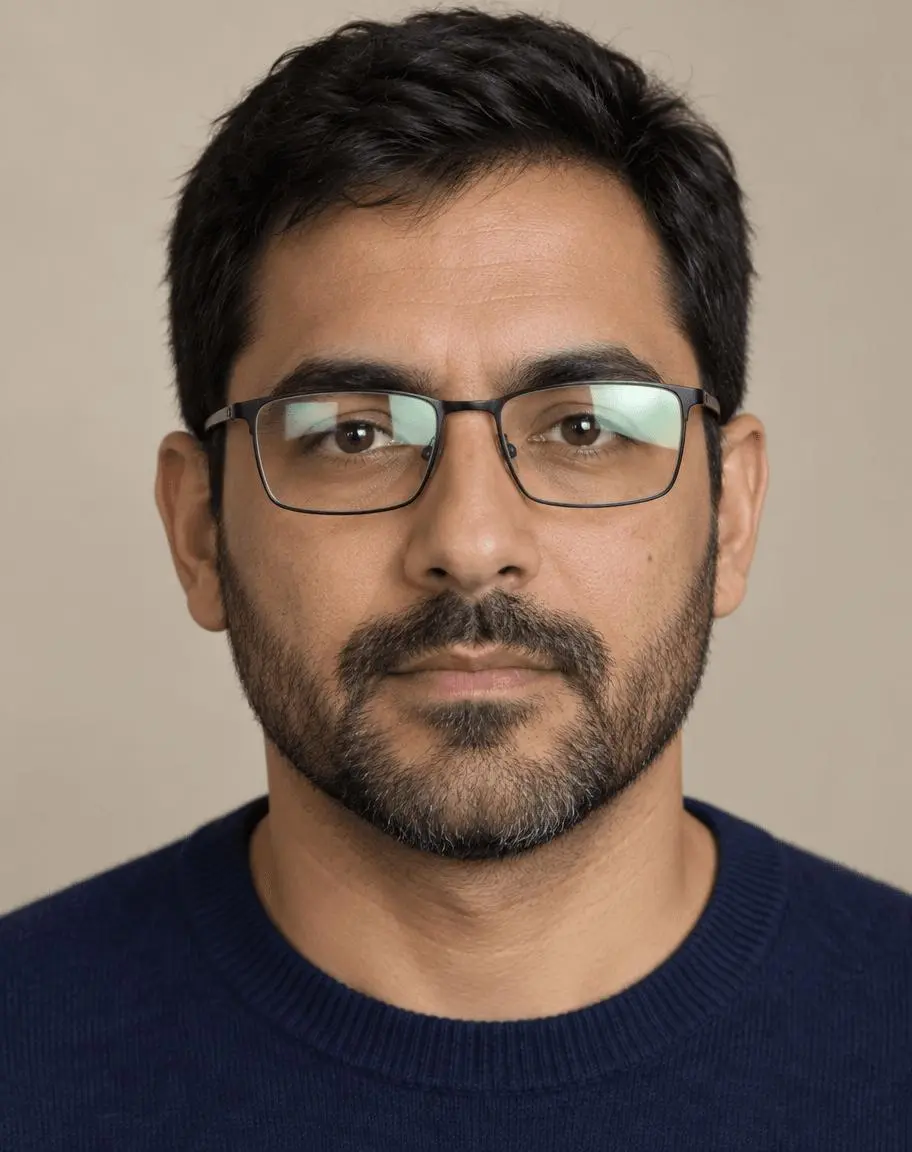 | 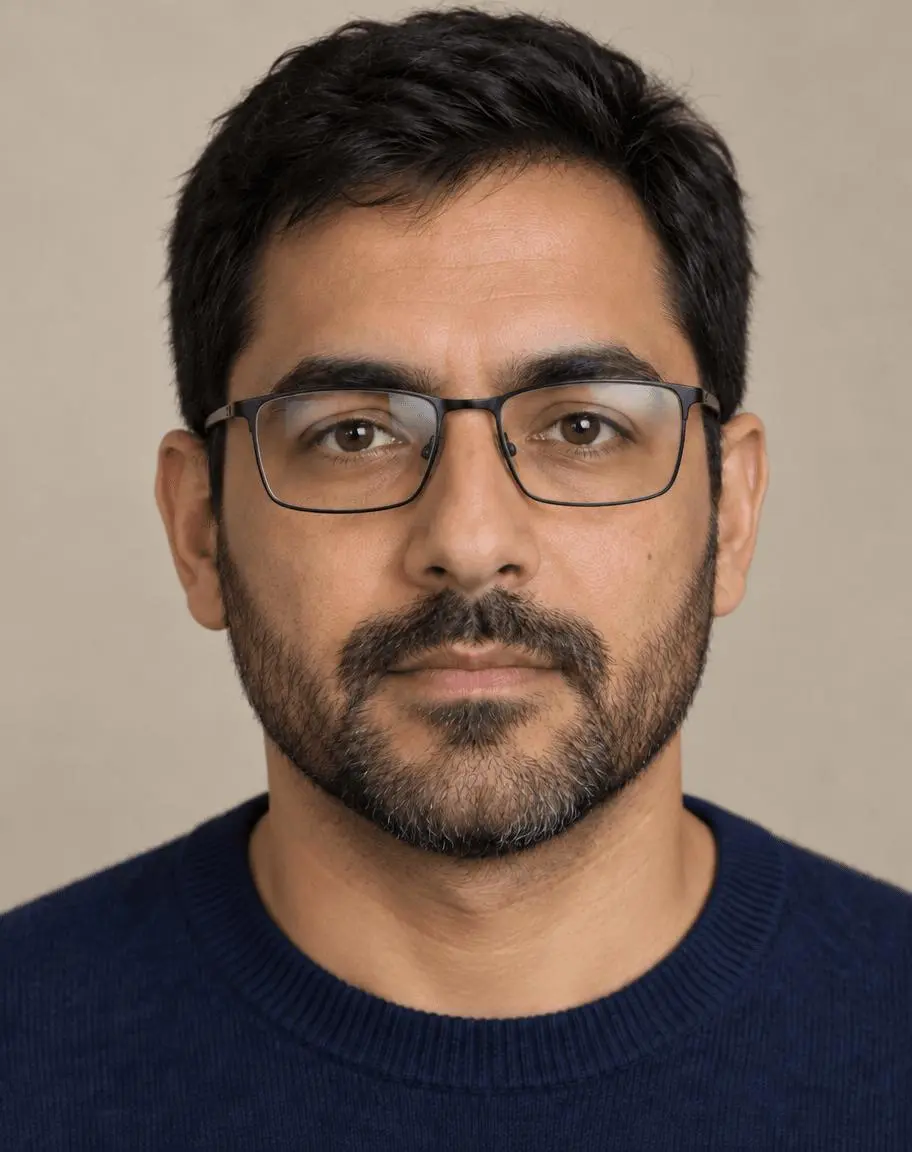 |
Glasses reflection reduction. One attached source image and one focused edit.
Start where the eyes are still partly visible
The source portrait has pale green rectangular reflections over part of both lenses. The pupils and lower irises remain partly visible, giving the model some appearance information. A fully opaque reflection is a different and more uncertain case. Keep a second clear photo available if a faithful eye appearance matters; this single-reference test does not establish recovery of hidden eye details.
The reference shown here is AI-generated specifically for this demonstration. The result is an actual image-to-image generation from that source, not a text-only illustration presented as an edit. Use your own photo or an image you are authorized to edit.
Reduce reflections without deleting the glasses
Say which reflections are distracting and explicitly retain the frame shape, position and lenses. Asking only for “clear eyes” can invite an edit that changes the glasses or enlarges the eyes. Small remaining reflections can look more natural than completely empty lenses.
Protect gaze, expression and facial texture
Name eye color, gaze direction, eyebrows, facial structure and expression. Compare both eyes together: lens refraction and frame alignment should remain plausible, and one eye should not look sharper or more stylized than the other.
Run the reference-based edit in WeShop
- Open WeShop’s GPT Image generator.
- Upload the source through the reference-image control and confirm its thumbnail is attached. A text description alone is not the same workflow.
- Select GPT Image 2.5 Sunburst, then enter the prompt below. Set the available controls to the tested values in the table.
- Generate an image and open the output at full size. Compare the requested change and the details you asked to retain against the original.
| Setting | Value in this test |
|---|---|
| Model | gpt-image-2.5-sunburst |
| Input | One attached image |
| Requested aspect ratio | 4:5 |
| Requested image size | 1K |
| Quality | medium |
| Quantity | 1 |
| Returned dimensions | 912 × 1152 pixels |
Copy the exact tested prompt
Edit image 1 to reduce the distracting pale green rectangular reflections on both eyeglass lenses. Keep the same thin black rectangular glasses frames, frame position, lens shape, adult man identity, brown eye color, gaze direction, eyebrows, facial structure, beard, skin texture, hair, navy sweater, beige background and crop. Make the lenses look naturally clear with subtle realistic residual reflections rather than removing the glasses. Do not beautify, enlarge eyes, change expression, add text or logos.
The interactive example loads the source, selected result and generation setup for this edit. You can try it directly using the tool on the right. Replace the example reference with your own and update the scene-specific wording before generating.
What the actual result shows
The prominent green rectangular reflections are reduced substantially, making both eyes more visible. Thin rectangular glasses remain in place.
The beard, navy sweater and beige background remain recognizable. Facial and eye detail is newly rendered, so a visually plausible result is not evidence that hidden iris or eyelash detail has been recovered.
The eyes and surrounding facial texture can change during generation. Inspect identity and gaze closely; fully obscured eyes require invented content, so do not present this as faithful recovery of missing detail.
This is one selected result from one request made on October 27, 2026. It demonstrates this example, not a success rate or a guarantee for every input. The requested aspect ratio and returned dimensions are reported separately.
Know when to stop regenerating the eyes
If the result changes gaze, eyelids or identity in a way you cannot validate, return to the original or use another photograph. For a creative portrait, a plausible reduction may be enough; for faithful retouching, compare against a clear reference and use controlled local edits. Do not describe invented iris or eyelash detail as recovered evidence.
If an output changes something important, return to the original and narrow the instruction to one edit. Do not keep stacking revisions on an output with an unnoticed defect. Suggested corrections are workflow guidance unless an additional result is shown here.
Frequently asked questions
Can AI recover an eye completely hidden by glare?
It can generate a plausible eye, but that is not a factual recovery of the missing visual information. This example uses partly visible eyes and still requires an identity check.
Why keep a little reflection on the lenses?
Real lenses often reflect their environment. The goal is to reduce the distracting block, not remove all evidence of glass. Evaluate the result against the lighting of the portrait.
For broader prompt ideas, see Top 10 Prompts for Photo Editing That Actually Work. For this task, start with the loaded example and check the retained details before using the result.