












Turn One Skincare Packshot Into a Premium Commercial Ad With Nano Banana 2
Use Nano Banana 2 in WeShop to transform one clean skincare packshot into a premium campaign image while preserving the package, label, and materials.
A useful AI product-ad workflow should change the campaign world without quietly redesigning the product. In this first-party WeShop test, Nano Banana 2 transformed a clean serum packshot into a botanical beauty advertisement while keeping the bottle, pump, glass color, and front label recognizable.
The workflow is designed for ecommerce teams that already have an approved product image but need a campaign-ready hero visual for a landing page, marketplace banner, or paid-social placement.
Source and Result
| Source Packshot | Generated Campaign Ad |
|---|---|
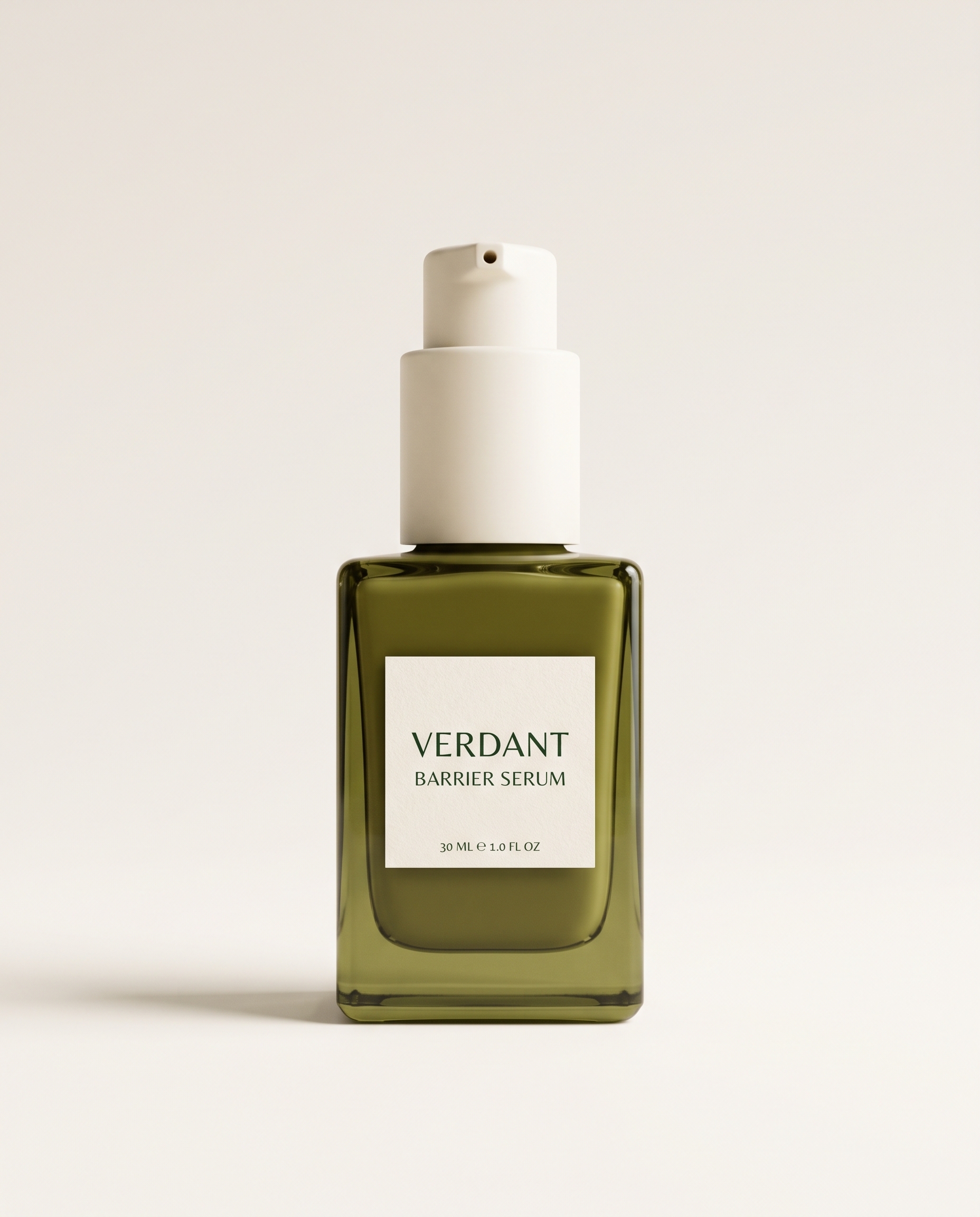 | 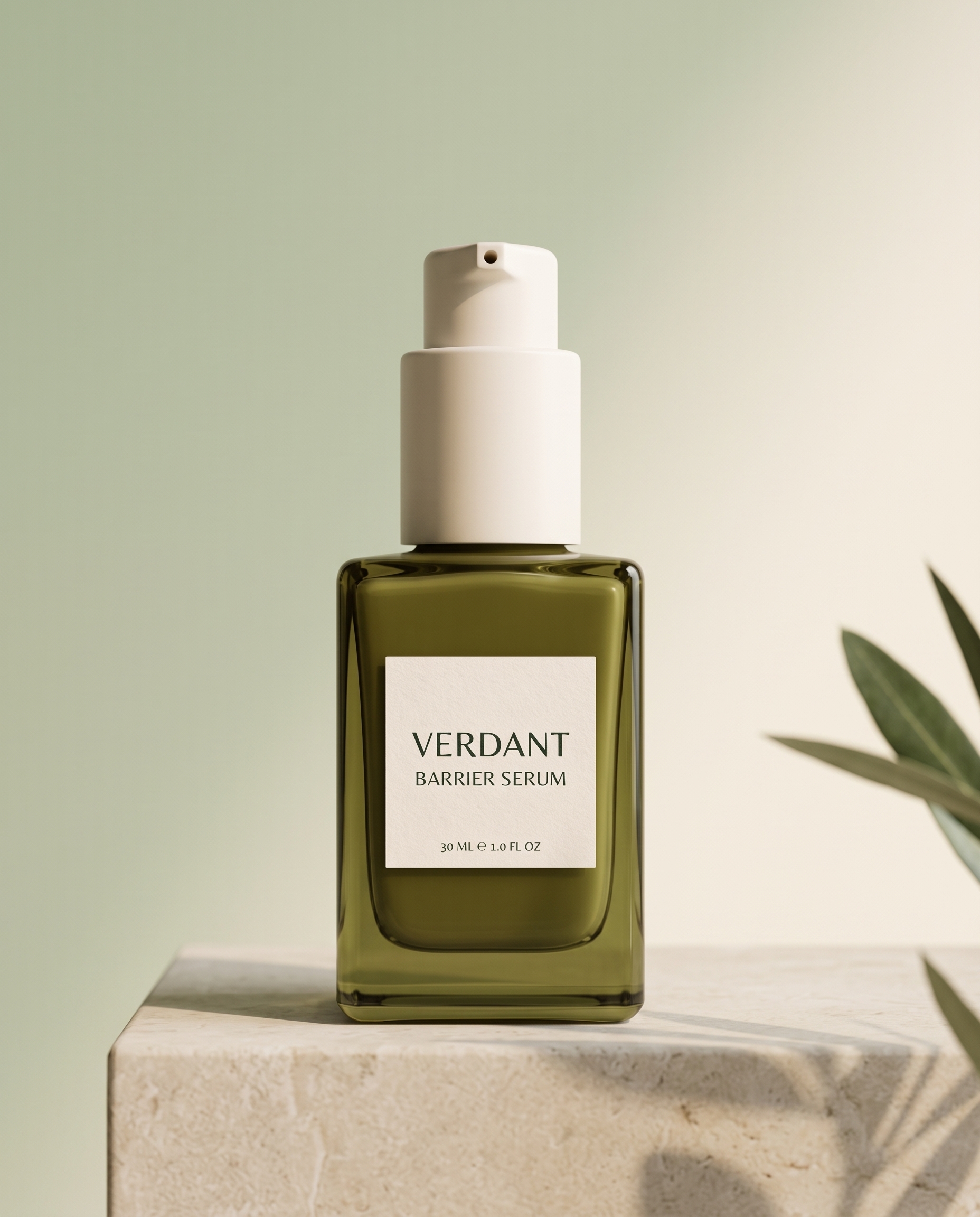 |
The fictional product uses several easy-to-check identity anchors: a rectangular olive-green glass bottle, an ivory pump, a centered ivory label, and the copy “VERDANT / BARRIER SERUM / 30 ML.”
Step 1: Start With a Clean, Auditable Packshot
Use one product on a quiet background. Keep the label front-facing and make distinctive construction details visible. A crowded lifestyle photo makes it harder for the model—and the reviewer—to separate product truth from scenery.
Before generating, list the details that cannot change: silhouette, color, material, closure, label position, approved words, product count, and orientation. These are the acceptance criteria for the final asset.
Step 2: Prompt Product Locks Before Art Direction
Use the uploaded product image as the exact product reference. Create a premium botanical skincare campaign image in 4:5 portrait.

Preserve the bottle geometry, olive-green glass color, ivory pump, label placement, and every readable label word exactly: “VERDANT”, “BARRIER SERUM”, “30 ML”.

Place the single bottle upright on a pale limestone pedestal, with a soft sage-to-cream background, one out-of-focus olive leaf shadow, delicate side lighting, realistic glass reflections, and a clean luxury-beauty mood. Keep generous negative space in the upper third for optional ad copy.

Do not redesign the package, add another bottle, cover the label, add new text, or distort the cap or pump. Photorealistic commercial studio advertising, natural shadow, high-end retouching without plastic surfaces.
The order matters. Product locks appear before the scene description, so the creative direction has a clear boundary.
Step 3: Review the Result as a Product Asset
The output changed the neutral studio into a sage-and-limestone beauty set. It added directional light, a pedestal, and a restrained botanical cue. The bottle remained the only sellable object, and its pump, olive glass, front label, and primary wording stayed visible.
The result also left useful negative space above the product. That makes it easier to add localized campaign copy later without regenerating or covering the package.
A Reusable Product-Ad Prompt Formula
Use the uploaded [product] as the exact reference.

Preserve exactly: [silhouette], [color], [material], [closure], [logo/label], [approved text], [product count], and [camera angle].

Create a [channel and aspect ratio] commercial ad. Place the same product on [surface] against [background]. Use [lighting direction], [shadow behavior], [one controlled prop], and [amount of copy-safe negative space].

Do not redesign, recolor, relabel, crop, cover, duplicate, or distort the product. Do not add unauthorized text, logos, people, or extra products.
Product-Fidelity Checklist
- Compare the outer silhouette and proportions.
- Check pump, cap, handle, or closure construction.
- Verify label position, spelling, and line order.
- Compare material color, transparency, and reflections.
- Confirm the product count and camera orientation.
- Check that shadows ground the product instead of merging with it.
- Reserve a copy-safe area if the asset will become an ad.
Practical Limitations
This is one test with a fictional product, not a universal fidelity score. Exact legal copy, color values, ingredient lists, barcodes, and small manufacturing details still need human preflight. Keep the original catalog packshot as the source of truth, and use generated images as campaign assets only after SKU-level review.
Final Takeaway
Nano Banana 2 turned a plain serum packshot into a premium beauty campaign without losing the product’s main identity markers. The reliable pattern is straightforward: define what cannot change, describe one art direction, and review the result against a written checklist.
You can try it directly using the tool on the right.
Build a Commercial Ad From One Packshot
Upload an approved product image, lock its identity details, and test one campaign environment at a time in WeShop.