












Turn a Bedroom Photo into a Haunted Room with GPT Image 2.5
Give a bedroom photo a haunted Halloween makeover with GPT Image 2.5. See the actual before-and-after, layout-preservation prompt, and lighting checks.
The room is still yours: bed at the back, window on the left, wardrobe on the right. The wallpaper, moonlight and cobwebs make it look as though the rental agreement came with a ghost story.
This AI Halloween room makeover uses an existing room image as the structure, rather than asking for an unrelated haunted bedroom. The goal is a fictional film-set transformation with recognizable furniture placement.
| Reference input | A gothic room with the layout intact |
|---|---|
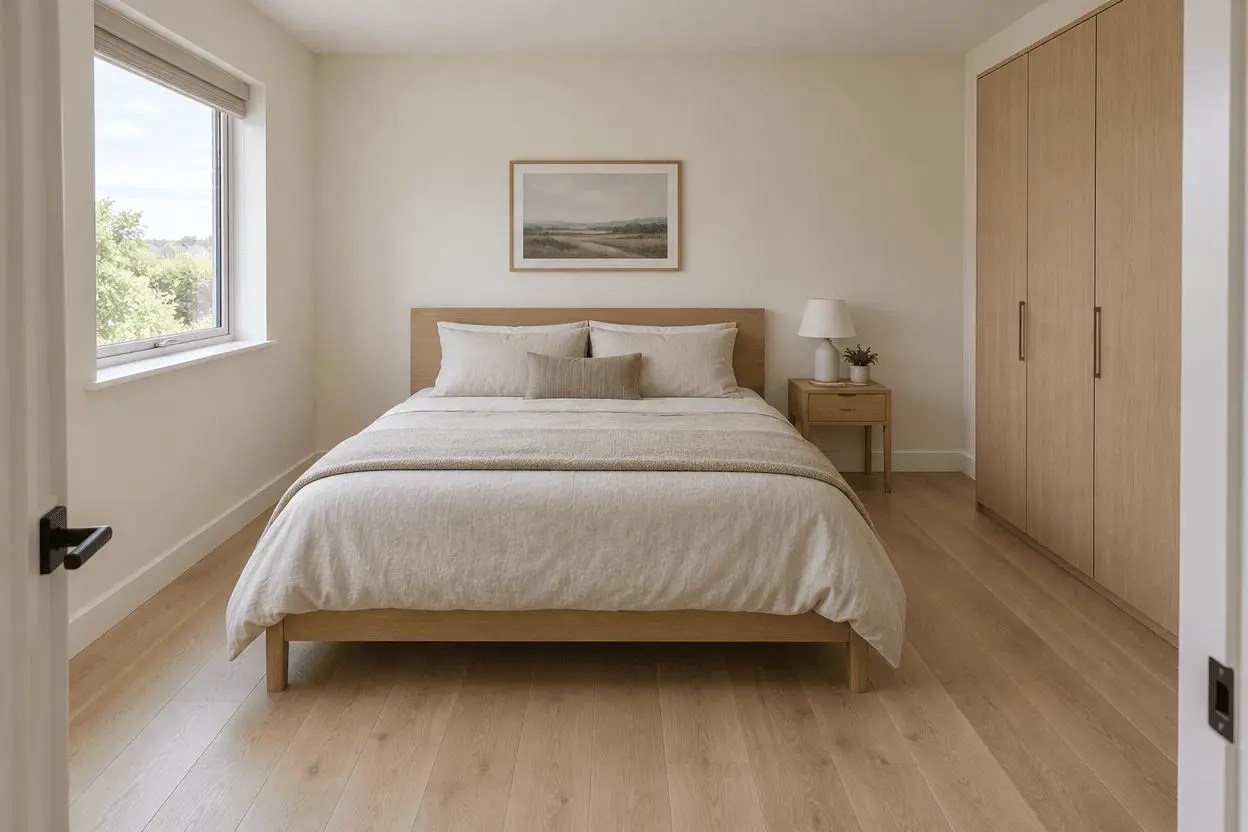 | 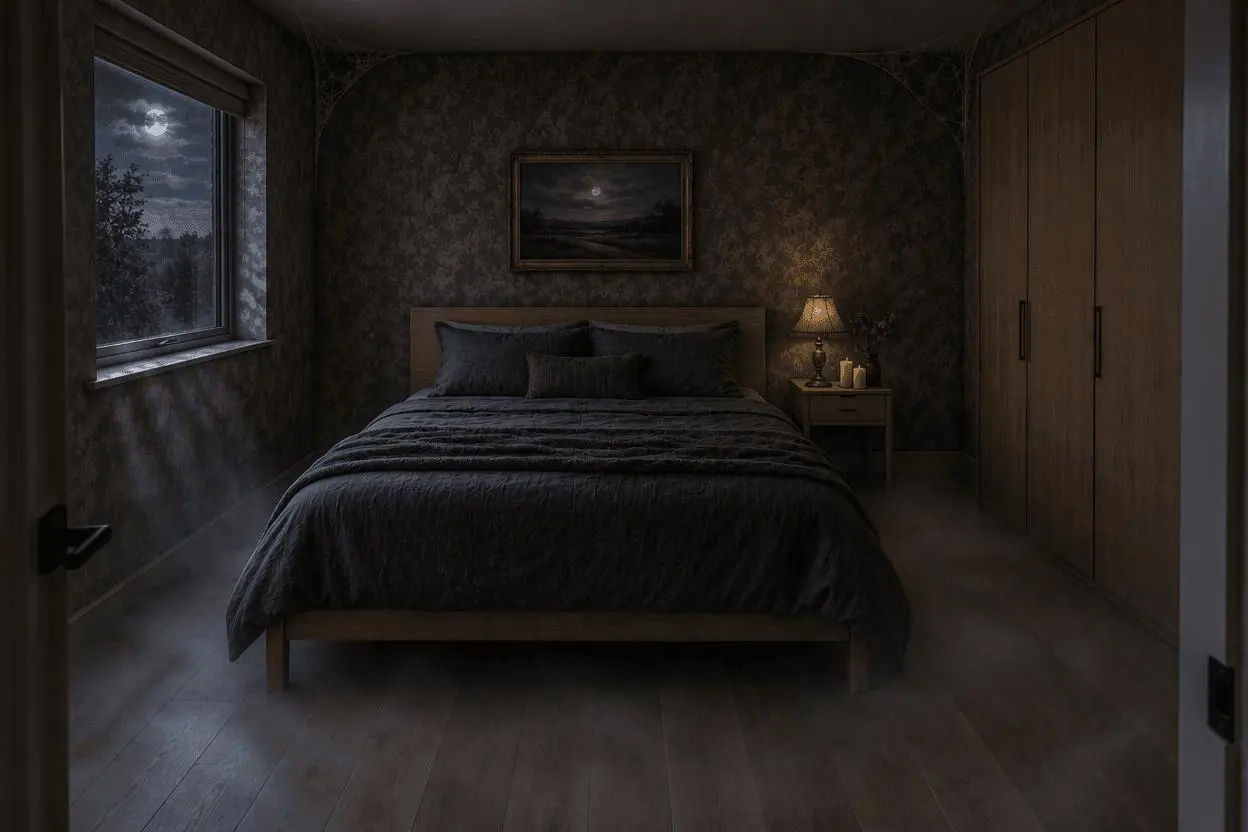 |
One reference image → GPT Image 2.5 Sunburst → haunted room transformation.
Map the room before describing the atmosphere
A wide room photograph should show the bed, window and major furniture clearly. Our synthetic source is viewed from the doorway. Write down the positions before asking for dark wallpaper or mist: the scene needs a structural checklist, not just a mood word.
Our reference was generated for this demonstration; no real person, pet owner or location is being represented as the subject of a real event. You can use your own suitable photo or another reference you are authorized to edit.
Reproduce the selected result in WeShop
Open WeShop’s GPT Image generator, attach the reference through the image upload control, and select GPT Image 2.5 Sunburst. The source must actually be attached: describing it in words alone would create a different task.
| Setting | Tested value |
|---|---|
| Tool | WeShop GPT Image generator |
| Model | gpt-image-2.5-sunburst |
| Input | One attached reference image |
| Aspect ratio request | 3:2 |
| Image size / quality | 1K / medium |
| Quantity | One per prompt |
| Selected output dimensions | 1248 × 832 pixels |
The table reports the requested aspect ratio and the returned dimensions separately. The portrait outputs in this set do not have to be an exact mathematical 4:5 crop. These runs were made on October 20, 2026, with one result per prompt; they do not measure repeat-run reliability.
Lock the architectural anchors
Name the bed location, the left window, the bedside table and lamp on the right, and the wardrobe at the far right. Preserve viewpoint and crop. These are the anchors to compare after generation; “same room” by itself does not tell the model which relationships matter.
Change surfaces and light together
Dark wallpaper, charcoal bedding, cobwebs and cool window light form a connected style. Restrained floor mist helps the effect without hiding the furniture. Keep the request to dressing and atmosphere instead of adding extra doors, figures or furniture.
Copy the tested a gothic room with the layout intact prompt
Edit image 1 into a fictional haunted gothic bedroom while preserving the room geometry and furniture positions. Keep exactly the same bed location, window on the left wall, right bedside table and lamp, wardrobe on the far right, viewpoint and crop. Change the cream walls to worn dark sage wallpaper, the beige bedding to deep charcoal linen, and the lamp to an antique brass lamp in the same position. Add fine cobwebs in upper corners, three small unlit candles on the existing bedside table, subtle floor mist and cool moonlight through the existing window. No new doors, windows or furniture, no people or ghosts, no damage suggesting structural danger, no readable text or watermark. Spooky film-set mood, still clearly recognizable as the original room.
Generate one image, open the result at full size, and compare it with the attached source. The right-hand tool loads this selected example with its actual reference, prompt and settings. You can try it directly using the tool on the right.
What the actual output shows
The result retains the central bed, left window, right bedside table and large wardrobe. Dark wallpaper, cobwebs, a moonlit window and muted bedding make the room visibly more gothic.
The prompt requested unlit candles, but the output shows candle flames. The lamp is also visibly illuminated. The image is useful as a mood transformation, not proof of exact compliance with every lighting instruction.
Check the details before you share
Compare the room geometry and furniture first, then inspect added objects and light sources. The output is deliberately dark; check it on a phone before choosing a final exposure. This is an AI concept image, not an assessment of an actual building or a renovation plan.
If a detail needs correction, return to the source or attach the selected result for a clearly scoped revision. State exactly what should change and what must remain. That correction path is workflow guidance; we are not presenting an untested follow-up as a successful result.
Show the room before revealing the film set
Put the bright source and darker result in the same crop, one per slide. Let the unchanged furniture establish that the room is related to the original. “The landlord said no renovations. Nobody mentioned summoning a mood board.” works as a fictional caption without claiming a real haunting.
Suggested caption:
The landlord said no renovations. Nobody mentioned summoning a mood board. Same room layout, very different bedtime. Fictional AI Halloween makeover.
For a different creative task, see Add a Hidden Ghost to a Travel Photo with GPT Image 2.5. Start with the loaded example, replace its reference with your own, and adapt one instruction at a time.