












Add a Hidden Ghost to a Travel Photo with GPT Image 2.5
Make a ghost visible in a travel photo with GPT Image 2.5: reframe around a large window, use clear contrast, and follow the tested image-to-image prompt.
A ghost photobomb needs a window you can actually see. This revised example brings the stone guesthouse window close to the traveler and puts a clear white figure behind its glass, so the effect survives a smaller screen.
This AI ghost photo editor workflow starts from one supplied street image. GPT Image 2.5 Sunburst reframes it into a tighter selfie and adds the fictional ghost. The result is a creative Halloween edit, not an unchanged documentary photograph or evidence of a paranormal event.
| Reference input | A large window with a visible ghost |
|---|---|
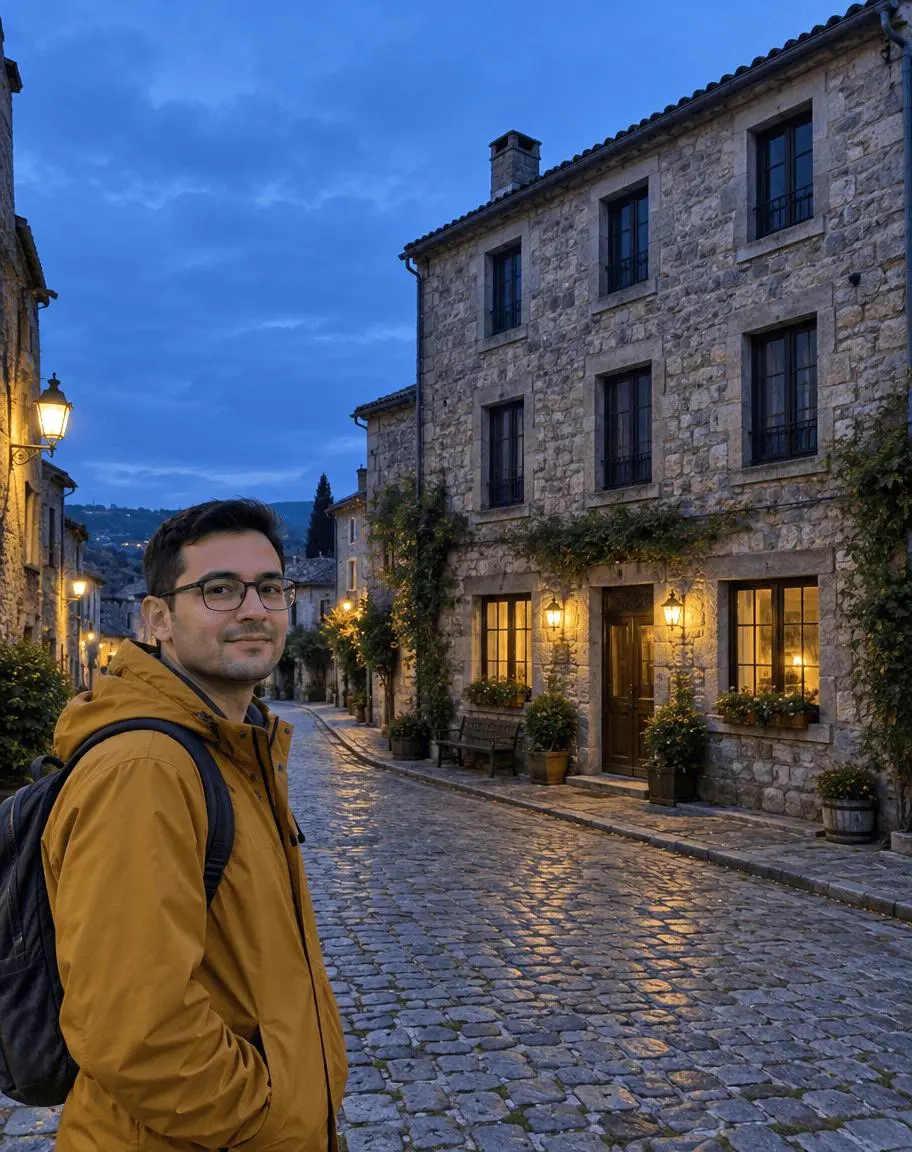 | 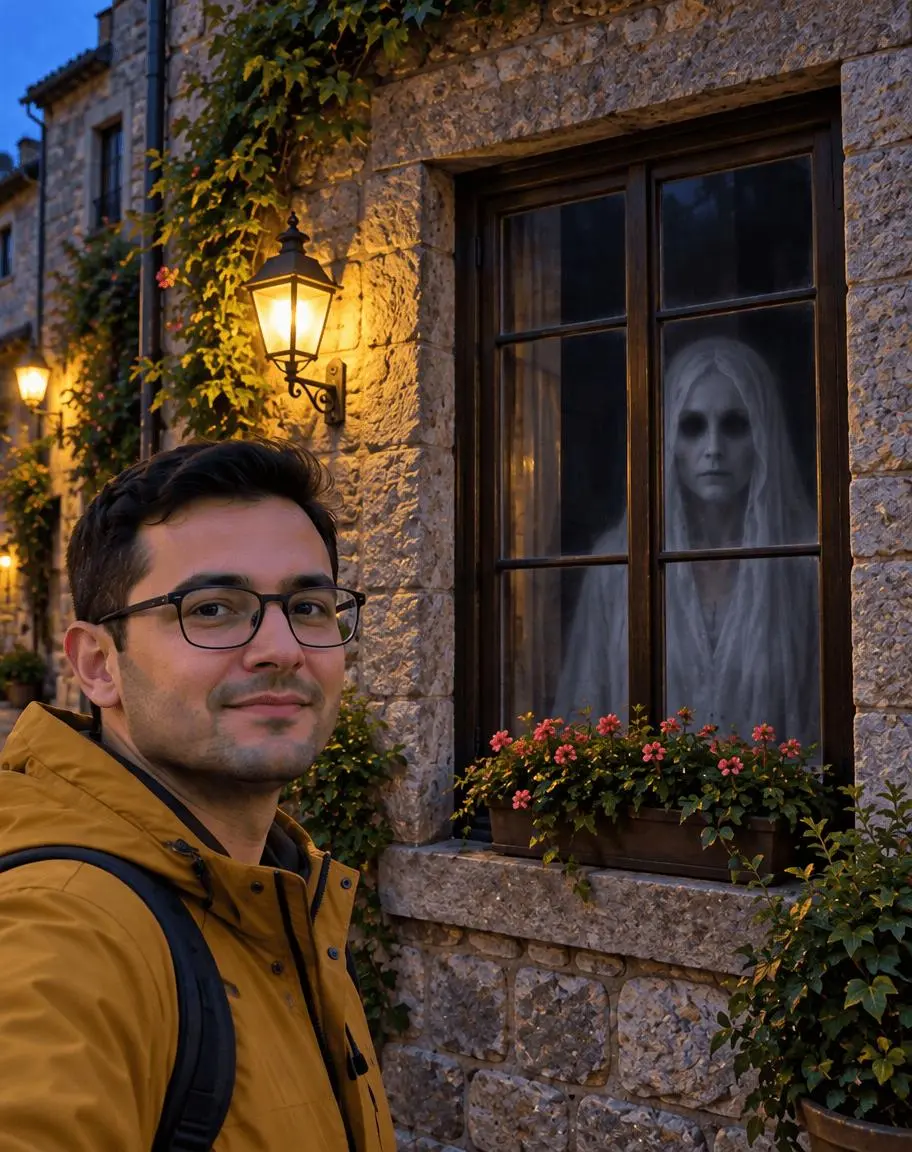 |
One reference image → GPT Image 2.5 Sunburst → hidden ghost photobomb.
Give the window enough space in the composition
Our synthetic reference has a traveler at lower left and a stone guesthouse on the right. In the original wide composition, the windows are small. Instead of hiding a figure in those few pixels, the revised request makes the traveler a head-and-shoulders subject and the haunted window the second main subject. This deliberately changes the framing and building proportions.
Our reference was generated for this demonstration; no real person, pet owner or location is being represented as the subject of a real event. You can use your own suitable photo or another reference you are authorized to edit.
Reproduce the selected result in WeShop
Open WeShop’s GPT Image generator, attach the reference through the image upload control, and select GPT Image 2.5 Sunburst. The source must actually be attached: describing it in words alone would create a different task.
| Setting | Tested value |
|---|---|
| Tool | WeShop GPT Image generator |
| Model | gpt-image-2.5-sunburst |
| Input | One attached reference image |
| Aspect ratio request | 4:5 |
| Image size / quality | 1K / medium |
| Quantity | One per prompt |
| Selected output dimensions | 912 × 1152 pixels |
The table reports the requested aspect ratio and the returned dimensions separately. The portrait outputs in this set do not have to be an exact mathematical 4:5 crop. The original attempt and two revisions were generated on October 20, 2026, with one result per prompt. The selected result below uses the final, tighter-composition prompt; this is not a repeat-run reliability test.
Make one window the second main subject
Request a large, front-facing window immediately behind and to the right of the traveler. Give it a rough share of the frame instead of relying on an ambiguous floor number. Preserve the traveler’s recognizable appearance and the stone-house setting while explicitly allowing a tighter camera composition.
Use contrast instead of extreme faintness
Place a pale shrouded head and torso against a nearly black room, with the window frame and mullions in front. Ask for a readable figure at phone width. Our earlier “faint” and “small enough to be missed” instructions produced a weak reveal; making the window and figure readable is the correction tested here.
Copy the tested large-window ghost prompt
Edit image 1 into a TIGHTER TRAVEL SELFIE composition that makes the haunted window large and obvious. Preserve the recognizable adult man, black hair, glasses, ochre raincoat, old stone guesthouse and blue-hour color atmosphere. Reframe the scene: the man is shown head and shoulders in the LOWER LEFT, occupying roughly the left third; the large dark wooden-framed rectangular guesthouse window immediately behind and to his RIGHT is the second main subject and occupies roughly ONE THIRD OF THE WHOLE IMAGE WIDTH and nearly HALF THE IMAGE HEIGHT. Crop out most of the empty sky and street. The window must be large, front-facing, easy to identify, with a strong stone surround and only a few thin mullions. Inside this one window, behind the glass and mullions, show exactly one clearly visible fictional ghost: pale white shrouded adult head and shoulders, oval face and two dark eye sockets, against a nearly black room. The white head and torso fill about two thirds of the window. Make its shape and contrast readable even when the complete image is shown at 375 pixels wide. A soft cool glow defines the window interior and ghost; preserve warm amber exterior lamps for contrast. The ghost is unmistakable, not a tiny faint reflection. The traveler looks into the camera and does not notice it. Realistic travel snapshot with a playful fictional Halloween photobomb. No extra ghosts, foreground monsters, gore, violence, text, arrows, circles or watermark.
Generate one image, open the result at full size, and compare it with the attached source. The right-hand tool loads this selected example with its actual reference, prompt and settings. You can try it directly using the tool on the right.
What the actual output shows
The selected revision shows a much larger window beside the traveler, with a white shrouded figure against its dark interior. The head, dark eye area and pale torso are recognizable behind the glass.
The traveler retains recognizable glasses, dark hair and an ochre coat, while the camera composition and house details are regenerated. This is a reference-guided reframe, not a pixel-preserving window-only retouch.
Check the details before you share
The previous published result was too faint at article size. It has been replaced rather than treated as a successful hidden-detail effect. For the replacement, inspect the complete image at the size you will publish: the window surround and white figure should both be identifiable without arrows or a magnifying glass. Architectural geometry and the traveler’s pose can change when the model reframes the image.
If a detail needs correction, return to the source or attach the selected result for a clearly scoped revision. State exactly what should change and what must remain. That correction path is workflow guidance; we are not presenting an untested follow-up as a successful result.
Reveal the window without inventing a ghost sighting
For a carousel, show the original street photo and then the tighter edited selfie. Label the post as AI-created fiction. “I checked the photo after I got home” can be a story premise, but it should not be presented as a factual supernatural report.
Suggested caption:
A perfectly normal travel photo. Until you check the window behind me. 👻 Fictional AI Halloween edit—did you spot it before the reveal?
For a different creative task, see Turn a Bedroom Photo into a Haunted Room with GPT Image 2.5. Start with the loaded example, replace its reference with your own, and adapt one instruction at a time.