












GPT Image 2.5 Flare: Create and Edit a Cafe Promo Poster
See a tested GPT Image 2.5 Flare cafe poster workflow: generate a design, replace its headline, and check preserved details and punctuation before use.
GPT Image 2.5 Flare: Create and Edit a Cafe Promo Poster
The drink looks right, the colors work, and the schedule is already approved. Then someone asks for a different headline. Regenerating a promotional poster from scratch can change all the parts you wanted to keep.
We tested a more focused workflow with GPT Image 2.5 Flare: create a café poster, then use that image as the reference for a headline-only edit. The revised image retained the café name, schedule, and a visually similar latte scene. It also added an unrequested full stop—a small but useful reminder that text QA includes punctuation.
The job: one poster, one targeted revision
A fictional café promotion demonstrates how to specify a layout, separate change instructions from preservation instructions, and inspect a revised result.
The poster brief: approve the words before the image
Our fictional business, MOSS CAFE, needed a weekend iced-coffee promotion. We supplied four text lines, a cream-and-green palette, and a clear composition: brand at the top, headline in the upper half, schedule underneath, and a glass of iced latte below.
The initial brief deliberately excluded prices, discounts, addresses, and extra slogans. These details would need real business approval; asking for a complete-looking advertisement should not invite the model to invent them.
The copy was:
MOSS CAFEWEEKEND COFFEE CLUBSAT + SUN9 AM - 2 PM
All business details are illustrative. Both images below are AI-generated, not photographs of an actual café's product or evidence of campaign performance.
Our Flare test settings
We ran the initial generation and one edit on October 12, 2026 using the WeShop gpt-image v1.0 agent through its official API. The first request used text only; the edit used the first output as its single reference image.
| Setting | Value used |
|---|---|
| Model | gpt-image-2.5-flare |
| Requested aspect ratio | 4:5 |
| Requested image size | 1K |
| Quality | Medium |
| Outputs per request | 1 |
| Delivered dimensions | 912 × 1152 for both images |
The delivered dimensions were close to, but not exactly, 4:5. Check the actual export dimensions and resize for your placement before delivery.
OpenAI describes Flare as the speed-oriented option in the GPT Image 2.5 family. Its image prompting guidance recommends specifying the intended image and separating what should change from what must remain. This case evaluates the resulting poster and revision; it is not a latency benchmark or a quality comparison with Sunburst.
WeShop's model guide confirms the Flare model selection. Specify it explicitly: leaving the model unset in this agent defaults to GPT Image 2.
Generate a design with a readable hierarchy
The initial prompt gave the model a delivery format, subject, visual treatment, text hierarchy, and a list of prohibited additions. It asked for a finished poster image rather than a poster photographed on a wall.
The result placed all four requested text lines correctly, without adding prices or supporting claims. The large headline, smaller schedule, and lower-half drink formed the intended reading order. Inspect this draft before editing: an error in the source can carry forward into the next image.
Replace the headline using the poster as a reference
For the edit, we supplied the initial poster as image 1. We did not start another text-only request. The change was specific: replace WEEKEND COFFEE CLUB with YOUR WEEKEND, ON ICE, while retaining the other text and visual elements.
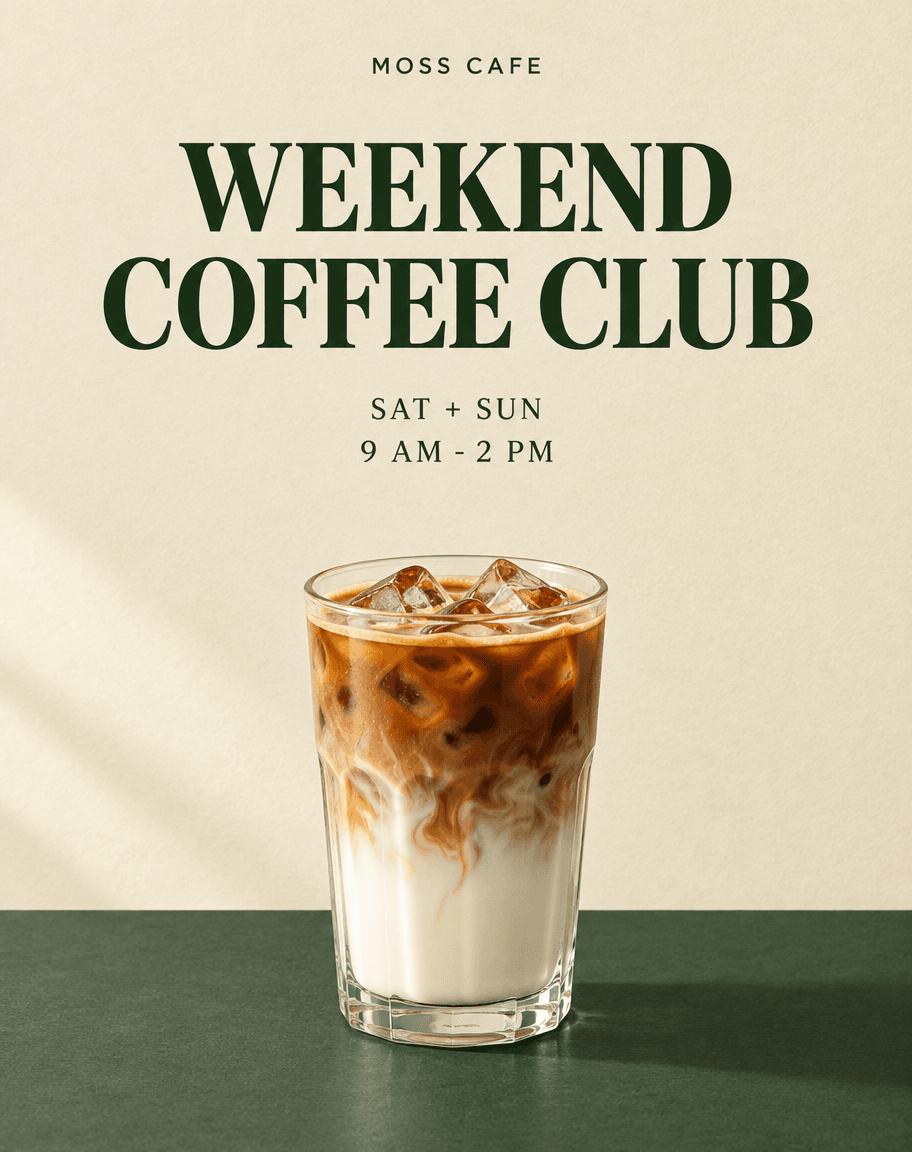
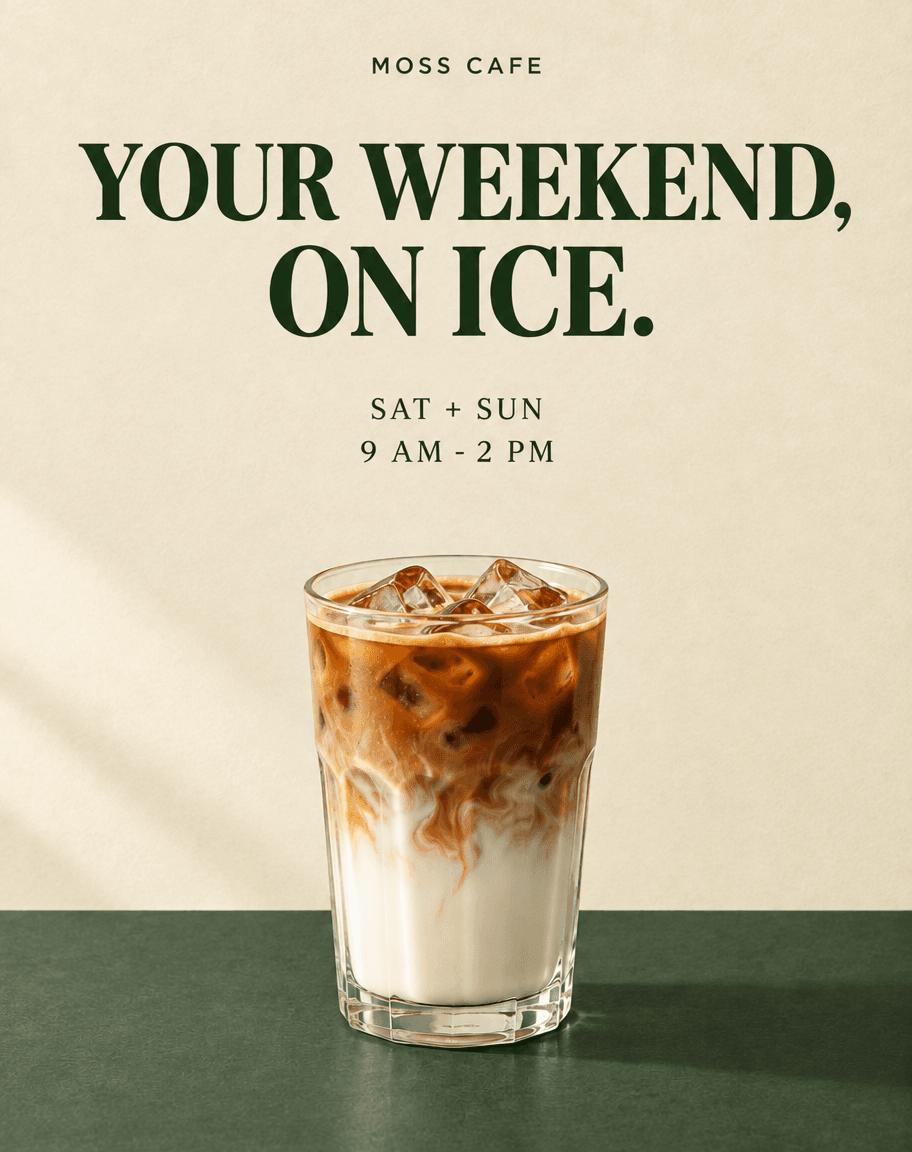
The new headline occupied two balanced lines. The previous headline disappeared, while the brand and schedule remained correct. The glass outline, ice arrangement, coffee-and-milk layers, counter, and overall composition looked highly similar at visual inspection. That is a visual observation, not a claim that the image stayed pixel-identical.
The small error that should stay in your QA checklist
The requested headline ended at ICE; the rendered headline ended at ICE. The words and comma were correct, but the additional full stop means this edit did not meet a strict verbatim-copy requirement.
| Check | Observed result |
|---|---|
| New headline words | Correct |
| Requested comma | Present |
| Unrequested final full stop | Added; correction needed for exact copy |
| Old headline | Removed |
| Brand and schedule | Preserved |
| Drink and scene | Visually highly similar |
| Extra prices or claims | None observed |
If punctuation must match approved copy exactly, correct it before use. A follow-up edit can request removal of the final full stop, but that additional correction was not tested here. For locked typography or an urgent final export, replace the text manually in your design file.
Adapt the workflow to a real promotion
Start with the smallest approved brief: business name, headline, dates, and a visual direction. Generate the first draft, then inspect every text line and the subject before accepting it as the next reference.
For subsequent revisions, change one item at a time. State the old content, the replacement, and the elements to preserve. A different headline length may require new line breaks; decide whether that is acceptable before generating. After every edit, recheck both the changed region and the regions meant to remain unchanged.
If you need to show your actual drink, supply an authorized product photo and inspect the glass, ingredients, portions, and appearance against it. That is an adaptation of this workflow, not a reference-product test performed in this case.
The result is a raster image, not a layered layout with editable text objects. Flare is useful here for preparing a visual draft and testing a focused copy revision. Final production still needs accurate business information, the required export dimensions, and a typography check. One successful scene-preservation example does not establish reliability across repeated runs.
Create a poster draft with the WeShop GPT Image tool, then use that draft as the reference for one targeted revision. For the separate model-selection question, see our GPT Image 2.5 Flare vs Sunburst comparison.