












Turn a Day Photo into a Night Scene with GPT Image 2.5
Turn a day photo into a night scene with GPT Image 2.5. Use existing windows and a lantern for believable lighting, with the actual prompt and result.
A convincing day-to-night photo edit needs more than a dark blue filter. The scene needs believable light sources and a reason for each bright area. This tutorial uses GPT Image 2.5 Sunburst to reinterpret a daytime cafe at blue hour, with warm light from the existing lantern and windows while retaining the same recognizable storefront.
| Reference input | Generated result |
|---|---|
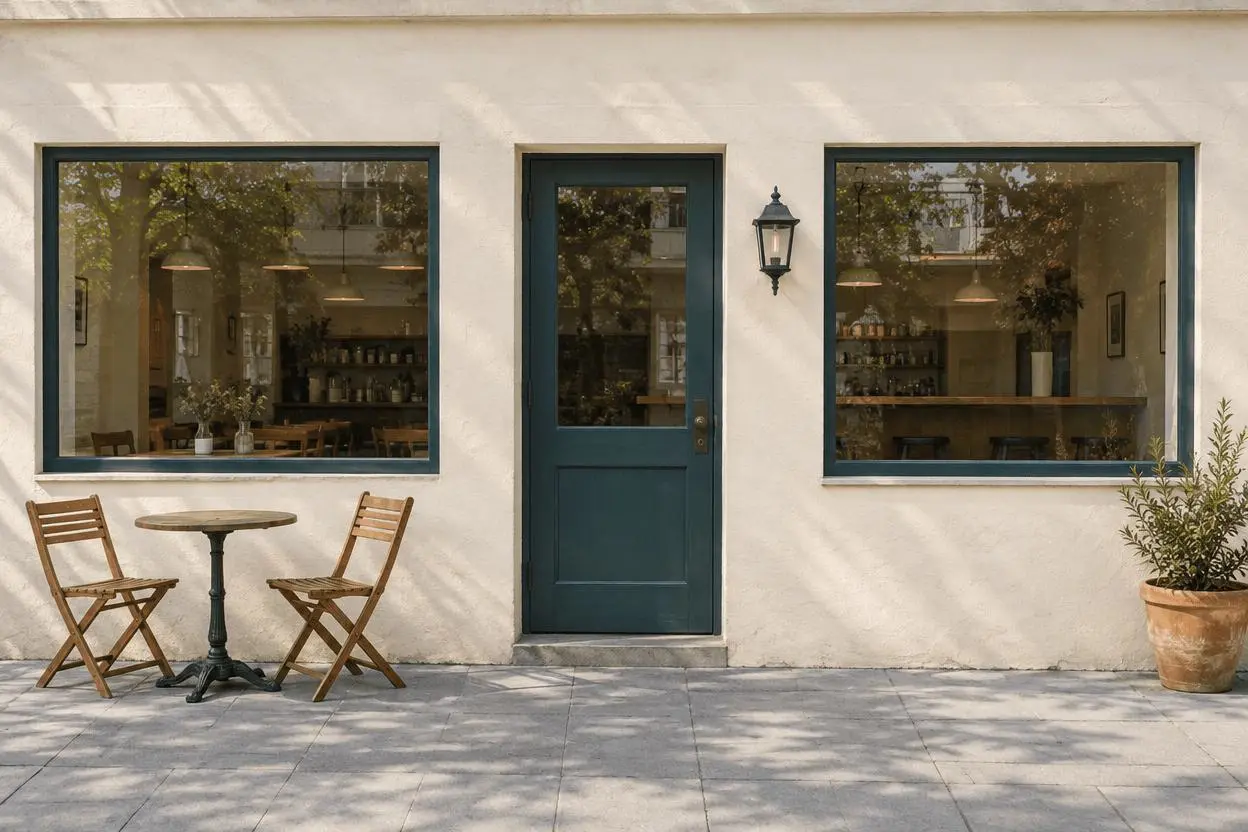 | 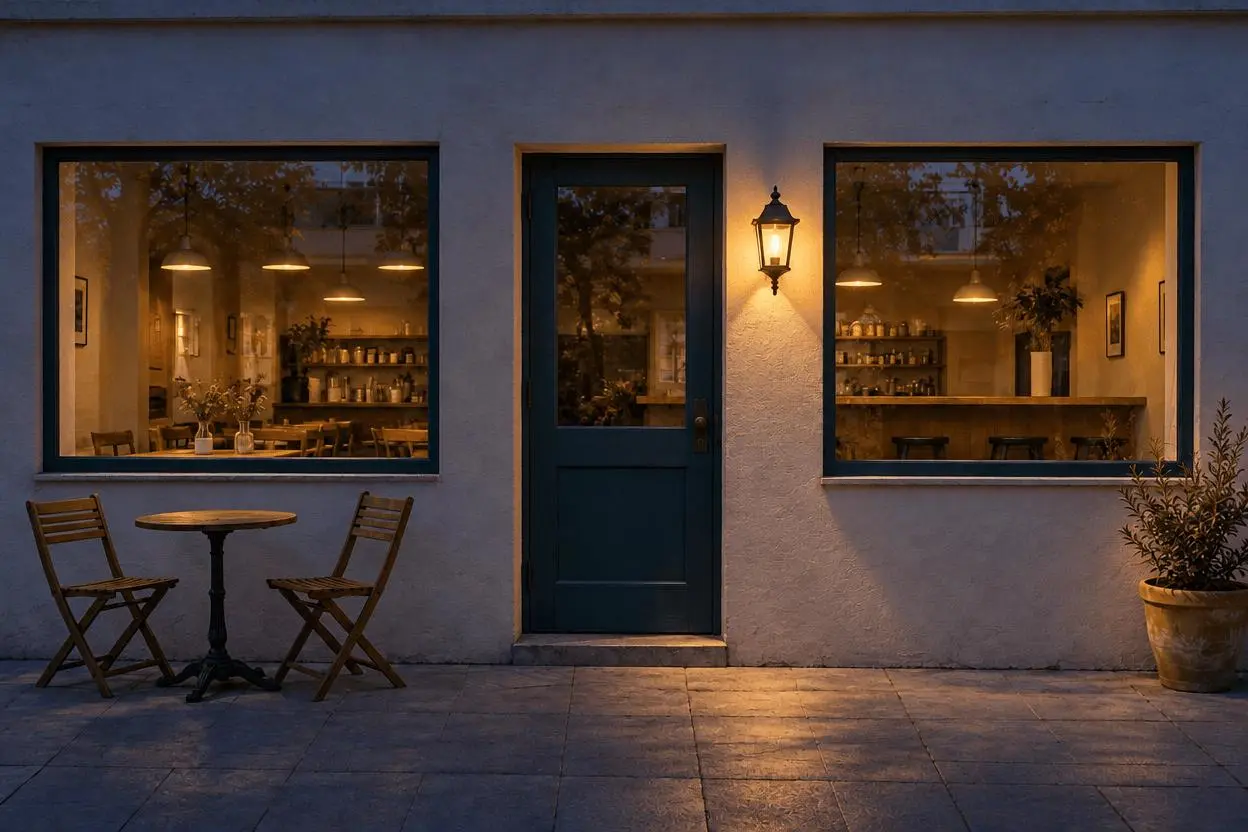 |
Day-to-night scene relighting. One attached source image and one focused edit.
Choose the light sources before writing the prompt
The reference has one wall lantern and two windows. Those are the requested sources of warm night light. The door, chairs, table and planter are composition checks rather than objects to redesign. A clear building facade is useful because adding or losing a window is easy to spot. This is a creative relighting example, not a record of what the location actually looks like at night.
The reference shown here is AI-generated specifically for this demonstration. The result is an actual image-to-image generation from that source, not a text-only illustration presented as an edit. Use your own photo or an image you are authorized to edit.
Separate ambient light from practical light
Request cool blue evening ambient light and warm light from the existing fixtures. The surrounding wall and pavement should receive plausible spill from those sources. This is more specific than “make it cinematic at night.”
Keep the storefront geometry explicit
List the one central door, two windows, lantern, two chairs, table and planter. Exclude neon signs, stars and extra furniture unless they are part of the intended creative change. Keep camera viewpoint and crop in the request.
Run the reference-based edit in WeShop
- Open WeShop’s GPT Image generator.
- Upload the source through the reference-image control and confirm its thumbnail is attached. A text description alone is not the same workflow.
- Select GPT Image 2.5 Sunburst, then enter the prompt below. Set the available controls to the tested values in the table.
- Generate an image and open the output at full size. Compare the requested change and the details you asked to retain against the original.
| Setting | Value in this test |
|---|---|
| Model | gpt-image-2.5-sunburst |
| Input | One attached image |
| Requested aspect ratio | 3:2 |
| Requested image size | 1K |
| Quality | medium |
| Quantity | 1 |
| Returned dimensions | 1248 × 832 pixels |
Copy the exact tested prompt
Edit image 1 into a believable blue-hour night photograph of the same cafe. Keep exactly the same building geometry, single central teal door, two windows, black wall lantern, two chairs, round table, planter, pavement, camera viewpoint and crop. Darken the ambient scene with cool blue evening light, illuminate the existing wall lantern with warm light and let soft warm interior light glow through both existing windows. Add subtle warm light spill onto nearby wall and pavement consistent with those light sources. Do not add a moon, stars, neon signs, extra furniture, doors, windows, people, cars, text or logos.
The interactive example loads the source, selected result and generation setup for this edit. You can try it directly using the tool on the right. Replace the example reference with your own and update the scene-specific wording before generating.
What the actual result shows
The facade and pavement shift into cool dusk tones, while the existing lantern and two windows emit warm light. The table, chairs, planter and central door remain recognizable.
Warm illumination appears around the lantern and along the pavement. The result reads as a creative evening version rather than the original daytime exposure with a uniform color overlay.
The warm interior and night illumination are synthesized. Fine window contents and texture can change even when the facade layout remains recognizable. This example does not establish an exact nighttime reconstruction of a real location.
This is one selected result from one request made on October 27, 2026. It demonstrates this example, not a success rate or a guarantee for every input. The requested aspect ratio and returned dimensions are reported separately.
Adapt the lighting plan to your own scene
Before copying the prompt, identify the light sources actually visible in your image. For a house, those may be porch lights and windows; for a street, they may be existing lamps. If no light source is present, decide whether a darker silhouette is appropriate or whether adding a fixture is an intentional part of the edit. That choice changes the task and should be stated plainly.
If an output changes something important, return to the original and narrow the instruction to one edit. Do not keep stacking revisions on an output with an unnoticed defect. Suggested corrections are workflow guidance unless an additional result is shown here.
Frequently asked questions
Is a night edit just a blue filter?
A filter changes color and brightness. This example asks the generator to reinterpret illumination, including warm windows and local light spill, so it can also redraw details. Compare structure as well as mood.
Can I make an exact nighttime record from a day photo?
No. The generator cannot establish unseen nighttime conditions. Label it as an AI-edited creative version when viewers might otherwise mistake it for a real night photograph.
For broader prompt ideas, see Top 10 Prompts for Photo Editing That Actually Work. For this task, start with the loaded example and check the retained details before using the result.