












Replace Your Ex with a Red Flag: A Funny AI Breakup Photo Edit
Replace your ex in a photo with a giant red flag or emotional baggage. Follow tested GPT Image 2.5 edits and a short Kling animation for a funny tutorial.
You love how you look in a couple photo. You are less attached to the person standing beside you. Instead of cropping half the picture away, replace that person with a gigantic red flag—and then try a stack of emotional baggage.
This AI breakup photo edit uses one reference for two visual punchlines. A short animated flag gives the finished tutorial one more reveal. The examples use fictional adults, so the joke belongs to the scene rather than an accusation about a real person.
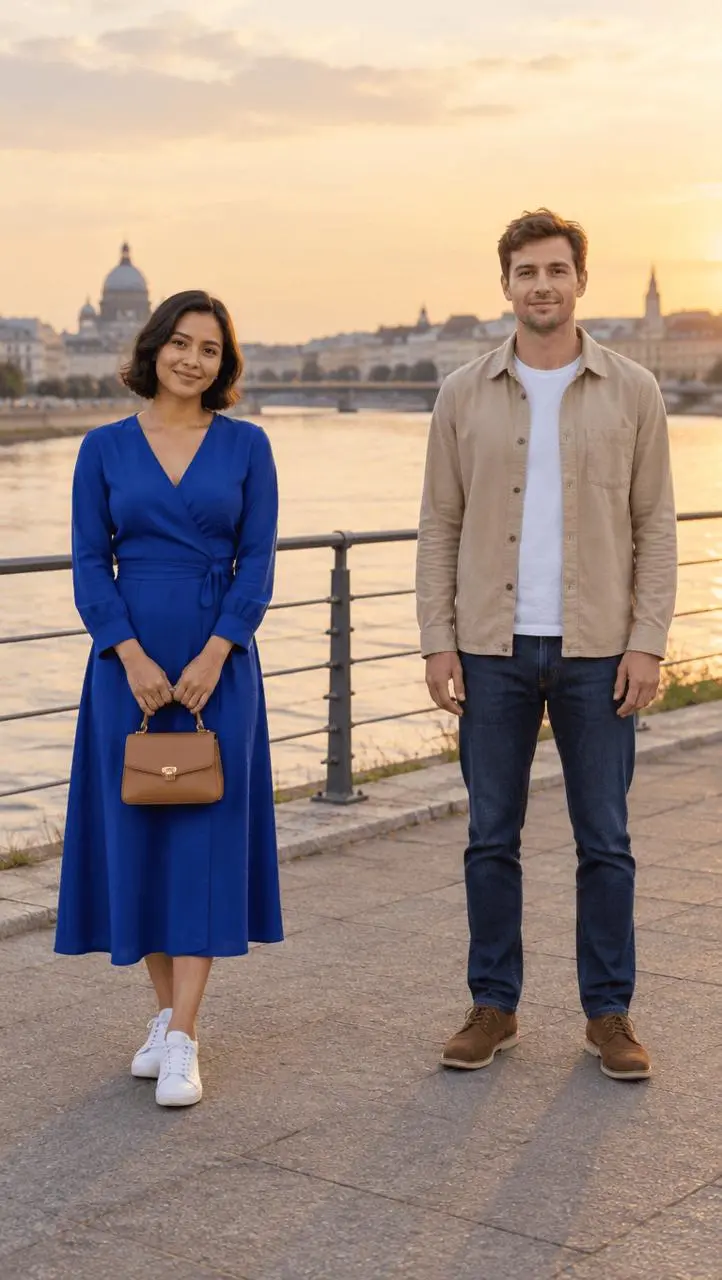
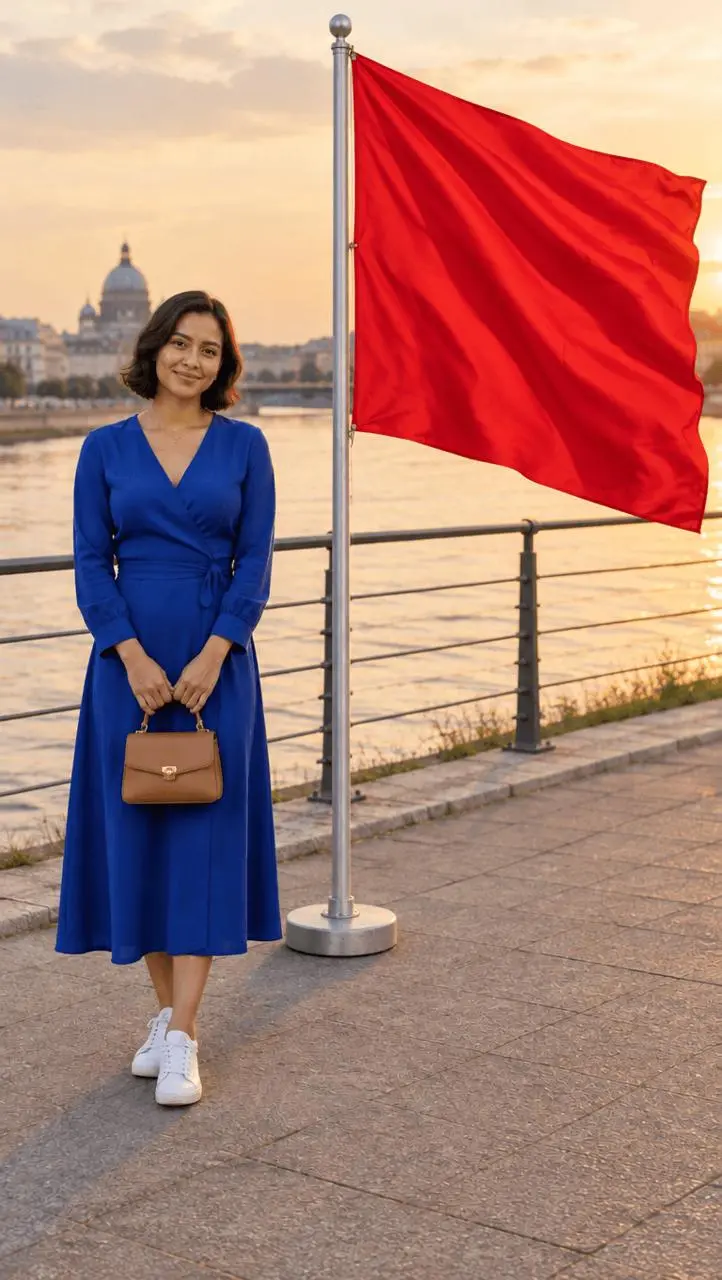
| Original reference | Literal red flag |
|---|---|
 |  |
One reference → two image edits → one short motion payoff.
Choose a couple photo with a clean gap
Use a photo where you can identify the person to keep and the person to replace by position and clothing. In our synthetic reference, the woman in blue stands on the left and the man in beige stands on the right. Their arms do not overlap. That gap makes the target unambiguous and reduces the amount of anatomy the edit has to reconstruct.
For your own reference, inspect shared hands, an arm around a shoulder and any body part crossing in front of the person you want to keep. Those are harder starting points than two separate silhouettes. Upload the actual image; a text description of a similar couple is not this editing workflow.
The red-flag replacement idea has an earlier creative precedent in Picsart’s replace-your-ex tutorial. Below is our own WeShop test with newly generated assets and a different production workflow.
Replace the right-hand person with a literal red flag
Open WeShop’s GPT Image generator, upload the original photo, and select GPT Image 2.5 Sunburst. Our requests used 9:16, 1K, medium quality and one output. The returned images are 768 × 1360 pixels; the requested ratio and the exact returned dimensions are separate facts.
Build the instruction in three parts: keep this person → remove that person completely → put this object in their place. “Make this photo funny” leaves all three decisions unresolved.
Edit image 1. Keep the woman on the LEFT recognizable, preserving her dark bob, face, cobalt blue dress, white sneakers, tan handbag, pose and position. Remove ONLY the adult man on the RIGHT completely, including his head, body, clothing, hands, legs and shoes. Replace his position with a freestanding tall silver flagpole in a small round weighted base resting on the pavement. The flagpole carries ONE very large vivid plain RED fabric flag, stretched to the right by a breeze, occupying roughly the same upper-right area as the removed man. The flag is a clear rectangular cloth banner, with folds and a straight free edge; no symbols, lettering or human-like features. Its fabric must be large and obvious at phone width and must not cover the woman. Fill the area where the man stood with coherent promenade, railing and city background. Preserve the warm light, framing, perspective and believable shadows. The woman is smiling normally beside a literal gigantic red flag. Playful fictional breakup meme, photorealistic edit, no extra people, no leftover human limbs, no text or watermark.
Open the output and check the removed person’s former shoes, hands and head position. Then compare the remaining person’s face, clothing and bag with the reference. A large flag makes the joke readable without adding an arrow or explanatory text to the generated image.
In our selected output, the right-hand man is absent and a freestanding pole carries a very large plain red flag. The woman remains recognizable, with her blue dress and tan handbag. The railing and background have been rebuilt; this is not a guarantee of unchanged pixels or perfect identity preservation on every run.
You can try it directly using the tool on the right.
Make “emotional baggage” the second reveal
Start again from the same original couple photo, not from the red-flag result. This keeps the two edits comparable and avoids asking the model to undo its own flag before making luggage.
Edit image 1. Keep the woman on the LEFT recognizable, preserving her dark bob, face, cobalt blue dress, white sneakers, tan handbag, pose and position. Remove ONLY the adult man on the RIGHT completely, including all human body parts, clothing and shoes. Replace his position with an absurdly oversized stack of THREE clearly separate vintage travel suitcases, reaching almost to the woman's shoulder: one large brown suitcase on the ground, a burgundy suitcase above it, and a small tan suitcase on top. Show visible handles, latches and realistic worn leather. No text, labels, faces or human limbs on the luggage. The stack should be stable, clearly readable at phone size, and should not cover the woman. Rebuild the promenade and railing where needed. Preserve the original warm light and camera framing. A deadpan visual joke about emotional baggage, realistic travel photo, no extra people, no watermark.
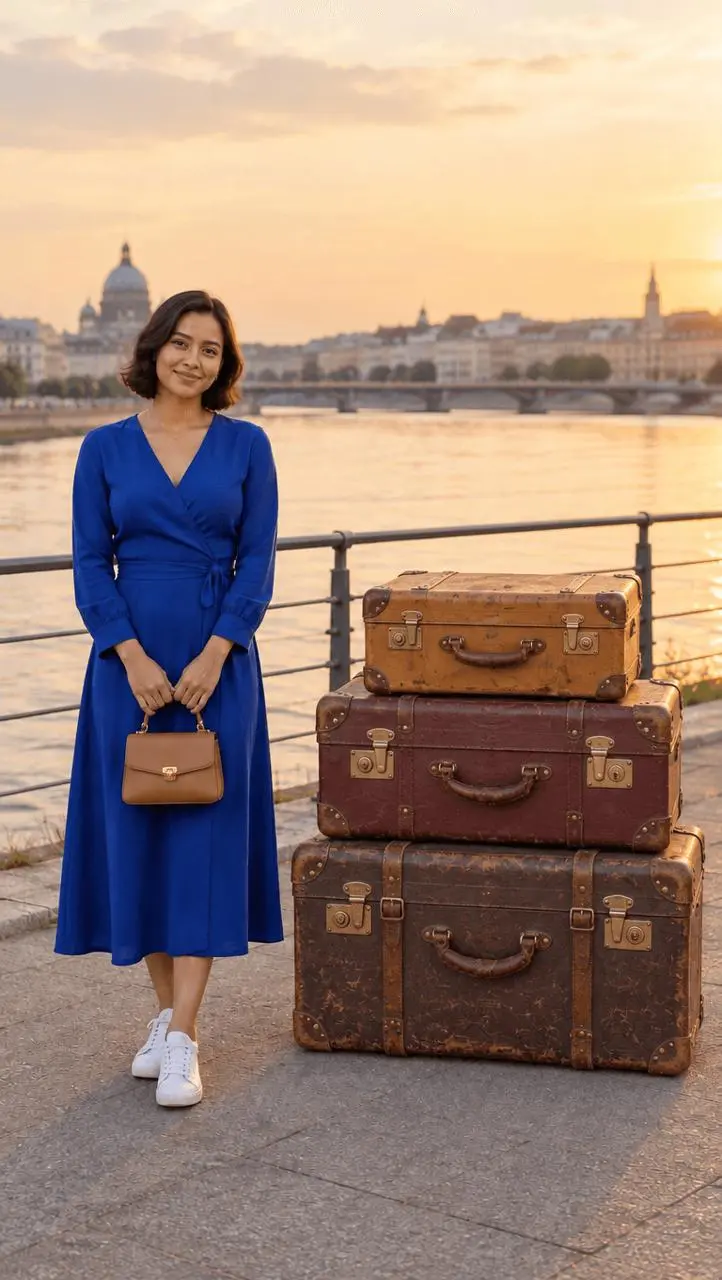
The result contains three separate suitcases with visible handles and latches. They are large enough to read as the second main subject, without covering the woman. They reach around her waist and lower chest rather than the shoulder height requested in the prompt. That mismatch does not break this particular joke, but it is a useful reminder to judge the output rather than repeat the request as if it happened exactly.
Keep the text joke in your video captions: “I asked it to remove my emotional baggage.” Then reveal the luggage. Generating words on the suitcases would add a separate text-rendering problem without improving the visual premise.
Give the red flag one small movement
Open WeShop’s Kling generator, click First Frame, and upload the selected red-flag image. Choose Kling 3.0, a six-second duration, one output and Generate Audio: false. Leave Last Frame empty. The original couple photo is not the input for this step: the flag must already exist in the frame. These are the settings used for the clip below.
Ask for one controlled action instead of a transformation scene. A flag rippling beside a still person is already the punchline; an added character, camera orbit or dramatic scene change makes continuity harder to inspect.
Use the supplied image as the FIRST FRAME. Locked-off portrait camera. Keep the woman on the left, her face, blue dress, handbag, pose, the promenade, railing, buildings and lighting visually consistent. Only the large plain red fabric flag on the right moves: a light breeze makes it unfurl once and ripple gently, then settle into the original readable flag shape. The pole and weighted base remain upright and stationary. The woman may blink naturally but does not speak or walk. Nobody appears, no man returns, no fabric turns into a person, no camera move, no text or added objects. A short deadpan comedy hold on the literal red flag. Silent clip.
The actual returned clip is about 6.04 seconds, at 1080 × 1916 pixels. The flag visibly ripples, the woman remains in place, and the pole stays upright. At the end the cloth folds into a narrower hanging shape instead of returning to the original extended rectangle. The woman also makes small expression and head-position changes. For the tutorial reveal, use a brief earlier segment while the flag is still broad; do not describe this as a perfectly looping or frozen-face animation.
Cut a tutorial with three reveals, not one long wait
For a short tutorial, show the outcome before opening the tool. Then teach the targeting instruction, introduce the luggage variation, and finish on the moving flag.
| Beat | What the viewer sees | What it teaches or reveals |
|---|---|---|
| Opening | Couple photo → giant red flag | The problem and the visual joke |
| Method | Upload, model selection, keep/remove/replace phrases | How to reproduce the edit |
| Second payoff | Same original → three suitcases | One changed object creates a new joke |
| Closing | Short flag animation | A still-image result becomes a motion shot |
Cut generation waiting out of the recording. Hold each reveal long enough to read it, and keep captions away from the retained face and replacement object. Do not frame the flag or suitcases so tightly that viewers cannot compare the scene.
The tests were made on October 21, 2026, with one output per recorded request; they do not establish a success rate. When publishing your adaptation, label it as an AI edit and use a suitable reference you are authorized to edit. For a different couple-photo treatment, try the dramatic romance book-cover workflow.
Start with the loaded red-flag example, replace its reference, and change one instruction at a time. Your first useful check is simple: can someone understand the replacement at the size they will actually see it?