Nano Banana Pro는 이미지 생성과 편집을 위한 Google의 Gemini 3 Pro Image 모델입니다. 텍스트로 포스터, 정보 레이아웃, 캐릭터 시트를 만들거나 참조 이미지를 업로드해 제품과 인물을 편집할 수 있습니다. WeShop은 1K, 2K, 4K 출력 옵션을 제공합니다.
4개 시점의 캐릭터 시트, 날씨와 옷차림 정보 레이아웃, 운동화 사진 편집이라는 세 가지 작업을 살펴보세요. 각 예시에는 실제 사용한 영어 프롬프트와 결과가 있으며, 참조 이미지를 사용한 경우 입력도 함께 표시합니다. 날씨 그래픽은 디자인 콘셉트이며 실시간 예보가 아닙니다.
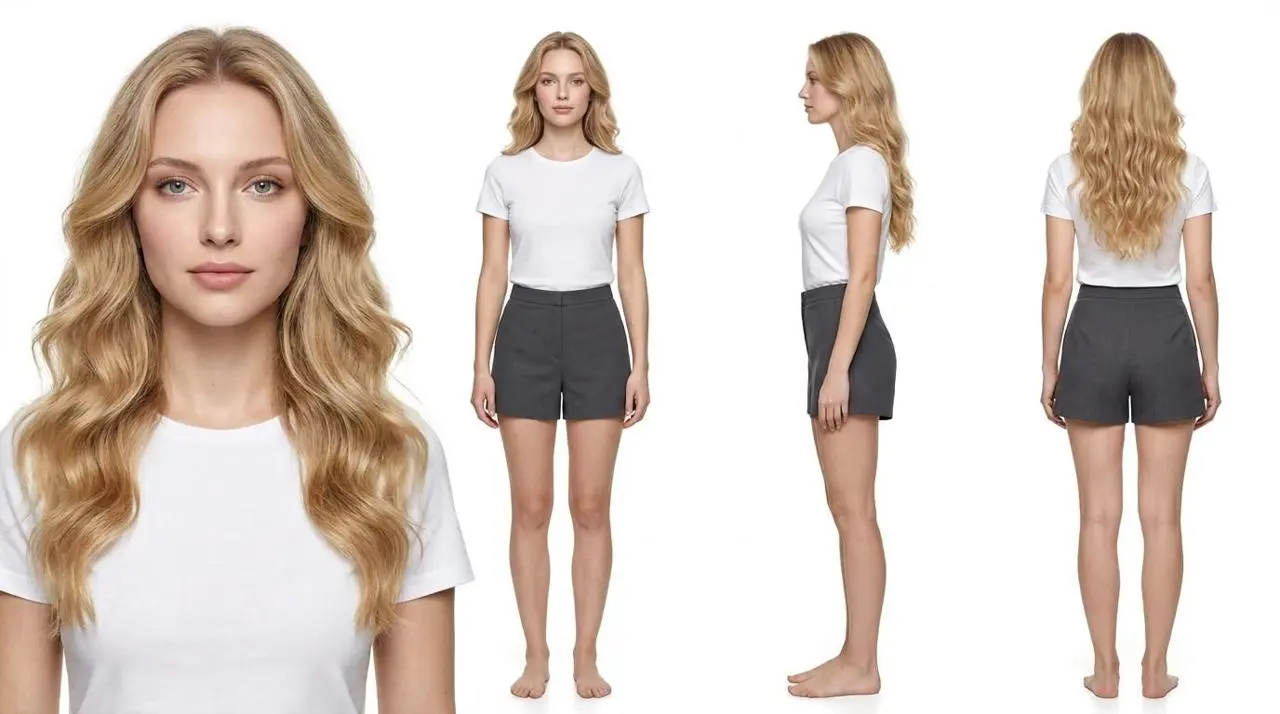
4개 시점의 캐릭터 스타일링 시트
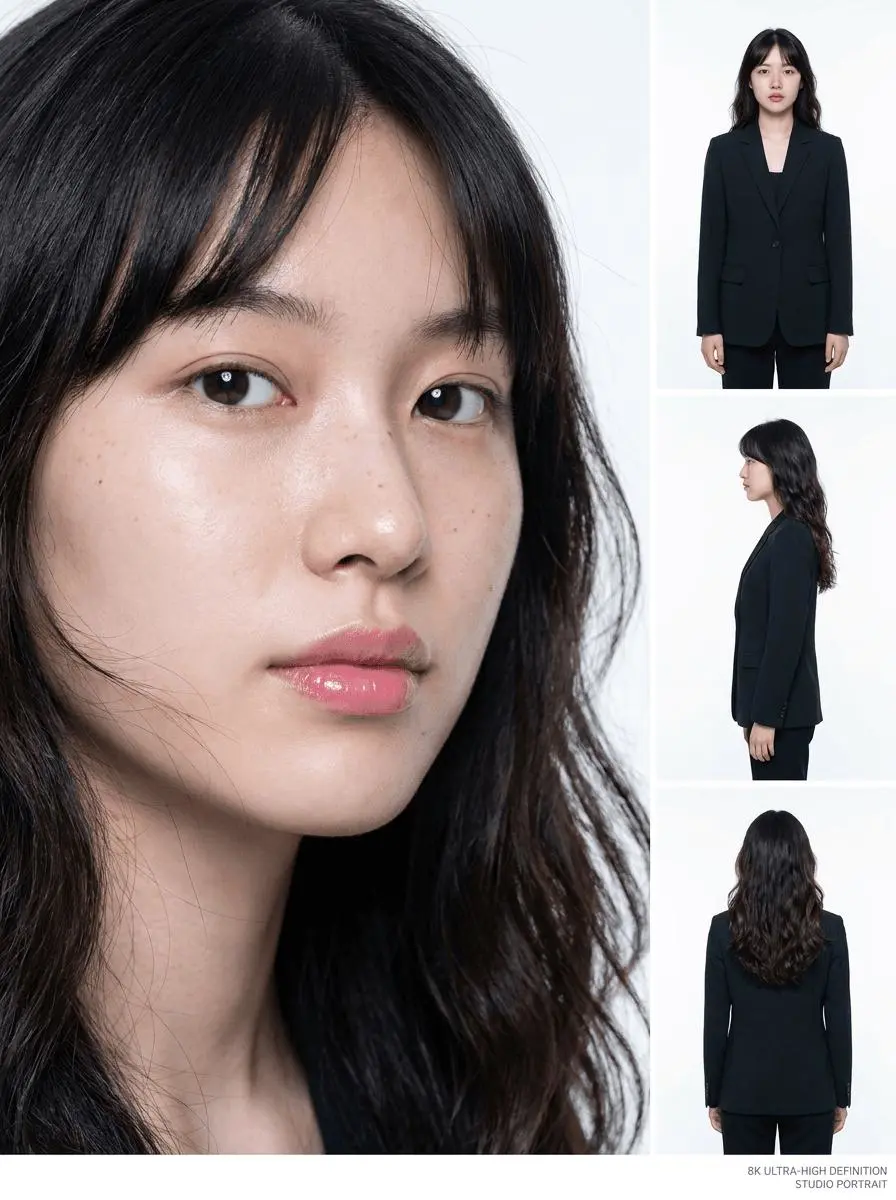
텍스트만으로 만든 캐릭터 시트에 인물 사진, 정면, 측면, 후면을 함께 배치했습니다. 금발, 흰색 티셔츠, 짙은 회색 반바지가 공통적으로 나타납니다. 이 사례는 1K 설정을 사용했으며, 프롬프트의 ‘4K’는 출력 크기 설정을 바꾸지 않습니다.
16:9 horizontal aspect ratio, 4K ultra-high definition, photorealistic photography, seamless pure-white background, and professional fashion studio lighting. Create a four-view character styling sheet.
Arrange the four views from left to right as follows: a large head-and-shoulders close-up, a full-body front view, a full-body left-side profile, and a full-body back view. Every view must show the same adult female model, with completely consistent facial features, hairstyle, skin tone, body proportions, and clothing details. Each full-body view must show the complete figure from the top of the head to the soles of the feet, without cropping or overlapping. The model should stand naturally in a neutral presentation pose.
The subject is a young European or North American female model, approximately 20–25 years old, with a tall, slender, naturally balanced figure, long limbs, and relaxed posture. She has an oval face, soft and refined facial contours, clear and expressive eyes, naturally light-colored irises, a defined yet natural nose bridge, and soft dusty-pink lips. Her expression is calm and peaceful, with a clear, gentle, non-aggressive gaze. Her overall presence should feel clean, relaxed, warm, and contemporary.
She has voluminous, long blonde hair styled in large, soft waves. The hair is a natural warm blonde with realistic tonal variation, dimension, and shine. It falls naturally over her shoulders and down her back, with a few lightweight strands framing her face. She wears no hair accessories. The length, curl pattern, parting, and color of her hair must remain identical in all four views.
Her makeup is fresh, sheer, and natural: subtle light-brown eye makeup, softly defined eyes with minimal eyeliner, individually visible eyelashes, a gentle pink blush, and hydrated natural-looking lips. Preserve authentic skin texture, visible pores, minor imperfections, and natural variations in skin tone. The complexion should appear clean and luminous without excessive smoothing, plastic-looking skin, or exaggerated influencer-style makeup.
Outfit: a minimalist solid-color fitted short-sleeve T-shirt paired with simple high-waisted shorts. The T-shirt is made from soft, fine cotton with a clean silhouette that follows the body without appearing overly tight. The shorts have a minimal, tailored design and an appropriate length that clearly shows the waistline and natural leg proportions. Use a white T-shirt with black or dark-gray shorts. Do not include patterns, prints, text, brand logos, elaborate pockets, or decorative details. The model is barefoot and wears no jewelry, hat, belt, or accessories.
Keep the subjects centered and evenly spaced in a clean, structured layout. The composition should feel full while maintaining enough separation between each view. Use a seamless pure-white background with no horizon line, scenery, furniture, props, text, or borders. Apply soft, even professional studio lighting that clearly reveals facial features, clothing construction, and fabric texture. Include only subtle, natural shadows beneath the feet.
The final image should resemble a premium commercial fashion portrait and a professional model styling reference sheet, featuring photorealistic detail, accurate anatomy, authentic skin texture, clearly defined individual hair strands, and rich fabric details. Identity consistency across all four views is essential.
Avoid: inconsistent identities, different faces, changes in hairstyle or body proportions, inconsistent clothing colors or designs, excessive skin smoothing, plastic skin, cartoon or anime aesthetics, exaggerated curves, distorted anatomy, extra limbs, missing hands or feet, cropped full-body views, overlapping figures, complicated poses, colored backgrounds, text, logos, and watermarks.
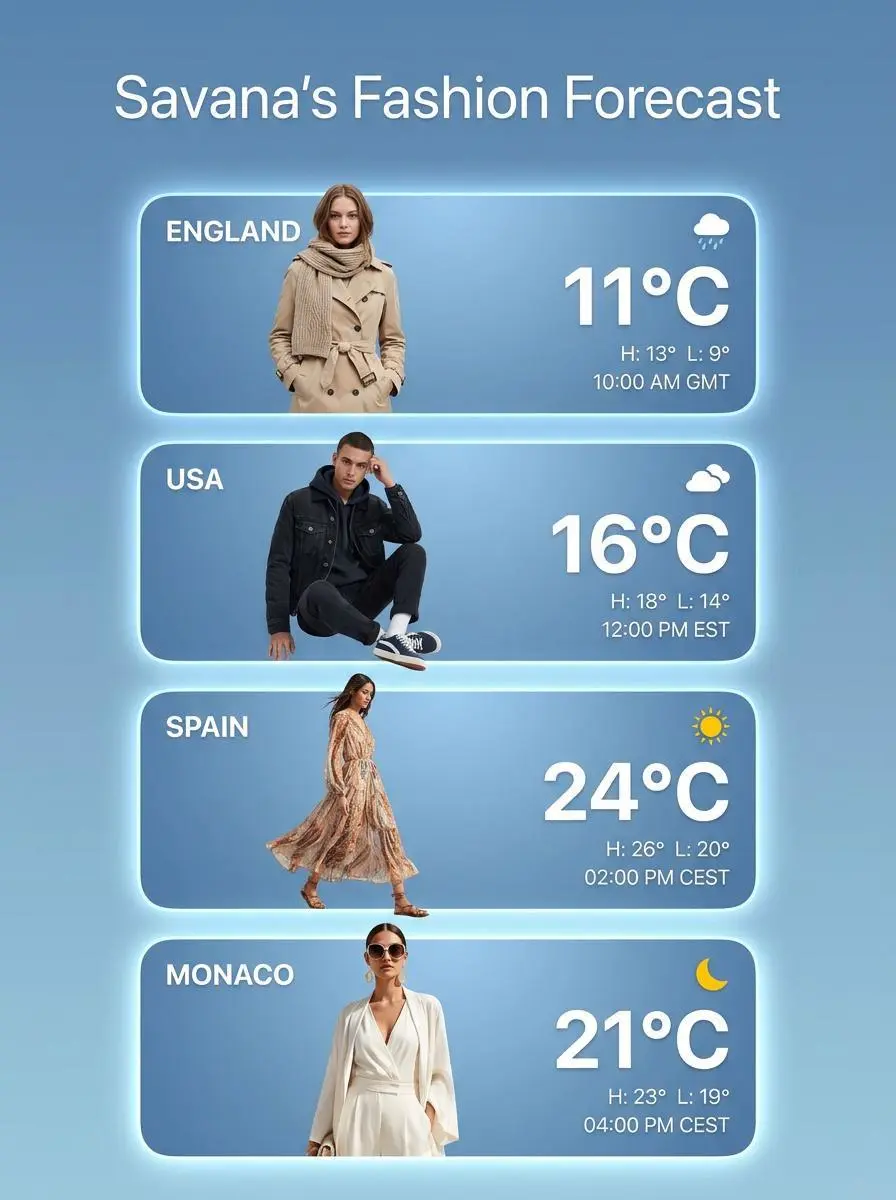
패션 인물, 장소 이름, 아이콘, 기온을 반복되는 카드에 배치한 콘셉트 포스터입니다. 레이아웃과 텍스트의 정보 위계를 확인해 보세요. 표시된 날씨 수치는 설명용이며 실시간 예보가 아닙니다.
The third image combines weather app design with fashion styling in a sleek promotional poster. The background is a soft gradient blue, and the title at the top reads “Savana’s Fashion Forecast.” Below it are four large rounded weather cards stacked vertically, each representing a different country: England, USA, Spain, and Monaco. Each card displays a model dressed in an outfit that matches the mood of the location and temperature, along with time and weather data. The temperature numbers are large and bold, while the high and low temperatures are shown in smaller text. The styling varies from soft layering and neutral coats to darker denim and streetwear-inspired looks. The design feels polished, trendy, and lifestyle-oriented, as if it is promoting clothing choices based on climate. It merges fashion editorial imagery with modern app-style UI in a visually smooth and commercial way.
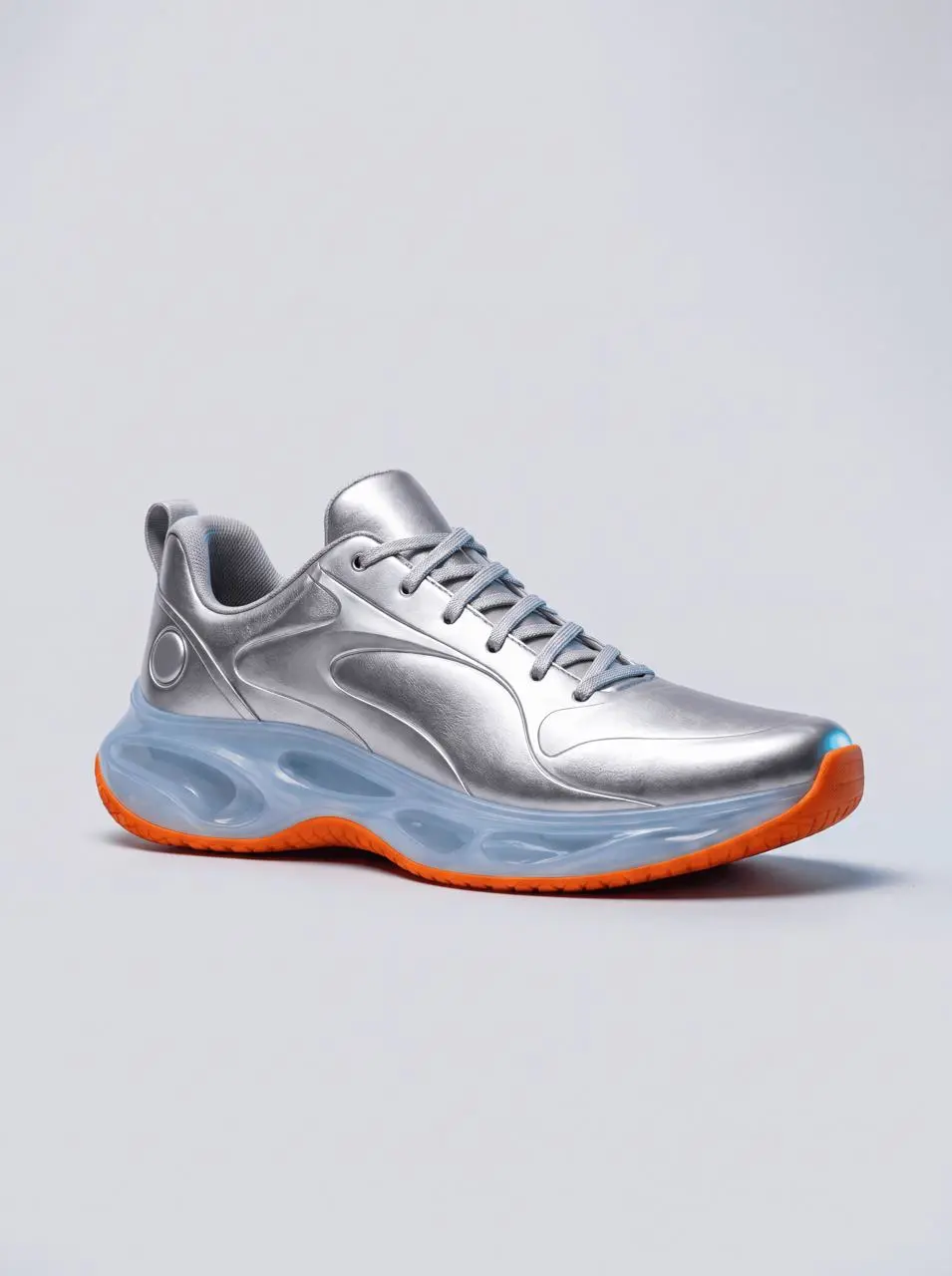
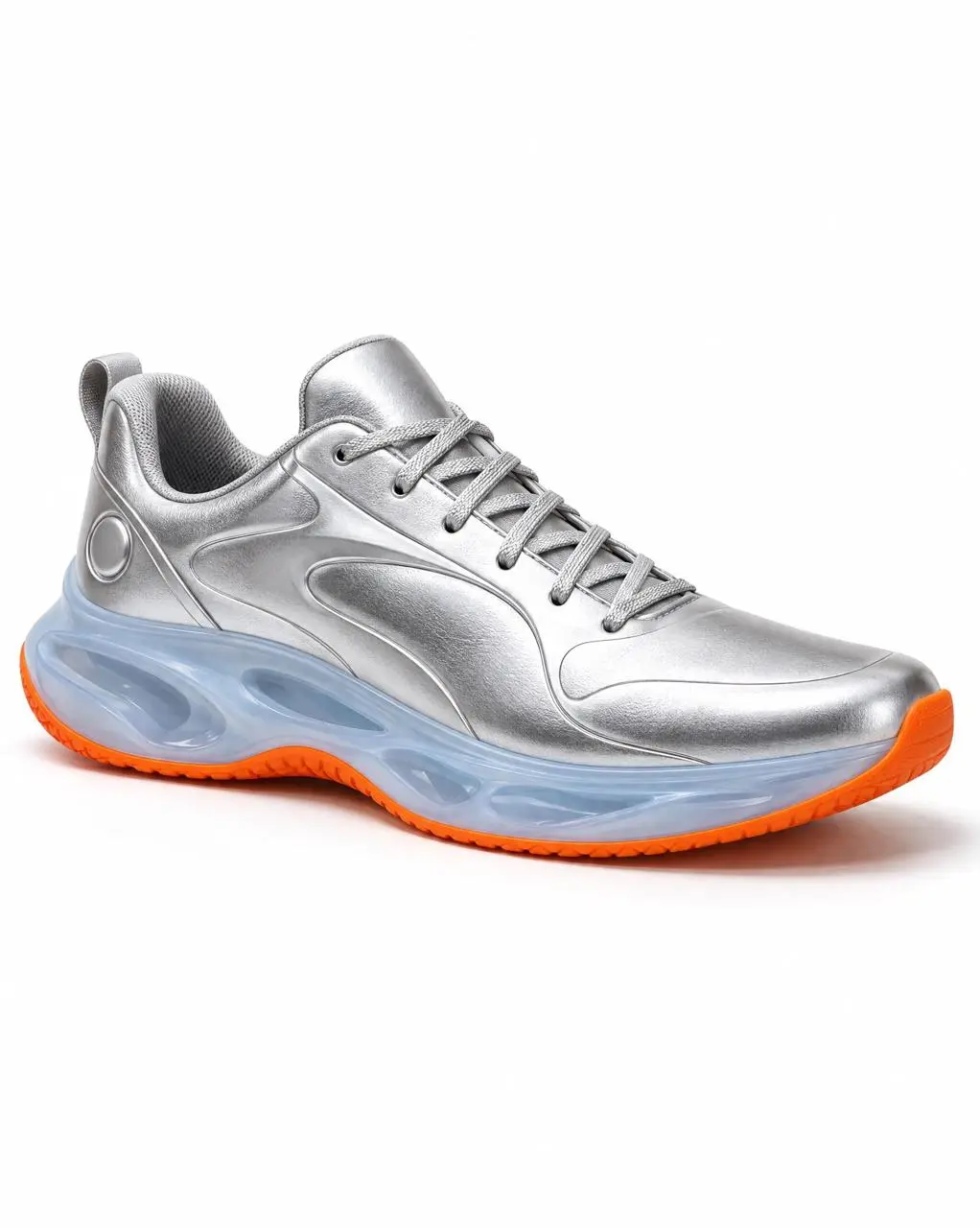
업로드한 운동화를 바탕으로 은색 패널과 끈, 반투명 파란색 밑창, 주황색 포인트가 있는 스튜디오 제품 이미지를 만듭니다. 부드러운 조명과 윤곽 조명이 소재를 드러냅니다. 이 작업은 4K 설정을 사용했으며 원본 결과는 3584 × 4800픽셀입니다.
Use image 1 as the sole product reference. Create a high-resolution vertical 3:4 studio product photograph of the same sneaker, preserving the silver upper, silver laces, translucent ice-blue sculpted midsole, orange outsole, circular heel detail, and right-facing three-quarter orientation. Place exactly one sneaker on a pale-gray seamless studio surface. Use a large soft light from the upper left and a narrow cool rim light to show the metallic texture, translucent material, and contact shadow. Keep the complete shoe visible with breathing room around it. Do not redesign the product, change its colors, add text or logos, add another shoe, add a border, or add a watermark.
Nano Banana Pro는 Gemini 3 Pro Image라고도 하는 Google의 이미지 생성·편집 모델입니다. 텍스트가 포함된 레이아웃, 제품 목업, 참조 이미지 기반 구도 제작에 고려할 수 있습니다. 주로 문구, 피사체의 모습, 조명, 프레이밍, 스타일 등 이미지 자체의 요소를 조정합니다. 디자인을 사용하기 전에 완성된 세부 내용을 검토하세요.
읽을 수 있는 텍스트를 담은 포스터와 그래픽
포스터나 정보 그래픽의 제목, 보조 문구, 배치 위치를 지정하세요. Google은 다국어 텍스트 렌더링을 문서에서 설명하지만, 철자와 번역은 여전히 확인해야 합니다. 날씨와 옷차림 예시는 반복되는 라벨과 계획된 레이아웃을 보여 줍니다.
알아볼 수 있는 인물과 제품
참조 이미지를 업로드해 인물의 외모나 제품 디자인을 안내하세요. 운동화 편집 사례는 스튜디오 조명을 바꾸면서 은색 패널, 파란색 밑창, 주황색 포인트를 유지합니다. 사용 전 얼굴, 옷, 제품 윤곽과 작은 디테일을 원본과 비교하세요.
조명, 프레이밍, 시각적 스타일
카메라 각도, 빛의 방향, 색상과 소재를 지정하세요. 운동화 프롬프트는 금속성 갑피와 반투명 밑창을 보여 주기 위해 왼쪽 위의 부드러운 빛과 차가운 윤곽광을 요청합니다. 결과의 형태, 신발 끈과 소재 디테일을 확인하세요.
1K, 2K, 4K 출력 선택
WeShop의 이 Pro 선택 항목에는 1K, 2K, 4K가 표시됩니다. 폼에서 크기와 화면 비율을 선택하세요. 운동화 작업은 4K를 사용해 3584 × 4800 원본을 반환했습니다. 페이지의 작은 미리보기는 원본 파일이 아닙니다.
제작 방식
텍스트로 생성하거나 참조 이미지 편집하기
새로운 구도는 텍스트로 시작하세요. 기존 인물, 제품, 의상, 장면을 바탕으로 이미지를 만들려면 참조 이미지를 추가하세요.
설명으로 새 이미지 만들기
사진을 업로드하지 않고 피사체, 배경, 구도, 시각적 스타일을 설명하세요. 캐릭터 시트와 날씨·옷차림 그래픽은 텍스트만으로 요청한 사례입니다.
사진 편집 또는 참조 이미지 조합하기
편집에 필요한 이미지를 업로드하세요. 각 이미지가 인물, 의상, 제품, 장면 중 무엇을 제공하는지 설명하고 변경할 부분과 유지할 디테일을 구분하세요. 여러 이미지를 사용할 때는 ‘이미지 1은 인물, 이미지 2는 의상’처럼 역할을 명확히 지정하세요.
프롬프트 가이드
Nano Banana Pro 프롬프트는 어떻게 작성하나요?
Google의 Pro 프롬프트 가이드는 피사체, 구도, 배경, 스타일, 구체적인 편집 지시를 명확히 하도록 권장합니다. 여섯 가지 WeShop 사례에서 특정한 선택이 실제 프롬프트와 결과에 어떻게 나타나는지 살펴볼 수 있습니다. 복사할 수 있는 텍스트는 각 사례에서 실제로 사용한 영어 프롬프트입니다.
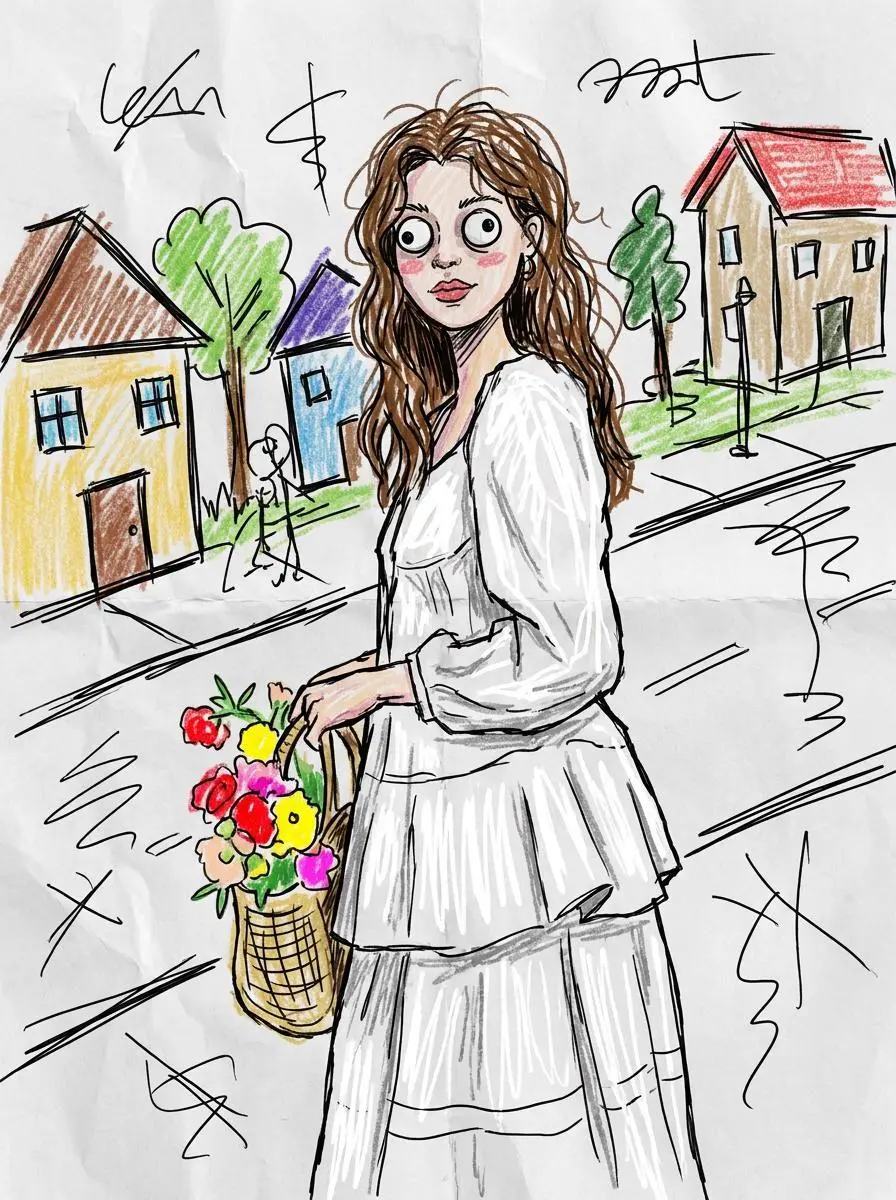
스타일의 선과 채색 특징 설명하기
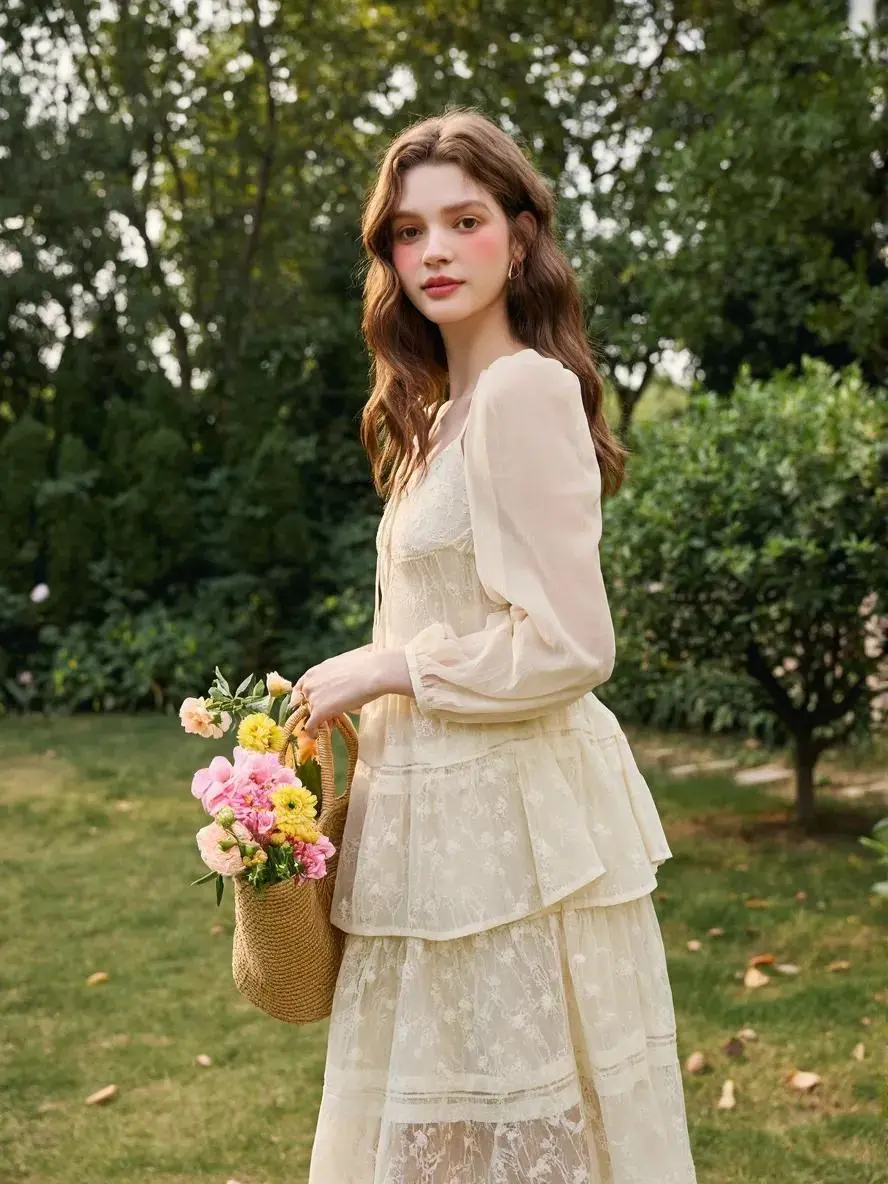
스타일 이름만 쓰기보다 눈에 보이는 선과 채색 특징으로 화풍을 정의하세요. 이 예시의 문구는 “uneven coloring and visible strokes”입니다. 입력 인물 사진과 낙서 그림의 거친 선, 단순화된 형태, 고르지 않은 채색을 비교해 보세요.
urn this photo into a funny ugly doodle drawing. Make it look like: a quick sketch using a cheap marker or crayon messy, rough, childlike style bad perspective and awkward proportions slightly exaggerated facial features Add: simple cartoon background (like buildings, trees, street) random sketchy lines and details uneven coloring and visible strokes Style: looks like a lazy drawing, not polished humorous and a bit stupid-looking meme-like, casual, internet style Do NOT: make it realistic
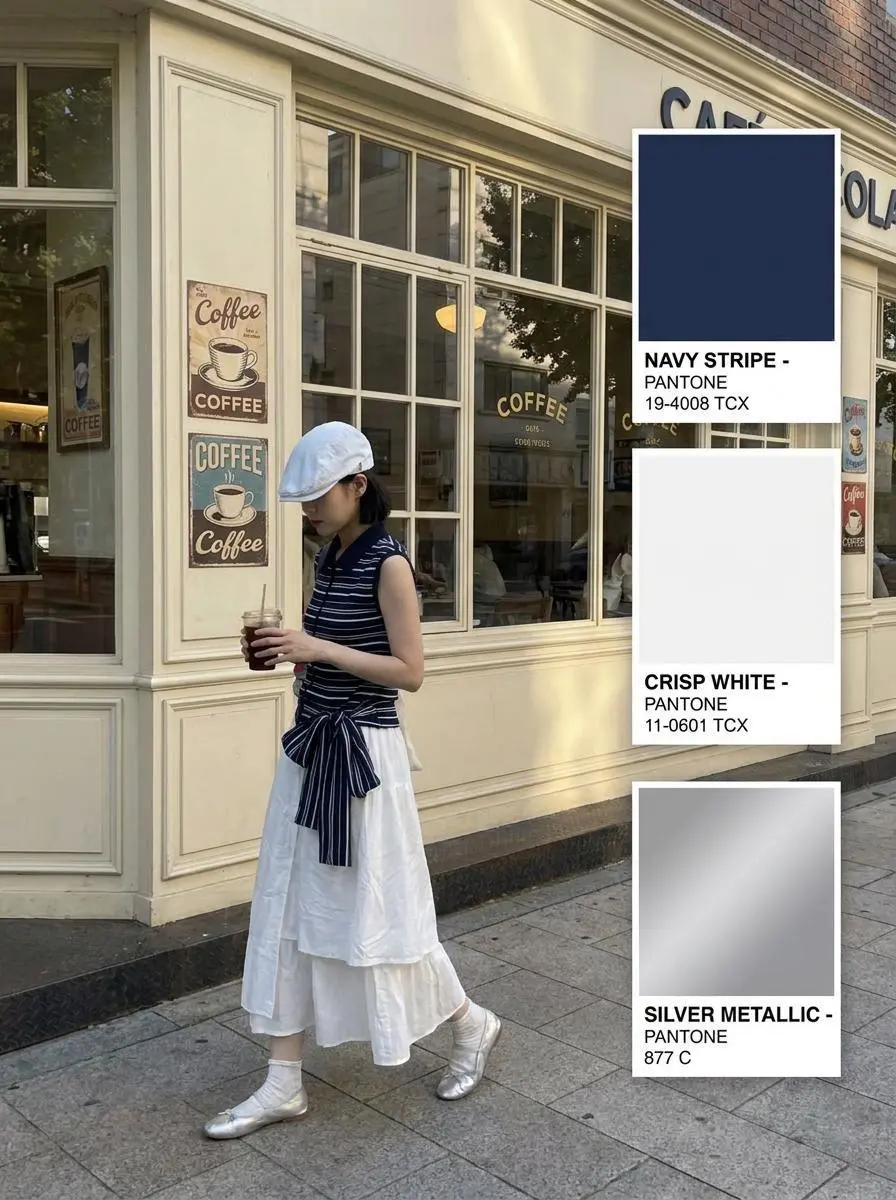
참조 이미지와 레이아웃의 역할 구분하기
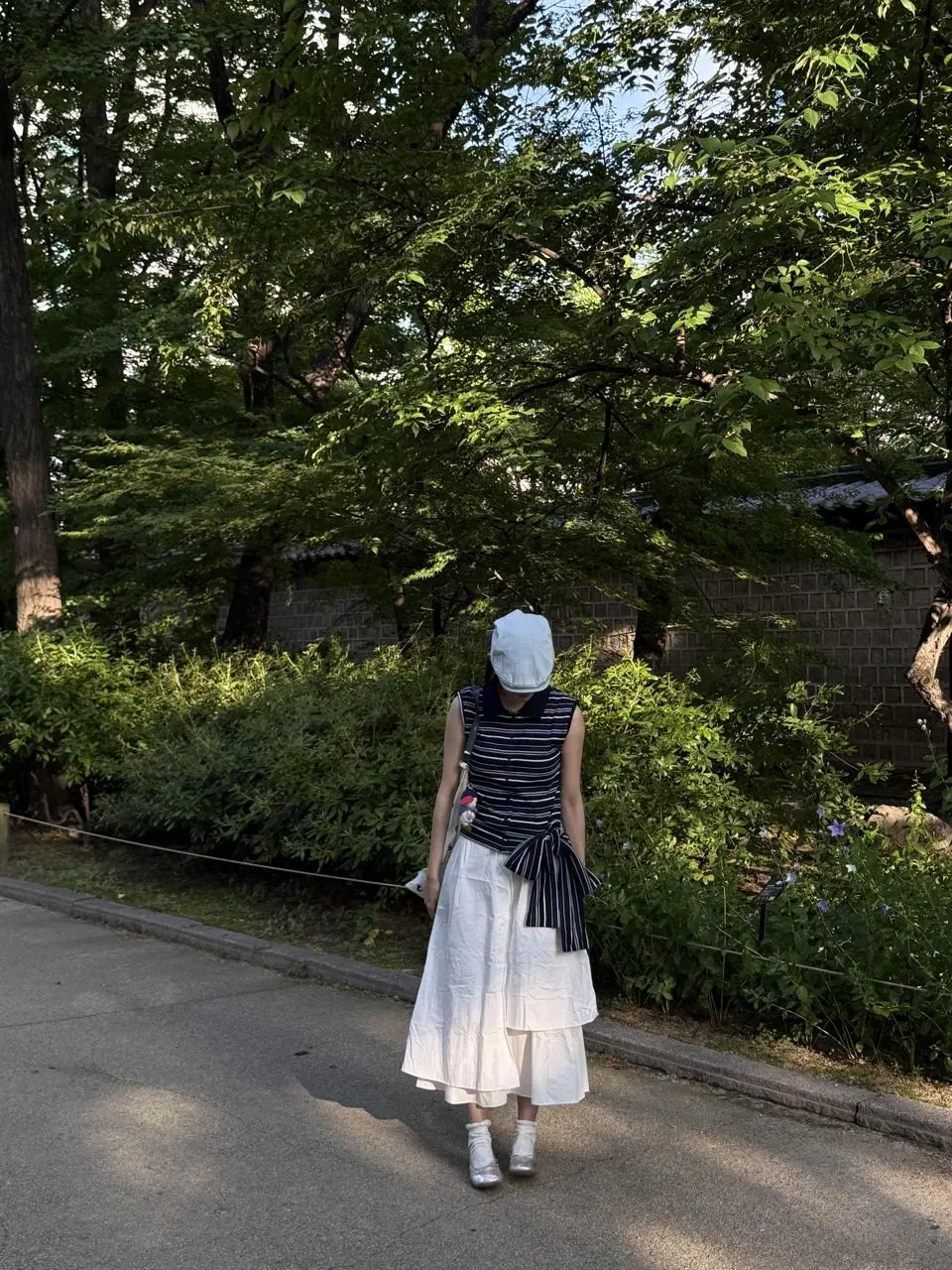
참조 이미지에서 가져올 요소를 설명한 다음 피사체와 그래픽 요소의 위치를 지정하세요. 이 예시의 문구는 “model on the left two-thirds of the image, vertical color palette cards on the right one-third.”입니다. 유지된 의상과 별도의 팔레트 열을 살펴보세요. 프롬프트가 각각의 역할을 따로 지정합니다.
Create a Pinterest-style street fashion color palette editorial using the 【uploaded model and outfit】
Preserve the uploaded outfit details accurately, including colors, textures, accessories, shoes, bag, hairstyle, and overall styling. The model should be walking casually in side profile or slightly from behind, holding an iced coffee or small drink, creating a natural candid street photo feeling.
Scene: vintage café exterior, cream or beige storefront, large coffee shop windows, retro coffee posters, warm urban sidewalk, subtle European street atmosphere.
Composition: model on the left two-thirds of the image, vertical color palette cards on the right one-third.
Color cards: add three Pantone-style rectangular color cards stacked vertically on the right side, using the main colors extracted from the uploaded outfit. Each card should include a large color block and simple black Pantone-style label text underneath.
Mood: cozy coffee-shop aesthetic, casual streetwear, soft daylight, warm muted tones, Pinterest fashion color analysis, editorial layout, realistic photography.
High-resolution, natural lighting, realistic fabric texture, clean graphic design, modern fashion magazine composition.
유지할 부분과 바꿀 부분 구분하기
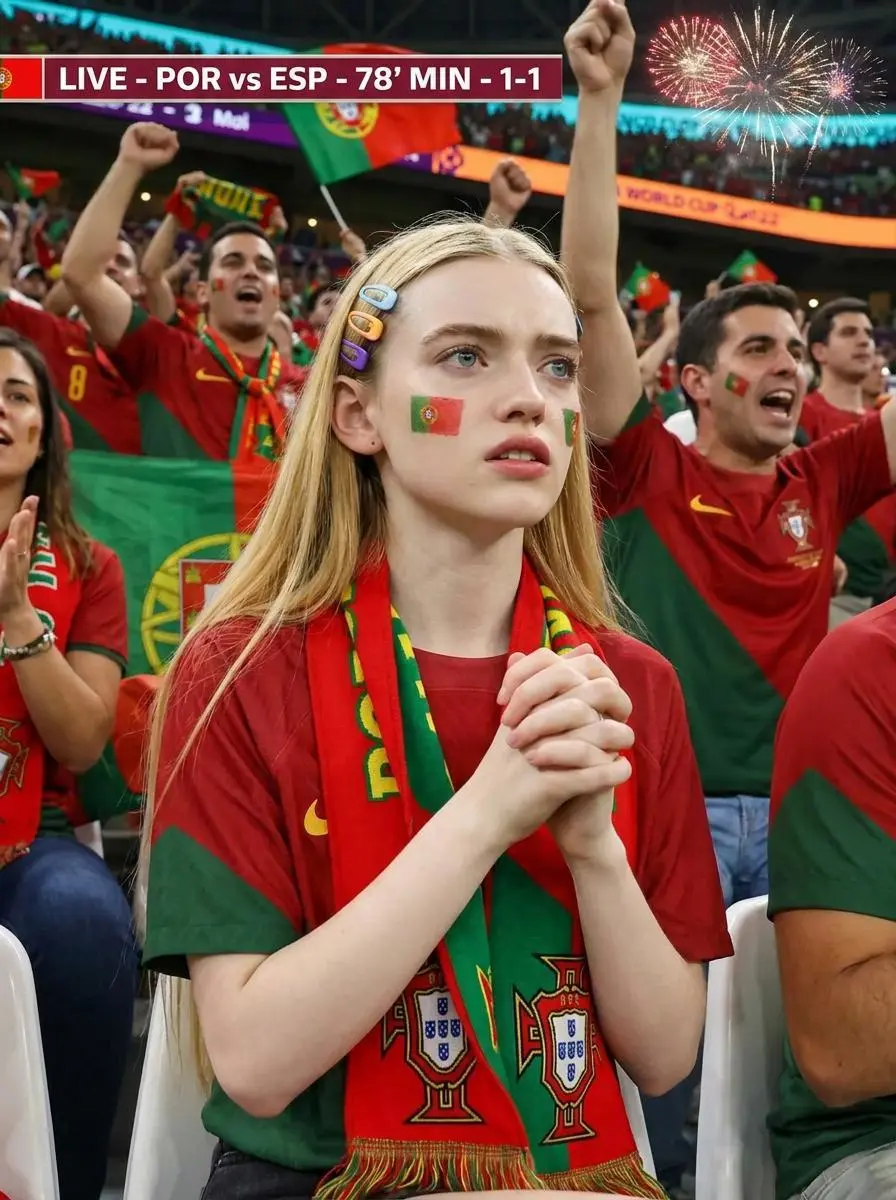
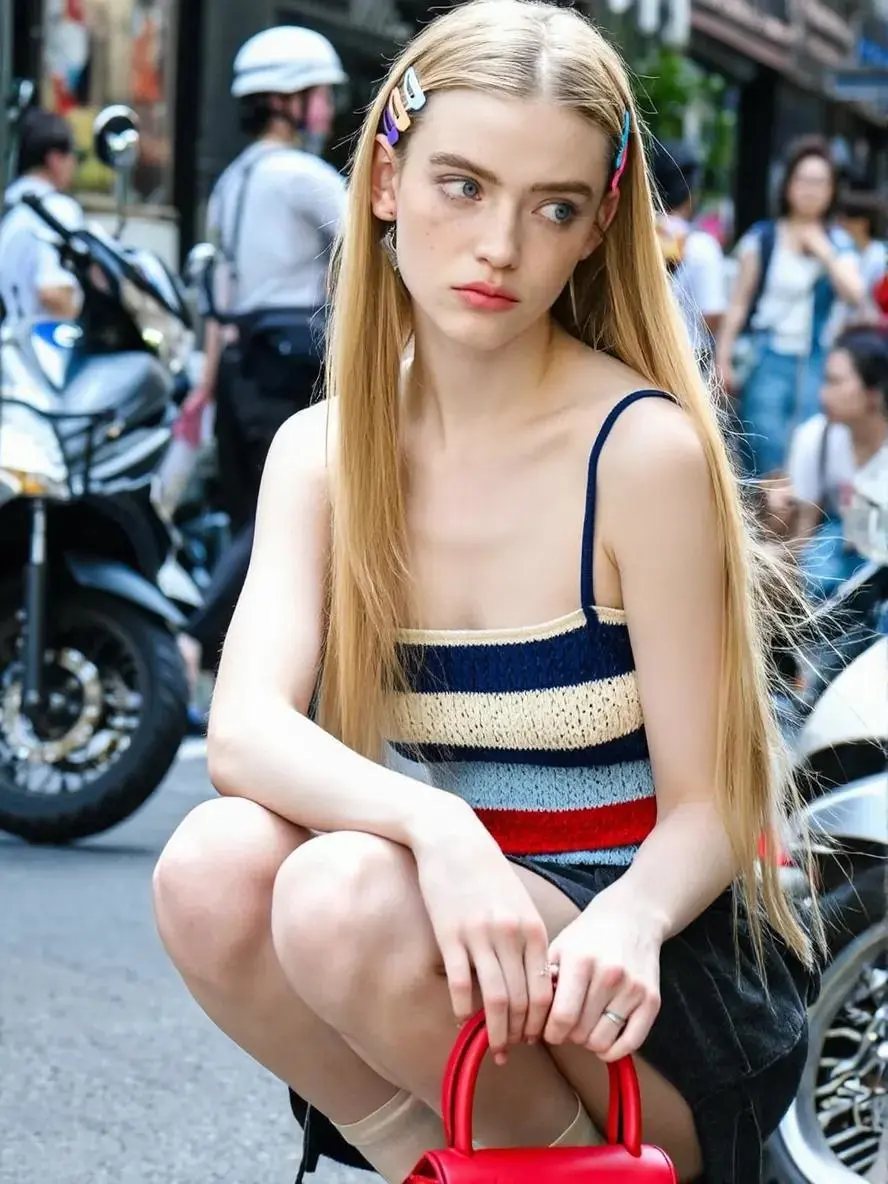
새 의상과 배경을 설명하기 전에 유지할 인물 특징을 지정하세요. 이 예시의 문구는 “retain facial features and identifiable characteristics.”입니다. 인물 사진과 경기장 결과를 비교하며, 추가된 유니폼과 관중을 얼굴과 구분해 확인하세요. 방송 화면 그래픽은 가상의 디자인입니다.
Based on uploaded portrait photos, retain facial features and identifiable characteristics. Create a character positioned in the stands of a World Cup match, portraying a dedicated fan attentively watching the game. The character wears a [Portugal] home jersey, a support scarf around their neck, and has subtle national team paint on their cheeks. The camera angle is a close-up from a TV broadcast or a candid shot from the stands, showing the character seated, focused, slightly tense, or expectant. The background is a large stadium stand with densely packed fans, surrounding spectators also wearing the national team's colors. The scene includes realistic scoreboards, match times, broadcast subtitles, "LIVE" signs, bright lighting, fireworks, cheering sticks, banners, and a vibrant match atmosphere. The overall effect resembles a high-quality, attractive fan suddenly captured during a World Cup broadcast.
Do not include brand logos.
구체적인 사물에 색상 지정하기
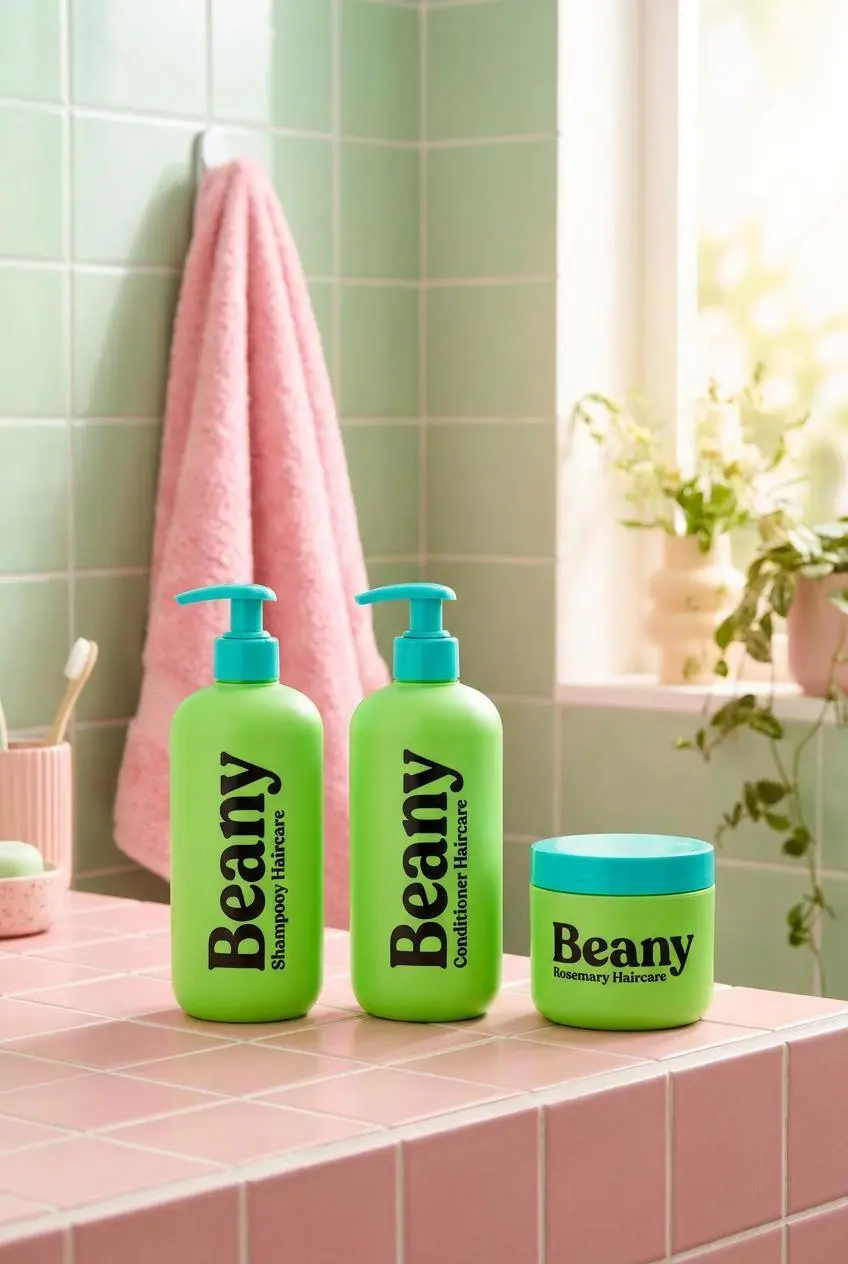
색을 적용할 표면을 명시하고 글자는 별도로 설명하세요. 이 예시의 문구는 “bold black typography with turquoise pumps and caps”입니다. 초록색 용기, 분홍색 타일, 청록색 뚜껑, 대비를 이루는 패키지 글자를 확인해 보세요.
A playful bathroom product display featuring three bright green Beany rosemary haircare products on a pink tiled counter. The background includes pale green wall tiles, a pink towel, and a soft window detail. The product packaging uses bold black typography with turquoise pumps and caps, creating a fun retro color contrast. The image feels youthful, colorful, fresh, and suitable for haircare or shower routine advertising.
보여 줄 세부 요소 중심으로 구도 잡기
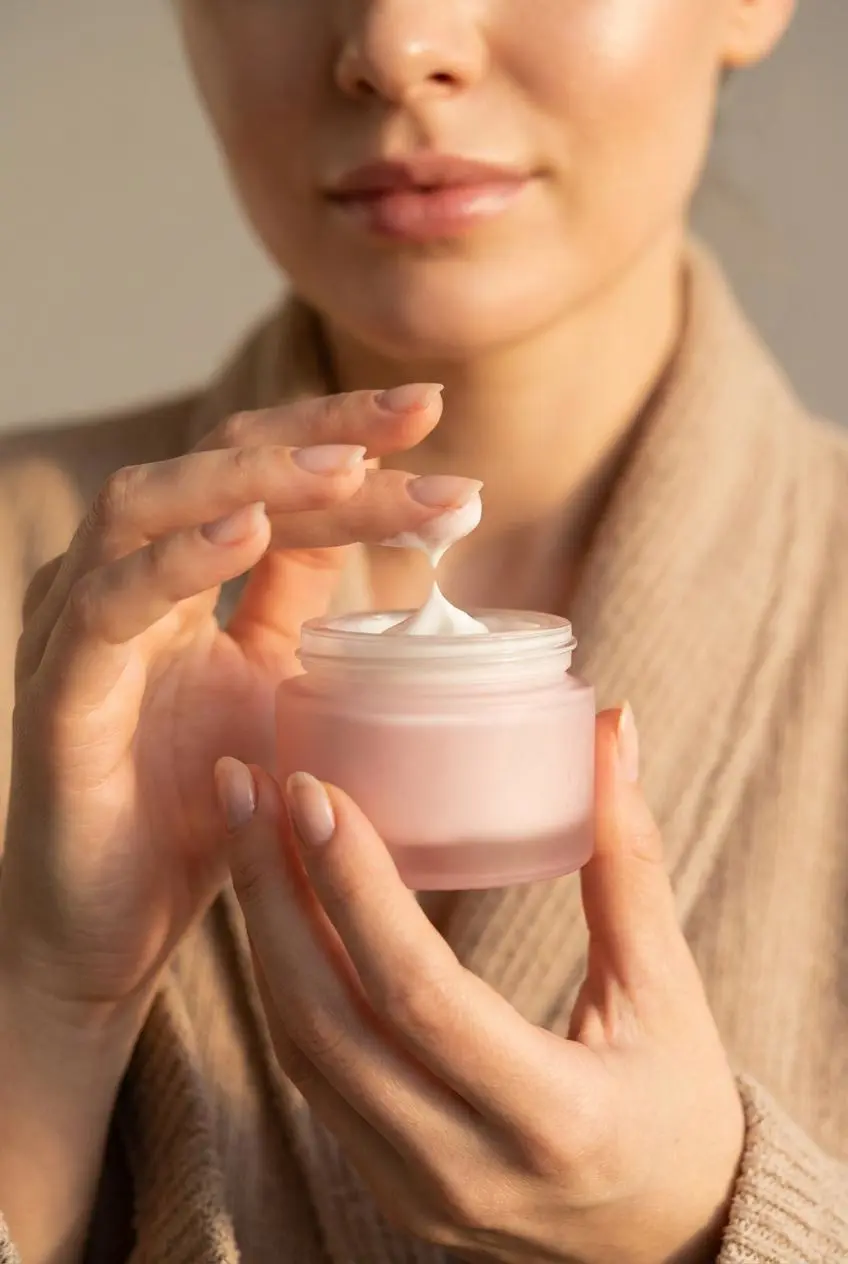
소재 디테일에 초점을 맞추고 배경을 더 부드럽게 묘사하세요. 여기서 ‘forming a soft peak of product texture’는 손가락과 용기 사이로 늘어난 흰색 크림에 해당하며, 뒤쪽 얼굴의 아래 부분은 부드럽게 흐려져 있습니다.
A close-up skincare texture shot showing a model holding a pink jar of face cream. Her hand lifts a small amount of white cream between two fingers, forming a soft peak of product texture. The background focuses on the lower face and skin, softly blurred to keep attention on the cream. The image feels intimate, sensual, moisturizing, and premium, with warm nude tones and soft lighting.
문구와 정보 위계 지정하기
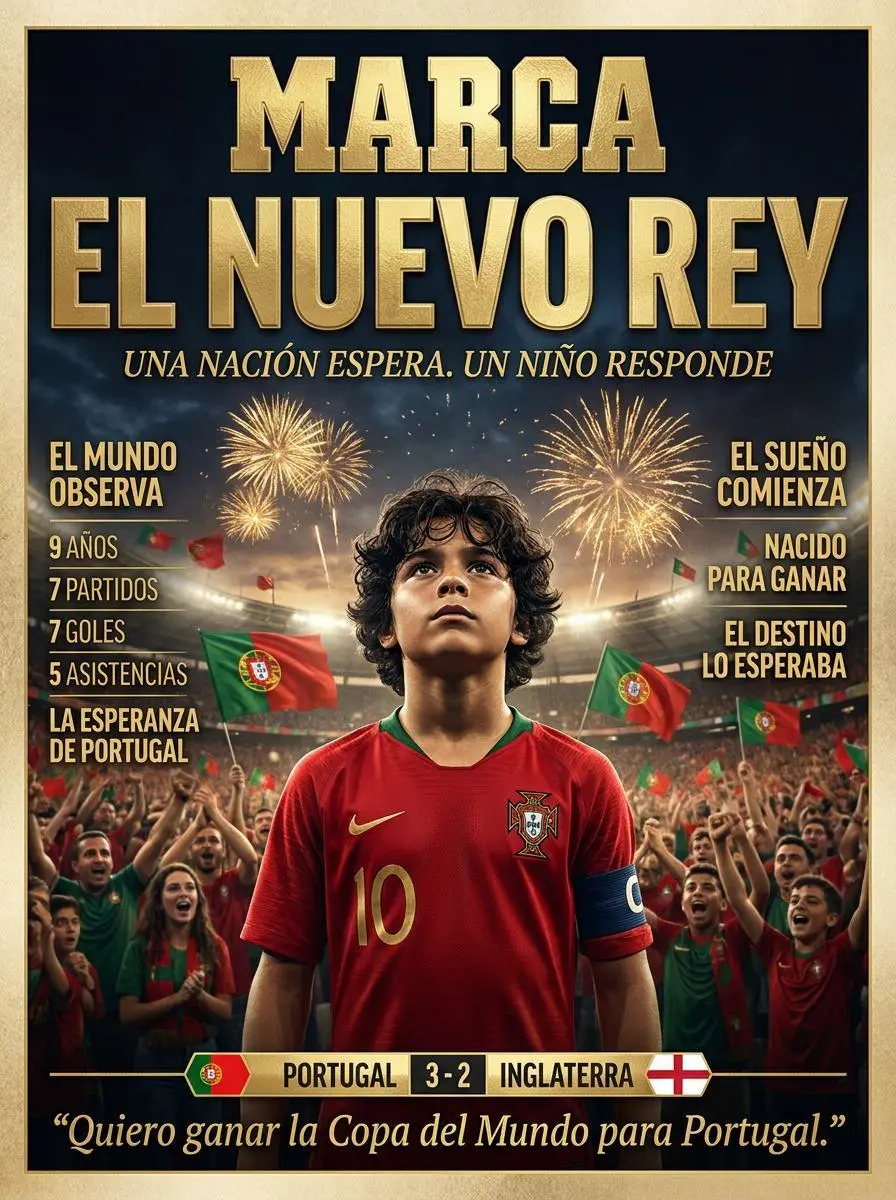
현지 언어의 표지를 만들 때는 정확한 문구와 우선순위를 지정하세요. 이 사례는 ‘EL NUEVO REY’를 큰 제목으로 쓰고 양옆의 글과 아래쪽 점수판을 배치합니다. 작은 글자, 인물 디테일과 브랜드 표시를 점검하세요. 이야기와 점수는 가상입니다.
World Cup 2026 newspaper cover, Spanish sports newspaper, luxury editorial design.
Massive headline:
EL NUEVO REY
Subheadline:
UNA NACIÓN ESPERA. UN NIÑO RESPONDE.
Center cover:
10 year old Portuguese football prodigy boy, dark curly hair, Portugal national team red number 10 jersey, captain armband.
Portuguese flags.
Golden fireworks.
Packed stadium.
Left column:
EL MUNDO OBSERVA
9 AÑOS
7 PARTIDOS
7 GOLES
5 ASISTENCIAS
LA ESPERANZA DE PORTUGAL
Right column:
EL SUEÑO COMIENZA
NACIDO PARA GANAR
EL DESTINO LO ESPERABA
Bottom scoreboard:
PORTUGAL 3-2 INGLATERRA
Bottom quote:
"Quiero ganar la Copa del Mundo para Portugal."
premium newspaper cover, gold typography, photorealistic, sports documentary poster, masterpiece.realistic, editorial design, masterpiece, 8K.
사용 방법
Nano Banana Pro 사용 방법
페이지 상단 생성기에 프롬프트를 입력하고 필요하면 참조 이미지를 추가한 뒤 사용 가능한 설정을 확인하세요. 사례의 프롬프트를 복사해 대상, 문구와 장면을 바꿔 사용할 수도 있습니다.
새 이미지를 설명하거나 참조 이미지 업로드하기
새 이미지는 설명문을 입력하세요. 편집할 때는 사용할 이미지를 업로드하고 각 참조 이미지의 역할을 설명하세요. 사례를 응용한다면 피사체의 세부 정보와 참조 이미지 역할을 자신의 작업에 맞게 바꾸세요.
형식 설정과 포인트 확인하기
필요한 문구와 레이아웃을 지정한 다음 폼에서 제공하는 화면 비율, 출력 크기, 수량을 선택하세요. 생성 전에 표시되는 포인트와 이용 중인 요금제의 모델 접근 권한을 확인하세요.
생성한 결과를 열어 검토하기
생성 후 결과 작업 공간을 여세요. 텍스트, 얼굴, 제품 디테일을 설명문 및 참조 이미지와 비교하세요. 해상도를 검토할 때는 원본 파일을 확인하고, 다시 시도하려면 설명이나 참조 이미지를 조정하세요.
Nano Banana 캐릭터 시트 튜토리얼
Nano Banana 캐릭터 시트 튜토리얼
WeShop Nano Banana를 사용하여 클로즈업, 정면, 측면, 후면 뷰로 구성된 일관된 4면 AI 코믹 드라마 여주인공 시트를 만드는 방법을 알아보세요.
네. Nano Banana Pro는 Google이 Gemini 3 Pro Image에 붙인 이름입니다. 이미지 생성·편집 모델이며, Nano Banana와 Nano Banana 2는 서로 다른 모델을 가리킵니다.
Nano Banana Pro는 어떤 작업에 활용하나요?
Google은 Pro를 전문 제작용 에셋과 창작 제어를 위한 모델로 소개합니다. 이 페이지의 실제 WeShop 사례에서는 캐릭터 시트, 정보 레이아웃, 참조 이미지 기반 제품 사진을 보여 줍니다. 시도하려는 작업과 가까운 예시를 선택하세요.
텍스트로 이미지를 만들거나 기존 사진을 편집할 수 있나요?
둘 다 지원합니다. 새 이미지는 설명문으로 시작하거나, 사진을 업로드하고 편집 내용을 설명하세요. 텍스트만으로 요청할 때는 참조 이미지가 필요하지 않습니다.
참조 이미지를 여러 장 사용할 수 있나요?
네. 업로드 후 각 참조 이미지가 인물, 의상, 제품, 장면 중 무엇을 제공하는지 설명하세요. 현재 업로드 입력란의 이미지 수 제한을 따르고 작업에 필요한 선명한 참조만 사용하세요.
Nano Banana Pro로 이미지 안에 글자나 다른 언어를 넣을 수 있나요?
Google은 텍스트 렌더링과 현지화 디자인을 문서에서 설명합니다. 원하는 문구와 위치를 지정한 다음 결과의 철자와 번역을 확인하세요. 날씨 예시는 디자인 레이아웃을 보여 주며, 검증된 실시간 날씨 데이터가 아닙니다.
WeShop에서 Nano Banana Pro의 4K를 선택할 수 있나요?
현재 WeShop Pro 폼은 1K, 2K, 4K를 제공합니다. 생성 전에 출력 크기를 선택하세요. 운동화 사례는 4K 설정으로 3584 × 4800 원본을 반환했으며, 웹사이트 미리보기는 더 작을 수 있습니다.
편집해도 인물이나 제품이 완전히 그대로 유지되나요?
참조 이미지는 피사체를 알아볼 수 있도록 유도할 수 있지만, 완전한 보존은 보장되지 않습니다. 운동화 사례에서는 주요 색상과 디자인 특징을 알아볼 수 있으나 일부 형태와 디테일은 다릅니다. 원본 이미지와 결과를 비교해 확인하세요.
Nano Banana Pro 프롬프트는 어떻게 쓰면 되나요?
피사체, 구도, 배경, 스타일을 설명하세요. 편집할 때는 바꿀 부분과 유지할 부분을 밝히고 각 참조 이미지의 역할을 지정하세요. 여섯 가지 가이드 사례에서 실제 사용한 전체 프롬프트를 입력·출력과 함께 확인할 수 있습니다.
Nano Banana Pro와 Nano Banana 2 중 무엇을 선택하면 되나요?
상세한 디자인 지시, 텍스트가 많은 레이아웃과 제품 목업에는 Pro를 고려하세요. 잦은 수정이나 추가 비율인 1:4, 4:1, 1:8, 8:1이 필요하면 Nano Banana 2를 고려할 수 있습니다. 둘 다 이미지 생성과 참조 편집을 지원하므로 작업과 사용 가능한 옵션에 맞춰 선택하세요.
WeShop에서 Nano Banana Pro를 무료로 사용할 수 있나요?
WeShop의 현재 무료 체험에는 Nano Banana Pro가 포함되지 않습니다. 시작 전 가격 페이지와 계정에서 이용 권한과 포인트를 확인하세요. Google Gemini 구독과 사용 한도는 WeShop 요금제와 별개입니다.
Nano Banana Pro 이미지 생성 비용은 얼마인가요?
설정과 이미지 수를 선택한 후 WeShop 생성기에 표시되는 예상 포인트를 확인하세요. 모델 이용 권한과 제공 포인트는 현재 가격 페이지와 계정에서 확인할 수 있습니다.
결과에서 어떤 한계를 확인해야 하나요?
Google은 작은 얼굴, 미세한 시각적 디테일, 철자, 사실 정보, 번역, 복잡한 편집에 여전히 문제가 있다고 밝힙니다. 사용하기 전에 실제 결과를 검토하세요. 자세한 프롬프트나 더 큰 출력 크기만으로 정확성이 검증되지는 않습니다.