









Turn One Office Portrait Into an Original Desk-Band Video With Seedance 2.5
Create an original four-person office performance with a clear musical build, restrained reactions, and copyright-safe audio direction.
Small-room performance clips feel intimate because the audience can read every glance, hesitation, and improvised sound. That structure has become useful well beyond music accounts: creative teams use it for employer branding, product jingles, founder introductions, and playful campaign announcements.
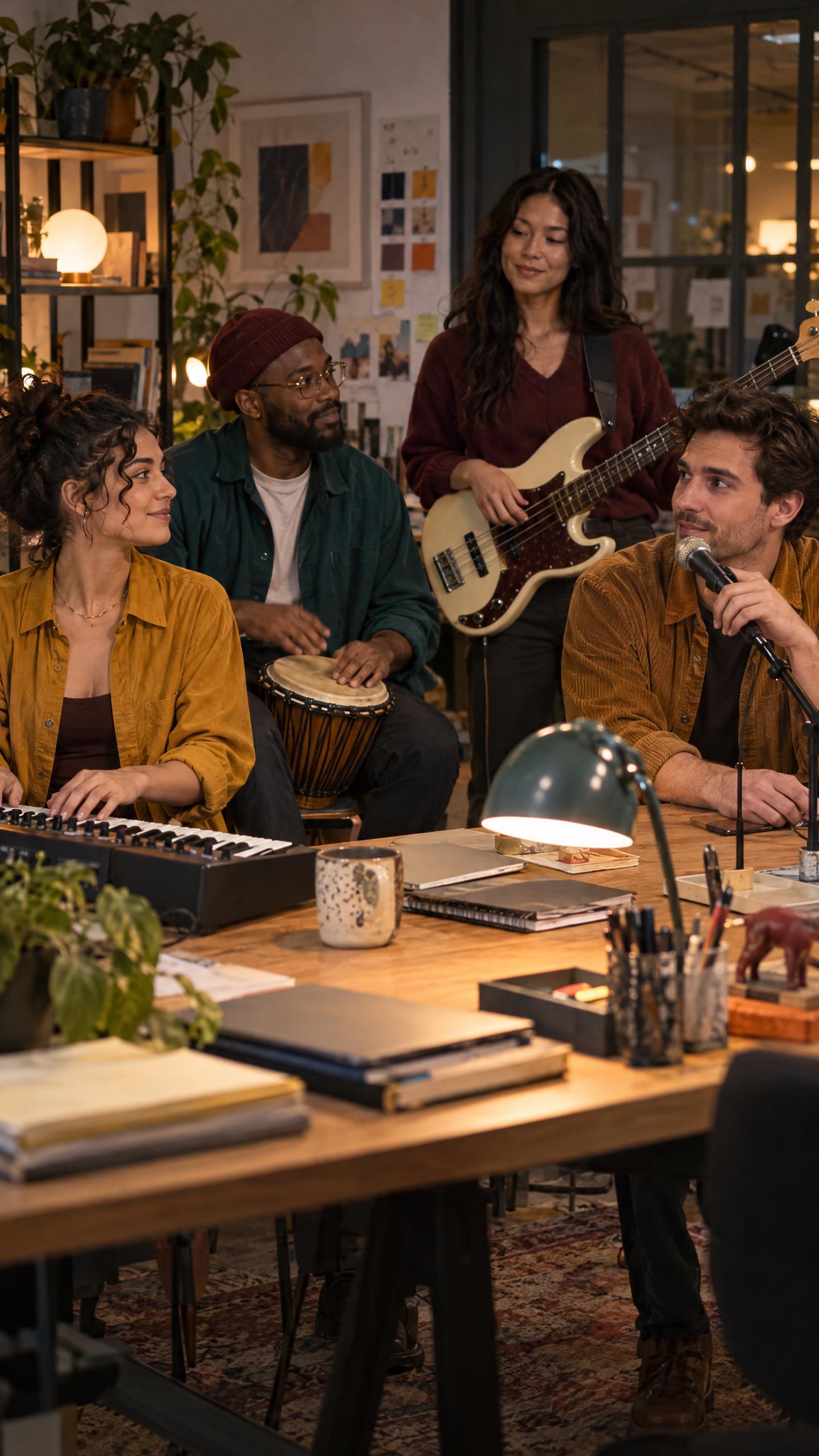
The safest creative approach is to borrow the format—not a recognizable set, celebrity, song, or broadcast identity. This workflow builds an original after-hours office band with fictional adults, original music, and an ordinary shared desk.
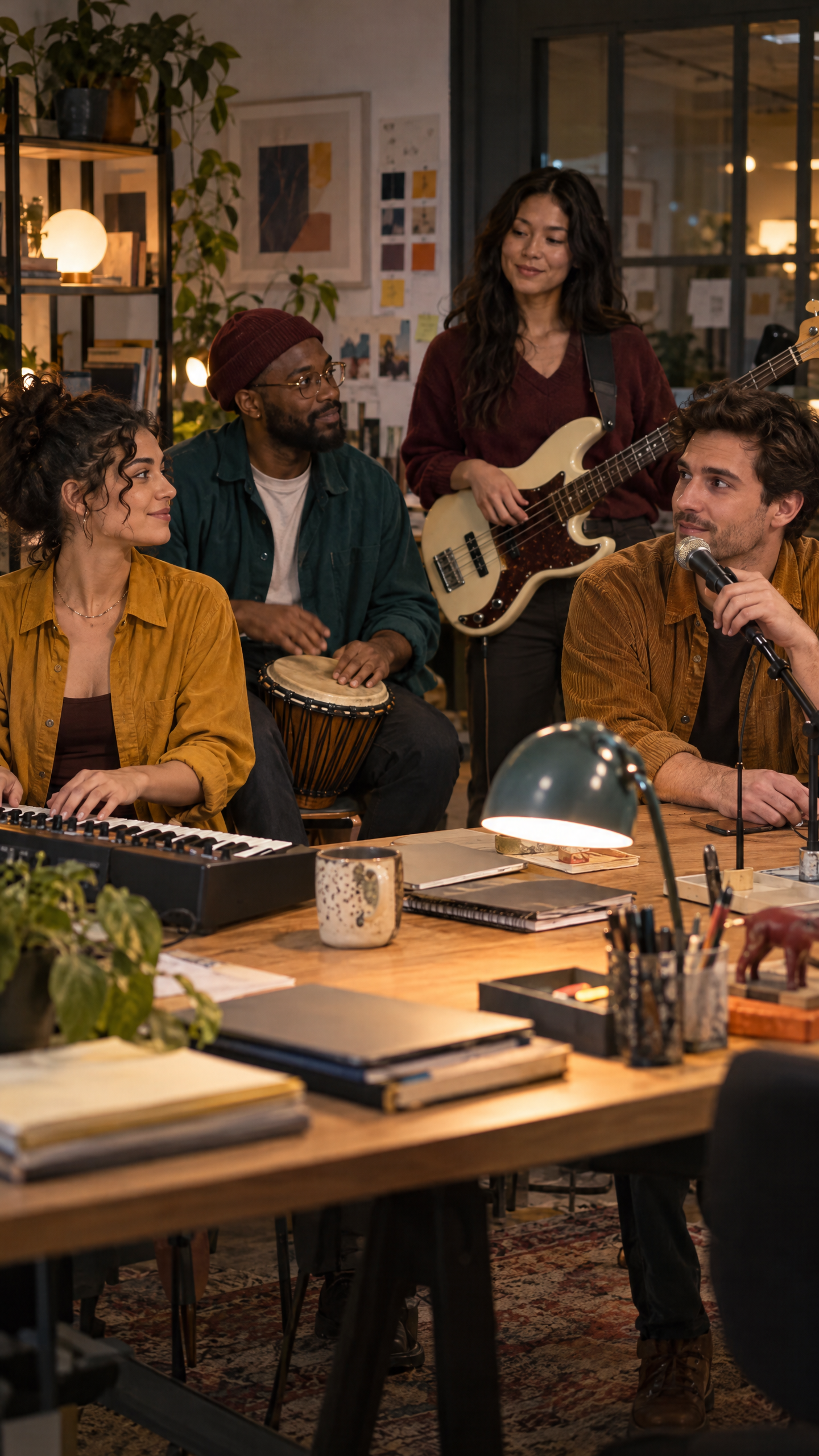
| Original ensemble reference generated in WeShop AI |
|---|
 |
Why this video format works
The performance begins with a mundane setting and gradually reveals unexpected coordination. A keyboard note starts the rhythm, the hand drum answers, the bass enters, and the singer delivers one memorable line. Viewers understand each layer without needing narration.
Step 1: Give every performer one job
Keep the ensemble small. The keyboardist starts, the drummer establishes tempo, the bassist supports the hook, and the vocalist completes it. Do not ask every character to sing, dance, and change positions at once.
Step 2: Write a 15-second musical arc
- 0–3 seconds: room tone, exchanged glances, one keyboard chord.
- 3–7 seconds: hand drum and bass join.
- 7–12 seconds: vocalist delivers one original hook.
- 12–15 seconds: group reaction and a clean final chord.
Step 3: Direct reactions between notes
The clip feels human when the bassist smiles after the first drum hit and the keyboardist looks toward the vocalist before the hook. Ask for restrained reactions, not exaggerated cheering.
Seedance 2.5 prompt
Prompt: Use the uploaded 9:16 office-band image as the exact character, wardrobe, instrument, desk, and lighting reference. Create a 15-second realistic after-hours office performance in one coherent scene. Four fictional adults remain in their original positions. 0–3 seconds: quiet office ambience; the keyboardist looks at the group and plays one warm electric-piano chord. 3–7 seconds: the seated drummer joins with a relaxed two-beat hand-drum rhythm; the bassist begins a simple original groove and smiles briefly at him. 7–12 seconds: the vocalist leans slightly toward the tabletop microphone and sings one original line, “We made a little room for something new,” in a natural understated voice. The others keep playing and exchange small approving glances. 12–15 seconds: they land on one clean final chord, then share a restrained laugh. Gentle handheld push-in, warm practical office light, realistic fingers and instrument contact, stable faces and clothing, natural room acoustics, original music only. No recognizable song, no celebrity, no branded concert set, no extra performer, no subtitles, no watermark.
Audio review
Check whether the drum strikes match the hand movement, the singer’s mouth matches the lyric, and the bass continues during the vocal line. If the audio becomes crowded, remove one instrument before rewriting the entire prompt.
Commercial variations
Replace the lyric with a short original product message, let the final chord reveal a campaign card in post-production, or assign the ensemble to a fictional retail store after closing. Keep the musical material original and obtain performer consent whenever real employee references are used.
Seedance 2.5 is listed in the WeShop model directory for longer reference-led video creation. Confirm the exact duration and audio controls shown in the active workspace before production.
Excellent example generated in WeShop AI
This completed reference-led version uses Kling 4.0 in WeShop AI while preserving the same shot plan, ensemble blocking, and original-audio workflow described above.
| Source reference | Generated video |
|---|---|
 |
Open the complete office-band example in WeShop AI.