












AI Swimsuit Photo Editor with Nano Banana 2.1: Recolor Swimwear, Keep the Pose
Recolor a one-piece swimsuit with Nano Banana 2.1. Compare black-to-burgundy fabric while retaining green straps, the straw hat and the original beach pose.
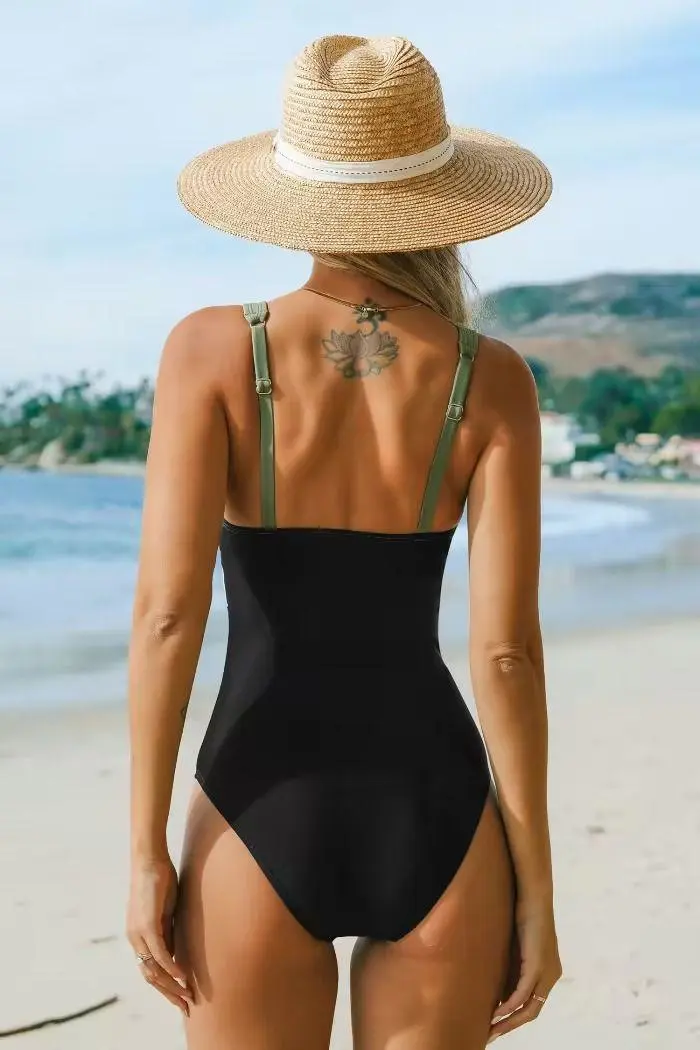
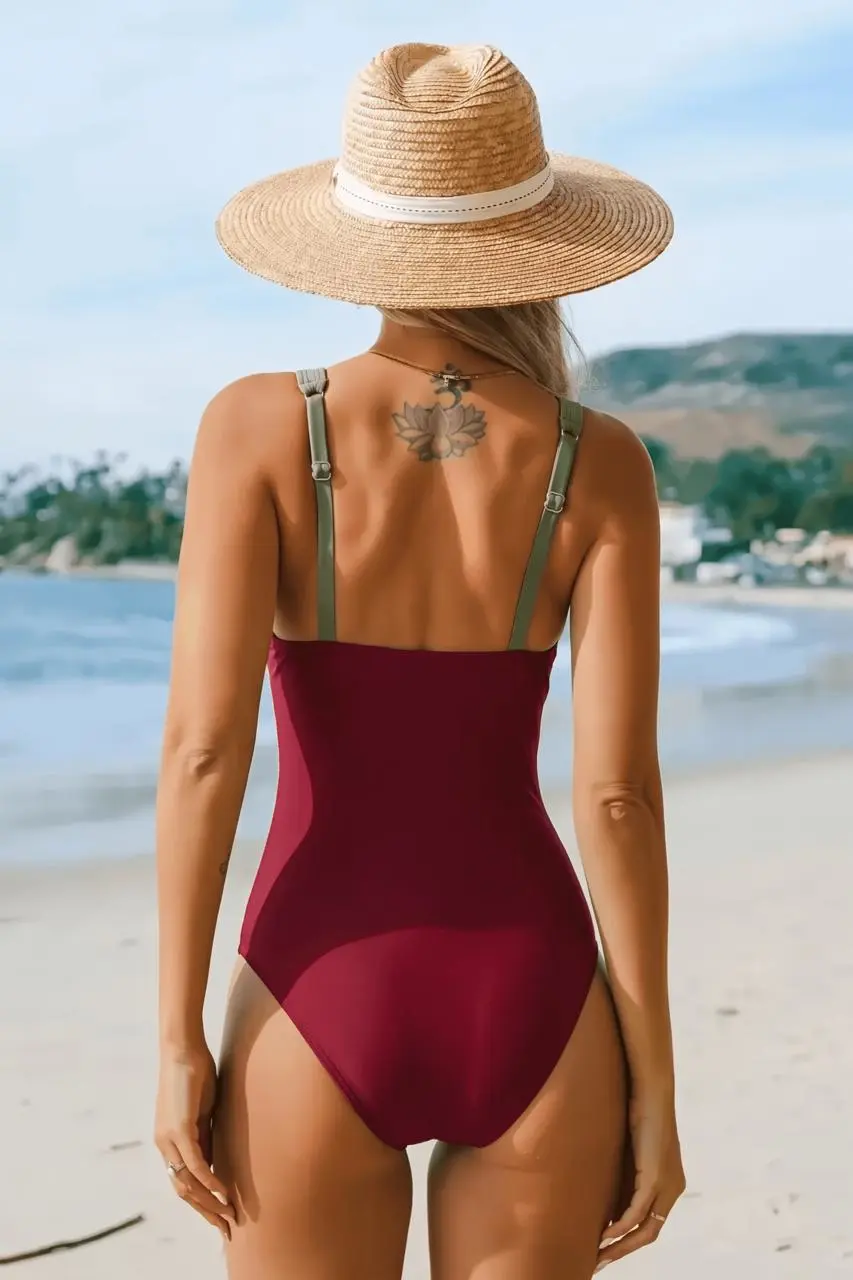
A swimsuit recolor should change the selected fabric while leaving neighboring colors readable. This Nano Banana 2.1 example turns the black body of a one-piece swimsuit burgundy and keeps its green straps. The original rear-facing pose, straw hat, upper-back tattoo and beach remain recognizable in the edited image.
Original input
AI-generated result
Specify which fabric changes and which color stays
The black swimsuit body is the selected area. The green straps remain green. Naming both constraints gives a more precise color-edit request than asking to recolor the entire swimsuit without distinguishing its parts. Keep the existing one-piece cut, fit and coverage.
Use the original rear-view photograph as Image 1
This source is a separate Pinterest photograph, not a frame from the video used in another Solution. It shows the swimsuit from behind with a straw hat and a visible upper-back tattoo. No face is visible, so this example does not test facial preservation or ask the model to reveal a new face.
Tested prompt and reference roles
Edit only the existing black fabric body of the one-piece swimsuit in Image 1. Recolor that black swimsuit body to rich burgundy red while preserving the exact existing one-piece design, fit, cut, coverage, fabric behavior and seams. Keep the original green shoulder straps green. Preserve the same adult woman, rear-facing standing pose, natural body proportions, upper-back tattoo, hair under the straw hat, hat shape, hands, arms, beach, sea, hills, daylight, framing and crop. Do not reveal a face that is not visible in the source. Mainstream swimwear-fashion recolor only. No smaller garment, extra exposed skin, clothing removal, nudity, transparent fabric, body reshaping, erotic posing, new people, text or other changes.Compare the burgundy body against the green straps
The selected result has a burgundy swimsuit body while the green straps remain recognizable. Inspect the top edge, side boundaries, strap attachments and shaded fabric. Then check the hat, tattoo, hands and beach for unintended changes. Fine texture and tattoo detail can be reconstructed even when the overall pose and color edit succeed.
Keep the result within a color-concept workflow
A generated recolor is not a guarantee of exact fabric dye or commercial product-color accuracy. Use a specific color reference when an exact shade matters, and inspect the image at the size where you intend to use it. This example preserves the existing garment coverage; no clothing-removal step is involved.
Recorded settings for this example
Open Nano Banana on WeShop, choose Nano Banana 2.1, and add the original input. Paste the prompt, generate one result and inspect it against the source.
| Setting | Tested value |
|---|---|
| Workflow | Image-to-Image |
| Image inputs | 1 |
| Video inputs | 0 |
| Image size | 2K |
| Aspect ratio | auto |
| Quantity | 1 |
What the selected result shows
- Swimsuit main fabric is burgundy
- Green straps, straw hat, upper-back tattoo, rear-facing pose and beach remain recognizable
Fine tattoo, fabric and skin details regenerated. Source is a one-piece swimsuit, so article title and language must use swimsuit rather than bikini. No visible face: no facial-preservation claim. These are selected outputs generated and reviewed on November 12, 2026; they do not measure repeatability across many runs.
You can try it directly using the tool on the right.
For recoloring an existing moving clip, see the Kling swimwear video editor.
Reference credit: Cupshe on Pinterest. Pinners are credited as source curators where original authorship is not established. This independent AI-editing demonstration does not imply endorsement by the source creators or depicted people. Use media and likenesses you are authorized to edit.