












Create a Dongdaemun-Style OOTD Poster with an AI Image Generator
Learn how to combine flat-lay clothing and accessory photos into a burgundy, vintage-inspired OOTD poster using AI image generation prompts.
Create a Dongdaemun-Style OOTD Poster with an AI Image Generator
You do not need a model photoshoot or a manually assembled collage to present several fashion products as one complete outfit.
A leather jacket, pair of wide-leg pants, and matching bag can be combined into a vertical OOTD poster with a deep burgundy background, handwritten annotations, and the visual language of an independent fashion magazine.
The key is to assign each uploaded product a clear role, then use the prompt to control the outfit assembly, subject size, background, annotations, and unwanted visual effects.
“Dongdaemun-style” describes an editorial look inspired by Korean fashion retail visuals. It does not imply an official connection with Dongdaemun Market.
From Flat-Lay Product Images to an OOTD Poster
| Leather Jacket | Wide-Leg Pants | Leather Bag | Generated OOTD Poster |
|---|---|---|---|
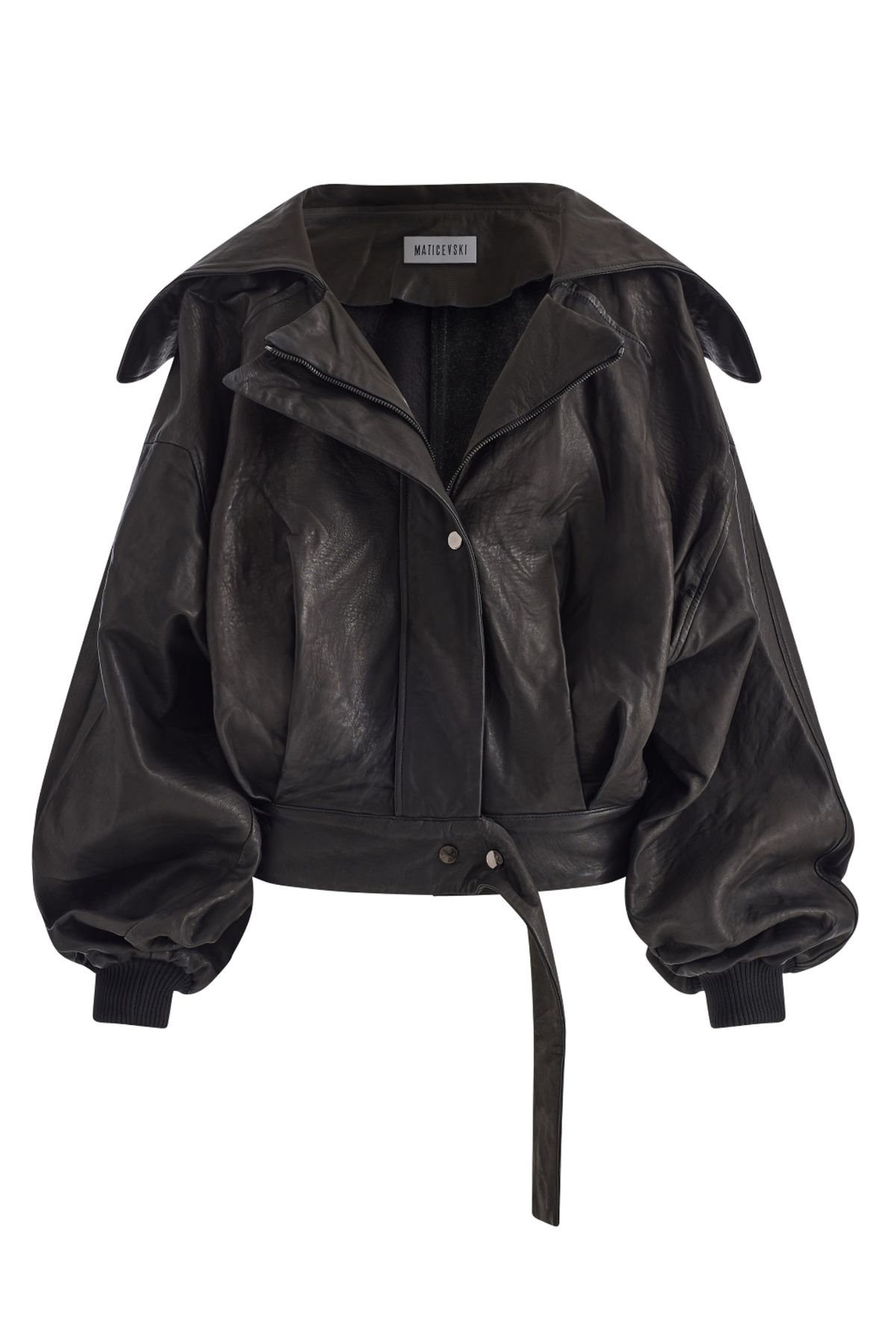 | 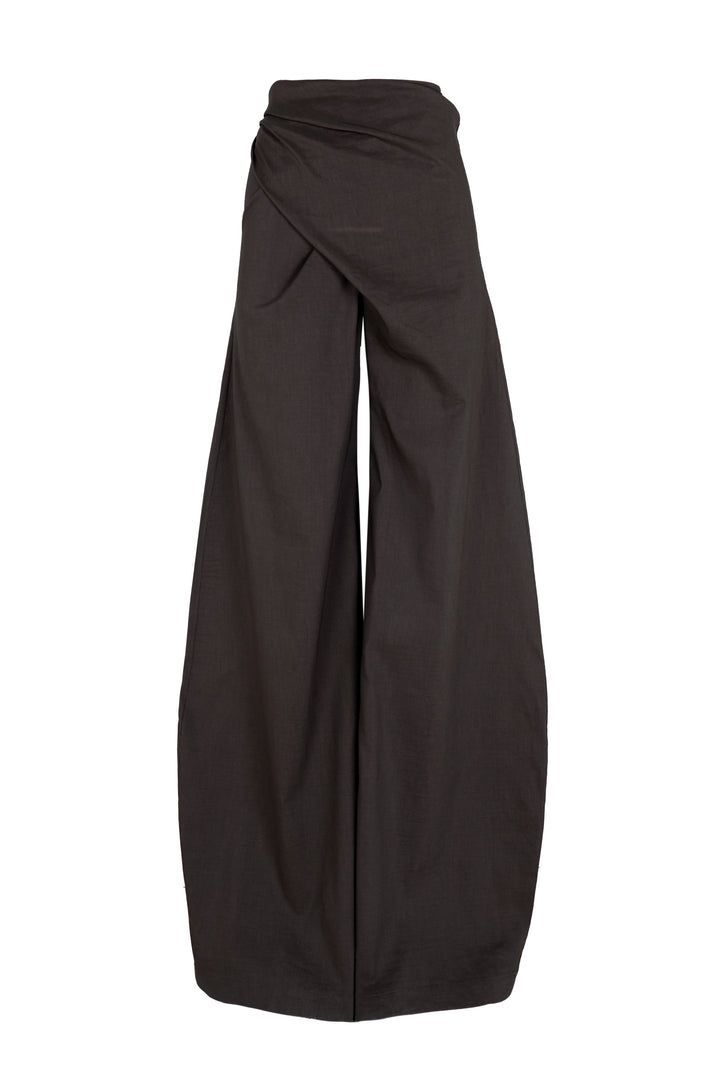 | 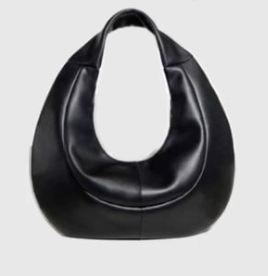 | 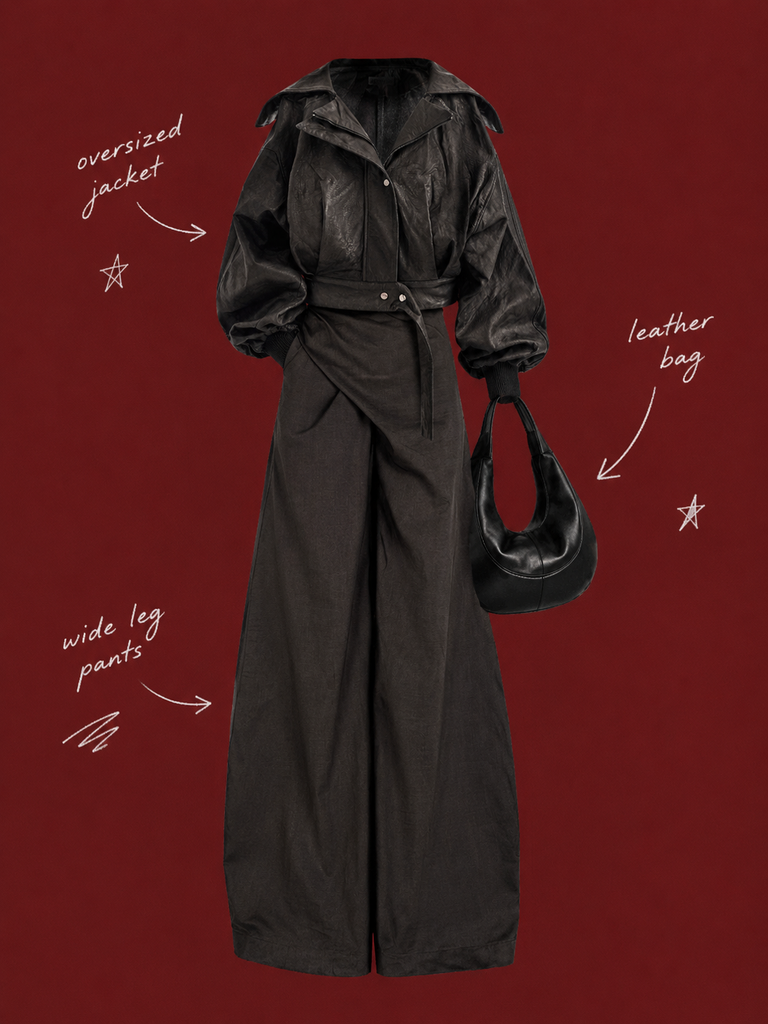 |
| Role: Hero piece and upper-body garment | Role: Lower-body garment and vertical silhouette | Role: Supporting outfit accessory | Result: One complete headless OOTD on a deep burgundy poster |
Why Flat-Lay Clothing Photos Work for Mix-and-Match Outfits
This workflow is not limited to the three products shown in the example.
You can upload different tops, bottoms, shoes, bags, and accessories, then use the AI image generator to assemble them into new outfit combinations.
Possible inputs include:
- jackets, shirts, knitwear, sweatshirts, or blazers;
- wide-leg pants, jeans, skirts, shorts, or tailored trousers;
- boots, sneakers, loafers, or heels;
- handbags, hats, belts, jewelry, or scarves;
- contrasting colors, materials, and silhouettes.
The AI is not being asked to reproduce one fixed outfit. Its task is to identify the role of each uploaded product and arrange the separate pieces as one coherent OOTD silhouette.
In this example, the products have the following roles:
| Product | Styling Role | Details to Preserve |
|---|---|---|
| Black leather jacket | Hero piece and upper-body garment | Oversized silhouette, lapels, sleeves, leather texture, and waist construction |
| Black wide-leg pants | Lower-body garment and vertical silhouette | High-waisted appearance, wide legs, dark fabric, and full length |
| Black leather bag | Outfit accessory | Curved shape, short strap, black leather, and volume |
The matching dark palette helps the example feel cohesive, but the products do not need to use the same color.
You can also combine contrasting colors, mixed materials, or different fashion directions. Replacing even one product can create a different OOTD without changing the overall poster workflow.
For more reliable results, use input images that have:
- one clearly visible product per image;
- complete product silhouettes;
- clean backgrounds;
- recognizable colors and materials;
- a realistic relationship between the selected garments;
- no unnecessary text, stickers, or decorative elements.
What You Need
Prepare:
- several clean flat-lay images of clothing or accessories;
- access to WeShop GPT Image;
- the complete English prompt below.
If an input image contains a complex scene or several unrelated objects, those elements may appear in the generated poster.
Simple product photography gives the AI clearer information about the shape, color, and intended role of each item.
Step 1: Upload the Clothing and Accessory Images
Open WeShop GPT Image and upload the products you want to combine.
The example uses:
- a black leather jacket;
- black wide-leg pants;
- a black leather bag.
The jacket acts as the hero product. The pants and bag support the outfit.
The goal is not to arrange three isolated products with equal visual weight. The products should become one coordinated look:
- the jacket forms the upper body;
- the pants continue naturally below the jacket;
- the bag appears beside the body or near the hand position;
- all selected products form one centered, headless outfit silhouette.
If you upload different products, first decide:
- which image is the main upper-body garment;
- which image is the inner layer;
- which image is the bottom garment;
- which images show shoes;
- which images are accessories.
Clear roles make it easier for the AI to understand the intended outfit.
Step 2: Paste the Complete Vintage Fashion Poster Prompt
Use the original prompt below:
Use my uploaded image as the main person or product asset to create a vertical, vintage fashion collage poster.

Carefully cut out the subject and place it in the center of the composition. Preserve its recognizable clothing, pose, silhouette, proportions, colors, and important details without changing its identity. Present the subject as a clean magazine-style cutout layered directly onto the background. If the uploaded image features a person, the head may be cropped out or extend beyond the top edge so the visual focus remains on the outfit and body shape. If the subject is a product, keep it complete, clear, and easily recognizable.

Use a solid deep burgundy, dark brick-red, or muted oxidized-red background that fills the entire canvas. Do not add a white border, white margins, a paper frame, or empty white space around the poster.

Add only a few white handwritten English words, curved arrows, and casual fashion-sketch doodles on the left and right sides of the subject. The arrows may point toward clothing pieces, accessories, or other important details. The writing should look naturally hand-drawn, slightly irregular, and loosely arranged, like annotations in a fashion designer’s sketchbook. Keep these elements sparse and make sure they do not cover the subject.

The overall visual language should resemble an independent fashion magazine, a clothing-design scrapbook, or an experimental late-20th-century fashion advertisement. Keep the layout minimal and clear, with one central cutout subject against the red background.

Use an approximately 2:3 vertical aspect ratio. The subject should occupy around 75%–85% of the poster’s height and be positioned centrally, slightly toward the bottom.

Keep the final image sharp and clearly defined. Do not add torn-paper edges, rough cutout edges, glue marks, tape, folds, stains, fading, film grain, scanning noise, blur, distressed textures, decorative badges, realistic scenery, complex props, modern interface elements, neon lighting, 3D rendering, or overly vivid colors.
This prompt controls five important parts of the result:
- product cutouts and outfit assembly;
- the deep burgundy background;
- the size and position of the central outfit;
- sparse handwritten labels, arrows, and doodles;
- excluded effects such as borders, torn paper, tape, grain, and complex scenery.
The original prompt uses the general phrase uploaded image. When working with several references, add a sentence that defines the role of each product:
Use all uploaded product images in one coordinated outfit. Treat the main upper-body garment as the hero piece, place the selected bottom garment below it, and use the remaining shoes, bags, or accessories as supporting styling elements.
For this specific combination, use:
Use the black jacket as the main upper-body garment, the black wide-leg pants as the lower-body garment, and the black leather bag as the outfit accessory.
Step 3: Control the OOTD Poster Composition
Make the Clothing the Main Subject
The generated poster does not need a complete person or realistic environment.
Instead, the jacket, pants, and bag form a headless styling silhouette. This keeps attention on:
- garment shapes;
- the relationship between the top and bottom;
- contrasting or matching materials;
- accessory placement;
- the overall palette.
The same structure can also combine dresses, skirts, shoes, hats, belts, or jewelry.
Fill the Canvas with Deep Burgundy
A deep burgundy, dark brick-red, or muted oxidized-red background creates contrast with black clothing while supporting the vintage fashion-editorial direction.
The prompt asks the background to reach every edge of the canvas. This prevents:
- white borders;
- white page margins;
- paper frames;
- unwanted empty space.
If the uploaded products are also red or burgundy, check that there is enough contrast between the products and the background.
Control the Subject Size
The assembled outfit should occupy approximately 75%–85% of the poster height.
If the outfit is too small, the product details lose impact. If it is too large, there may not be enough space for handwritten labels and arrows.
The subject can sit slightly below the vertical center while remaining the clear focus.
Keep the Handwritten Elements Sparse
The example uses only a few white handwritten labels, curved arrows, stars, and sketch marks.
The labels identify:
oversized jacket;wide-leg pants;leather bag.
These elements should support the fashion story without covering the products.
When using different garments, replace the labels with relevant descriptions such as:
cropped blazer;pleated skirt;knee-high boots;shoulder bag;layered necklace.
Keep every label short and easy to review.
Step 4: Generate and Inspect the Result
Start the generation using the control available in the current WeShop interface.
You can try it directly using the tool on the right.
Do not judge the result only by its overall atmosphere. Check whether every selected product has been used correctly.
| Check | What to Confirm |
|---|---|
| Hero product | The main jacket, top, or dress retains its recognizable silhouette, color, and material |
| Bottom garment | The pants, skirt, or shorts keep their original shape and do not become a different garment |
| Shoes and accessories | Every selected item remains complete and appears in a natural position |
| Outfit assembly | The upper and lower garments connect naturally without obvious breaks or incorrect overlaps |
| Product count | No selected item is omitted, duplicated, or replaced |
| Background | Deep burgundy fills the canvas without a white border or paper frame |
| Handwritten elements | Labels and arrows remain sparse and do not cover the products |
| Text | Spelling is correct and arrows point to the intended items |
| Sharpness | Product edges are clean, without blur, torn-paper effects, or rough cutout artifacts |
Final OOTD Poster
| Generated Poster | Result Analysis |
|---|---|
Final result: Three independent product images become one complete vertical OOTD. | Subject: The jacket, wide-leg pants, and bag form a centered, headless outfit silhouette. Background: Deep burgundy fills the entire poster. Annotations: White handwritten labels and arrows appear on both sides. Style: The result resembles an independent fashion magazine, design scrapbook, or vintage advertisement. |
How to Fix Common Problems
The AI Omits a Garment or Accessory
The original prompt uses the general phrase uploaded image. If one of the references is ignored, add:
Use every uploaded product image in one coordinated outfit. Do not omit, duplicate, or replace any selected garment or accessory.
If each role is known, describe it directly:
Use the black jacket as the main upper-body garment, the black wide-leg pants as the lower-body garment, and the black leather bag as the outfit accessory.
The Garments Do Not Form a Natural Outfit
Add:
Assemble the separate clothing items into one coherent headless OOTD silhouette. Align the upper garment and bottom garment naturally without changing their original design.
A Garment Changes Shape
Add:
Preserve the original garment silhouette, proportions, seams, collar, sleeves, waistband, leg width, color, and material. Do not redesign the clothing.
Adapt the preserved details when working with skirts, dresses, shoes, or accessories.
The Poster Has a White Border
Add:
Extend the deep burgundy background to every edge of the canvas. No white border, margin, frame, or empty outer area.
There Are Too Many Handwritten Elements
Add:
Use no more than three short handwritten labels, three curved arrows, and two small sketch doodles. Keep every annotation away from the garments.
The Poster Becomes a Torn-Paper Collage
The main prompt already excludes torn paper, tape, folds, and stains. If they still appear, reinforce the rule:
Use clean digital cutouts with smooth edges. No paper texture, torn edges, tape, glue, folds, stains, grain, or distressed effects.
The English Labels Are Misspelled
Reduce the amount of generated text and specify the exact labels:
Use only these three handwritten labels: “oversized jacket,” “wide-leg pants,” and “leather bag.” Spell every label exactly as written.
Replace these labels when the uploaded products change. Always review the generated text before publishing.
Starting with several clean flat-lay product photos, define the role of each item and use the prompt to control the background, composition, annotations, and exclusions.
You can then replace any garment or accessory to create a different Dongdaemun-inspired OOTD poster without being limited to the jacket, pants, and bag shown in this example.
Create Your Own OOTD Poster
Upload your preferred tops, bottoms, shoes, bags, and accessories, then combine them into a clean vintage fashion poster.
Try WeShop GPT Image