












Wan 3.0 Glamour Video: Create a Three-Shot Red-Carpet Entrance
Create a three-shot red-carpet fashion entrance with Wan 3.0 Reference. Assign an entrance, greeting and closing pose to one runway reference image.
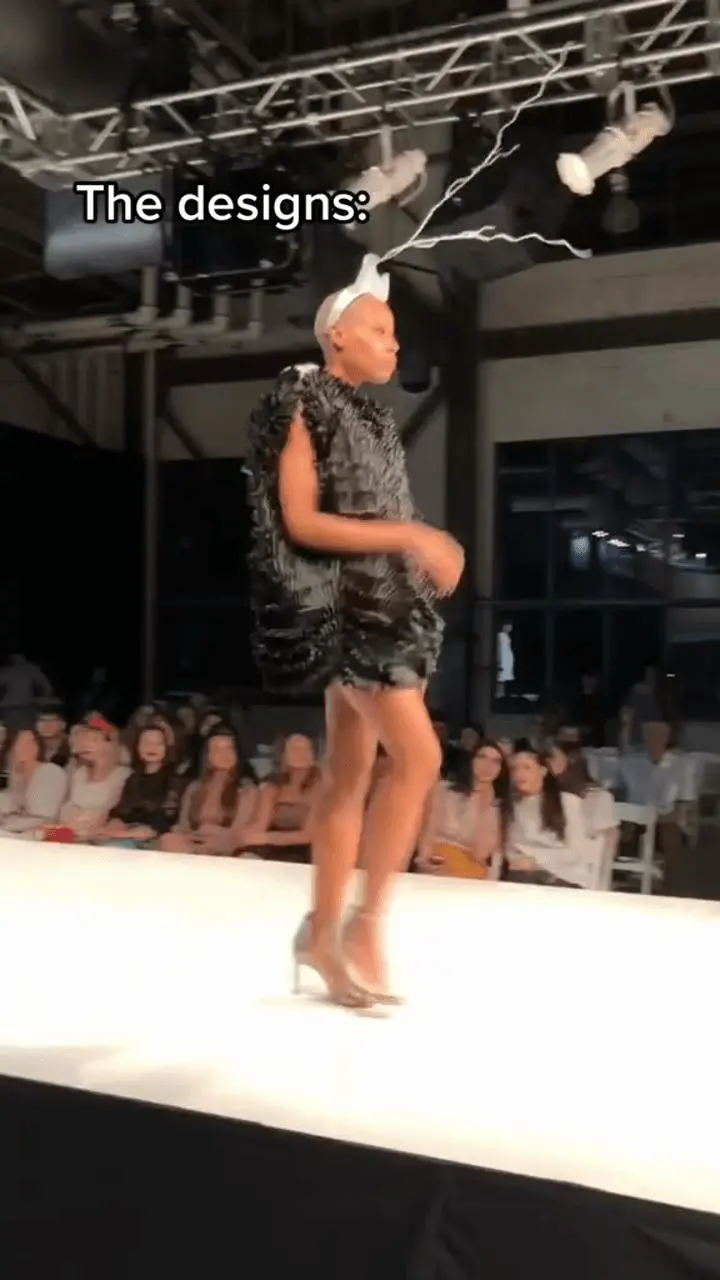
A red-carpet sequence needs more direction than “make this photo move.” This Wan 3.0 Reference workflow assigns three simple events to a runway image: two entrance steps, a friendly wave and a closing full-body pose. The reference is a textured black mini dress with silver heels and a sculptural white headpiece.
Source / reference
AI-generated result
Build the entrance around three readable events
The opening full-body shot establishes the red carpet and two poised steps. A medium shot makes the greeting readable. The final full-body view returns attention to the outfit. This gives a beginning, middle and end without requiring a long choreography.
Describe the actual outfit in the source
Image 1 is a frame from an Evan Hirsch runway video: black textured mini dress, silver heels and a white sculptural headpiece. The source contains an indoor stage, spectators and embedded text. Those are context in the input, while the prompt assigns a new exterior venue and asks not to recreate the source caption.
Keep the headpiece and hem in the continuity instructions
A distinctive accessory can disappear when the shot changes. Name the white headpiece alongside the black dress and existing hem length, then give the model only one small action per shot. The prompt below is the corrected version used for the selected generation.
Use Image 1 as one adult runway fashion model and her existing opaque textured black mini dress, silver high heels and sculptural white headpiece. Direct a three-shot red-carpet entrance: a full-body shot of two poised steps onto a simple red carpet outside a modern venue at dusk; a medium shot of a small friendly wave with soft photographer flashes behind; a final full-body neutral fashion pose. Keep the same face, hair, natural body proportions, black mini dress design, hem length, headpiece and coverage across the cuts. Preserve the visible bare legs below the existing hem and grounded feet; do not recreate the source caption, crowd or indoor stage. No real-celebrity substitution, wardrobe change, body reshaping, nudity, transparency, erotic posing, readable logos, speech or music.Inspect the entrance beyond the opening frame
Review whether the opening steps, wave and closing pose are visible, then track the headpiece, dress hem and heels through the cuts. A generated fashion sequence can reconstruct garment details and facial features; do not interpret it as footage of an actual red-carpet attendance.
Reuse the shot structure with a different look
For your own reference, replace the garment and accessory description with what is actually visible. Keep the three shot roles and restrained actions. If a wave deforms the hand, reduce it to a brief small greeting and review the full arm movement rather than a single favorable frame.
Recorded generation settings
Open Wan on WeShop, select Wan 3.0 Reference, and load the source in the roles described above. Paste the tested prompt, generate one result, then compare it with the source.
| Setting | Tested value |
|---|---|
| Workflow | Image-to-Video |
| Image inputs | 1 |
| Video inputs | 0 |
| Duration | 9s |
| Resolution | 720P |
| Aspect ratio | 9:16 |
| Quantity | 1 |
| Generate audio | Off |
These examples were generated and inspected on November 12, 2026. They show selected outputs, rather than a repeatability benchmark. Model selection and supported input modes are documented in the WeShop model guide.
Try the workflow with your own source
Use the entrance, greeting and closing pose as a compact direction pattern. Keep the reference outfit description accurate and inspect all three shots before exporting.
You can try it directly using the tool on the right.
Related workflows: Wan 3.0 Swimwear Lookbook: Direct Three Beach Fashion Shots.
Original reference credit: evanhirschfashion on TikTok. The reference posts and their creators are independent of this AI-editing demonstration; no endorsement is implied. Use source media and likenesses you are authorized to edit.