












Create Walk-In and Walk-Out OOTD Transitions with Kling 4.0
Create a Kling 4.0 OOTD transition with a complete walk-out, an empty frame and a new walk-in. See the tested two-image prompt, settings and actual video.
An OOTD transition is easier to read when one complete outfit leaves the frame before the next look arrives. Asking clothing to transform while the model is standing still can instead produce a distracting morph. This Kling 4.0 test uses a walk-out, a brief empty studio, and a separate walk-in to connect two fully visible outfits. The generated result below shows that sequence.
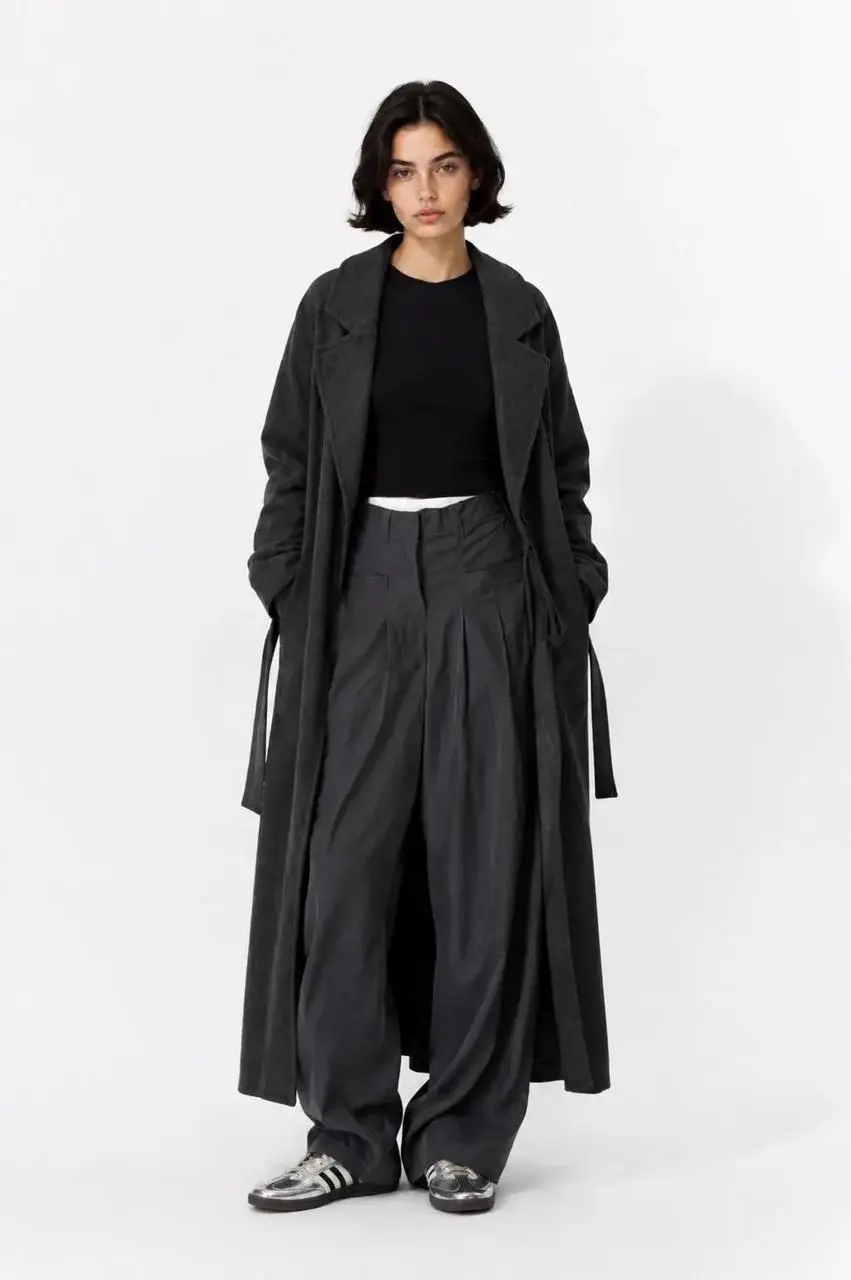
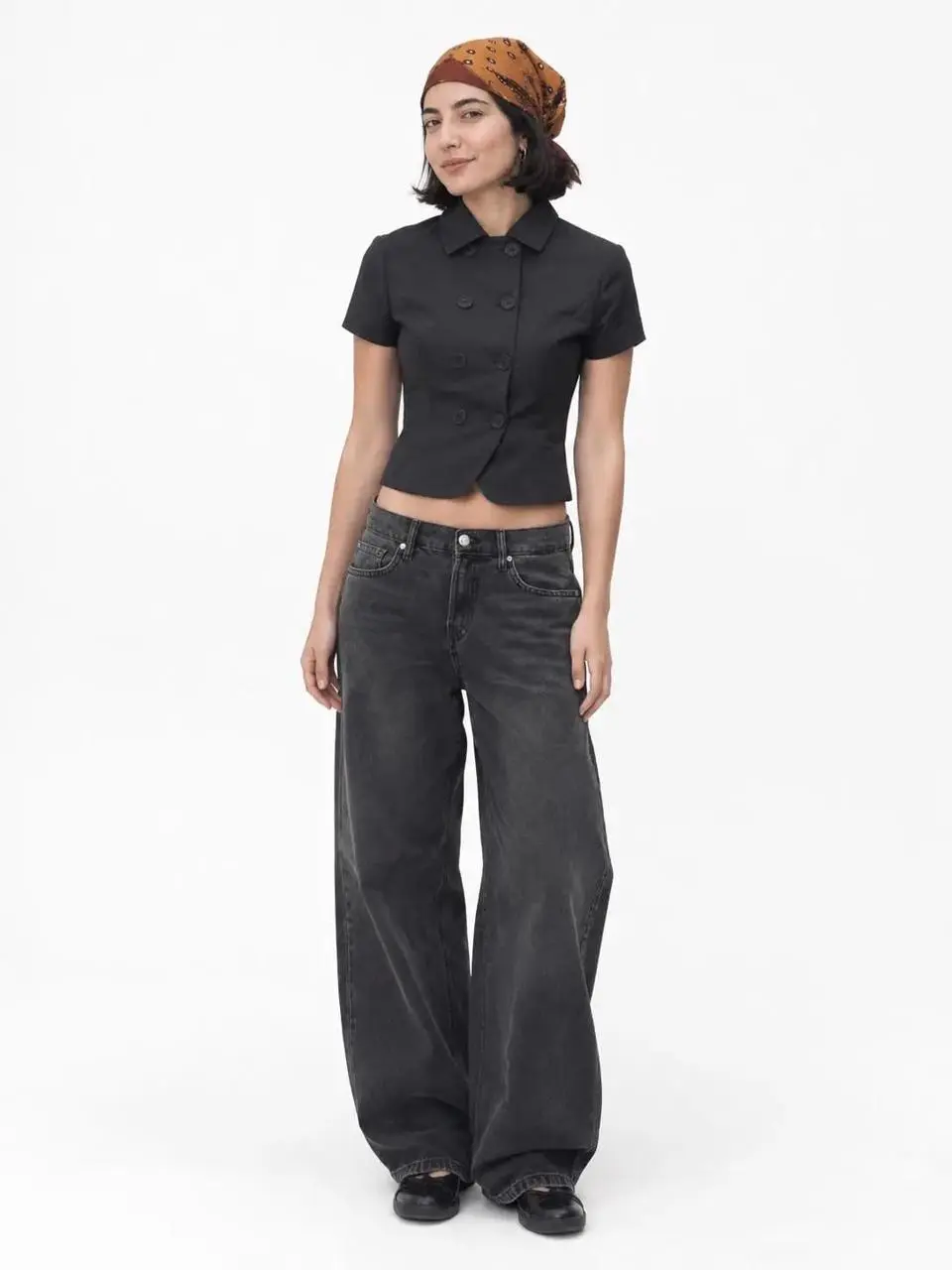
Generated result — walk out, empty frame, walk in
Choose two full-body looks that can stand on their own
The first reference shows a long charcoal coat over a black top and wide trousers. The second shows a cropped black short-sleeve jacket, dark jeans, an orange patterned headscarf, and black shoes. Both photographs have a simple light studio setting and enough room to see the shoes. This makes the requested entrance and exit easier to judge than a close-up would.
These are the reference images distributed with WeShop's public OOTD example. The video is a new AI-generated test made for this tutorial. The references are not evidence of one person's identity across both looks, and this article does not claim an identity-preservation test. Replace them with photographs you are authorized to use.
Use similar framing when preparing your own pair. A tightly cropped upper-body photograph and a distant full-body photograph create an additional framing problem. Start with two readable looks before asking for dramatic camera movement, a new location, or additional outfit changes.
Put the clothing change between the exit and entrance
The reusable structure is first look → complete exit → empty frame → second entrance → second look. The empty frame is the transition device. It gives the generator a moment to change the visible person and outfit without depicting fabric melting or switching on the body.
The prompt names the direction of each movement and asks for exactly one visible adult at a time. A locked camera and even studio lighting keep the edit focused on the clothing. The two looks should remain distinct; “make a fashionable transition” alone does not define that order.
Create an OOTD transition with exactly one adult model visible at a time. Begin with the supplied first frame: the woman wearing a long charcoal coat, black top and wide charcoal trousers in a white studio. She holds a clear full-body pose, then walks completely out of frame to the right. Briefly show the empty studio. A woman wearing the second reference look enters from the left: cropped black short-sleeve jacket, dark jeans, orange patterned headscarf and black shoes. She stops for a clear full-body pose matching that reference. Keep each complete outfit separate and recognizable. The clothing change takes place across the empty-frame transition, not as a melting morph on the body. Keep the camera locked, white floor, soft contact shadows and even studio lighting. No duplicate people, split screen, collage, readable text, logos or extra outfits.Load the two image states in Kling 4.0
Open Kling on WeShop and select Kling 4.0 Image to Video. Upload the long-coat photograph as the opening image and the headscarf outfit as the closing image. Leave Middle Frame empty for this two-look transition.
Paste the prompt and use the tested settings:
| Setting | Recorded value |
|---|---|
| Model | Kling 4.0 Image to Video |
| Images | Two actual image inputs |
| Middle frames | None |
| Duration | 7 seconds |
| Requested resolution | 720p |
| Aspect ratio | Automatic from the image inputs |
| Quantity | One video |
This test was generated on November 11, 2026. Select the mode and duration in the controls before generating; mentioning them in the prompt does not change the settings.
Generate the clip, then watch the entire sequence before choosing it. The important question is whether the requested transition happened, rather than whether its opening frame looks attractive.
Check the empty studio before judging the second outfit
The selected output begins with the charcoal-coat look, shows her turning and walking off to the right, briefly exposes the empty studio around the middle, and brings the second look in from the left. The ending settles into a readable full-body view. A contact sheet sampled every half second makes this order visible across the seven-second clip.
This is one selected output. It does not establish a success rate or exact preservation of facial features, garment construction, and fabric texture. Inspect hands, feet, hems, and the moment each model crosses the frame edge before using the result. A recognizable silhouette is not proof that every clothing detail survived.
If both looks overlap, strengthen the one-person-at-a-time and complete-exit instructions. If clothing changes while the first model is still visible, make the empty-frame beat explicit. If the second entrance feels rushed, increase the duration in the generator rather than adding more unrelated effects to the prompt. Recheck the whole clip after each change.
Adapt the transition to another pair of outfits
Keep the action structure and replace the clothing descriptions with the actual items in your references. Match the walking directions to the space available in your pictures. Add another look only after two looks have a clean, readable connection; this example does not test a longer outfit carousel or a large number of transitions.
You can try it directly using the tool on the right.
Treat the output as an AI-generated styling video, not a recording of a real fitting or a guarantee of clothing accuracy. Start with the loaded two-look example, replace its references, and check that the exit and entrance remain separate.