












Kling 4.0 Runway Model Swap: Replace the Face, Keep the Outfit
Test a runway appearance swap with Kling 4.0 using a front-facing walking clip and a dedicated portrait. Inspect facial features, hair and outfit continuity.
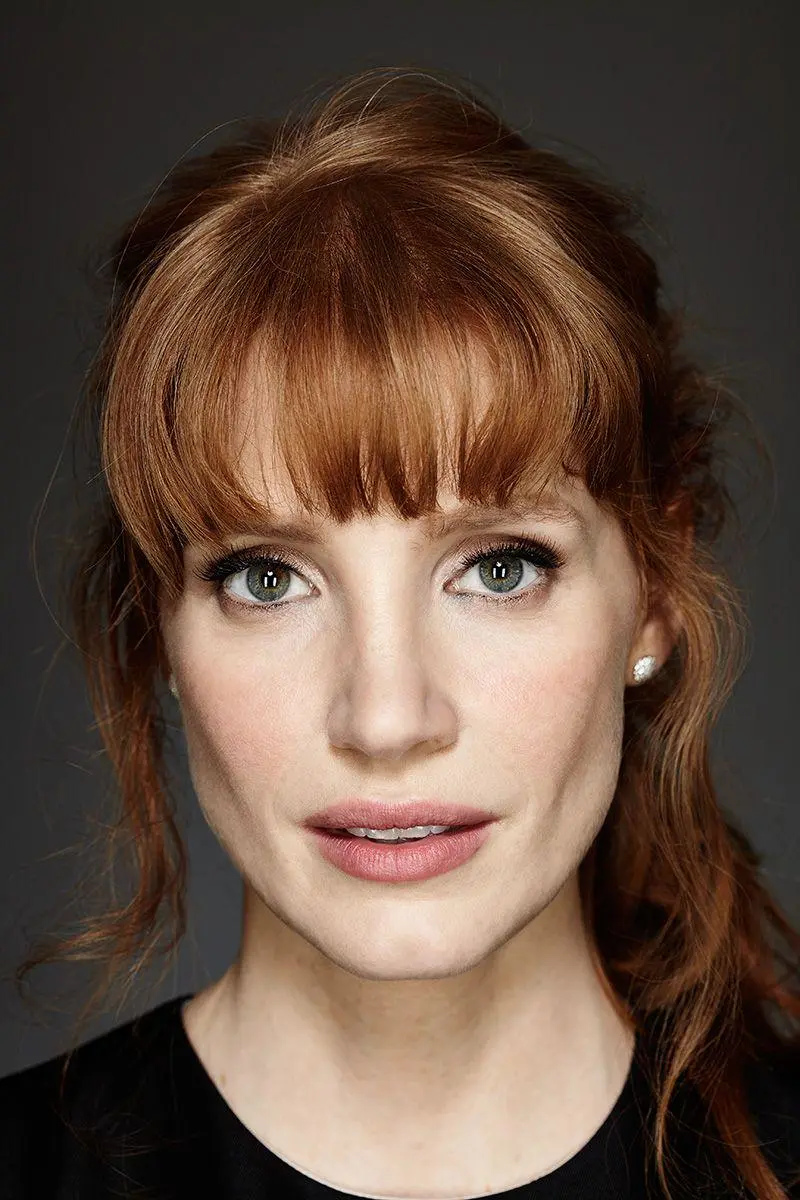
A video model swap should show a different facial appearance while keeping the source performance readable. This Kling 4.0 Reference test uses a continuous front-facing runway excerpt and a separate red-haired portrait. The portrait supplies the replacement head appearance; the video supplies the lavender shirt, black shorts, handbag and walking action.
Original input
AI-generated result
Image 1 / appearance reference
Choose a shot that exposes the face
The four-second input comes from a front-facing section of the original runway video, before its later close-up cuts. The face, hair and existing outfit are visible together. A side or rear view can show a hair change but gives much weaker evidence for a facial-appearance edit.
Make the portrait responsible for head appearance only
Image 1 is a separate adult portrait with red hair and bangs. Assign its face shape, eyes, nose, mouth and hairstyle to the replacement appearance. Keep the shirt, shorts, handbag, shoes, body proportions and runway action from Video 1. The black top and gray background of the portrait should not transfer.
Tested prompt and reference roles
Use Video 1 as the master runway performance and scene. Replace the main adult woman’s facial identity and hairstyle with the adult red-haired woman in Image 1. Match Image 1’s recognizable face shape, eyes, nose, mouth and red hair consistently through every frame; do not merely recolor the original performer’s hair. Preserve the source performer’s natural body proportions, pale lavender collared shirt, black high-waisted shorts and belt, black handbag, black high heels, garment coverage, arm swing, walking rhythm, camera, runway and audience. Image 1 supplies head appearance only; do not copy its clothes, pose, background, lighting or crop. Keep the same outfit throughout, one stable replacement person, grounded walking and no extra people. No nudity, transparent fabric, erotic posing, body reshaping, clothing removal, added text or scene change.Compare the face with both references
Review the generated face against the original performer and the portrait, rather than judging it only by red hair. Examine the visible eye and brow area, nose, mouth and head shape as the subject approaches. The result is a generated appearance interpretation; a single clip cannot establish biometric identity or perfect reproduction of small facial details.
Protect the outfit and walking rhythm
Follow the pale lavender shirt, black high-waisted shorts, belt and handbag through the full clip. A successful head edit should not silently replace these with clothing from the portrait. Keep your first revision focused on the face and hair instead of changing body shape, camera and clothing at the same time.
Recorded settings for this example
Open Kling on WeShop, choose Kling 4.0 Reference, and add the original input plus Image 1 in its assigned reference role. Paste the prompt, generate one result and inspect it against the source.
| Setting | Tested value |
|---|---|
| Workflow | Image + Video-to-Video |
| Image inputs | 1 |
| Video inputs | 1 |
| Duration | 4s |
| Resolution | 720p |
| Aspect ratio | 9:16 |
| Quantity | 1 |
What the selected result shows
- New pale red-haired facial appearance and bangs are visibly distinct from the original dark-haired performer
- Lavender shirt, black shorts, belt, handbag, heels, runway and walking action remain recognizable
Portrait hair is expanded into long red waves; exact hairstyle length is not preserved. No biometric-identity or perfect microdetail claim. These are selected outputs generated and reviewed on November 12, 2026; they do not measure repeatability across many runs.
The portrait’s red hair and bangs become long red waves in the result. The hairstyle is interpreted rather than copied at an identical length. Compare the new face with both the source performer and portrait before deciding whether it suits your own appearance-editing task.
You can try it directly using the tool on the right.
For an outfit-focused edit, see the Kling evening-gown video workflow.
Reference credit: Ana Rodrigues (pinner) on Pinterest; REEMA on Pinterest. Pinners are credited as source curators where original authorship is not established. This independent AI-editing demonstration does not imply endorsement by the source creators or depicted people. Use media and likenesses you are authorized to edit.