












Kling 4.0 Reference Shoulder Carry Trend: Recast a Duo
Make a shoulder carry trend video with Kling 4.0 Reference on WeShop. Recast two people using portraits and a motion clip, with the exact prompt and settings.
One person starts underneath, carrying their partner upside down. A forward swing changes the silhouette, and suddenly the person in front appears to have somebody else’s legs. This Kling 4.0 Reference shoulder carry trend example recreates that visual joke with two identity photos and a short reference video.
The workflow gives each input a separate job: the photos define the replacement cast, while the video guides the carry, swing, room, and camera. You can reuse the supplied case without filming a new lift.
Reference video
AI-edited result
Keep the carrier and partner assigned to the right roles
The shoulder carry trend is built around a two-person illusion. The partner on the shoulders swings forward, then holds a supported pose in front of the carrier. The final overlap makes the two bodies briefly read as one. The ViralRemix shoulder carry trend page provides context for this format, also described there as the “I’m the one” trend.
For this WeShop case, the important instruction is who replaces whom:
| Input | Assigned role | What to preserve |
|---|---|---|
| Image 1 | The standing carrier underneath | Recognizable face, dark hair, visible black shirt and blazer |
| Image 2 | The partner who starts inverted and swings forward | Recognizable face, pulled-back hair, visible earrings |
| Video 1 | The motion and scene reference | Carry, grips, forward swing, supported finish, room, and vertical framing |
Use those roles throughout the prompt. “Replace both people” alone leaves the assignment unclear precisely when the two bodies overlap and one face disappears.

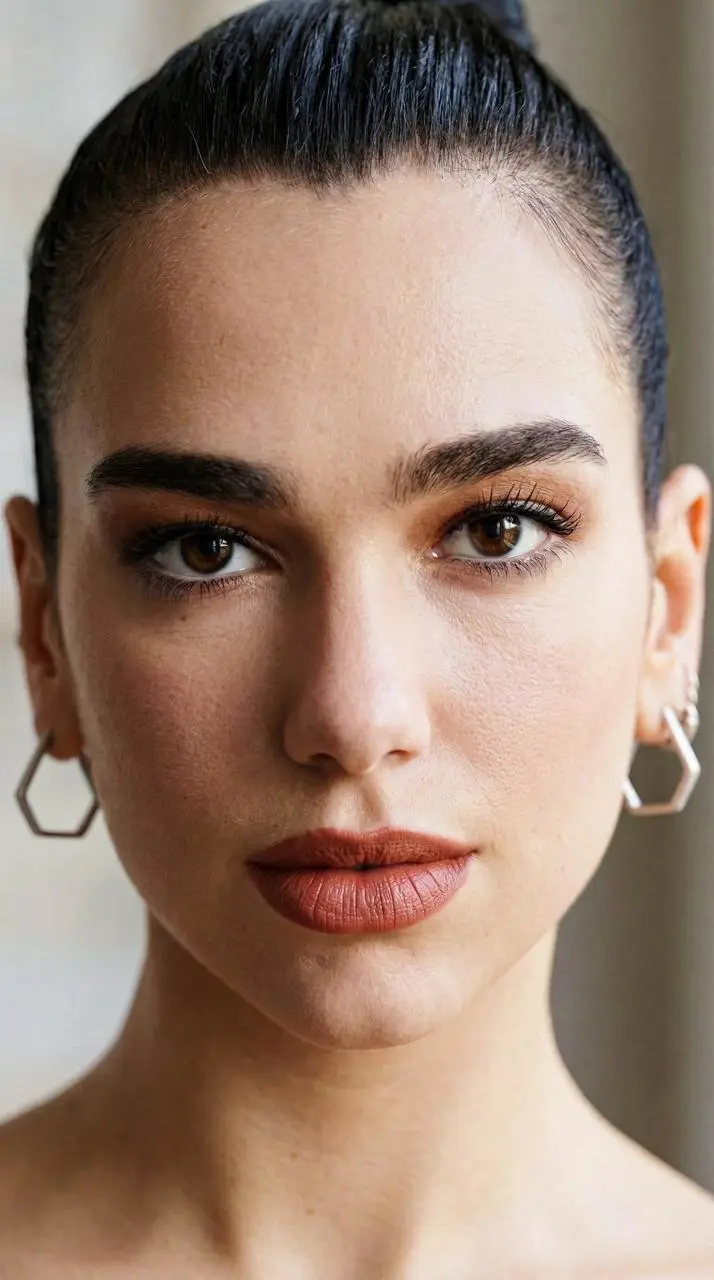
The second portrait is a face-and-shoulders close-up, so it cannot specify a full outfit. The case prompt keeps that partner in the source video’s black T-shirt and dark trousers. The first portrait supplies the carrier’s visible black shirt and blazer. Describe this choice explicitly when one photo shows clothing and the other does not.
Upload both portraits and the actual motion clip
Open Kling on WeShop, select Kling 4.0 Reference, and add the three inputs. Put the carrier portrait in Image 1, the partner portrait in Image 2, and the carry-and-flip clip in Video 1.
Confirm that all three thumbnails are present before generating. This example depends on a video reference being attached; a text description of a shoulder carry does not provide the same motion input.
Use clear, well-lit faces. If your intended result depends on a particular full outfit, provide photos that actually show it. Otherwise, tell the model which source clothing to retain rather than asking it to reconstruct unseen garments from a close-up.
Match the settings to the nine-second portrait clip
The successful case shown here used the following setup in WeShop:
| Setting | Case value |
|---|---|
| Model | Kling 4.0 Reference (Kling_4_0_Reference) |
| Duration | 9s |
| Resolution control | 720p |
| Aspect Ratio | Auto |
| Quantity | 1 |
| Reference video | 720 × 1280, 30 fps, approximately 9.1 seconds |
| Downloaded result | 720 × 1280, 24 fps, approximately 9.04 seconds |
Auto produced a vertical result in this case. Check your downloaded file’s dimensions and duration before fitting it into a social post. These are the settings and file properties of this example, rather than a promise that every reference will produce the same output.
Keep Resolution at 720p to match this example. The reusable case defaults to 720p. Confirm that control before generating if you have changed any settings.
Use a prompt that names the carry, swing, and finish
The prompt first fixes the identities, then explains the clothing choice, then anchors the action to the source clip. The approximate three- and four-second markers belong to this reference; change them if you use a clip with different timing.
Here is the exact prompt used for the displayed result:
Replace the two adults in the reference video with the people in image 1 and image 2. Image 1 replaces the standing man underneath who carries his partner; image 2 replaces the woman upside down on his shoulders who swings forward and down at about 3 seconds and lands in front at about 4 seconds. Never exchange their roles. Match each face, skin tone, hair and visible jewelry to its reference throughout. Give the man the black shirt and blazer visible in image 1 with dark trousers. Image 2 shows no full outfit, so keep the source woman fully clothed in her black T-shirt and dark trousers. Preserve the exact shoulder carry, hand grips, flip, landing, final supported pose, gestures and timing from the video. Keep the same room, daylight, camera position and vertical framing. Natural anatomy and stable identity during occlusion and fast motion. No extra people, limbs, scene changes, text or photo interface icons. Edit the entire source clip without adding a new scene.Requests such as “preserve the exact” describe the intended edit. Judge the generated movement by replaying it alongside the source, especially where hands, legs, and clothing overlap.
Check the forward swing before choosing the final clip
The rendered example keeps the recognizable room and action sequence. The carrier appears in a black blazer at the start, and the second identity becomes visible in front after the swing. That start-to-finish transfer is more useful to inspect than a single attractive thumbnail.
Review three moments:
- Opening carry: the carrier should match Image 1. Check the partner’s raised legs and the supporting hands without assuming every visible garment belongs to the carrier.
- Forward swing, around 3–4 seconds: slow down or pause the clip to inspect grips, limbs, face changes, and clothing. Brief occlusion is expected; unexplained extra limbs or an identity exchange are reasons to revise.
- Supported finish: the face in front should match Image 2, while the final overlapping pose remains readable. A legible illusion still needs believable anatomy and contact.
If the roles switch, reinforce the carrier/partner assignment. If an outfit drifts, specify which reference owns it or upload a more complete portrait. Clothing can be reinterpreted around the inverted pose, so inspect it even when both faces look convincing.
The result includes an audio track. Listen through the full clip before sharing; the presence of audio alone does not establish that a soundtrack is unchanged or that every mouth movement matches it.
Make your own shoulder carry remix
You can try it directly using the tool on the right.
Replace the two portraits, keep or replace the motion reference, and generate one result to inspect. Review the opening, the fast swing, and the finish before deciding to make more versions.
This is an AI-edited performance, not evidence that the pictured people filmed it together. Use photos, video, and audio you have permission to use, and label shared remixes as AI-edited.