












Kling 4.0 Comedy Short: One-Pass vs Shot-by-Shot Editing
Compare four 30-second AI comedy videos made with Kling 4.0 and Seedream 5.5: one-pass generation versus shot-by-shot editing, in portrait and landscape.
A student blames the dog for his missing homework. A goose walks in carrying the notebook. “He ate the dog too,” the student explains. The teacher considers the evidence, gives the goose the lesson, and sits down to take notes.
We made this 30-second AI comedy short with Kling 4.0 Reference, using Seedream 5.5 images as references. One workflow generated the complete video in a single request. The other generated six separate clips and assembled them in an edit. Both have a landscape and a portrait version, giving you four finished videos to compare.
Watch the same classroom comedy made two ways
One-pass · Landscape
Shot-by-shot · Landscape
One-pass · Portrait
Shot-by-shot · Portrait
All four finished videos are 30 seconds, with English dialogue and Chinese/English subtitles. The original landscape exports are 1920 × 1080; portrait exports are 1080 × 1920, at 24 fps. The article players use Media Library playback copies at 854 × 480 and 480 × 854 respectively, retaining the 30-second duration, frame rate and audio. The people are fictional adults in a Russian adult-school classroom. The visuals and original dialogue were AI-generated; subtitles and finishing were added afterward.
| Production choice | One-pass generation | Shot-by-shot generation and editing |
|---|---|---|
| Video requests per format | One 30-second request | Six 6-second requests |
| Who determines the internal cuts? | The model interprets the full timeline | The editor selects source ranges and cut points |
| Image preparation | Classroom master, three scene photos, three blocking maps | Shared assets plus a separate chalk-handover photo and map |
| Finishing used here | Subtitles, loudness adjustment; repeated speech removed in portrait | Assembly, dialogue-aware trimming, selected reframing, loudness adjustment and subtitles |
| Main trade-off | Less control over exactly when each beat happens | More continuity checks between separately generated clips |
One pass does not mean one continuous camera take. The generated video can contain cuts. Likewise, shot-by-shot editing means cutting generated clips, with frame-level control over the edit; we did not generate each individual frame as a separate image.
Build the references before asking for motion
The story needs three recognizable subjects: Elena, the teacher in red reading glasses and a charcoal cardigan; Misha, an adult student in a cream sweater; and an ordinary white goose. A classroom master image established their appearance alongside the green board, wooden desks and window light.
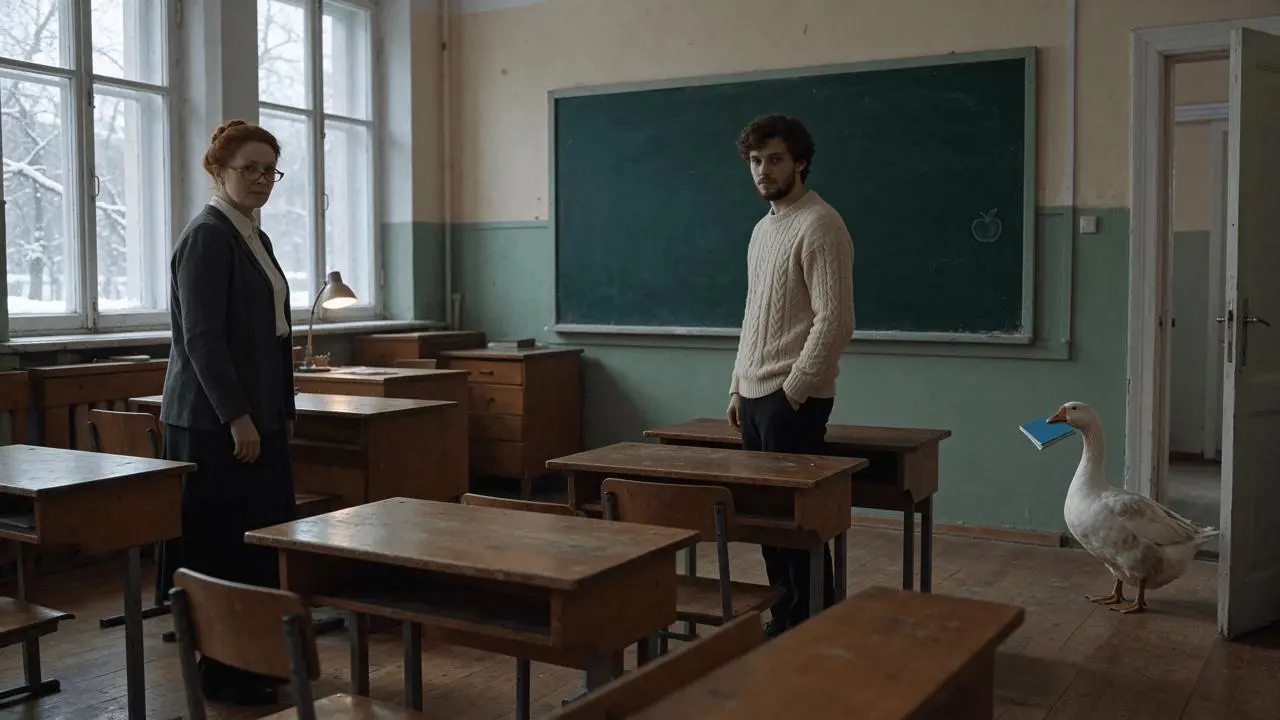
We used Seedream 5.5 through WeShop CLI to prepare that master, then the key scene photographs and blocking maps. Both video workflows reused this visual foundation. The project used a shared classroom image for identity reference; it did not first create independent character turnarounds or separate face sheets.
For each aspect ratio, prepare three photographic setups: the homework check, the goose arriving with a blue notebook, and the goose teaching while both humans take notes. Treat these as separate moments in one story.

Then create a matching simplified blocking map for each setup. Preserve the camera view, crop, relative size, position, facing direction and occlusion. Use distinct thin colored outlines to identify the subjects, while leaving appearance and lighting to the photos.

In our prompts, blue identified Elena, orange identified Misha and purple identified the goose. Those colors only identified subjects in the diagrams. The actual wardrobe came from the photographic references. Photos were attached before the maps, with each image's role explicitly assigned in the prompt. These are production choices tested in this example, rather than a guarantee of exact positioning.
Route 1: Generate the complete 30-second film in one pass
Open Kling on WeShop and select Kling 4.0 Reference. To match this case, use 30s, 1080p, quantity 1, with 16:9 for landscape or 9:16 for portrait. These are the settings recorded in our generation requests; see the WeShop API reference for current CLI operation details.
Attach seven images in order: the master, the three scene photos, and the three corresponding maps. Use the images prepared for the selected format. The two formats were generated separately, with their own scene compositions and maps.
Write the full story in one prompt. Assign the references first, then give the action order, exact dialogue, performance tasks and sound. The compact timeline below shows the requested structure, rather than a measured account of every cut in the result:
| Requested interval | Story beat |
|---|---|
| 0–9s | Teacher asks for homework; student blames the dog; a pause redirects attention |
| 9–18s | Goose arrives with the notebook; teacher identifies it; student escalates his excuse |
| 18–25s | Teacher evaluates the interruption and transfers teaching authority |
| 25–30s | Goose teaches; both humans take notes; student tries to ask a question |
The reusable case contains the complete original prompt and its seven reference inputs. This is an excerpt from the performance instructions:
“Where is your homework?” — require accountability and check his willingness to answer. “That is a goose.” — offer him a chance to correct his story. “Good. You teach.” — give the goose responsibility, checking whether it accepts.
The teacher is trying to keep the lesson running. The student is trying to make his excuse survive new evidence. The goose seeks attention and occupies the teaching position. Giving each subject a task makes the absurd situation readable without asking the actors to advertise the joke.
Inspect the result before adding subtitles
Check the spoken lines, notebook visibility, classroom positions and final role reversal. Inspect for colored outlines or diagram styling appearing in the footage. The sampled outputs retained photographic imagery, and both one-pass versions reached the goose-teaching ending, but the requested timings and actions were not followed exactly.
The portrait original repeated “Good. You teach.” During finishing, the second occurrence at 21.65–24.65s was replaced with room sound copied from 6.4–9.4s of the same video. The picture stayed intact. Both formats received subtitles aligned to the generated speech and a loudness pass. The players above show these finished versions, rather than untouched raw outputs.
Route 2: Generate six shots and control the final edit
For the second workflow, we added a dedicated reference photo and blocking map of the teacher handing over authority at the desk. This gave the transition its own visual setup, instead of leaving the entire handover to the full-film prompt.
Each shot used Kling 4.0 Reference, 6s, 1080p, quantity 1. The landscape and portrait sets were generated independently. Each request included the master, the relevant scene photo and its blocking map, with the necessary identity, location, dialogue and sound instructions repeated in full.
| Shot | What it contributes | Final retained duration |
|---|---|---|
| 1 | Homework question and the first excuse | 6s |
| 2 | Goose carrying the notebook: a short evidence insert | 1s |
| 3 | “That is a goose.” / “He ate the dog too.” | 6s |
| 4 | Teacher delegates the lesson to the goose | 6s |
| 5 | Goose teaches; both humans take notes | 5s |
| 6 | Student raises a hand, receives a honk, resumes writing | 6s |
The initial plan was to retain five seconds from each six-second source, leaving half a second at either end for trimming. The actual dialogue did not fit those planned windows. We changed the edit to 6 + 1 + 6 + 6 + 5 + 6 = 30 seconds, preserving complete spoken lines.
The notebook also exposed a continuity problem: later in the goose-arrival source, it no longer matched the state required by the next shot. We retained the first second as an insert. This made the notebook's arrival readable while avoiding the inconsistent tail of the clip. It was an editorial workaround, rather than a repair to the original generated action.
The final edit applied fixed crops to the third and sixth shots for framing variation, normalized loudness and added bilingual subtitles. The separately generated dialogue was retained; repeating a voice description in the prompts should not be mistaken for proof of perfectly identical voices between clips.
Compose portrait and landscape as separate scenes
In landscape, the room gives the teacher, student and goose more horizontal separation. Portrait needs a composition that still shows their relationship, the notebook and the desk. That is why this project prepared distinct 9:16 reference scenes and maps, then generated portrait footage separately.
Watch the notebook entrance and the final raised-hand beat in both formats. They reveal more about staging and comic timing than comparing a single attractive frame. The finished portrait video is not simply a center crop of the landscape output, although selected shots received additional reframing during editing.
Choose the workflow around the beat you must preserve
Use the one-pass route when you want to test whether the complete joke works and can accept the model interpreting the internal cuts. You still need to review speech, props and the ending, then finish the result.
Choose the shot-by-shot route when the handover, reaction pause or final question needs its own retained screen time. It also lets you revise one source clip while keeping the others, at the cost of checking continuity and sound between separate generations.
These four videos document one production example, not a success-rate benchmark. Start with the complete 30-second classroom case, inspect what your result actually preserves, and split the scene into shots when a specific beat needs more control.
You can try it directly using the tool on the right.