












Turn a Car Photo into GTA 6 Style Art and Video
Convert a car photo into GTA 6 inspired painted artwork with GPT Image 2.5, then animate the edited keyframe with Wan 3.0.
A car photograph gives a style transformation something concrete to preserve: the body silhouette, viewing angle and wheel placement. This workflow edits the attached vehicle photo with GPT Image 2.5, then uses the selected painted image as the actual first frame of a short Wan 3.0 clip.
| Original reference | Edited illustration |
|---|---|
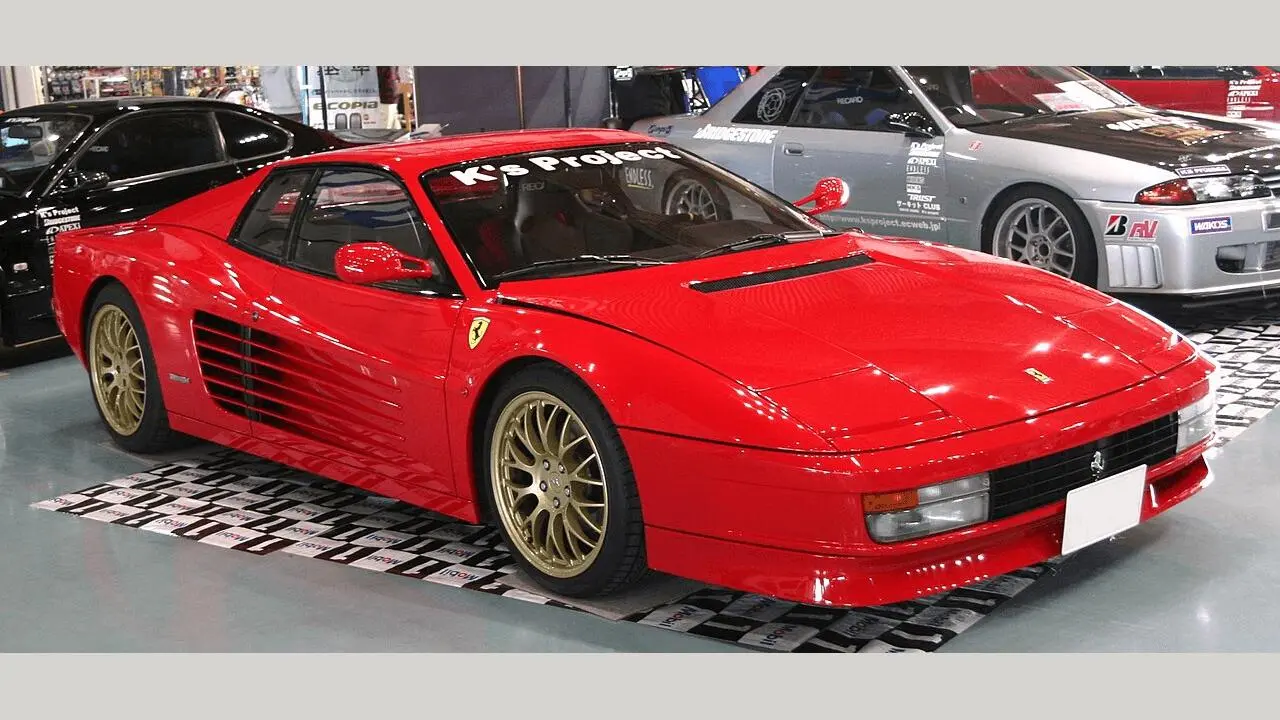 | 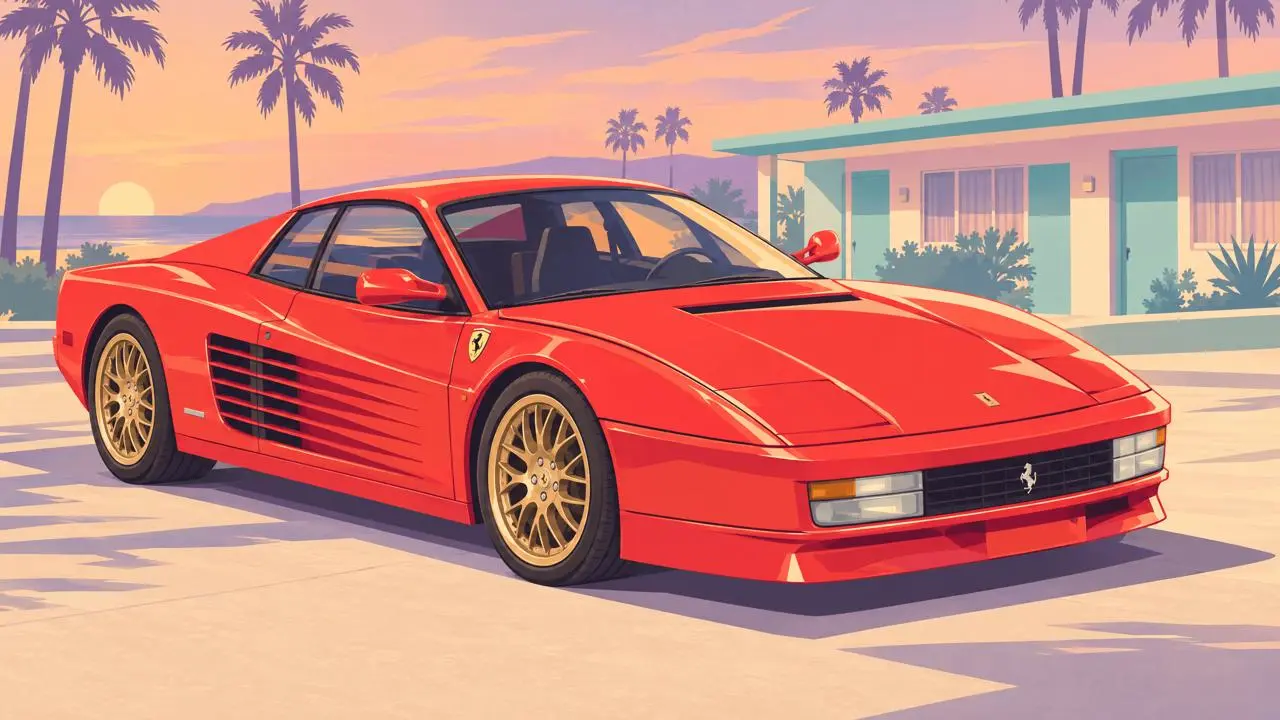 |
TTTNIS, Ferrari Testarossa, Wikimedia Commons, public domain. AI-stylized adaptation. Source photo
The displayed adaptations are AI-generated fan concepts. They are not official artwork or captured gameplay.
Keep the vehicle geometry specific to the source photo
The input photograph shows a red Ferrari Testarossa at an indoor display. The photo is placed within a neutral 16:9 canvas for upload without cropping away the vehicle. The edit keeps the recognizable car but replaces the surrounding display with a simplified coastal motel setting; the background change is intentional.
Describe the drawing treatment, light and visual hierarchy
The illustrated treatment uses believable proportions, broad opaque color areas, angular cheek and garment shadows, selective fine contours, warm peach-gold light and lavender shadow planes. Foreground subjects stay crisp while distant buildings and vegetation become flatter pastel shapes. These visual properties were studied from official promotional artwork; the tested prompt expresses them directly without naming a game or artist.
Describe red paintwork as large coral color areas, angular plum shadows and narrow cream reflections. Keep dark trim, glass and visible wheels clean. The motel should use flatter, lighter shapes so it supports the vehicle. Ask the video model for a small camera move while the car stays parked.
Repaint the attached car photograph
- Open GPT Image on WeShop and upload your source photo through the image control.
- Confirm that the thumbnail shows the intended photo. Select GPT Image 2.5 Flare, 16:9, 2K, quality high, and quantity 1.
- Paste the prompt below. Adapt the identity or scene details to your actual photo, then generate.
- Compare the output with the source at full size, checking recognizable features as well as the painted treatment.
| Setting | Tested value |
|---|---|
| Generation method | Image-to-Image |
| Actual reference inputs | One attached photograph |
| Model | GPT Image 2.5 Flare |
| Aspect ratio | 16:9 |
| Image size / quality | 2K / high |
| Quantity | 1 |
| Returned illustration | 2560 × 1440 pixels |
Use the complete image-editing prompt
Use attached photograph 1 as the vehicle reference. Preserve the recognizable red sports-car body, its front three-quarter angle, rectangular lamps, side intake slats, wheel placement and overall proportions. Place the car on dry pale concrete in front of a low, simplified pastel coastal motel, framed by palm silhouettes and a peach-lavender evening sky. Repaint the entire scene as a polished two-dimensional editorial cover illustration. Use believable adult anatomy and recognizable facial structure, built from broad opaque areas of color, crisp angular planes and a few controlled soft transitions. Use selective thin dark-colored contours around eyes, lips, hair, garment seams and object silhouettes. Skin is smooth painted color with clearly designed cheek, nose and jaw shadow shapes. Fabric folds and metal reflections are simplified into clean hard-edged shapes. Use warm peach and pale gold direct light, dusty magenta and lavender shadows, muted teal accents, and restrained cream highlights. Keep foreground contours sharp and contrast strong; simplify distant architecture and vegetation into flatter, lighter pastel shapes. The finish is smooth and graphic, with almost invisible brush texture. Design the red paintwork as large coral-red color areas with angular plum shadow shapes and narrow cream reflections. Keep both visible wheels clear and the full vehicle inside the frame. Use crisp dark trim, simplified glass reflections and flatter background architecture. Horizontal 16:9. Exclude extra cars, people, readable branding, text, UI, wet-road neon, photographic texture, grain and thick uniform black outlines.
The tool on the right loads this selected photo-to-illustration edit with its actual reference. You can try it directly using the tool on the right. Replace the reference and revise the subject details before generating.
Inspect the actual edited result
The edited image keeps the red sports-car silhouette, side intake slats, rectangular lights and gold-toned wheels recognizable. The indoor display is replaced with a low pastel motel and dry ground. Paint reflections become controlled cream and red shapes over plum shadow areas. The new scene and slightly interpreted proportions are intentional parts of the illustration edit.
The source car was letterboxed before upload to preserve the full vehicle. Inspect wheel geometry and perspective after the edit; the output is not a mechanically exact rendering.
Animate the edited image with Wan 3.0
Upload the selected edited illustration to Wan AI as the first-frame image. Choose Wan 3.0 I2V, 5 seconds, 720P, Adaptive, quantity 1, and generated audio off. Confirm that the attached image is the illustration shown above, then generate with this motion prompt.
Use the attached image as the first frame. One slow subtle lateral camera slide from left to right past the parked coral coupe, keeping the full car in frame. The car remains stationary; wheels do not rotate. Preserve its body shape, wheel positions, motel background, dusk lighting and illustrated rendering. Gentle highlights slide across the paint because of camera movement. One uninterrupted shot, no cuts, no driving, no new cars or people, no logos, no text, no HUD. Original fan-made concept animation, not gameplay.
This section loads the separate animation template, with the edited illustration as Before and the video as After. The returned core clip is five seconds long at 1280 × 720 pixels and 30 frames per second.
The generated clip keeps the red coupe fully visible and preserves the main body silhouette, gold wheels and motel background across the inspected frames. The framing shifts gently while the vehicle remains apparently parked. The motion is intentionally subtle.
Judge the wheels and body before increasing motion
Compare the edited still with the original car before animation. Then inspect the grille, intake slats, window edges and visible wheels across the complete clip. If a shape changes, reduce movement and regenerate from the same keyframe. A camera-motion prompt is an instruction to verify, not a guarantee of mechanically exact car geometry.
This example was generated on November 19, 2026. It is one selected result, not a measured success rate or an exact-preservation guarantee. The model names and input support are documented in WeShop’s generation guide; the observations above refer to these displayed results.
Frequently asked questions
Is the vehicle an official game asset?
No. The source is a credited photograph of a real car. The illustration and animation are AI-generated adaptations and do not establish any vehicle’s availability in a game.
Can I use my own car photo?
Replace the source in the image-editing template, describe the visible model features, and preserve enough space around the vehicle for the final framing.
For another format in this series, see Turn a Coastal Photo into GTA 6 Style Art and Video.
Start with a clear reference photo, change one visual decision and inspect the source-to-result relationship before using the image or clip.