












Create a Story-Driven AI Fashion Lookbook with GPT Image
Learn how to create a cohesive AI fashion lookbook with connected Paris scenes, consistent character details, controlled color palettes, and reusable GPT Image prompts.
How to Create a Story-Driven AI Fashion Lookbook with GPT Image
A beautiful AI fashion image can stop the scroll. A connected image series can make people remember the campaign.
Instead of generating unrelated model shots one at a time, this workflow treats a lookbook as a short travel story. The character moves through Paris, interacts with her surroundings, and carries recognizable colors, clothes, and objects from one scene to the next.
Generated Lookbook: Five Scenes, One Paris Story
The following images were generated in WeShop AI with a shared character description, wardrobe palette, camera language, and travel narrative.
| Scene | Generated Image | Story |
|---|---|---|
| 1 — Arrival | 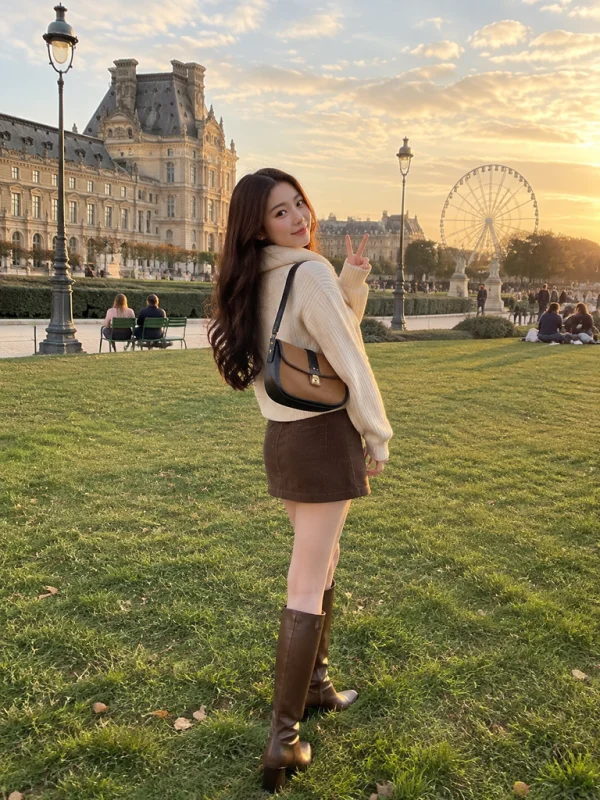 | The character begins her Paris story in the Tuileries Garden during golden hour. |
| 2 — Discovery | 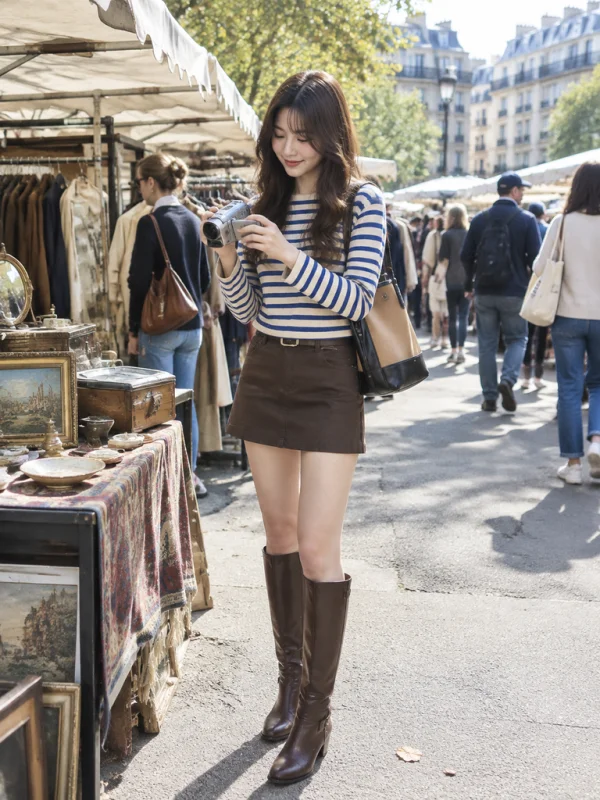 | She finds a vintage camcorder at a flea market. |
| 3 — Exploration | 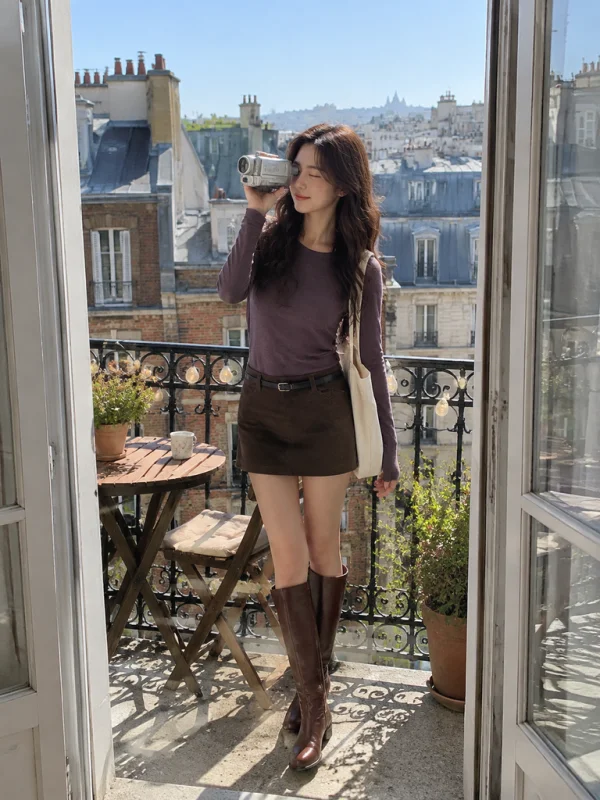 | The recurring camcorder connects the balcony scene to the wider story. |
| 4 — Observation | 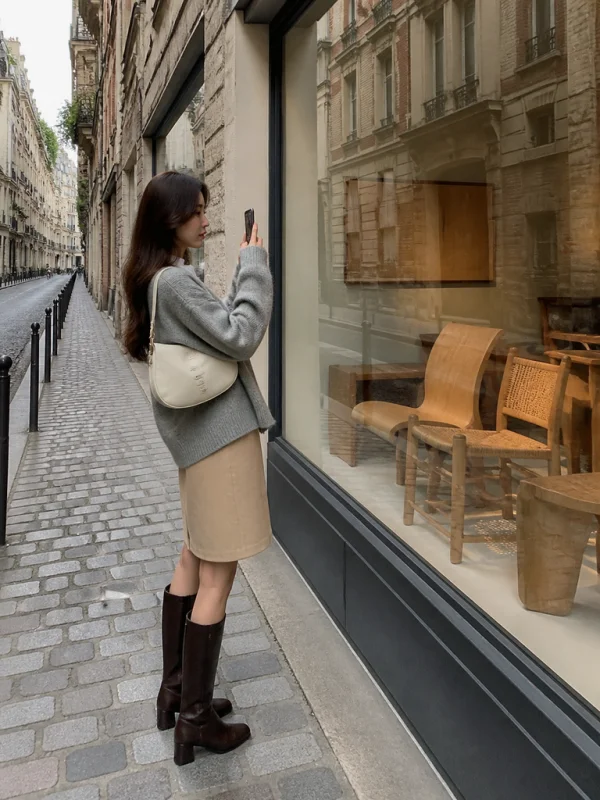 | A quiet gallery-window moment gives the series a slower visual rhythm. |
| 5 — Connection | 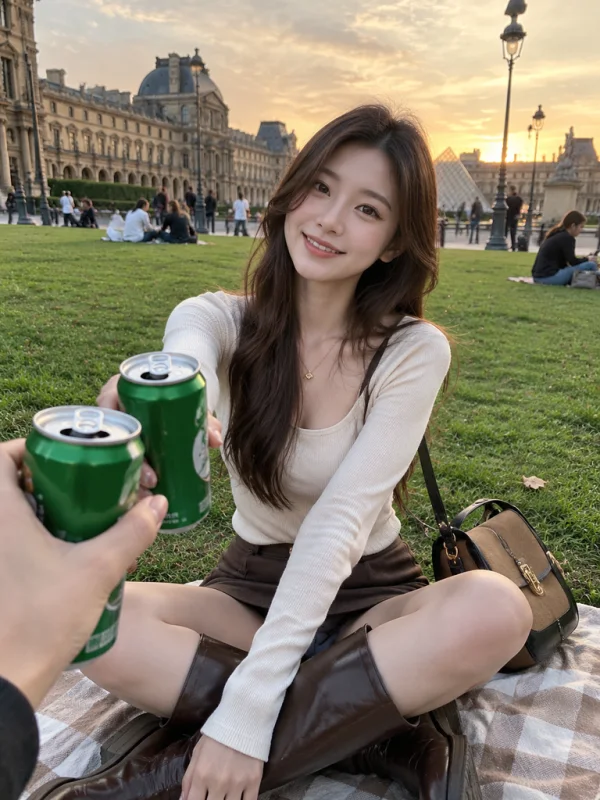 | A friend’s hand creates an intimate point-of-view ending. |
AI-generated with GPT Image in WeShop AI. No real photography session was used for these five images.
Why Separate AI Fashion Images Often Feel Disconnected
Generating each image independently can produce attractive results, but the finished gallery may lack a recognizable identity.
Common problems include:
- The character appears to belong to a different story in every image.
- Lighting jumps randomly between morning, sunset, and night.
- Clothing colors do not form a unified collection.
- Every image uses the same front-facing pose.
- Locations look decorative instead of connected to an experience.
- There is no visual object linking one scene to the next.
The solution is not simply writing a longer prompt. It is establishing a small creative system that every prompt follows.
The Four Anchors of a Cohesive AI Lookbook
1. Give the Series a Simple Story
Write one sentence for every planned image before opening the generator.
| Scene | Story beat | Visual purpose |
|---|---|---|
| 1 | She arrives at the Tuileries Garden before sunset. | Establish the character, wardrobe, and Paris setting. |
| 2 | She finds a vintage camcorder at a flea market. | Introduce a recurring prop. |
| 3 | She records the rooftops from a balcony. | Continue the prop-led narrative. |
| 4 | She pauses outside a furniture gallery. | Add a quieter street-style moment. |
| 5 | She meets a friend for a picnic. | End with an intimate point of view. |
The story does not need an elaborate plot. The scenes only need to feel as though they happened during the same trip.
2. Repeat a Visual Anchor
A recurring object helps viewers connect separate images subconsciously.
Useful visual anchors include:
- A vintage camcorder
- One recognizable shoulder bag
- A silk scarf
- A newspaper or travel notebook
- The same picnic accessory
- A repeated color or fabric
The object should support the story rather than appear as arbitrary product placement.
In this series, the vintage camcorder connects the market and balcony scenes. Brown leather boots and neutral shoulder bags create a second layer of continuity.
3. Lock the Color Family
For this early-autumn concept, the dominant wardrobe colors are:
- Cream and ivory
- Camel and taupe
- Chocolate brown
- Soft gray
- Small amounts of muted blue or purple
The environment can remain more varied, but the outfits and accessories should return to the same palette throughout the series.
4. Make the Character Do Something
Natural action is more convincing than a repeated fashion pose.
Instead of asking the model to “stand and look at the camera,” describe actions such as:
- Looking back while walking
- Examining a vintage camera
- Recording the rooftops
- Photographing a shop window
- Sitting casually on a picnic blanket
- Reaching forward for a toast
Small actions create the impression that the photographer captured a real moment.
Reverse-Engineered Prompt Formula
The visual approach can be translated into this reusable structure:
[photographic format and mood]
+ [consistent character description]
+ [specific early-autumn outfit]
+ [recognizable travel location]
+ [natural action]
+ [friend or documentary camera perspective]
+ [time-appropriate lighting]
+ [controlled color palette]
+ [realistic texture and imperfections]
+ [unwanted visual exclusions]
The important distinction is that the prompt describes a moment—not merely a model and an outfit.
How to Generate the Lookbook in WeShop AI
Step 1: Open GPT Image
Open the GPT Image generator in WeShop AI and create a new task.
Step 2: Define the Character Before the Location
Use the same core character description in every prompt.
The tested series used:
A young adult East Asian fashion model with an oval face, warm fair skin, long dark-brown softly wavy hair, and natural makeup.
Keep this section unchanged across the series. Only replace it when intentionally creating a different model.
Text-only repetition can improve continuity, but it does not guarantee a perfectly identical face. If the selected workflow supports reference images, use an approved hero image as the character reference.
Step 3: Choose the Format
The five images shown above were generated with the following settings:
| Setting | Tested value |
|---|---|
| Model | GPT Image 2 |
| Aspect ratio | 3:4 |
| Image size | 1K |
| Output dimensions | 768 × 1024 |
| Quantity per prompt | 1 |
The 3:4 format leaves enough space for a complete outfit while preserving the surrounding location.
Prompt 1: Paris Garden Hero Image
Photorealistic vertical 3:4 candid fashion editorial, early-autumn Paris travel lookbook.

A young adult East Asian woman with long dark-brown softly wavy hair wears an ivory ribbed cardigan with a plush cream collar, a chocolate-brown corduroy mini skirt, knee-high brown leather boots, and a two-tone camel-and-black shoulder bag.

She stands on the lawn of the Jardin des Tuileries at golden hour, with an ornate Louvre palace facade, classic Paris street lamps, a Ferris wheel, and relaxed visitors in the background. She looks back over her shoulder and makes a subtle V sign, as if photographed by a friend during a real trip.

Handheld smartphone travel snapshot, eye level, slightly wide 28mm perspective, natural skin texture, realistic proportions, candid relaxed body language, soft warm late-afternoon light, cream camel and brown palette, gentle cinematic color, documentary realism, slight photographic imperfections, full body.

No text, no watermark, no logo, no studio lighting, no over-smoothed skin.
Prompt 2: Vintage Market Scene
Use the same young adult East Asian fashion model as the established series: oval face, warm fair skin, long dark-brown softly wavy hair, natural makeup.

Photorealistic vertical 3:4 candid early-autumn Paris travel lookbook. At a sunny Paris flea market, she examines a compact silver vintage camcorder with a quiet smile.

She wears a blue-and-cream striped long-sleeve top, chocolate-brown mini skirt, knee-high brown leather boots, and the same two-tone camel-and-black shoulder bag. Clothing racks, antique stalls, canvas awnings, and casually dressed shoppers appear in the background.

Handheld smartphone travel snapshot by a friend, eye-level 28mm, bright late-morning sunlight, natural skin texture, realistic proportions, candid body language, cream camel brown and muted blue palette, documentary realism, slight photographic imperfections, full body.

No text, no watermark, no logo, no studio lighting, no over-smoothed skin.
Prompt 3: Paris Balcony Scene
Use the same young adult East Asian fashion model as the established series: oval face, warm fair skin, long dark-brown softly wavy hair, natural makeup.

Photorealistic vertical 3:4 candid early-autumn Paris travel lookbook. On a small sunlit Paris apartment balcony, she holds the same compact silver vintage camcorder to one eye and records the rooftops.

She wears a fitted muted-purple long-sleeve top, dark brown mini skirt, slim black belt, knee-high brown leather boots, and carries a cream canvas tote. Open French doors frame her, with zinc rooftops, brick buildings, a small wooden café table, and subtle string lights behind her.

Handheld smartphone photograph by a friend from inside the doorway, eye-level 28mm, crisp clear morning sunlight, natural skin texture, realistic proportions, spontaneous action, cream brown and muted-purple palette, documentary realism, slight photographic imperfections, full body.

No text, no watermark, no logo, no studio lighting, no over-smoothed skin.
Prompt 4: Gallery Window Scene
Use the same young adult East Asian fashion model as the established series: oval face, warm fair skin, long dark-brown softly wavy hair, natural makeup.

Photorealistic vertical 3:4 candid early-autumn Paris travel lookbook. She pauses on a quiet cobblestone street outside a minimalist furniture gallery, photographing sculptural wooden chairs through a reflective shop window with her phone.

She wears a soft gray brushed cardigan over an ivory camisole, a beige knee-length skirt, dark chocolate knee-high leather boots, and a small cream shoulder bag. Parisian brick architecture is reflected in the glass.

Handheld friend-shot street photograph, eye-level 28mm, soft overcast daylight, candid side profile, natural skin texture, realistic proportions, cream taupe gray and brown palette, documentary realism, slight photographic imperfections, full body.

No text, no watermark, no logo, no studio lighting, no over-smoothed skin.
Prompt 5: First-Person Picnic Scene
Use the same young adult East Asian fashion model as the established series: oval face, warm fair skin, long dark-brown softly wavy hair, natural makeup.

Photorealistic vertical 3:4 candid early-autumn Paris travel lookbook. She sits cross-legged on a picnic blanket on the lawn of the Jardin des Tuileries at warm sunset, smiling naturally while holding a green beverage can.

A friend’s hand enters from the foreground with another can for a toast, creating an intimate first-person viewpoint.

She wears a fitted ivory long-sleeve top, chocolate-brown mini skirt, and dark brown knee-high leather boots, with the same camel-and-black shoulder bag resting beside her. Louvre architecture, classic Paris street lamps, relaxed visitors, and a soft evening sky appear behind her.

Handheld smartphone travel snapshot, eye-level 28mm, warm natural light, realistic skin texture and proportions, spontaneous interaction, cream camel and brown palette, documentary realism, slight photographic imperfections.

No text, no watermark, no logo, no studio lighting, no over-smoothed skin.
Inspect Every Result Before Continuing
After each generation, check more than facial attractiveness.
Review whether:
- The outfit follows the intended palette.
- The location is recognizable without overwhelming the model.
- The action feels natural rather than staged.
- Hands and body proportions are credible.
- The recurring prop remains recognizable.
- The face, hair, and apparent age stay reasonably consistent.
- Lighting matches the planned time of day.
- The image contributes a new story beat.
Review consistency throughout the campaign. Approve or correct every scene before moving forward.
What Worked in This Generated Series
The resulting set maintains several useful continuity signals:
- Brown leather boots appear across all five images.
- Cream, camel, taupe, chocolate brown, and muted accent colors hold the collection together.
- The market and balcony scenes share the vintage camcorder.
- Each image gives the character a different activity.
- Paris remains identifiable without repeating the same background.
- The camera perspective changes between full-body, side-profile, doorway-framed, and first-person compositions.
- Natural crowds, street furniture, reflections, and environmental details support the documentary look.
Practical Limitations
Text Alone Does Not Guarantee an Identical Face
These images were generated with a repeated text description rather than a locked identity reference.
The character remains visually related across the set, but small facial differences are still visible. Avoid promising perfect identity consistency based on text prompting alone.
For stronger control:
- Generate and approve one hero image.
- Use that approved image as a character reference when the workflow supports it.
- Keep the character description unchanged.
- Change only the scene, action, wardrobe variation, and lighting.
- Reject outputs that visibly change the character’s age, facial structure, or hair.
Products and Logos Require Separate Review
AI-generated bags, beverage cans, cameras, and clothing details may not reproduce a real commercial product accurately.
If the campaign is for a specific product:
- Use an approved product reference.
- Inspect labels and construction details closely.
- Replace or correct distorted brand elements.
- Verify product accuracy before making commercial claims.
Create Your First Lookbook Scene
Start with one strong hero image, approve the character and palette, and build the remaining story around those visual anchors.
You can generate your own lookbook directly using the tool on the right.