







Create Photorealistic Images with Seedream 5.5
Generate a documentary-style bicycle workshop image with Seedream 5.5. Use specific light, surface and framing instructions, then inspect hands and objects.
The chipped blue doorway, worn work jacket and soft side light do more for this workshop image than a long string of “ultra realistic” keywords. This Seedream 5.5 example builds a documentary-style scene around one mechanic repairing a bicycle on a rainy afternoon.
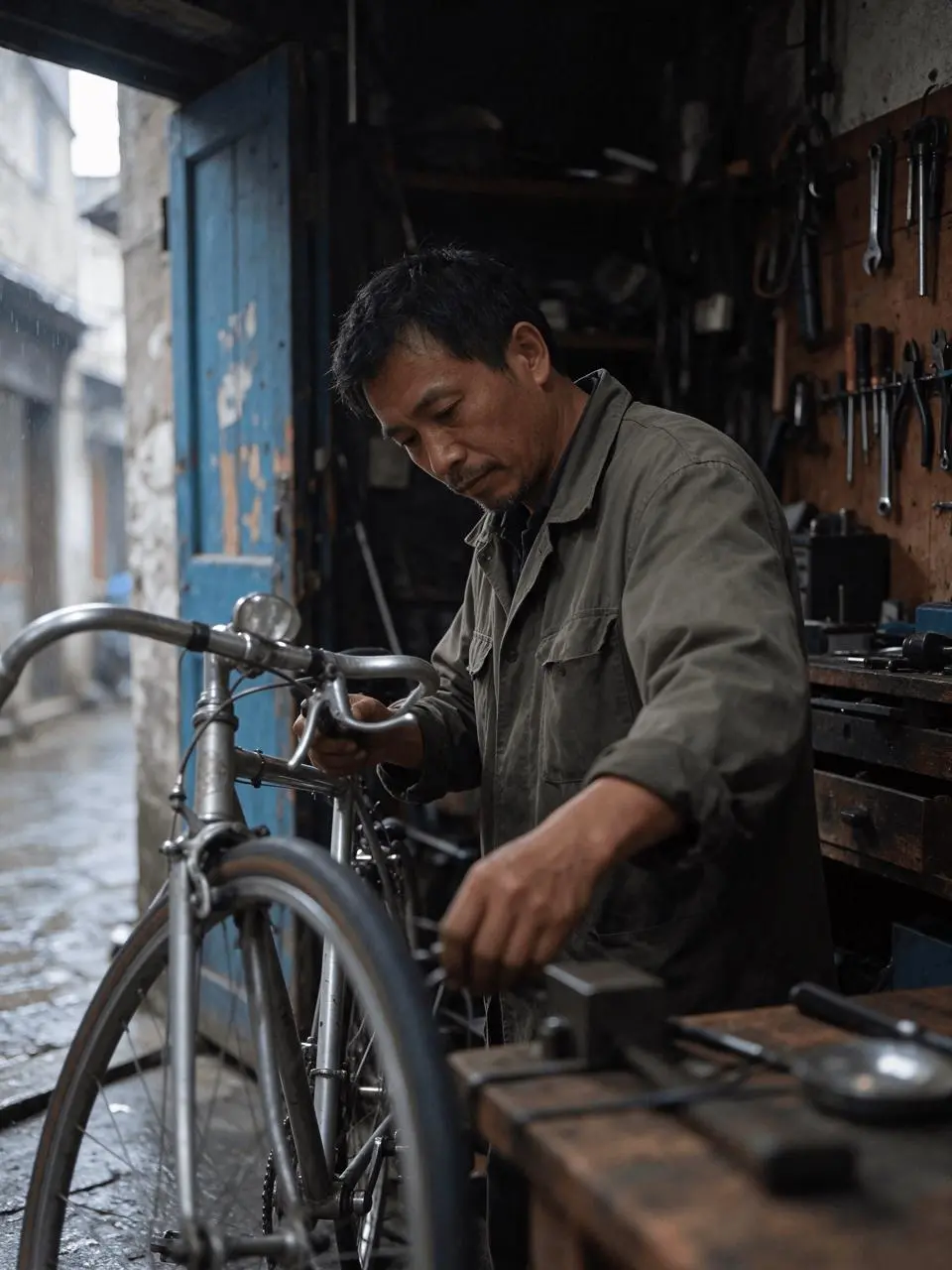
AI-generated result from the Seedream 5.5 workflow shown below.
Text-to-Image · Seedream 5.5 · PNG · 2K
Give realism a physical scene to describe
The mechanic and workshop are AI-generated fictional subjects. No reference photograph was supplied. The task is text-to-image creation, with the light source, material wear and camera position described together. The example is useful for editorial visual concepts, not documentary evidence of a real person or place.
1. Write the subject and action before camera adjectives
Start with an adult mechanic repairing a silver bicycle beside an open doorway. Add an olive work jacket, tools and wet paving only because they support the same scene. A coherent action gives the model a clearer task than unrelated photographic keywords.
2. Tie each material to the same light
Describe side light through the opening, rough cotton, worn metal and chipped paint. Ask for soft highlights and restrained contrast so every surface does not become glossy. Keep wet reflections outside the shop consistent with the rainy setting.
3. Generate, then choose a complete composition
Select Seedream 5.5, 2K, PNG, Opaque and Auto aspect ratio; the prompt requests a vertical 3:4 scene. This recorded task produced four candidates, and the article uses one selected result. Start with one output when you only need to check the composition before exploring alternatives.
Reuse the exact generation prompt
A candid documentary photograph of a small bicycle repair shop on a rainy afternoon, portrait 3:4. A fictional adult mechanic age 45 in a faded olive work jacket repairs a silver bicycle beside an open blue-painted doorway. Side window light reveals rough hands, worn cotton, scratched metal tools and chipped paint. Wet cobblestones outside reflect the gray sky, with no dramatic neon. Slightly off-center waist-up framing with the front bicycle wheel in the foreground, realistic proportions and restrained colors. Soft highlights, visible skin texture, fine film grain, modest natural contrast. No beauty retouching, plastic skin, excessive gloss, text, logo or watermark.Inspect the result before reusing it
The selected image shows a dark workshop, the worn blue door, hanging tools and a mechanic working near the foreground wheel. The left-side opening creates a plausible bright-to-dark transition across the jacket and face. The overall exposure is subdued, which supports the requested atmosphere but may be too dark for a layout that needs facial detail.
| Check | What to inspect |
|---|---|
| Skin and cloth | Inspect texture under both highlights and shadow. |
| Hands and action | Check finger placement and whether the tool meets a plausible part of the bicycle. |
| Objects and depth | Trace wheel rims, spokes, cables and the doorway perspective. |
Photographic atmosphere does not prove mechanical accuracy. The foreground hand and bicycle details are partly soft and occluded; use a clearer crop or regenerate the scene if those details carry the story. This example does not establish a general realism ranking against other models.
Try this workflow with your own brief
You can try it directly using the tool on the right.
Keep the prompt structure and replace the subject or exact wording with your own brief. Open the Seedream generator to select Seedream 5.5.
If your job is changing an existing portrait rather than creating a scene, follow portrait accessory editing.