












Clean Up a Jessica Nigri Cosplay Photo with Seedream 5.5
Jessica Nigri cosplay with Seedream 5.5: a sourced reference photo, exact editing prompt, generated example and practical checks.
Armor spikes and a long prop handle make background cleanup more demanding than replacing a flat wall. This Jessica Nigri cosplay example uses Seedream 5.5 to remove industrial clutter while keeping the costume and large hammer readable.
Treat the armor and hammer as protected subjects
The reference comes from Amazing Comic Con Aloha’s public Jessica Nigri guest announcement. The photograph shows the armored cosplayer among grass and industrial equipment. The edited version is a labeled AI demonstration, not documentation of a different photoshoot location.
Public reference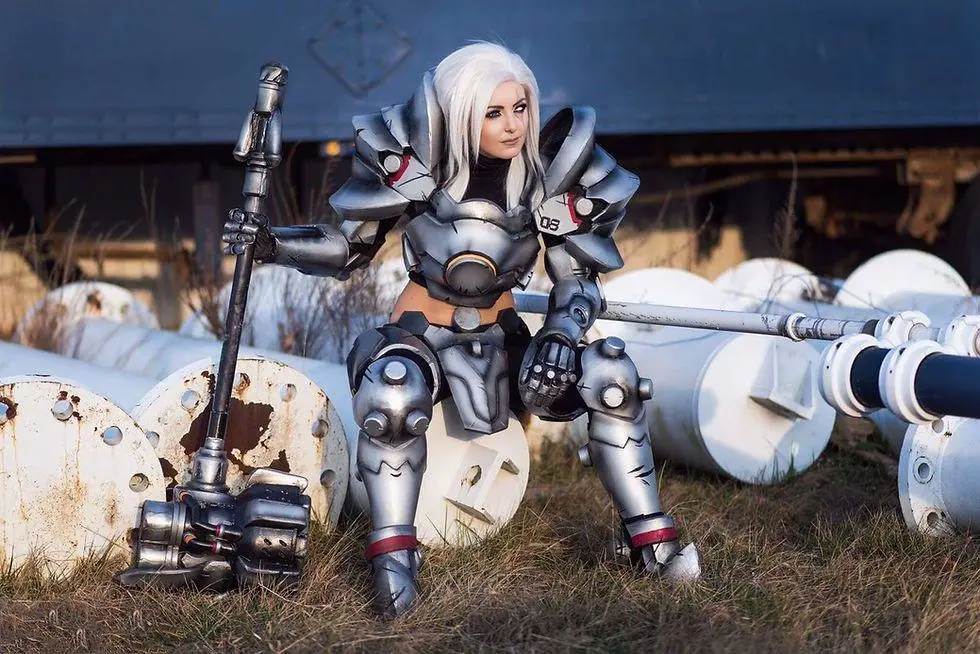 | AI-edited result · Seedream 5.5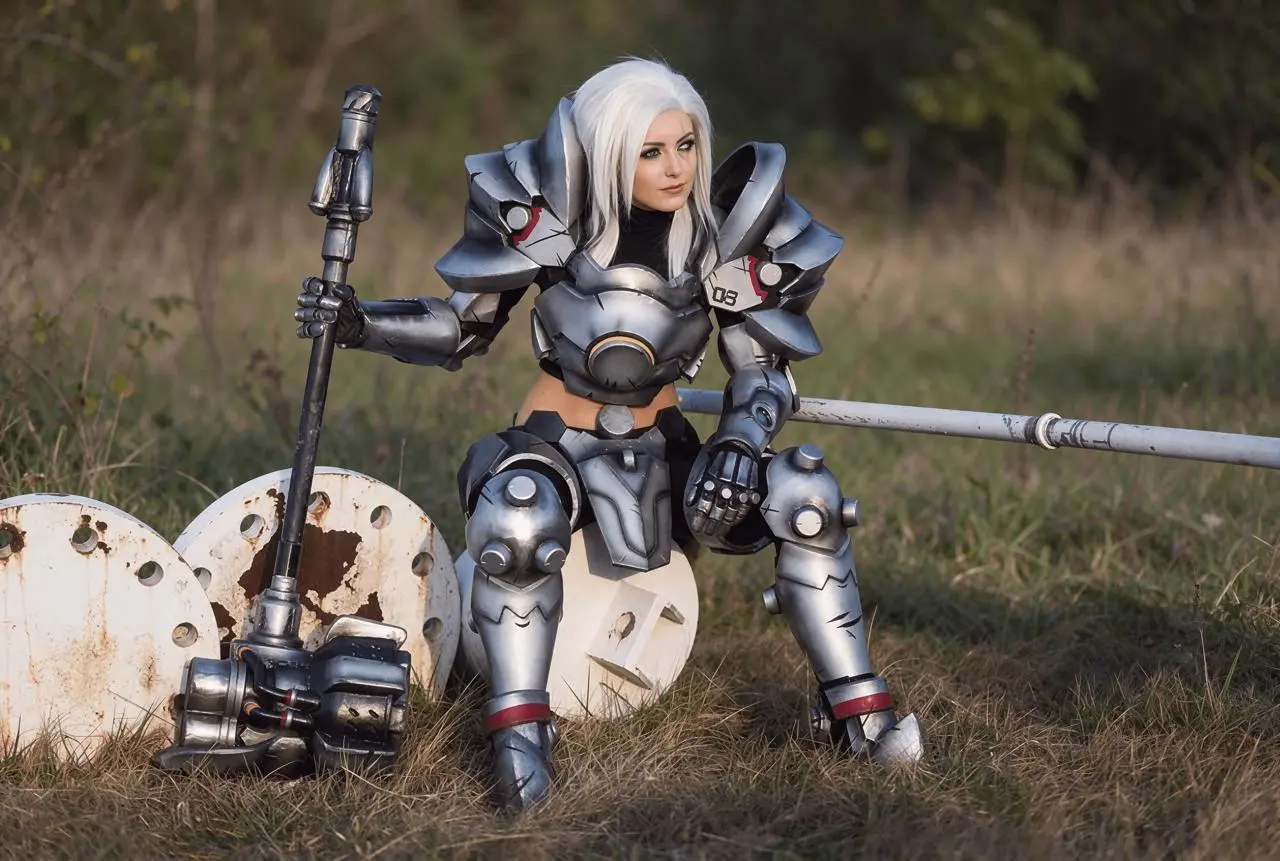 |
Jessica Nigri; public guest announcement by Amazing Comic Con Aloha, 7 August 2017. Photographer not specified on announcement. Public source.
Build the cosplay editing brief
Describe the unwanted background objects separately from the items that must survive. Here, pipes and industrial clutter are the removal target; the hammer, shaft, armor plates, wig and seated pose belong to the retained subject. Soft natural foliage gives the replacement background a plausible relationship with the existing grass.
Use Jessica Nigri’s public reference for this cosplay concept, and label the generated edit clearly.
Reproduce this Seedream 5.5 workflow
- Open the WeShop Seedream generator and select Seedream 5.5 in Model.
- Upload the actual reference photo or an image you are authorized to edit. Confirm that the correct reference thumbnail has finished loading.
- Select 2K, PNG, auto aspect ratio and 1 output. Keep an opaque background.
- Paste the following brief and generate. Compare the full-size result against the specific retained details before revising it.
Edit the attached cosplay photograph as a clearly labeled AI cleanup demonstration. Keep the adult armored cosplayer, face, wig, every armor spike, metal detail, pose and large prop exactly recognizable. Remove only the industrial pipes and distracting man-made background clutter, replacing those background areas with softly out-of-focus natural foliage that matches the existing grass, daylight direction and perspective. Preserve the subject silhouette and all props, including thin edges. Keep the original composition and costume coverage. No text, no new people.
The displayed reference was actually attached to this generation. A person’s name in a text-only prompt would be a different process.
Inspect the generated example
The selected edit replaces the dark building and much of the large background equipment with blurred natural vegetation. The seated armored figure, wig and long hammer remain recognizable. It is a partial cleanup: the large white circular foreground pieces and a horizontal pipe remain visible.
Compare the full hammer shaft, its head, the shoulder armor and the gaps beside the legs. These thin boundaries reveal whether the model has removed part of the costume along with the pipes. Check that the replacement foliage does not grow across metal edges or invent new armor pieces.
Refine the requested change
If a prop disappears, restart from the original and identify that prop explicitly before asking for removal. A simpler blurred background is easier to assess than a detailed fantasy scene. Do not treat any clean-looking silhouette as proof that all costume details survived.
This result does not remove every industrial object. For a fully natural background, a further focused edit must identify the remaining white circular pieces and horizontal pipe separately. The example is useful for reducing the upper-background clutter, not evidence of complete object removal.
You can try it directly using the tool on the right.
Replace the reference with your own image, retain the useful constraints and label shared AI edits clearly.