









Pikachu Coloring Pages for Kids with Nano Banana 2
Make Pikachu coloring pages for kids with Nano Banana 2. Use a simple pose, large open shapes and a sparse background, then check the actual page before printing.
A useful Pikachu coloring page needs open areas for crayons, not a dense scene full of tiny marks. This Nano Banana 2 workflow asks for a cheerful standing character, a clearly separated lightning-bolt tail and a nearly empty background. The text prompt creates a new unofficial fan-art composition rather than copying a downloaded coloring sheet.
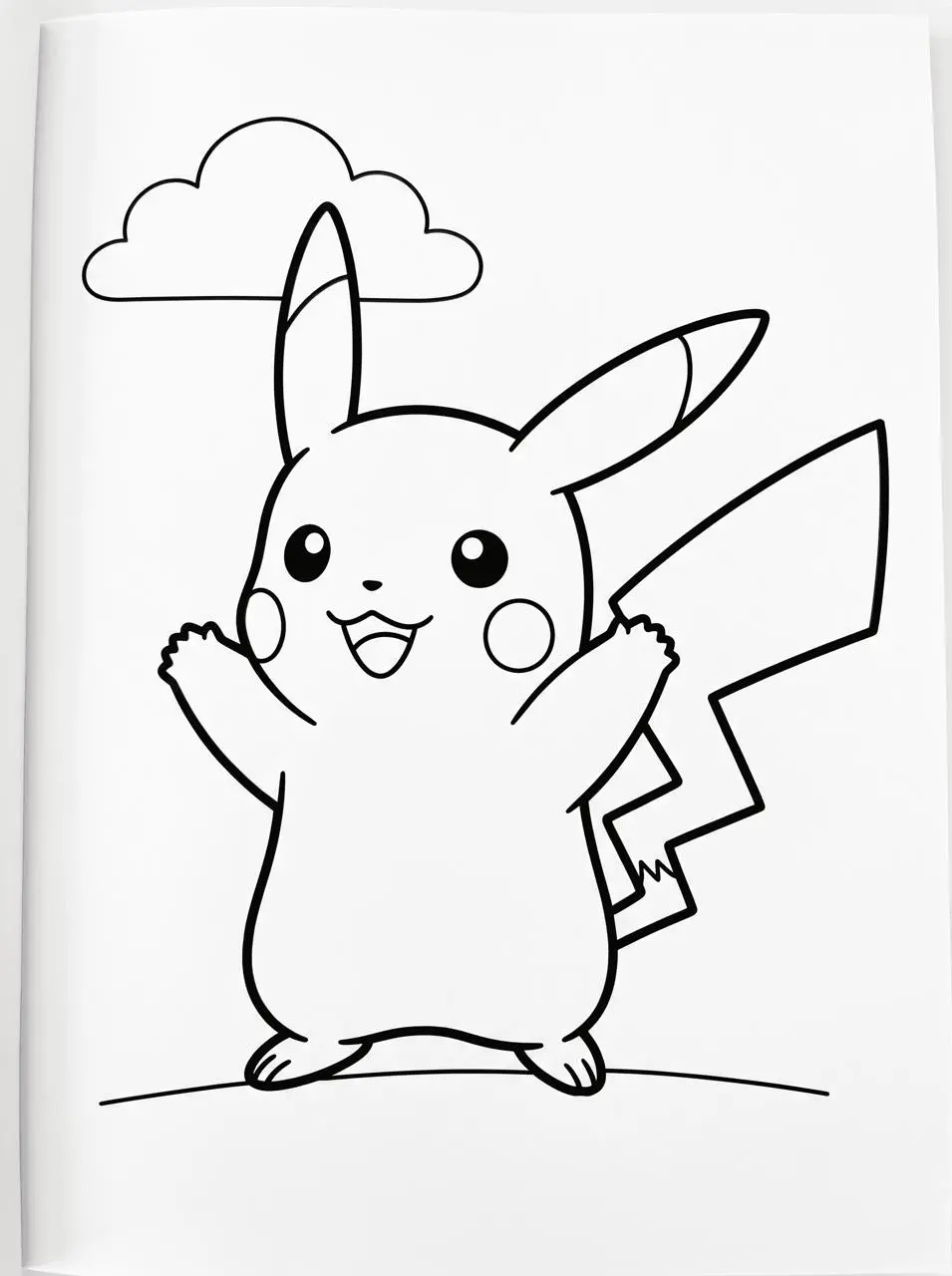
One AI-generated unofficial fan-art example. Text-only input; no reference photo was uploaded.
Keep ears, cheeks and tail easy to recognize
Start with the few shapes that identify Pikachu: long pointed ears, round cheeks, a rounded body and a lightning-bolt tail. Give the tail its own space beside the body rather than letting it disappear behind a dark outline. A simple standing pose makes those features easier to inspect than a jump or battle pose.
The brief uses large closed regions and only essential face and body contours. That is the design goal for this page, rather than an age certification. Select an activity according to the child’s comfort and inspect every generated result before printing it.
Use a background that does not compete with coloring
One cloud and a low ground line are enough to locate the figure. More scenery would create extra regions and may make the main character smaller. Ask for generous margins, thick smooth outlines and no shading.
Specifying black-and-white alone may produce a shaded drawing or a picture of a paper sheet. The prompt therefore names pure black outlines on white. If a generation still shows paper texture or lighting, treat those as part of the actual output, not as a clean digital-page guarantee.
Inspect the small details before the test print
Look at the paws, ear tips, cheek circles and tail joints. Check that an accidental line has not divided a large open region into several small ones. Zoom out to the intended print size: details that look clear on a large monitor may become fiddly on paper.
Check whether the background is truly white or has an unwanted gray cast. Use the printer preview to keep the ears and tail inside the printable area. The generator returns an image; this example is not a worksheet PDF, an A4 document or a US Letter document.
Simplify a new result one instruction at a time
If a later run adds a busy setting, remove everything except the ground line. If the tail merges into the body, specify a clear white gap around its outer shape. If paper edges or shadows appear, try “flat digital line art, no photographed paper, no page curl, no cast shadows.” These are suggested revisions, not additional tested results.
Keep the recognizable silhouette while reducing interior lines. Making strokes thicker without removing tiny spaces does not necessarily make a page easier to color. A test print is a more useful final check than judging the image only at full resolution.
Generate the Pikachu image in WeShop
- Open Nano Banana 2 on WeShop.
- Select Nano Banana 2, a 3:4 aspect ratio and the 2K image-size setting. Set the quantity to one.
- Paste the complete prompt below and generate the image. This example uses text only; you do not need to upload an existing character image.
- Open the result at full size, then check it in its intended context: a print preview.
| Setting | Used for this example |
|---|---|
| Model | Nano Banana 2 |
| Input | Text only |
| Requested aspect ratio | 3:4 |
| Requested image size | 2K |
| Quantity | 1 |
| Returned file | 1792 × 2400 pixels |
Copy the generation prompt
Create one simple Pikachu coloring page, portrait 3:4, pure black outlines on white. One cheerful recognizable Pikachu stands upright with both short arms visible, long pointed ears, round cheek circles and a lightning-bolt tail clearly separated from its body. Simple rounded cartoon proportions. Use large closed coloring regions and only essential face and body contours. One simple cloud and one low ground line only. Thick smooth outlines, large empty white spaces, comfortable white margins. No dense scenery, shading, grayscale, solid black fills, text, numbers, watermark or border. Original unofficial fan-art composition.
The tool on the right loads the selected result and its generation prompt. You can try it directly using the tool on the right. Keep the composition brief when changing colors or expression.
What the generated example shows
Pikachu has two long ears, visible cheek circles, raised paws and a clearly separated lightning-bolt tail. The body is a large open coloring region, with one cloud and a ground line rather than a dense setting.
The model simplified the character into thick outlines and broad shapes. The example is more open than the moderately detailed Batman page.
The image includes a photographed-paper appearance: a page edge, slight curl and faint gray shading. It is not a perfectly flat pure-white digital sheet. The black eyes and mouth details are also filled. Inspect a print preview; no physical print or child usability test was performed.
Generated on November 23, 2026. This is one selected output, not a benchmark, a measured success rate or a promise that future runs will match it exactly. Suggested refinements elsewhere on this page are not additional tested examples.
Frequently asked questions
Does this workflow turn an uploaded picture into a coloring page?
No. It uses text only to create a new Pikachu fan-art image. A reference-photo conversion would be a different workflow.
Can I download a ready-made PDF from this prompt?
The tested generation returns an image. A separate document export would be needed to create a PDF.
Are these official Pokémon coloring pages?
No. The example is AI-generated unofficial fan art. The workflow does not grant character rights or permission for commercial distribution.
For another format, explore WeShop’s image-generation tutorials. Start with the demonstrated prompt and change one design choice at a time.