







Generate a Goku 4K Wallpaper with Nano Banana 2
Generate a Goku 4K wallpaper with Nano Banana 2. Reserve desktop icon space, use a calm anime composition and verify the downloaded image dimensions.
A desktop wallpaper has to work behind icons as well as look appealing on its own. This Goku brief puts the character on the right and leaves the left side quiet. Nano Banana 2 generates the artwork from text at the 4K size setting; the downloaded file’s actual dimensions are reported separately from that request.
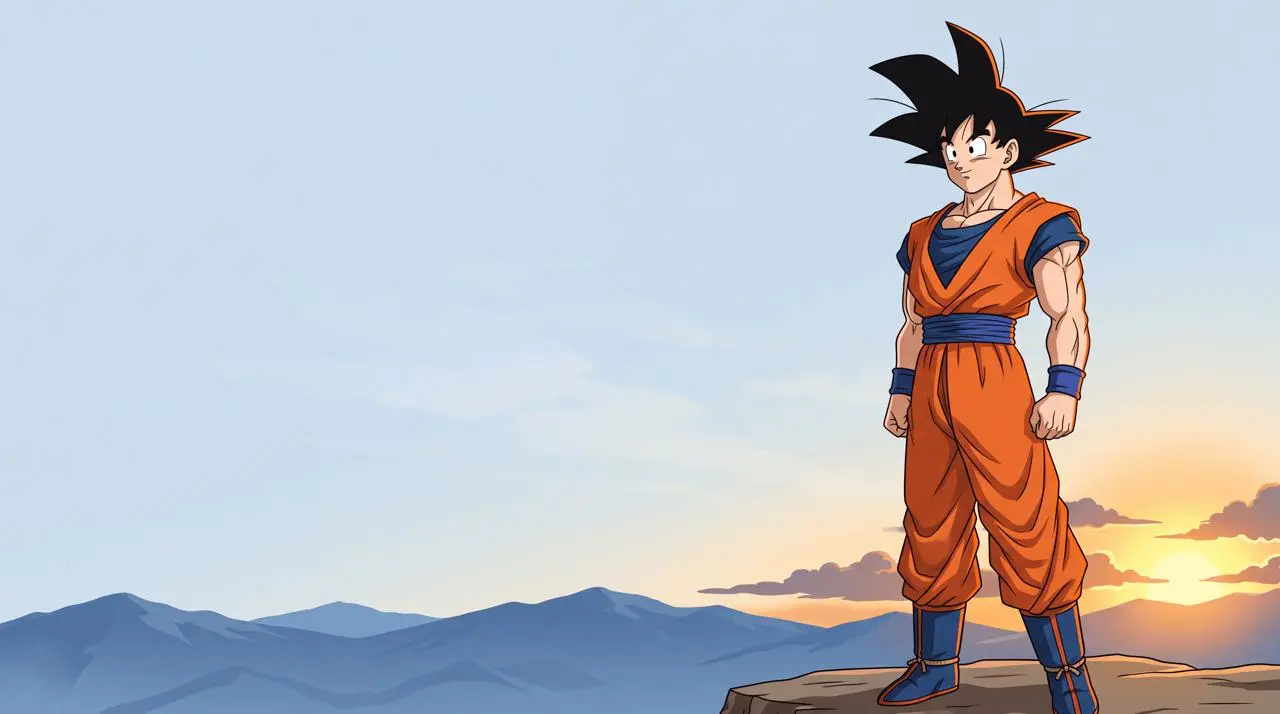
One AI-generated unofficial fan-art example. Text-only input; no reference photo was uploaded.
Reserve the desktop space before adding scenery
Place one full-length Goku on the right third and describe the left portion as quiet pale blue sky. The orange outfit creates a strong focal point, while the uncluttered sky provides a place for desktop icons. This gives the composition a practical purpose beyond showing the character.
A rocky ledge, distant mountains and a sunrise on the figure’s side provide depth. Avoid adding an aura across the entire canvas, extra fighters or scattered lettering. Every bright element in the empty area can compete with filenames and shortcuts.
Use the silhouette and outfit instead of an action pose
The text brief names spiky black hair, an orange martial-arts outfit and blue clothing accents. It asks for a calm standing pose with relaxed hands. Those cues make a recognizable fan-art subject without requiring motion effects or a complicated arrangement of limbs.
The sunrise outlines the character’s hair and shoulders. Broad cel-shaded shapes and crisp contours keep the figure readable against the mountains. This is a new AI-generated composition rather than a copied anime frame or official promotional image.
Measure the downloaded image before labeling an export
Select 4K in the generator, then inspect the returned file dimensions. A size setting describes the requested output tier; it is not a substitute for checking the downloaded asset. A UHD desktop uses 3840 × 2160 pixels, so compare those dimensions with the actual file reported below.
If the returned 16:9 image is larger, cropping or resizing it can create a display-specific version. Describe that export honestly. Do not present a resized copy as a second native generation or assume that a size label proves the exact pixel dimensions.
Test the wallpaper behind real icons
Preview the image with your usual desktop layout. Check the sky where your icon labels appear and the contrast around Goku’s outline. A quiet-left arrangement is most useful when the desktop elements also sit there. If your icons are on the right, a new left-positioned character brief may fit better.
Inspect the hands, boots, hair tips and contact with the rocky ledge at full size. For a different mood, change the sky and sunrise colors while keeping the subject placement. These refinements are possible next prompts, not additional verified outputs in this demonstration.
Generate the Goku image in WeShop
- Open Nano Banana 2 on WeShop.
- Select Nano Banana 2, a 16:9 aspect ratio and the 4K image-size setting. Set the quantity to one.
- Paste the complete prompt below and generate the image. This example uses text only; you do not need to upload an existing character image.
- Open the result at full size, then check it in its intended context: behind your desktop icons.
| Setting | Used for this example |
|---|---|
| Model | Nano Banana 2 |
| Input | Text only |
| Requested aspect ratio | 16:9 |
| Requested image size | 4K |
| Quantity | 1 |
| Returned file | 5504 × 3072 pixels |
Copy the generation prompt
Create an original Goku desktop wallpaper in horizontal 16:9. One adult Goku stands calmly on the right third, recognizable large spiky black hair, orange martial-arts gi with blue undershirt, blue belt and boots. Full figure visible, hands relaxed, no fighting or weapons. A rocky ledge beneath him, distant blue mountains and a warm sunrise on the far right. The left 55 percent is quiet pale blue sky with only a very subtle soft cloud, intentionally clear for desktop icons. Clean polished two-dimensional anime illustration with crisp contours and broad cel-shaded shapes, orange sunlight outlines the right side of his hair and shoulders. No aura covering the left half, extra characters, text, logos or watermark. Original unofficial fan-art composition, not a copied anime frame.
The tool on the right loads the selected result and its generation prompt. You can try it directly using the tool on the right. Keep the composition brief when changing colors or expression.
What the generated example shows
The generated Goku stands on the right, with spiky black hair, an orange outfit and blue accents. The left side remains mostly pale sky, with distant mountains low in the frame and the sunrise concentrated on the right.
The downloaded image measures 5504 × 3072 pixels. That is the actual returned file from the 4K size request, not an exact 3840 × 2160 UHD export.
The returned aspect ratio is approximately 1.792:1, slightly different from exact 16:9. One boot is close to the bottom edge, so allow for that when fitting the file to a display. No separate UHD resize, physical-monitor color check or desktop upload was performed.
Generated on November 23, 2026. This is one selected output, not a benchmark, a measured success rate or a promise that future runs will match it exactly. Suggested refinements elsewhere on this page are not additional tested examples.
Frequently asked questions
Does the 4K option guarantee exactly 3840 × 2160 pixels?
No. Check the actual file dimensions reported for the example and inspect any new download separately.
Is this a live wallpaper?
No. This workflow produces one static image, with no animation or interactive desktop behavior.
Is the generated image official Dragon Ball artwork?
No. It is unofficial AI-generated fan art. This tutorial does not grant a character license or imply endorsement.
For another format, explore WeShop’s image-generation tutorials. Start with the demonstrated prompt and change one design choice at a time.