







Create Batman Coloring Pages with Nano Banana 2
Create Batman coloring pages in Nano Banana 2 with clean outlines, open cape panels and printable margins. Copy the prompt and check the result before printing.
Batman’s dark costume creates a practical problem for a coloring page: a solid black cape leaves almost nothing to color. This workflow asks Nano Banana 2 to keep the recognizable cowl, cape and utility belt while drawing them as open outlined shapes. The goal is a printable fan-art illustration with enough structure to be interesting and enough white space to use.
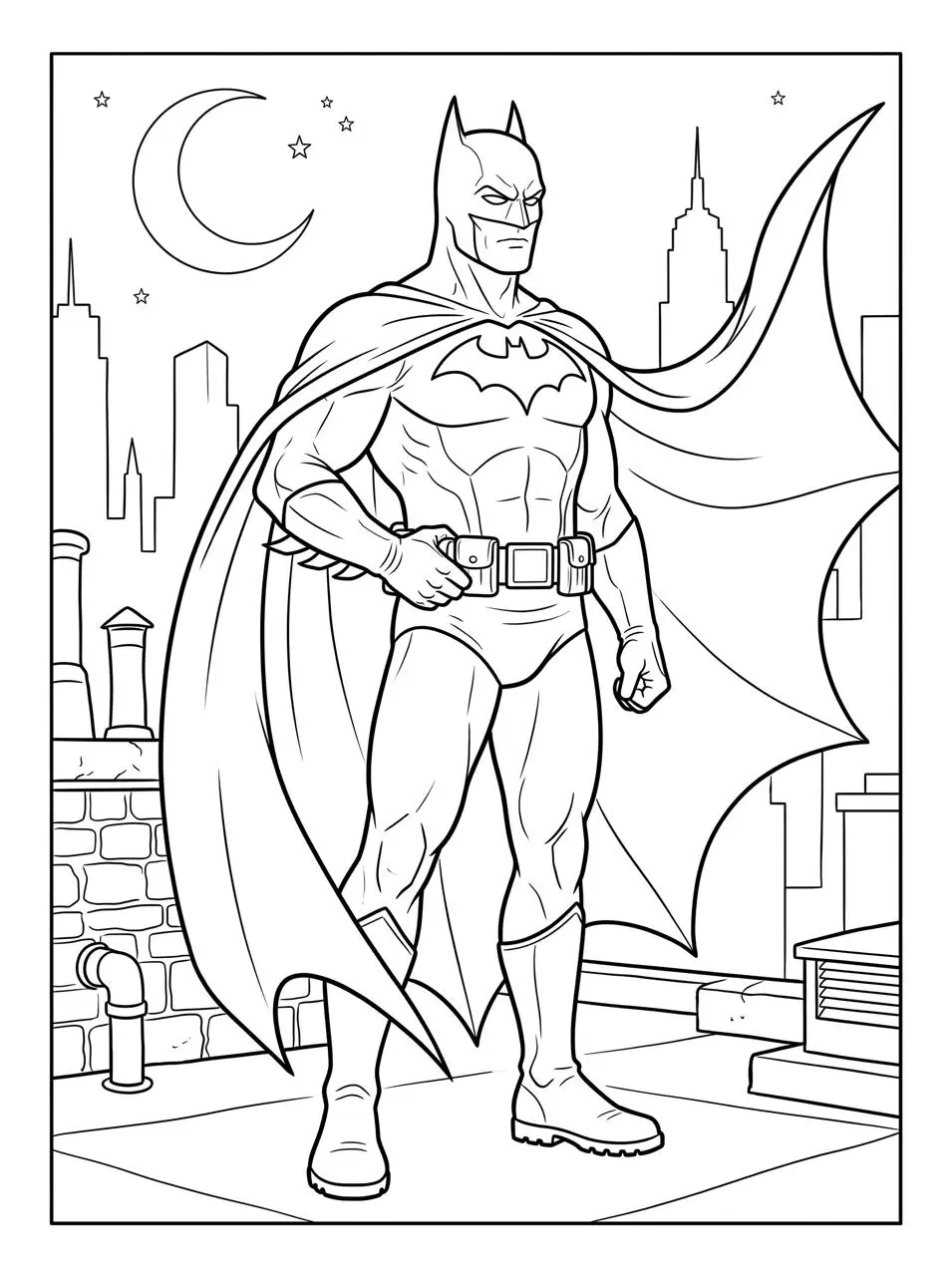
One AI-generated unofficial fan-art example. Text-only input; no reference photo was uploaded.
Design the cape as coloring space
Start with one standing figure rather than a fight scene. A quiet pose makes it easier to separate the arms, belt, boots and cape. Ask for the whole body inside the page, then give the cape several broad panels. Those panels are useful coloring regions; adding more costume texture would create visual noise without improving the activity.
A rooftop line and a few distant buildings establish Gotham without turning the page into an architectural puzzle. Keep those secondary shapes simpler than the figure. The white margins matter just as much as the drawing: a cape touching the edge is harder to place on a printed sheet without clipping.
Write positive line-art instructions before exclusions
“Black and white” can produce a dramatic shaded illustration. Specify black line art on pure white, then name the actual properties: smooth outlines, closed shapes, moderate interior detail and empty costume panels. Follow those positive requirements with exclusions for gray fill, crosshatching and solid black areas.
The prompt below asks for an original composition rather than a replica of an existing comic panel. It uses Batman’s familiar silhouette as a character cue; the pose and setting are a new fan-art brief. The character’s official background is documented in DC’s Batman profile.
Check the page at its intended print size
Inspect the outline around the fingers, boots, cape tips and belt compartments. A broken contour can connect regions that were supposed to be separate. Tiny loops may look crisp on screen but become difficult to color on paper. Zoom out to the approximate size of your printed page before deciding whether the detail level works.
Use your print dialog to fit the image within the printable area and inspect the preview. A portrait 3:4 image is not an A4 or US Letter document, and the generator does not create a print-ready PDF in this workflow. Print a test sheet before making several copies.
Fix dark fills without redesigning everything
If a new generation fills the cape with black, keep the pose and composition brief but strengthen “all cape and costume areas remain white inside the outlines.” If the skyline becomes too dense, remove the buildings and keep only the rooftop. Change one constraint at a time so you can tell which instruction affected the output.
For a simpler activity, remove the belt compartments and most cape folds. That is a different detail target from this moderately detailed page. Do not simply make the lines thicker while leaving dozens of tiny regions in place.
Generate the Batman image in WeShop
- Open Nano Banana 2 on WeShop.
- Select Nano Banana 2, a 3:4 aspect ratio and the 2K image-size setting. Set the quantity to one.
- Paste the complete prompt below and generate the image. This example uses text only; you do not need to upload an existing character image.
- Open the result at full size, then check it in its intended context: a print preview.
| Setting | Used for this example |
|---|---|
| Model | Nano Banana 2 |
| Input | Text only |
| Requested aspect ratio | 3:4 |
| Requested image size | 2K |
| Quantity | 1 |
| Returned file | 1792 × 2400 pixels |
Copy the generation prompt
Create one original Batman coloring page, portrait 3:4, black line art on pure white. Batman stands on a simple Gotham rooftop facing three-quarter toward the viewer, entire body, pointed cowl, cape, utility belt and boots visible. One hand rests on his belt, the other hangs relaxed. Large curved cape panels create open coloring areas; a few simple distant building silhouettes and a moon establish the setting. Use smooth crisp outlines, closed shapes and moderate interior detail. Leave generous white margins around every edge. No shading, gray fill, gradients, crosshatching, solid black costume panels, text, numbers, border or watermark. Original unofficial fan-art illustration, not a copied comic panel.
The tool on the right loads the selected result and its generation prompt. You can try it directly using the tool on the right. Keep the composition brief when changing colors or expression.
What the generated example shows
The returned page shows one full-body Batman on a rooftop, with an outlined cape, utility belt, boots and a simple skyline. Most costume panels remain open white areas rather than solid black fills.
The cape creates several broad regions, while the torso and rooftop contain smaller details. This is the more detailed coloring activity in this set.
The result adds a rectangular border despite the instruction to omit one. Keep that border inside the printer preview. Fine muscle and building lines make this less suitable when very large, simple coloring areas are the priority. No physical test print was performed.
Generated on November 23, 2026. This is one selected output, not a benchmark, a measured success rate or a promise that future runs will match it exactly. Suggested refinements elsewhere on this page are not additional tested examples.
Frequently asked questions
Can I generate several different Batman coloring pages?
Yes, vary one clear element of the brief, such as a standing pose, a seated rooftop pose or a cape shape, then inspect each new result. The demonstrated request produces one image; it does not establish a success rate across a batch.
Is the generated page official Batman artwork?
No. It is AI-generated unofficial fan art. This tutorial does not supply a license to the character or permission to sell the result.
Should I upload a Batman image first?
The demonstrated workflow uses text only. Adding a reference would be a separate image-guided workflow and would require its own input and result checks.
For another format, explore WeShop’s image-generation tutorials. Start with the demonstrated prompt and change one design choice at a time.