












Nano Banana 2.1 Text Test: Create a Product Poster
See a tested Nano Banana 2.1 workflow for generating a 2K product poster with five exact text lines, plus the layout limits to check before use.
When a product poster includes approved copy, a visually strong image is only useful if the words survive generation. A changed flavor name, invented claim, or missing call to action can turn a promising draft into another revision cycle.
We tested Nano Banana 2.1 with a fictional sparkling-tea launch poster containing five locked text lines. Two 2K outputs spelled every line correctly and added no extra copy. The compositions varied, however, and the model ignored one typography preference. The practical lesson is straightforward: explicit copy blocks can work well, but the result still needs design and text QA.
The test: five exact lines, two generations
A fictional drink launch shows how to separate approved copy from the visual brief, prevent invented claims, and evaluate output variation before production.
The brief: five approved lines and no filler copy
The fictional brand ORBIT TEA needed a vertical launch poster for a peach-and-yuzu sparkling tea. We chose a simple product setup—a matte-white can, navy crescent symbol, fruit, pale stone pedestal, and warm peach background—so text rendering remained the main test.
The approved copy was:
ORBIT TEAPEACH + YUZUSPARKLING TEAZERO ADDED SUGARSHOP THE DROP
The prompt prohibited people, extra cans, third-party logos, watermarks, and any additional text. ZERO ADDED SUGAR is fictional campaign copy for this test, not a verified claim about a real product.
Google describes Gemini Nano Banana 2.1 as its latest high-efficiency image-generation and conversational-editing model, with improvements to visual quality, prompt adherence, multi-turn consistency, and text rendering. The same documentation lists 1K, 2K, and 4K output options. Google DeepMind's model card also identifies clear poster text and localized text rendering as intended uses, while warning that small text, long passages, and page-length layouts can still fail.
This is a focused poster test, not a general review or a comparison with other image models.
Our Nano Banana 2.1 settings
We ran the test in the WeShop Nano Banana generator on October 14, 2026. We inspected two outputs created with the same prompt and settings.
| Setting | Value used |
|---|---|
| Model | Nano Banana 2.1 |
| Requested aspect ratio | 4:5 |
| Image size | 2K |
| Quantity shown in the form | 1 |
| Delivered dimensions | 1856 × 2304 for each output |
The interface labeled both results 4:5, while the delivered pixel ratio was close to rather than mathematically exact. Check and crop the final export for the destination placement.
Use a copy block inside a visual prompt
The prompt starts with the product and art direction, then isolates the exact copy and its hierarchy. The final sentences specify prohibited additions. This makes the request easier to audit than mixing product details and approved text throughout one paragraph.
For a real campaign, replace the fictional copy with approved product facts. Avoid asking the model to invent nutritional, price, sustainability, or performance claims.
Result one: all five lines rendered correctly
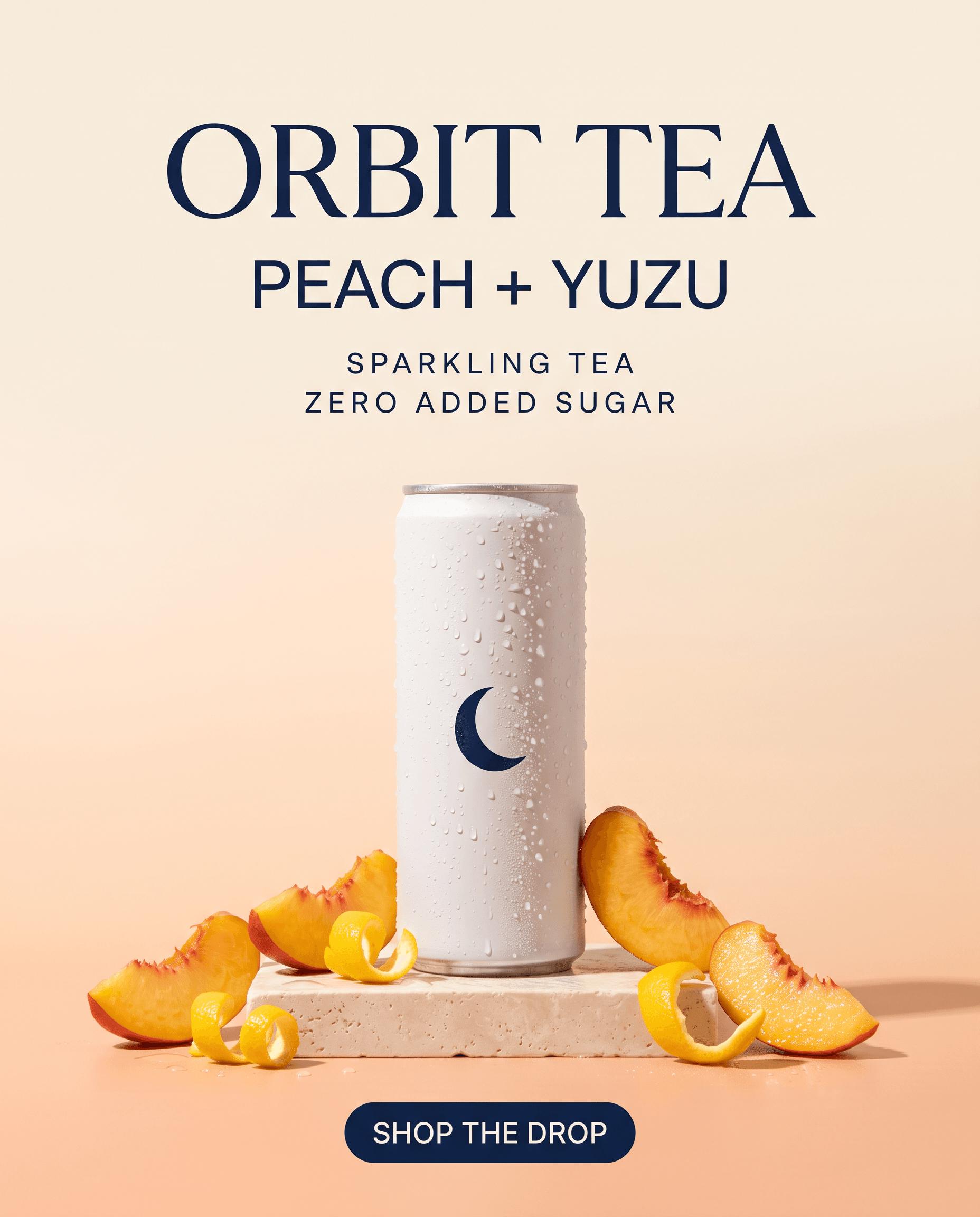
The headline, flavor, product type, claim, and call to action all matched the approved copy. No additional words were visible. The image also followed the requested one-can composition, crescent mark, fruit, stone pedestal, and warm studio palette.
One instruction was not followed: ORBIT TEA appeared in a serif typeface even though the prompt requested clean sans-serif typography. That does not affect spelling, but it matters when a brand system requires a specific typographic character.
Result two: the words stayed exact while the layout changed
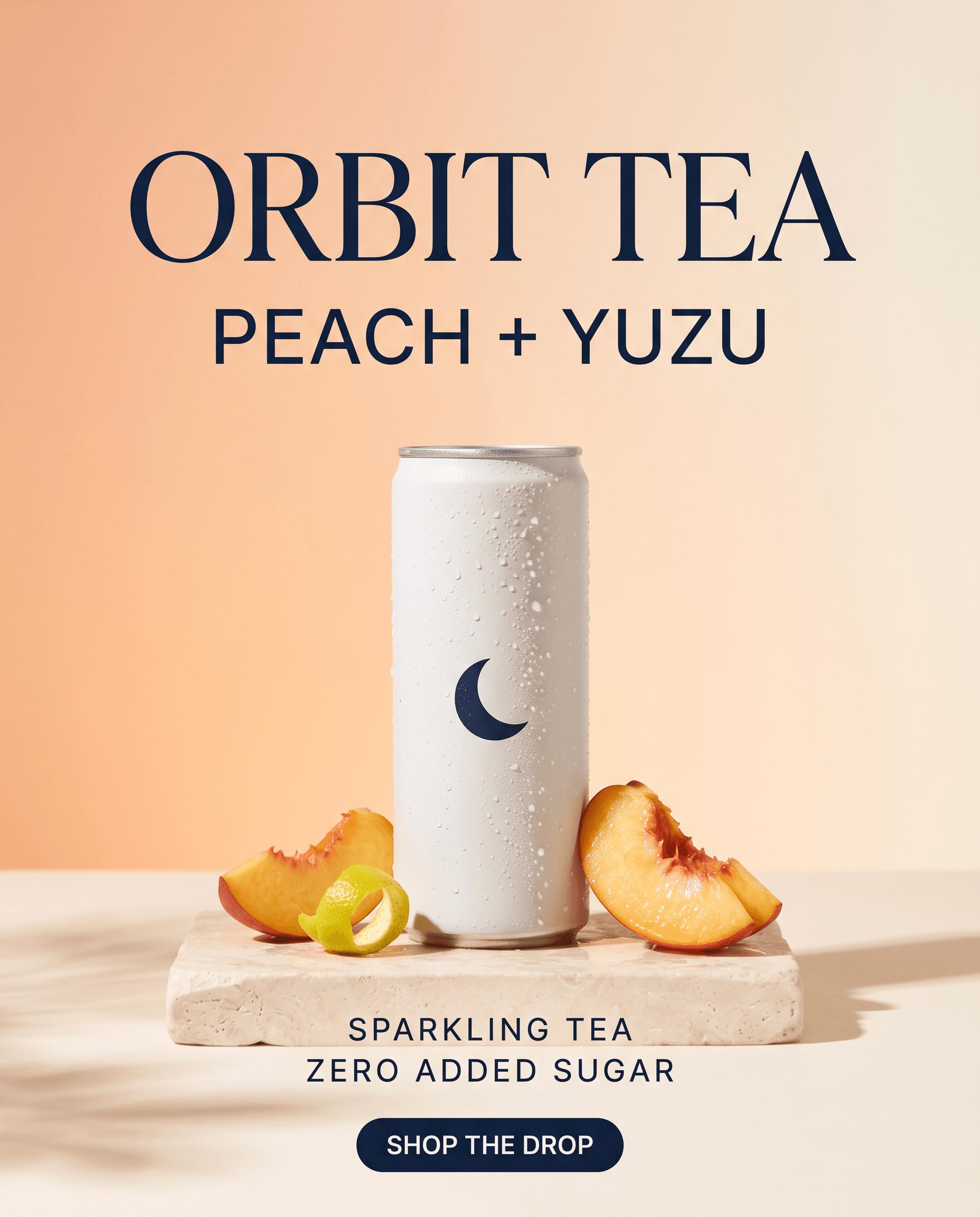
The repeat output again rendered all five lines without visible misspellings or extra copy. It preserved the brand cue and general visual direction, but enlarged the can, changed the lighting, reduced the number of peach pieces, and placed the two supporting lines on the pedestal.
| Check | Output 1 | Output 2 |
|---|---|---|
| Five requested lines | All present | All present |
| Spelling and symbols | Correct | Correct |
| Extra text | None observed | None observed |
| Single can and crescent mark | Present | Present |
| Requested sans-serif headline | Not followed | Not followed |
| Layout and fruit placement | One variation | Different variation |
Two successful outputs do not prove universal text accuracy. They do show that this short, clearly separated copy block worked twice in this specific setup.
Turn the draft into a production-ready poster
Start with approved copy, not placeholder prose. Keep the number of lines small, use unambiguous punctuation, and tell the model that every line should appear once. Separate the copy block from the visual brief, then specify which line is the headline, which lines are supporting information, and which is the call to action.
After generation, read the image character by character. Check spelling, punctuation, duplication, omissions, and invented text. Then inspect product count, logo-like marks, ingredients, and composition. If the words are correct but the layout is wrong, reuse the image as a reference and request one targeted change at a time.
Do not rely on image generation for legal or factual approval. Verify every claim independently, and move final typography into a design tool when exact fonts, kerning, accessibility, or localization rules are non-negotiable. The output is a raster image rather than a layered layout with editable text objects.
For longer paragraphs or very small disclaimers, add the copy after generation. That recommendation matches the model card's warning that small text and long passages remain difficult, especially at lower resolution.
The practical takeaway
Nano Banana 2.1 handled a five-line product poster unusually cleanly in this test: both outputs preserved the exact words while producing credible ecommerce compositions. The tradeoff was layout variability and incomplete typography control. Treat it as a fast way to create and explore poster directions, then keep a human copy and design check before delivery.
Try the same workflow in the WeShop Nano Banana generator: lock the copy first, describe the hierarchy second, and inspect the exported pixels before the poster goes live.