












Turn a Skyline Photo into a GTA 6 Phone Wallpaper
Make a GTA 6 inspired phone wallpaper from a skyline photo, with GPT Image 2.5 image-to-image editing and concrete instructions for painted color and quiet sky.
A skyline photo already contains a composition worth keeping. This workflow attaches a Miami city photograph to GPT Image 2.5, retains its recognizable skyline and foreground structure, then translates those elements into a clean painted phone wallpaper with quiet space above.
| Original reference | Edited illustration |
|---|---|
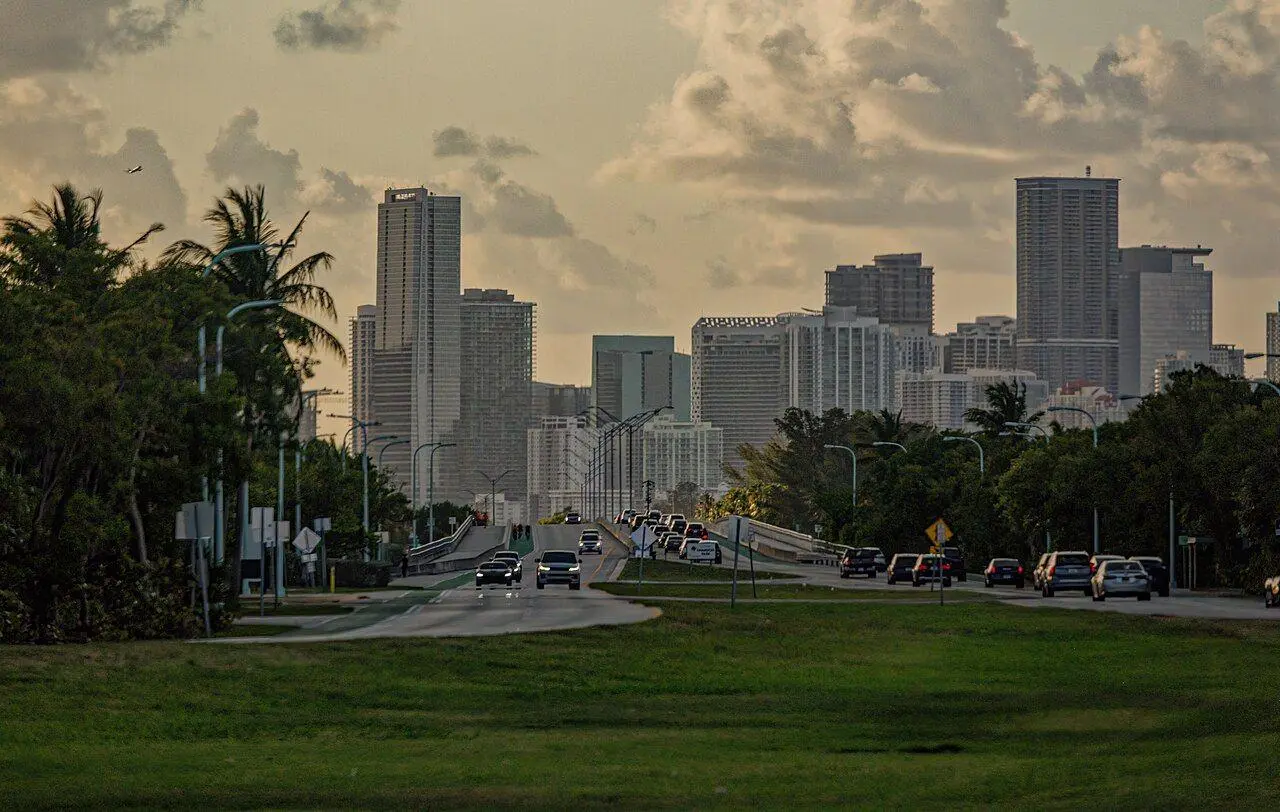 | 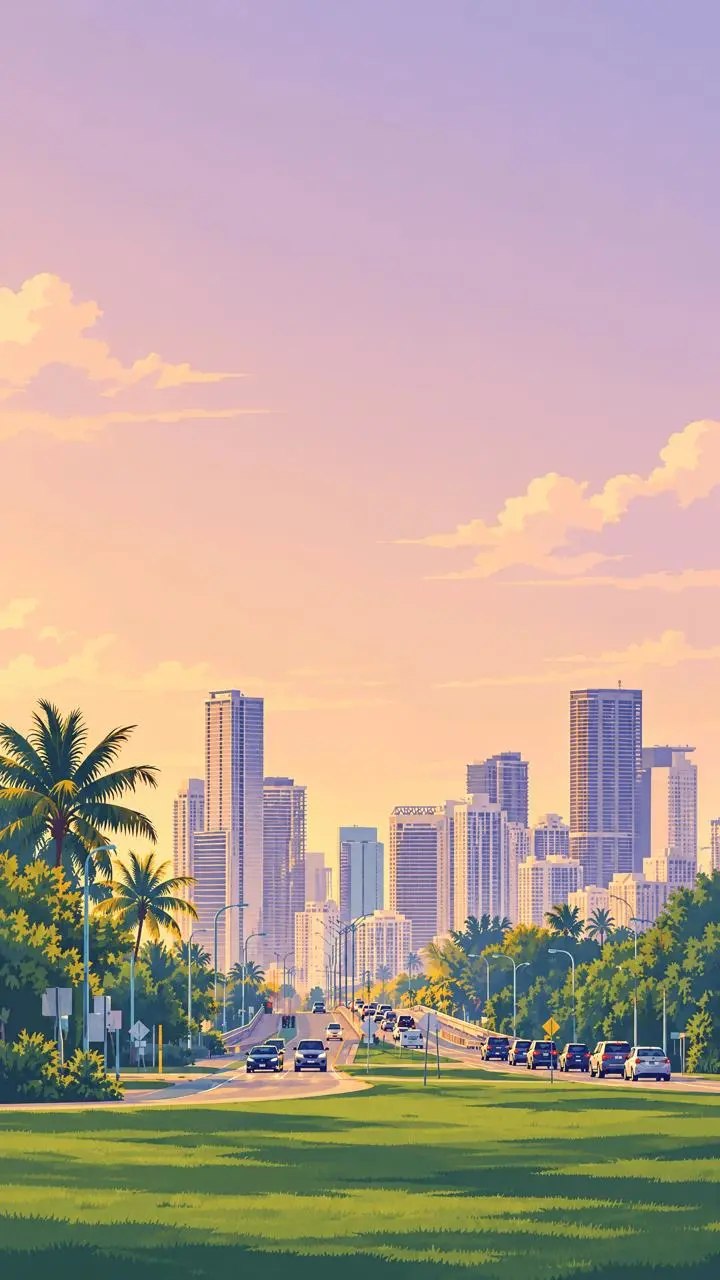 |
Wilfredor, Miami, Florida, Skyline, Wikimedia Commons, CC0 1.0. AI-stylized adaptation. Source photo · License
The displayed adaptations are AI-generated fan concepts. They are not official artwork or captured gameplay.
Identify the city shapes before changing the format
The input photograph shows a Miami skyline behind palms, lawn and a central road. The relative tower heights and road position are the reference cues to compare after the edit. Moving a horizontal source into 9:16 requires recomposition and added sky; the resulting picture should be checked for recognizable relationships rather than pixel-for-pixel registration.
Describe the drawing treatment, light and visual hierarchy
The illustrated treatment uses believable proportions, broad opaque color areas, angular cheek and garment shadows, selective fine contours, warm peach-gold light and lavender shadow planes. Foreground subjects stay crisp while distant buildings and vegetation become flatter pastel shapes. These visual properties were studied from official promotional artwork; the tested prompt expresses them directly without naming a game or artist.
Put the skyline and foreground in the lower half, then reserve a broad, quiet sky for a clock. Describe warm cream building faces, soft blue-violet shadows and grouped palm silhouettes. Window patterns should be simplified into organized marks so the lower scene remains readable without becoming visual noise.
Convert the skyline photograph into a vertical illustration
- Open GPT Image on WeShop and upload your source photo through the image control.
- Confirm that the thumbnail shows the intended photo. Select GPT Image 2.5 Flare, 9:16, 2K, quality high, and quantity 1.
- Paste the prompt below. Adapt the identity or scene details to your actual photo, then generate.
- Compare the output with the source at full size, checking recognizable features as well as the painted treatment.
| Setting | Tested value |
|---|---|
| Generation method | Image-to-Image |
| Actual reference inputs | One attached photograph |
| Model | GPT Image 2.5 Flare |
| Aspect ratio | 9:16 |
| Image size / quality | 2K / high |
| Quantity | 1 |
| Returned illustration | 1440 × 2560 pixels |
Use the complete image-editing prompt
Use attached photo 1 as the scene reference. Keep its recognizable Miami skyline, relative tower heights, central road, grassy foreground and palm arrangement. Recompose into a vertical 9:16 illustrated wallpaper: place those recognizable city features in the lower half and extend a quiet pale peach-to-lavender sky across the upper half. Repaint the entire scene as a polished two-dimensional editorial cover illustration. Use believable adult anatomy and recognizable facial structure, built from broad opaque areas of color, crisp angular planes and a few controlled soft transitions. Use selective thin dark-colored contours around eyes, lips, hair, garment seams and object silhouettes. Skin is smooth painted color with clearly designed cheek, nose and jaw shadow shapes. Fabric folds and metal reflections are simplified into clean hard-edged shapes. Use warm peach and pale gold direct light, dusty magenta and lavender shadows, muted teal accents, and restrained cream highlights. Keep foreground contours sharp and contrast strong; simplify distant architecture and vegetation into flatter, lighter pastel shapes. The finish is smooth and graphic, with almost invisible brush texture. Treat tower windows as a few organized geometric marks and trees as clean grouped silhouettes. The city should feel bright, humid and sunlit, with warm cream façades and soft blue-violet shadow faces. Keep the upper sky uncluttered for a phone clock. Exclude lettering, logos, UI, photographic texture, neon glow, grain and heavy black outlines.
The tool on the right loads this selected photo-to-illustration edit with its actual reference. You can try it directly using the tool on the right. Replace the reference and revise the subject details before generating.
Inspect the actual edited result
The edited wallpaper keeps the central roadway, foreground lawn, palms and broad skyline relationships from the photograph. The source’s horizontal scene becomes a tall composition with a large peach-lavender sky. Buildings and vegetation are drawn with flatter color areas and simplified detail. The added sky and changed framing are intentional.
The output does not include a real phone interface. Check clock readability, notification contrast and the device crop before using it.
Preview the wallpaper behind your real phone controls
Check the actual lock-screen clock, notifications and bottom controls. Your phone may crop or zoom the picture even when the request uses 9:16. If the upper sky competes with the clock, ask for fewer clouds and less contrast there. If the city has changed too much, prioritize the original tower order and road alignment over extra detail.
This example was generated on November 19, 2026. It is one selected result, not a measured success rate or an exact-preservation guarantee. The model names and input support are documented in WeShop’s generation guide; the observations above refer to these displayed results.
Frequently asked questions
Is this a text-to-image wallpaper prompt?
No. The generation consumes the attached skyline photograph. The right-hand template should show that photograph as its Before image and let you replace it.
Will the returned file match my phone exactly?
The request uses 9:16 and 2K. Preview the returned dimensions and crop on your device; screen proportions differ.
For another format in this series, see Turn a Photo into a GTA 6 Style Poster with GPT Image 2.5 · Make a GTA 6 Style Thumbnail from a Portrait Photo.
Start with a clear reference photo, change one visual decision and inspect the source-to-result relationship before using the image.