












GPT Image 2.5 Product Localization: Translate an Ecommerce Poster Without Rebuilding the Design
We tested GPT Image 2.5 Sunburst on a real ecommerce localization workflow: generate an English product poster, translate it into Spanish, and repair one missed label. Here is what stayed consistent, what failed, and the safest production workflow.
GPT Image 2.5 Product Localization: Translate an Ecommerce Poster Without Rebuilding the Design
Localization is usually where a finished campaign starts to come apart. The product render shifts, the lighting changes, the layout drifts, and translated copy no longer fits the design. We tested whether GPT Image 2.5 Sunburst could take an English ecommerce poster and turn it into a Spanish version while preserving the visual system.
The short answer: it is impressively strong at preserving the product, composition, color, and atmosphere. It is not yet reliable enough for exact packaging or regulated copy without a final human typography pass.
Test result at a glance
| What we tested | Result |
|---|---|
| Product and can geometry | Preserved almost perfectly |
| Lighting, shadows, fruit, and background | Highly consistent |
| Overall layout and visual hierarchy | Preserved |
| Translation of campaign copy | Mostly successful |
| Exact requested wording | Inconsistent; some lines were paraphrased |
| Targeted correction of one remaining English line | Failed in our test |
| Best use | Fast localization concepts and campaign variants |
| Human review still needed | Packaging, legal, ingredient, price, and exact brand copy |
OpenAI introduced GPT Image 2.5 on September 8, 2026, with sharper detail, faster generation, and more precise editing. The API offers two variants: Flare for faster generation and Sunburst for detailed creative work where precision matters more. For this test, we chose Sunburst because preserving a finished campaign across edits was the main goal.
What we tested
We ran the test on October 12, 2026, through WeShop CLI using the gpt-image agent and gpt-image-2.5-sunburst.
- Output format: 4:5 portrait
- Resolution: 2K
- Quality: High
- Batch size: 1
- Workflow: Generate an English source poster, localize it into Spanish, then correct one remaining English label
The product is fictional: AURORA, a yuzu botanical sparkling water. That let us test brand text, a hero product render, ingredients, atmosphere, and multiple lines of campaign copy without relying on an existing brand asset.
Step 1: Create the English source poster
We first asked Sunburst to create a premium ecommerce campaign poster with a centered can, warm yellow studio lighting, yuzu fruit, condensation, and clear typographic zones.
Prompt
Create a premium vertical 4:5 ecommerce campaign poster for a fictional sparkling water brand named AURORA. Center one slim aluminum can labeled AURORA and YUZU BOTANICAL SPARKLING WATER. Use a bright lemon-yellow studio background, a glowing circular sun behind the can, realistic yuzu fruit and green leaves around the base, crisp condensation, soft shadows, and high-end commercial product photography. Include clean English campaign copy in distinct typographic zones. Keep the logo, can geometry, text areas, lighting, and composition easy to preserve in later localization edits.
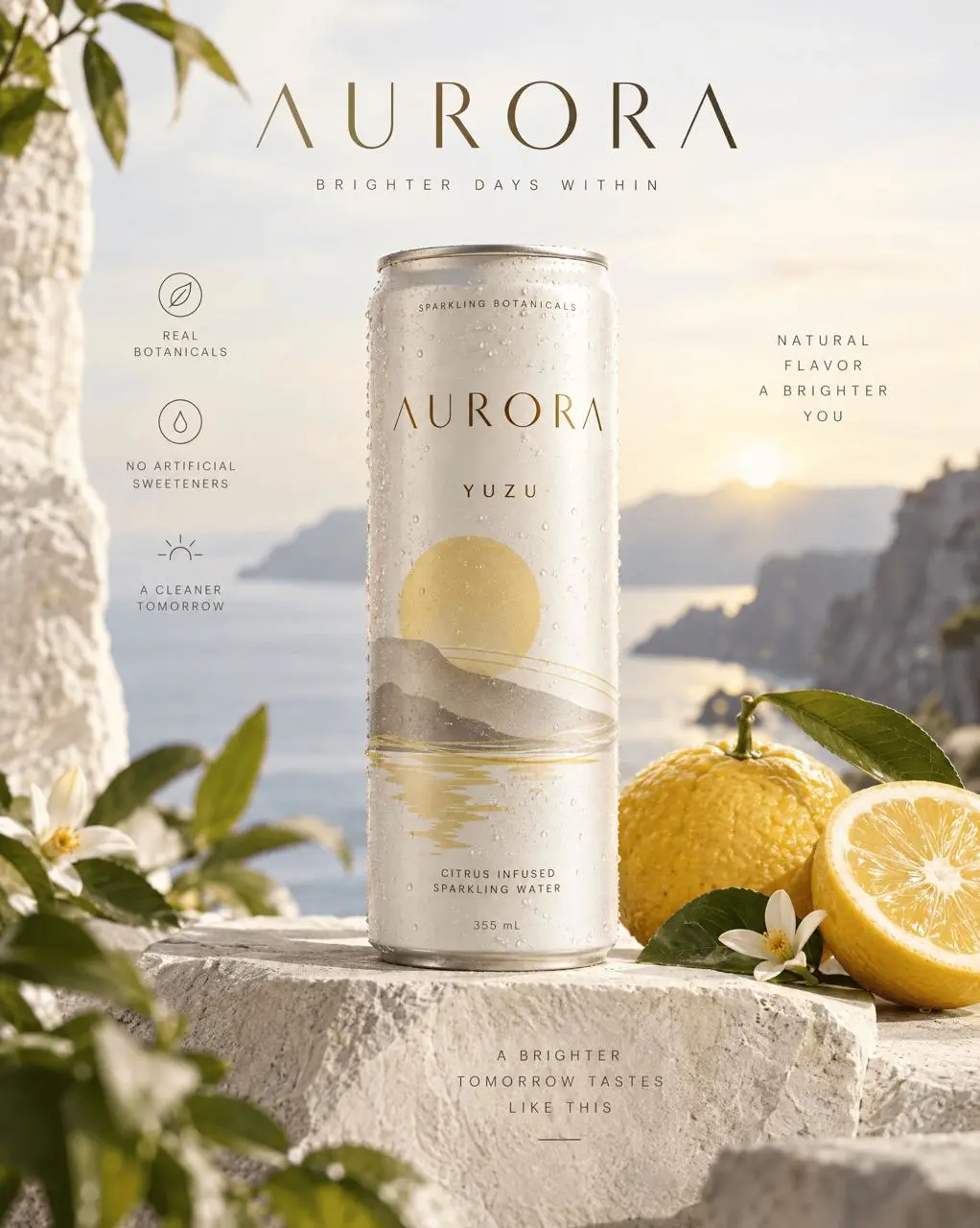
The first image looked polished and usable as a campaign concept. The can geometry was convincing, the product was separated clearly from the background, and the yellow-green palette felt coherent.
There was an early warning, however: the model did not follow every requested phrase exactly. It composed its own campaign lines. That is useful for ideation, but it means the output should not be treated as final copy-ready artwork.
Step 2: Localize the poster into Spanish
Next, we used the English poster as the reference image and asked the model to translate the visible campaign copy while leaving the rest of the design untouched.
Prompt
Localize this finished AURORA product campaign from English into natural Spanish. Preserve the exact can shape, logo placement, product scale, camera angle, fruit, leaves, condensation, yellow background, circular glow, lighting, shadows, spacing, and overall visual hierarchy. Change only the readable English marketing copy to Spanish. Do not redesign the poster or move any elements. Keep AURORA and YUZU as brand and flavor names. Use crisp, correctly accented Spanish typography suitable for a premium ecommerce ad.
| English source | Spanish localization |
|---|---|
| 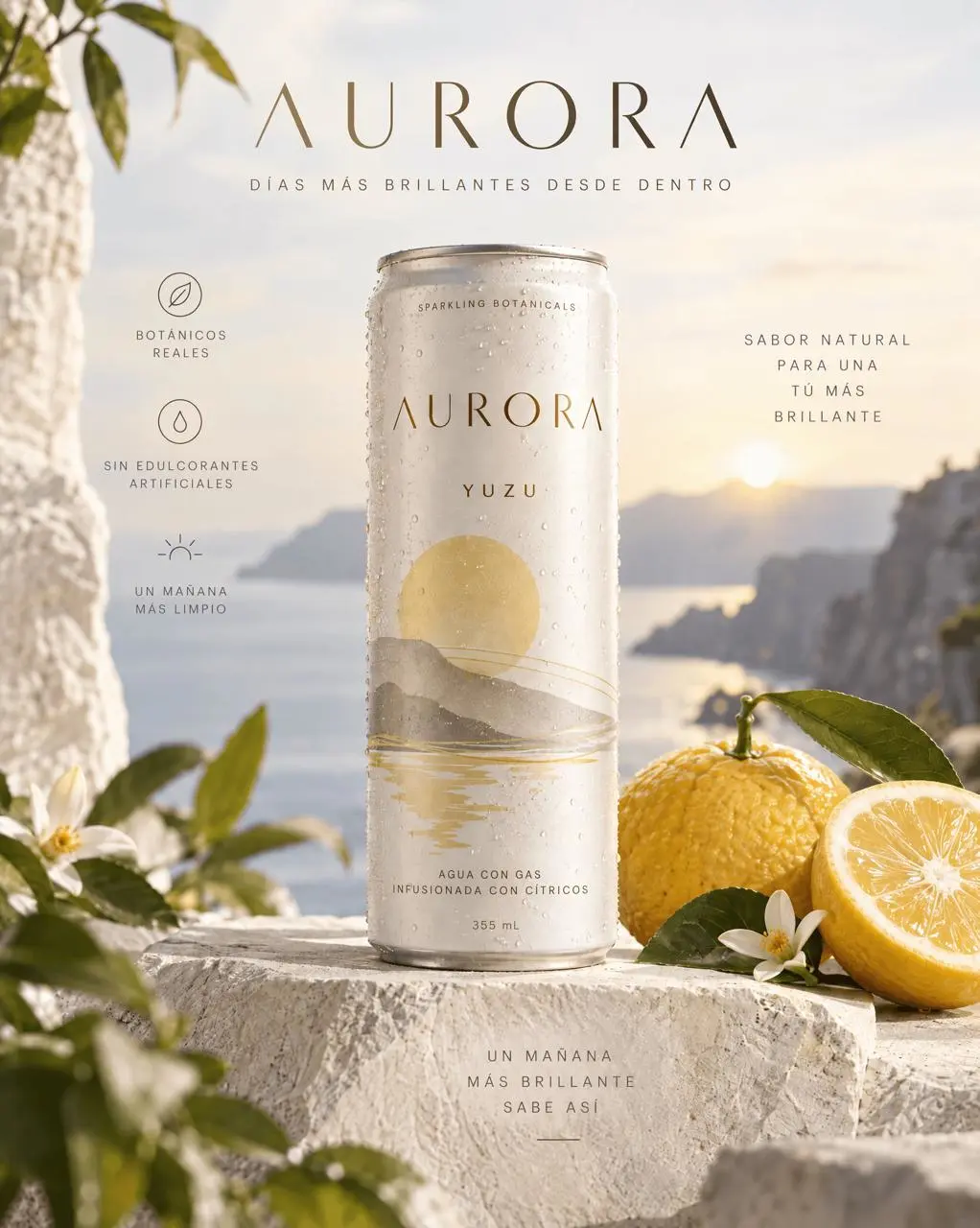 |
This was the strongest part of the test. The localized image retained the same can, composition, lighting, fruit placement, circular glow, and overall campaign identity. At a glance, it looks like a deliberate market variant rather than a newly generated poster.
Most copy changed into readable Spanish, and the model handled accented characters. But two limitations remained:
- Some requested wording was paraphrased instead of reproduced exactly. The result used natural-sounding alternatives such as “DÍAS MÁS BRILLANTES DESDE DENTRO” and “UN MAÑANA MÁS LIMPIO.”
- One line on the can, “SPARKLING BOTANICALS,” stayed in English.
For social ads or early localization concepts, that result is already useful. For a product page hero image, packaging mockup, or campaign with approved copy, it still needs review.
Step 3: Try a narrow corrective edit
The recommended recovery pattern for image editing is to isolate one change at a time. We therefore made a third pass and asked the model to replace only the remaining English line.
Prompt
Make one change only. On the can, replace the exact text “SPARKLING BOTANICALS” with “BOTÁNICOS CON GAS.” Preserve every other pixel-level detail: AURORA logo, YUZU text, can geometry, typography style, scale, alignment, colors, fruit, leaves, lighting, condensation, background, and all other Spanish copy. Do not translate, rewrite, or move anything else.
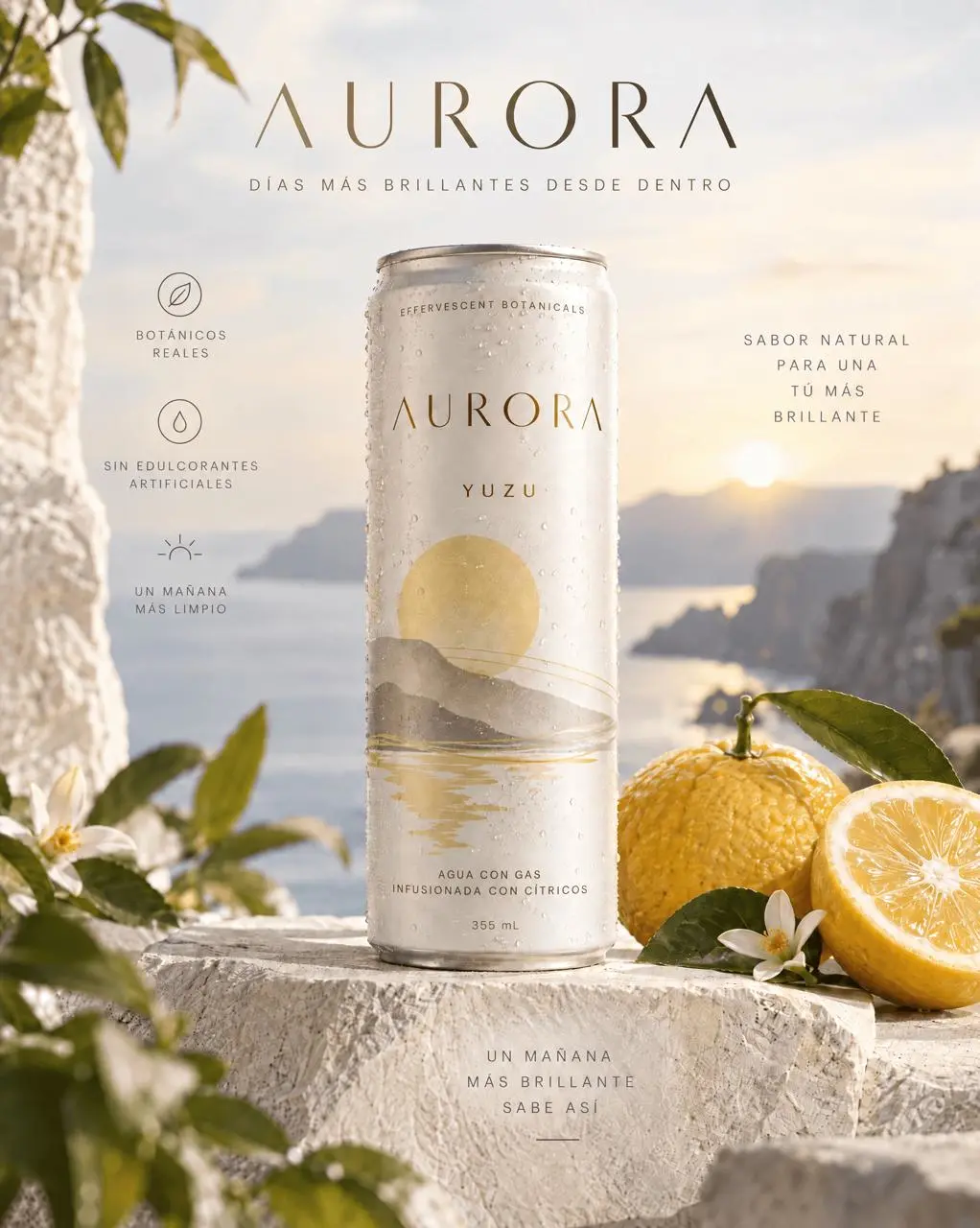
The edit preserved the image, but it did not make the requested correction. Instead of “BOTÁNICOS CON GAS,” the label became “EFFERVESCENT BOTANICALS”—another English phrase.
This failure is important. GPT Image 2.5 can understand the visual editing intent and protect the surrounding composition, yet still miss an exact text replacement. A narrow correction prompt improves control, but it is not a guarantee.
A practical product-localization workflow
The model works best as the high-speed visual layer in a localization pipeline:
- Start from approved source artwork. Use a clean, high-resolution reference with clearly separated text zones.
- Lock the visual invariants in the prompt. Name the product geometry, logo, framing, camera angle, lighting, colors, and background elements that must not change.
- Translate one market at a time. Ask for natural language, but also list any phrases that must remain exact.
- Use narrow follow-up edits. Correct one line or region per pass rather than asking for a full rewrite again.
- Run a text QA checklist. Check spelling, accents, price, units, ingredients, claims, legal copy, and brand terminology.
- Finish critical typography manually. For exact packaging or regulated content, export the localized visual and set final text in a design tool.
Prompt template for ecommerce localization
You can adapt this prompt to your own product image:
Localize this finished [PRODUCT/CAMPAIGN TYPE] from [SOURCE LANGUAGE] into [TARGET LANGUAGE]. Preserve the exact product shape, logo, packaging structure, camera angle, product scale, layout, lighting, shadows, background, props, and visual hierarchy. Change only the readable marketing copy. Keep these terms unchanged: [BRAND TERMS]. Use these exact translations: [SOURCE PHRASE] → [APPROVED TARGET PHRASE]. Do not add, remove, rewrite, or reposition any other content. Render crisp, correctly accented typography suitable for [CHANNEL].
For a corrective pass, reduce the instruction further:
Make one change only. Replace “[CURRENT TEXT]” with “[EXACT TARGET TEXT]” in the same location and typographic style. Preserve every other visual and textual detail unchanged.
Verdict
GPT Image 2.5 Sunburst is a strong tool for visual localization when speed and brand consistency matter. In our test, it preserved a finished ecommerce poster far better than rebuilding the asset from scratch, and most of the Spanish copy was convincing.
Its weak point is exact text fidelity. Even a tightly scoped correction can produce a plausible alternative instead of the approved phrase. That makes the model excellent for localized concepts, ad variations, mood boards, and production drafts—but not a replacement for final copy QA or manual typography on packaging and regulated assets.
You can try it directly using the tool on the right.
Create your own localized product visual with WeShop AI. For model details, see OpenAI’s GPT Image 2.5 announcement and Image API reference.