






Make a Naruto Anime PFP with GPT Image 2.5
Generate a Naruto anime PFP with GPT Image 2.5. Keep the face readable, protect the hair in a circular crop and test the avatar at small display sizes.
A Naruto portrait can look detailed at full size and become an orange blur as a profile picture. This workflow starts with the small avatar: a centered face, clear eyes, a complete hair silhouette and a quiet background. GPT Image 2.5 generates a square fan-art image from text, with no uploaded reference required.
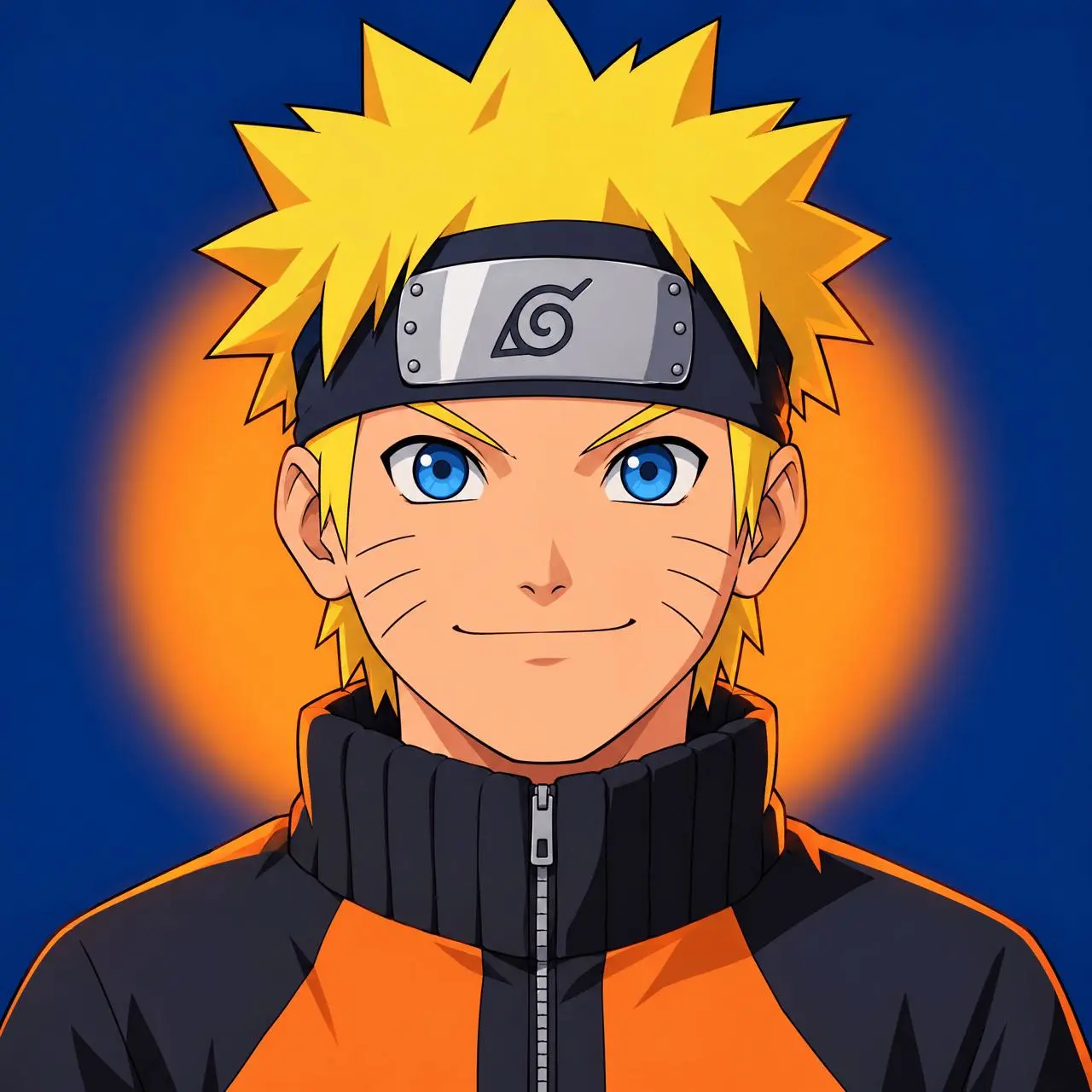
One AI-generated unofficial fan-art example. Text-only input; no reference photo was uploaded.
Choose recognition cues that survive a small crop
The brief names blond spiky hair, blue eyes, cheek marks, a forehead protector and the orange-and-black jacket. These cues give the model a concrete character description without asking for a replica of a particular anime frame. Keep the expression simple so the eyes and mouth do not compete with costume details.
A head-and-shoulders crop gives more space to the face than a full-body action pose. Do not add hands, weapons, a village panorama or multiple characters unless those elements are central to a different task. Character context is available from the official Naruto site.
Protect the silhouette before applying a circle
A square file does not guarantee that a circular avatar crop will work. The prompt keeps the hair and forehead protector within the central portion of the image, leaving room around the silhouette. This is a composition target; you still need to check the crop in the application where you will use it.
The deep blue background separates the warm hair and jacket from the canvas. One soft orange glow adds emphasis without filling the corners with effects. A clean contour and large color shapes matter more here than subtle textures that disappear when the image is reduced.
Test at avatar size before choosing the result
View a small preview beside the full image. Check whether both eyes, the headband and the general hair shape remain readable. Inspect a circular crop as well as the original square: hair tips that fit the square may still fall outside the circle.
The cheek marks and forehead-protector detail are small enough to need separate inspection. If they distort or disappear in a later run, simplify the lighting and background before adding more descriptive text. A good avatar should have a clear face even when those fine details are hard to see.
Refine expression without turning it into an action scene
Change “confident cheerful closed-mouth expression” to one specific expression when you want a different mood. Keep the same framing, silhouette margin and simple background. An open mouth, a tilted head and a raised hand introduced together can create a much harder composition problem.
If you want another palette, replace the background color and the rim-light color together so the contrast remains deliberate. These are suggested next prompts, not additional tested outputs. This article demonstrates a still image; it does not create an animated avatar or establish platform upload limits.
Generate the Naruto image in WeShop
- Open GPT Image 2.5 on WeShop.
- Select GPT Image 2.5, a 1:1 aspect ratio and the 2K image-size setting with high quality. Set the quantity to one.
- Paste the complete prompt below and generate the image. This example uses text only; you do not need to upload an existing character image.
- Open the result at full size, then check it in its intended context: a small square and circular avatar crop.
| Setting | Used for this example |
|---|---|
| Model | GPT Image 2.5 |
| Input | Text only |
| Requested aspect ratio | 1:1 |
| Requested image size | 2K |
| Quality | high |
| Quantity | 1 |
| Returned file | 1920 × 1920 pixels |
Copy the generation prompt
Create an original Naruto Uzumaki anime profile picture, square 1:1. Head-and-shoulders close-up of Naruto with recognizable spiky blond hair, blue eyes, three whisker marks on each cheek and a metal forehead protector, wearing his orange and black jacket. Confident cheerful closed-mouth expression, face centered, both eyes clearly visible, entire hair silhouette comfortably inside the central 80 percent of the square so it survives a circular crop. Clean two-dimensional cel-shaded anime illustration, strong dark contour, large simple color shapes, warm orange rim light. Plain deep blue background with one soft circular orange glow behind the head. No hands, extra people, busy village, text, lettering, frame or watermark. Unofficial fan art, no imitation of an exact existing anime frame.
The tool on the right loads the selected result and its generation prompt. You can try it directly using the tool on the right. Keep the composition brief when changing colors or expression.
What the generated example shows
The generated portrait has blond spiky hair, visible blue eyes, cheek marks, a forehead protector and an orange-and-black jacket. The dark blue background and orange glow keep the face separate from the surroundings.
The close framing gives the face most of the square. It is a still anime avatar with no hands, scenery or lettering.
Some top hair tips reach or meet the image edge. The request for a fully protected hair silhouette was not completely achieved; a circular crop can cut more of the spikes. Use a face-focused crop or generate a wider-framed version rather than assuming every hair tip will fit. No particular platform upload was tested.
Generated on November 23, 2026. This is one selected output, not a benchmark, a measured success rate or a promise that future runs will match it exactly. Suggested refinements elsewhere on this page are not additional tested examples.
Frequently asked questions
Does anime PFP mean an animated profile picture?
Here it means an anime-style still profile picture. The output is a static image.
Will this preserve a particular anime screenshot exactly?
No screenshot is supplied. The text-only brief creates a new unofficial fan-art portrait rather than preserving an existing frame.
Why generate a square if the avatar looks circular?
The square provides a source image that can be cropped by the destination application. Leaving space around the head helps with that later crop.
For another format, explore WeShop’s image-generation tutorials. Start with the demonstrated prompt and change one design choice at a time.