












How to Create Dynamic Anime Posters With AI Foreshortening
Learn how to generate dynamic vertical anime posters with AI using low-angle camera prompts, strong foreshortening, layered depth, and cinematic lighting.
AI Image Generator Tutorial: Create Dynamic Anime Posters with Foreshortening
Many AI-generated anime images have attractive characters, detailed outfits, and colorful backgrounds but still feel visually flat. The character stands in the center, the foreground and background appear compressed, and the result resembles a standard portrait rather than a dramatic social media poster.
Creating stronger anime artwork is not simply a matter of adding more visual effects. The key is controlling the spatial relationship between the camera, the foreground object, the character, and the environment.
In this tutorial, we will use an AI image generator, a reusable anime poster prompt, exaggerated foreshortening, a low-angle camera, and cinematic depth of field to create dynamic vertical character posters.
Anime Poster Examples
| Foreshortened Character Poster | Neon Anime Poster | Cinematic Anime Poster |
|---|---|---|
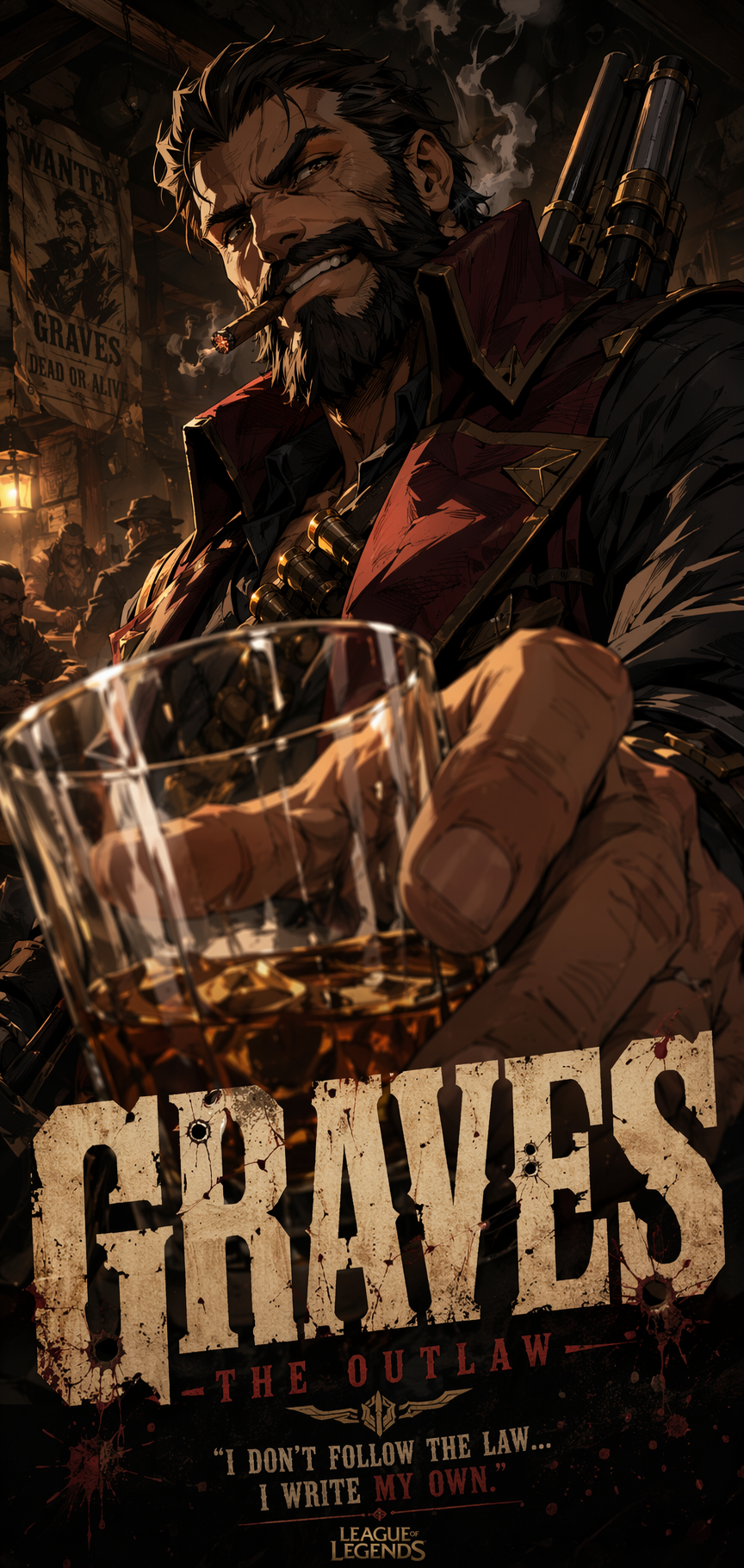 | 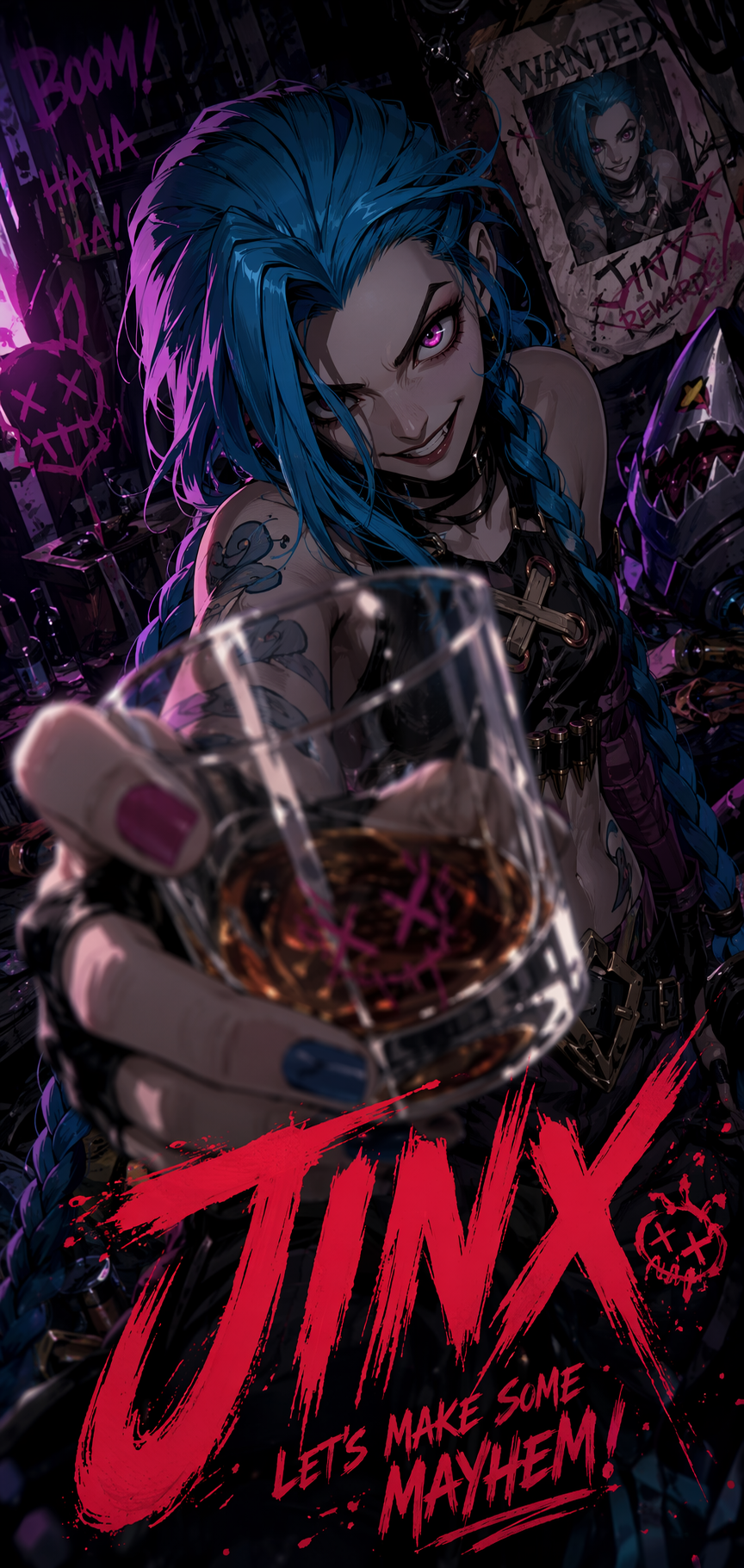 | 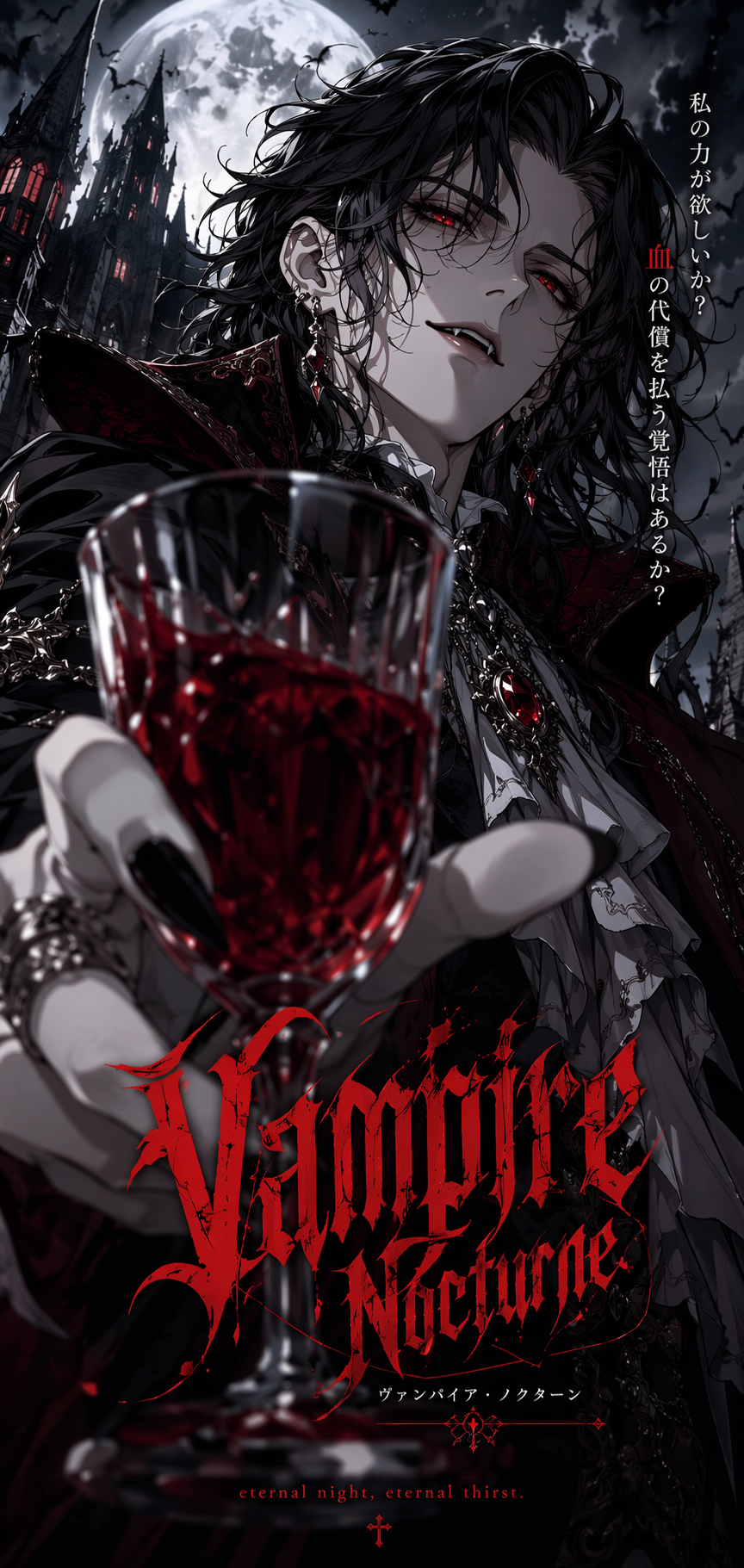 |
| An enlarged hand or prop creates a dramatic foreground layer. | Neon colors, a low camera position, and poster typography strengthen the social media composition. | Deep shadows, rim lighting, and selective focus create a cinematic atmosphere. |
These examples feature different characters and color palettes, but they share the same visual structure: an oversized foreground element, a recognizable character in the middle ground, and a layered environment in the background.
What You Need
This workflow uses WeShop AI GPT-Image as the AI image generator. It runs in the browser, so you do not need to install separate image-generation software.
Before you begin, decide on the following elements:
- The original character or character concept
- A hand, weapon, glass, or other foreground object
- The main poster color palette
- The background environment
- A short poster title
- A vertical composition for mobile platforms
- The preferred lighting style
If the result will be used commercially, make sure you have permission to use the characters, reference images, logos, and other protected materials.
Step 1: Open the AI Image Generator
Open WeShop AI GPT-Image and locate the prompt input area. This is where you can describe the character, camera angle, foreground action, lighting, environment, and poster layout.
| Step 1: Open WeShop AI GPT-Image |
|---|
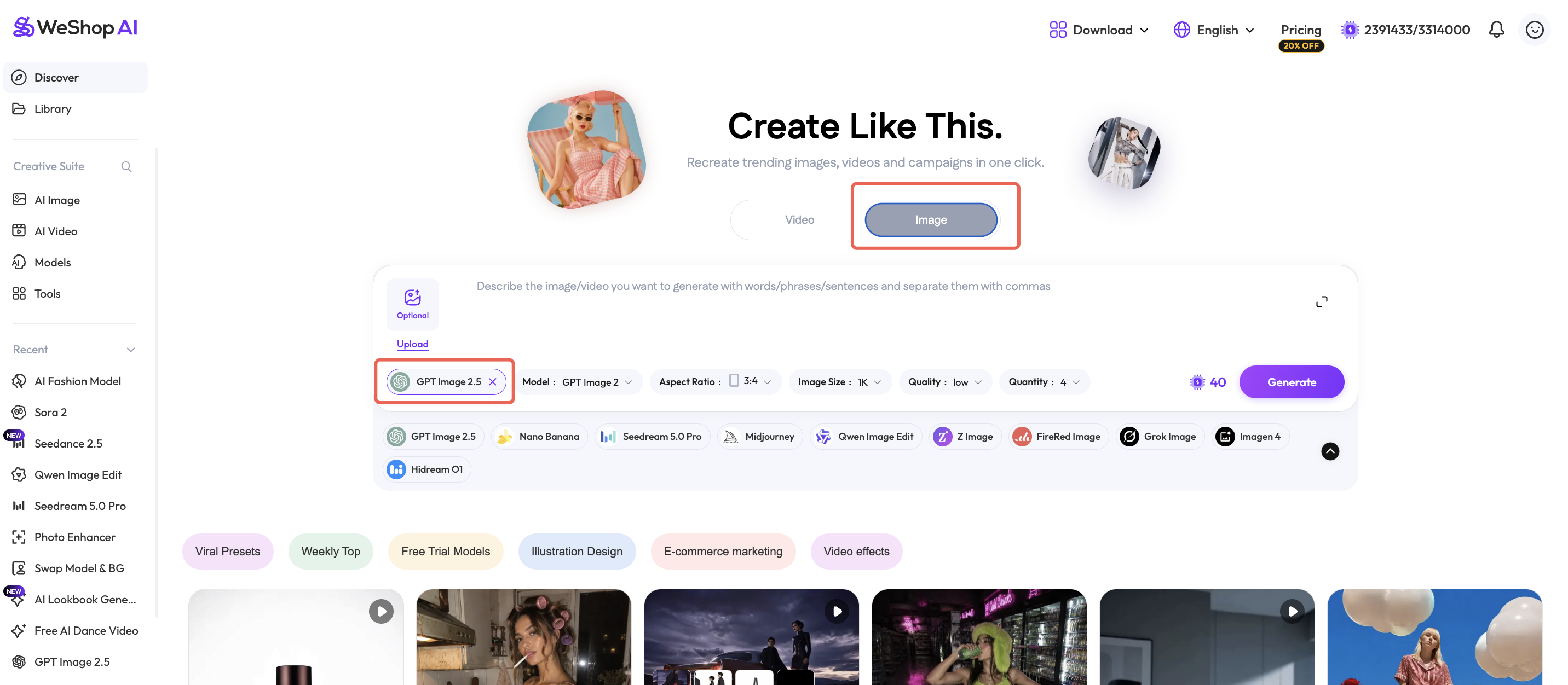 |
| Enter the character, perspective, foreground object, lighting, color palette, and poster composition in the prompt field. |
You can use text-to-image generation when you want the AI anime poster generator to create an original character. If you need to preserve the appearance of an existing original character, upload a reference image that you have permission to use.
Step 2: Write a Foreshortening Anime Poster Prompt
A basic prompt may describe the character and outfit without explaining how the camera should see them. This often produces a flat, front-facing portrait.
A more effective foreshortening prompt should define:
- A low camera position
- One object placed close to the lens
- An enlarged foreground hand or prop
- A clearly recognizable character in the middle ground
- A separate background environment
- Cinematic rim light and deep shadows
- A vertical social media poster layout
Use the following prompt template and replace the text inside the brackets.
Create a dynamic vertical anime poster featuring [CHARACTER].

Use an exaggerated low-angle camera perspective and strong
foreshortening. Place [FOREGROUND OBJECT OR HAND] very close to
the camera so it appears dramatically larger than the character's body.

Keep the character clearly recognizable in the middle ground.
Show a confident, energetic pose with expressive body language.

Build three visible layers of depth:

Foreground: [LARGE HAND, WEAPON, GLASS OR OTHER OBJECT]
Middle ground: the full character and main action
Background: [CITY, NEON LIGHTS, SMOKE, SYMBOLS OR ENVIRONMENT]

Use cinematic lighting, dramatic rim light, deep shadows,
selective depth of field and a [COLOR PALETTE] color scheme.

Add clean poster typography reading "[POSTER TITLE]".
High-impact social media composition, detailed anime illustration,
sharp facial features, dynamic perspective, vertical poster format.

Avoid flat front-facing composition, weak perspective, duplicated limbs,
deformed hands, unreadable typography, cluttered background and
unrelated objects.
Editable Prompt Variables
| Variable | Example |
|---|---|
[CHARACTER] | a rebellious blue-haired anime heroine |
[FOREGROUND OBJECT OR HAND] | her gloved hand holding a glass toward the camera |
[LARGE HAND, WEAPON, GLASS OR OTHER OBJECT] | an oversized hand and transparent glass |
[CITY, NEON LIGHTS, SMOKE, SYMBOLS OR ENVIRONMENT] | a futuristic city with purple smoke and neon signs |
[COLOR PALETTE] | electric blue, magenta, black and crimson |
[POSTER TITLE] | NIGHT REBEL |
If the result still resembles a conventional portrait, reinforce the perspective with these terms:
extreme foreground
dramatically enlarged hand
strong foreshortening
low-angle camera
wide-angle perspective
three visible layers of depth
foreground, middle ground and background separation
These phrases tell the AI image generator to reorganize the spatial composition instead of simply adding more decorative effects.
Step 3: Choose a Vertical Poster Format
A vertical aspect ratio close to 9:16 works well for anime social media posters. It provides enough space for a full character, an enlarged foreground element, the background environment, and optional typography.
Before generating the image:
- Select a vertical aspect ratio close to 9:16.
- Generate a small number of initial variations.
- Keep the character’s face near the main visual area.
- Avoid covering the entire face with the foreground hand.
- Leave a relatively clean area for the poster title.
- Avoid adding too many weapons, props, symbols, or text elements.
Click Generate after confirming the settings.
The first result does not need to be perfect. Use it to determine whether the perspective is strong enough.
If the foreground looks too small, increase the size and lens-distance instructions. If the character or hand becomes distorted, reduce the number of props and soften terms such as “extreme.”
Generated Anime Poster Results
| Dynamic Perspective AI Art | AI Social Media Poster | Cinematic Anime Poster |
|---|---|---|
| | |
The posters use the same underlying composition:
- A hand or prop near the camera establishes the foreground.
- A low camera angle exaggerates the character’s pose.
- The recognizable character remains in the middle ground.
- Lighting, smoke, architecture, or symbols establish the background.
- Selective depth of field separates the visual layers.
- High-contrast colors improve visibility on mobile screens.
Common Problems and Fixes
Why does the result still look like a standard portrait?
The prompt may describe the character without clearly defining the distance between the foreground object and the lens.
Add:
The foreground hand is extremely close to the lens and occupies
a large portion of the lower frame.
Why are the foreground hand or props distorted?
Distortion is more likely when the foreground object is extremely large, the hand performs a complicated action, or several objects overlap.
Simplify the scene to one visible hand and one main prop before adding more elements.
Why is the poster text incorrect?
AI image generators may still produce misspelled or inconsistent text. Keep the title between one and three simple words, or generate the poster without text and add accurate typography in a design editor afterward.
Why does the image feel cluttered?
Remove unnecessary environment descriptions. Start with one character, one foreground object, one main background, and a limited color palette.
Clear foreground, middle-ground, and background separation is generally more effective than adding more effects.
Final Thoughts
A strong AI anime poster does not require an extremely long prompt. It requires clear control over spatial composition.
By combining an enlarged foreground object, low-angle anime art, strong foreshortening, a readable middle-ground character, cinematic lighting, and a layered background, an AI image generator can produce more dynamic character posters for social media.
Open WeShop AI GPT-Image, replace the character, foreground prop, background, color palette, and title in the template, and create your own dynamic anime poster.