CRIAÇÃO DE IMAGENS COM GPT IMAGE 2

GPT Image 2: gerador de imagens com IA

GPT Image 2 é o modelo de geração e edição de imagens da OpenAI. Ele aceita texto e imagens para visuais novos e mudanças guiadas por referências.

gpt-image-2
EXEMPLOS DO GPT IMAGE 2

Exemplos de imagens com GPT Image 2

Explore o GPT Image 2 com estes exemplos: Transferência de estilo para escultura de néon ; Desdobramento editorial a partir de uma referência ; Pôster de jazz com foco em tipografia. Cada caso salvo mantém seu prompt real e as entradas disponíveis. Confira o resultado antes de adaptar uma solicitação ao seu sujeito.

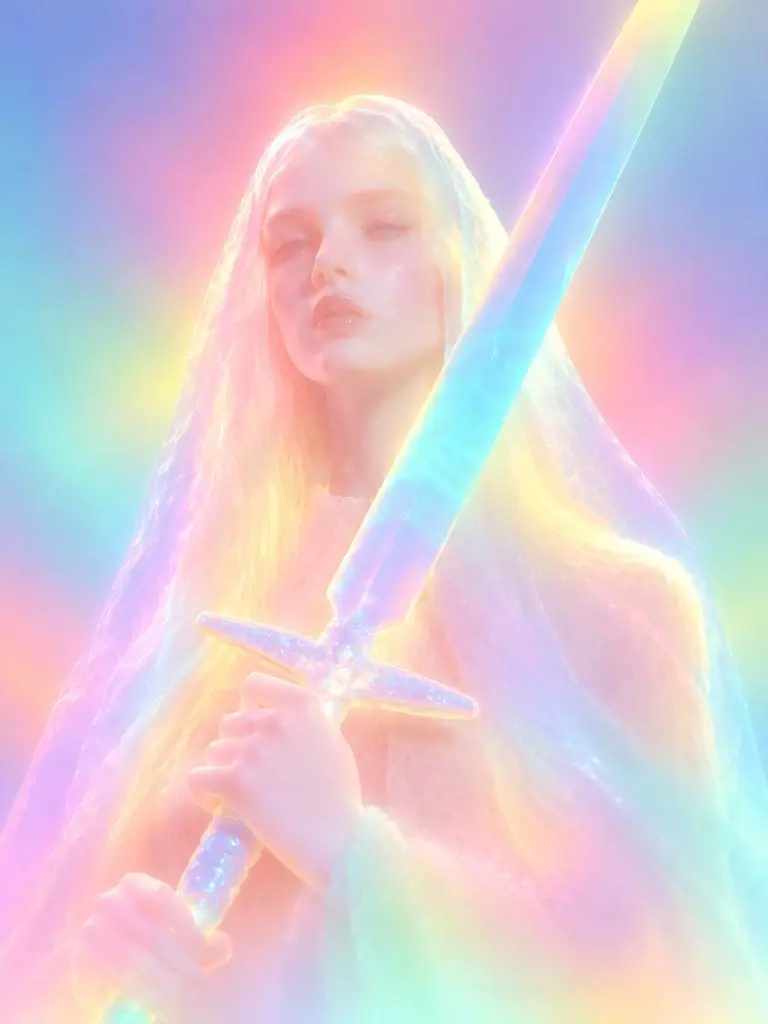
Resultado do WeShop: transferência de estilo para escultura de néon
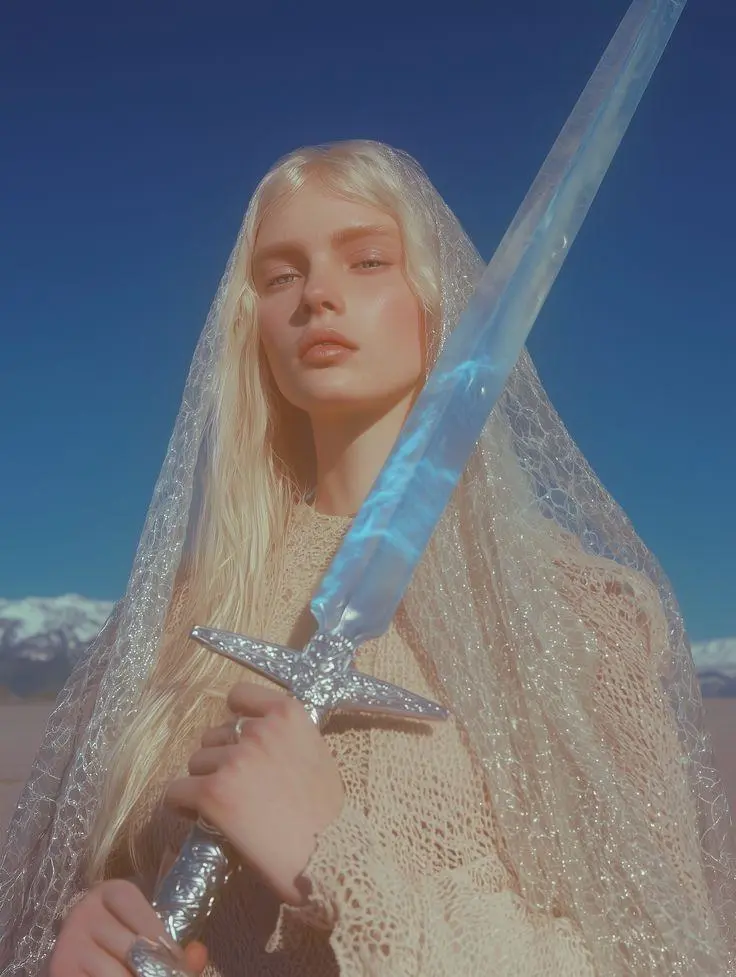
Referência 1

Transferência de estilo para escultura de néon

Uma transformação guiada por referência em escultura luminosa. Cores difusas de néon, detalhes faciais suavizados e materiais arredondados tornam visível a mudança de estilo solicitada.

Please transform the input image into a soft focus, neon gradient sculptural style. Do not copy specific specific characters, crowds, compositions, or poses from any reference, but follow this visual language: Style & Texture: Create a soft, dreamy, surreal 3D illustration and digital sculpture. The subject should look like translucent plastic, frosted glass, glowing rubber, or soft ceramic sculpture wrapped in colored mist. Smooth rounded edges, moderately simplified details, with a hazy, low-contrast, non-realistic artistic effect. Color & Light: Use highly saturated but softly diffused neon gradients (fluorescent pink, coral orange, lemon yellow, mint green, cyan, violet, pale grayish-blue). Colors should blend seamlessly like thermal imaging, colored mist, or dream halos. Shadows must be bluish-purple, cyan, or deep magenta—NO pure black hard shadows. Use strong inner glow, backlight, rim light, and ambient color reflections to make the subject glow from within. Include soft focus, slight mist, fine grain, and gradient noise. Subject Treatment: Retain the identity, pose, proportions, and clothing outlines of the input image, but transform them into a minimalist, rounded, dreamy neon sculpture. Soften and weaken facial features to create a quiet, ethereal, detached expression. The face should look like a soft mask covered by a glowing halo. Composition: Clean background (solid color, soft gradient, misty or large color blocks). Quiet, surreal, fairytale-like but slightly alienating atmosphere with a floating feeling. Keywords: soft neon gradient, dreamy 3D illustration, translucent sculpture, frosted glass texture, glowing rubber, pastel fluorescence, diffused light, inner glow, soft focus, blurred facial features, surreal portrait, minimal details, smooth rounded forms, luminous mist, thermal color gradient, ethereal atmosphere, clean composition, high-end digital art.
Use este prompt
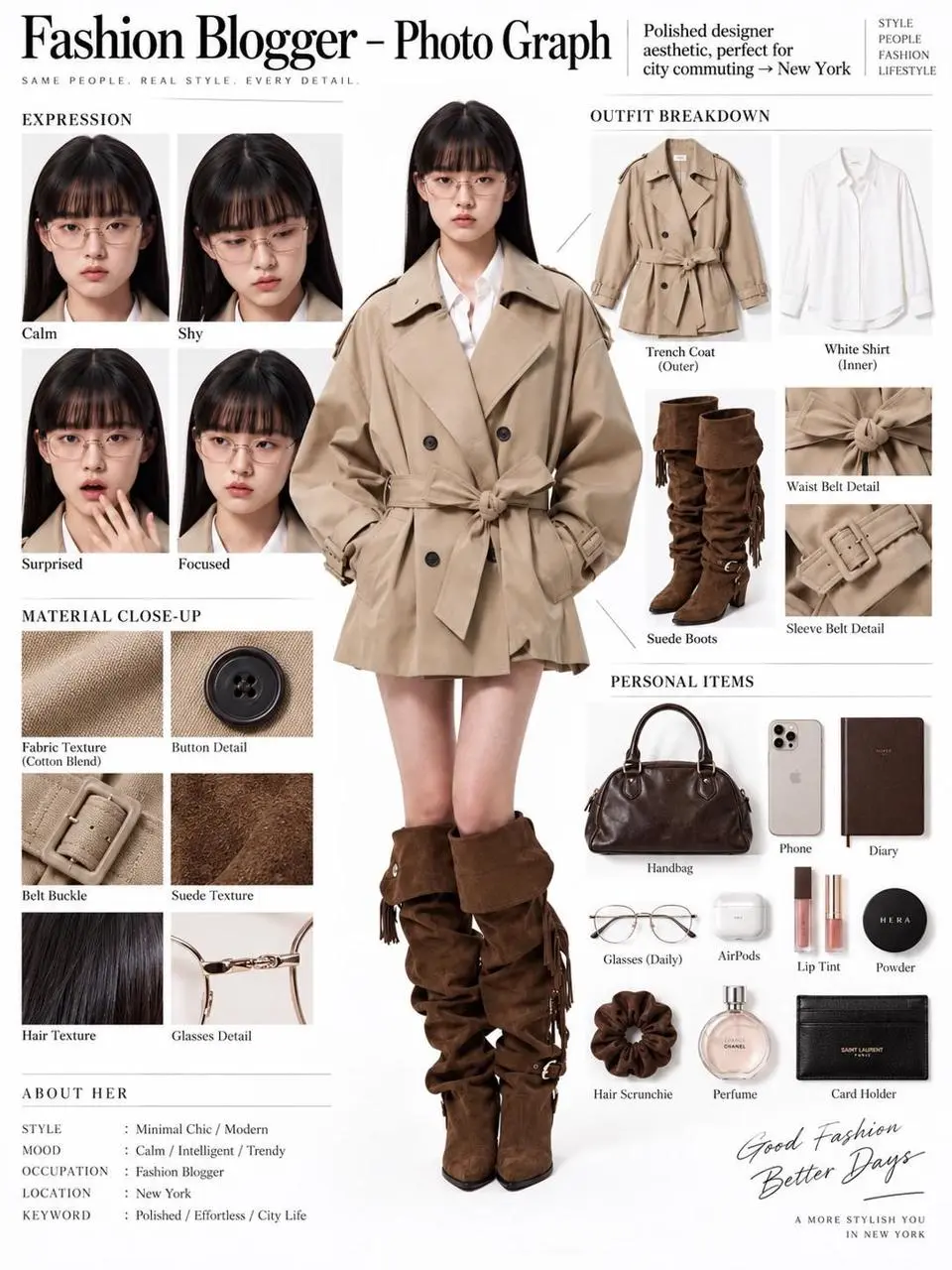
Resultado do WeShop: desdobramento editorial a partir de uma referência
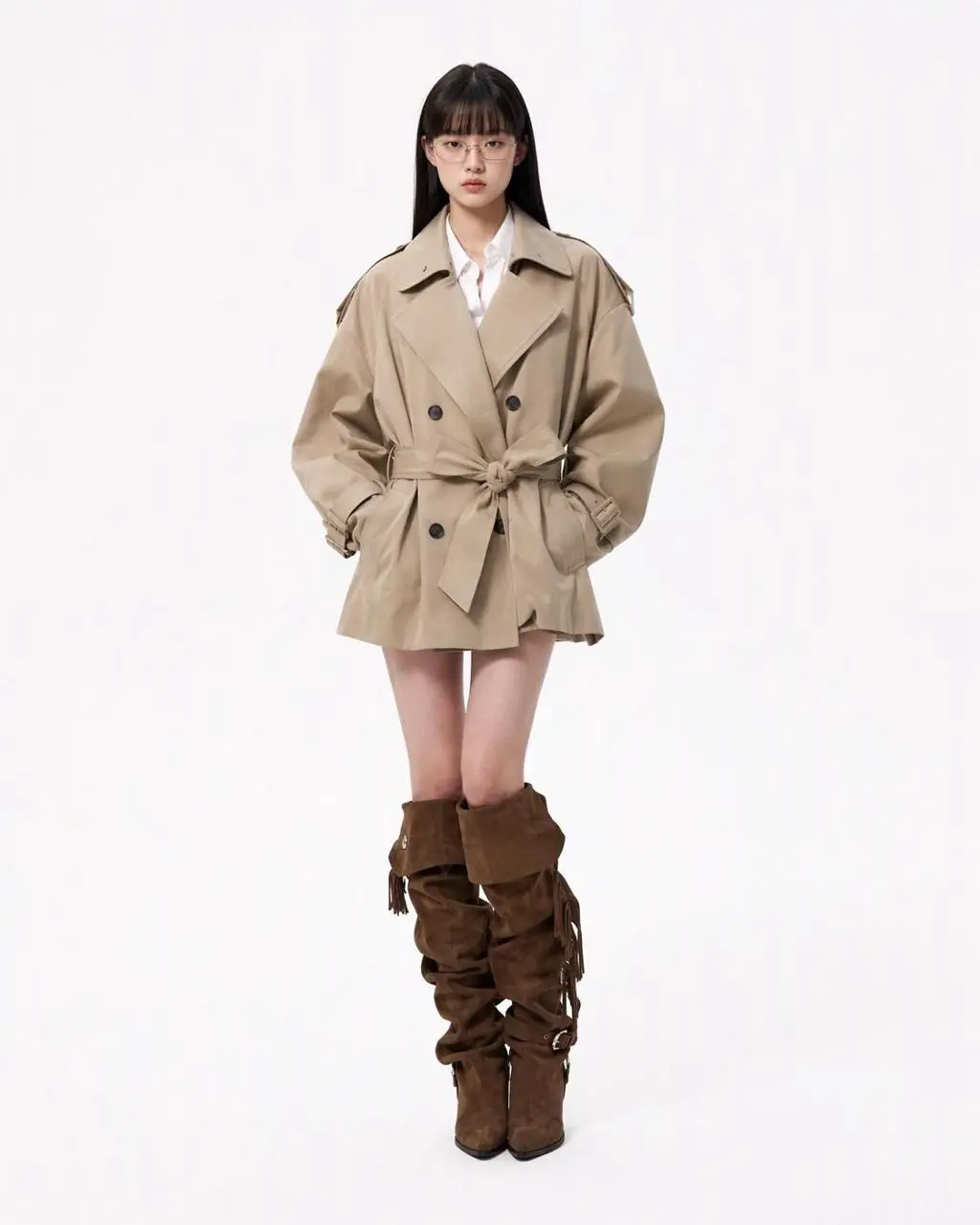
Referência 1

Desdobramento editorial a partir de uma referência

Uma única referência de pessoa se torna um painel editorial com figura de corpo inteiro, peças de roupa, closes faciais e detalhes de materiais. O resultado reúne edição com referências e layout estruturado em uma composição.

You are an expert in ultra-detailed, photorealistic character breakdown sheets. Create a highly detailed character reference sheet based on the uploaded person photo. Preserve 100% of the person’s original facial features, identity, hairstyle, clothing, body proportions, and realistic textures. Do not redesign, beautify, or alter the person. TASK: CENTER: Place the full-body photorealistic image of the uploaded person prominently in the center. Keep the person’s original appearance, outfit, proportions, and visual identity exactly consistent with the reference photo. SURROUNDING ELEMENTS: • Outfit Breakdown: Display each clothing item separately, from outer layers to inner layers. Preserve the exact original design, silhouette, colors, materials, patterns, stitching, accessories, and fabric textures. Present each item as realistic product photography. • Expression Variations: Create 3–4 close-up portraits of the same person showing different natural expressions, such as calm, shy, surprised, and focused. The face, hairstyle, skin tone, makeup, and identity must remain fully consistent with the uploaded person. • Material Close-ups: Include realistic macro photography of key details such as fabric texture, stitching, skin texture, hair strands, accessories, buttons, hardware, and other visible materials from the original photo. • Personal Items: Arrange realistic everyday objects that naturally match the person’s fashion style and overall character, such as bag contents, cosmetics, diary, phone, accessories, or other appropriate personal belongings. Present them as premium editorial flat-lay photography. VISUAL GUIDELINES: Layout: Use a clean white background. Position the full-body person as the main visual focus in the center. Arrange all outfit pieces, facial close-ups, material details, and personal items evenly around the central figure. Use thin, refined editorial-style lines to connect relevant details to the person. Style: Hyper-realistic professional photography only. Use natural studio lighting, realistic skin, authentic fabric textures, accurate material reflections, subtle shadows, and premium fashion-editorial photography quality. Overall aesthetic: Clean, sophisticated, modern fashion magazine character analysis board with a New York editorial atmosphere. Maintain a balanced layout, generous white space, and refined visual hierarchy. TEXT: Display the main title: “Fashion Blogger – Photo Graph” Include one short English style/persona judgment: “Polished designer aesthetic, perfect for city commuting → New York” STRICT RULES: The final image MUST look like real photography. NO illustration, anime, cartoon, sketch, painting, CGI, or obvious 3D-rendered appearance. Preserve the uploaded person’s identity, facial structure, facial features, hairstyle, skin tone, clothing, body proportions, and overall appearance as accurately as possible. Do not change, redesign, beautify, replace, or reinterpret the person’s original features. Do not randomly change the clothing design, colors, materials, patterns, or accessories. All facial close-ups must clearly represent the same person. All clothing breakdowns and material close-ups must correspond accurately to the clothing worn by the central person. All surrounding elements must have authentic photographic textures, realistic lighting, and consistent visual quality. Maintain strong visual consistency between the central full-body character and every surrounding detail image.
Use este prompt
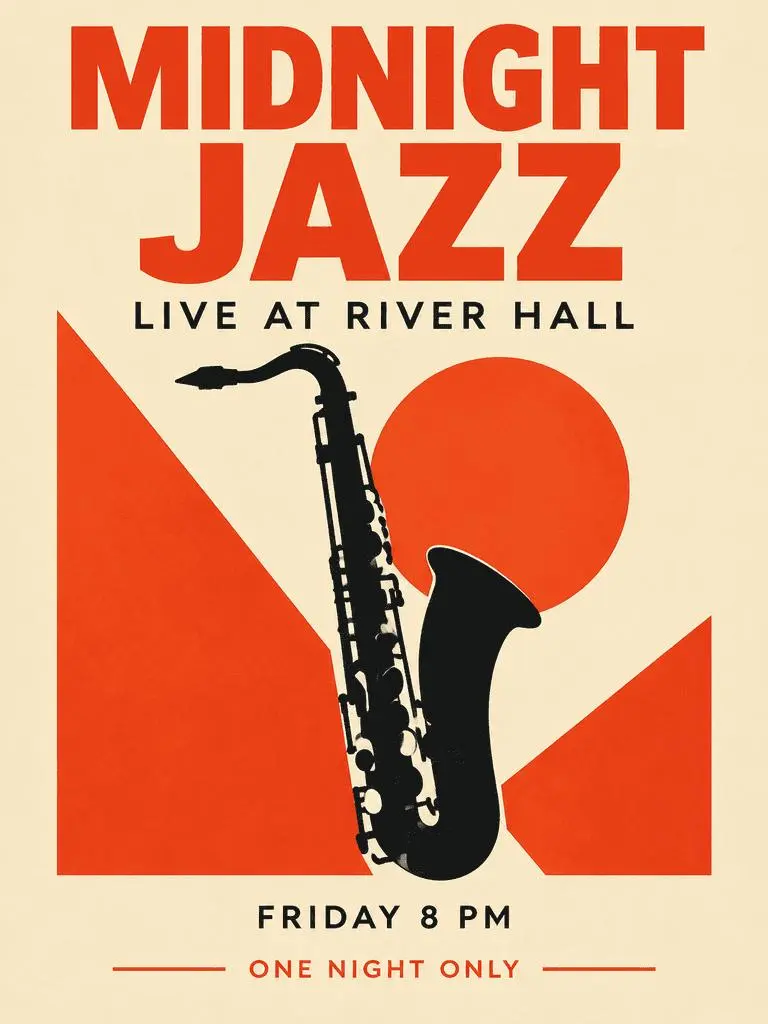
Resultado do WeShop: pôster de jazz com foco em tipografia

Pôster de jazz com foco em tipografia

Um pôster de evento fictício combina título dominante, informações de apoio e ilustração de saxofone. Confira as quatro frases solicitadas e sua hierarquia no resultado gerado.

Create a polished vertical 3:4 poster for a fictional jazz event. Use a warm ivory background, bold vermilion geometric shapes, a single black saxophone silhouette, and a carefully aligned editorial grid. Include exactly these four text lines, with no other words: 'MIDNIGHT JAZZ' as the largest headline, 'LIVE AT RIVER HALL' as the secondary line, 'FRIDAY 8 PM' as the small event detail, and 'ONE NIGHT ONLY' as a small bottom label. Make all four lines legible and spelled exactly. Keep a clear hierarchy between headline, illustration, details, and footer. Flat graphic design, crisp edges, restrained paper texture, no border or watermark.
Use este prompt
O QUE É O GPT IMAGE 2?

O que é o GPT Image 2 e para que ele serve?

GPT Image 2 é o modelo de geração e edição de imagens da OpenAI. Ele aceita texto e imagens para visuais novos e mudanças guiadas por referências. Use GPT Image 2 para designs guiados por texto, composições estruturadas ou transformações de referências. O pôster de jazz demonstra hierarquia textual planejada, enquanto o painel editorial e o estilo néon ilustram diferentes usos de imagens de origem.

Texto dentro de uma imagem planejada

Crie layouts com palavras e elementos visuais; confira a ortografia e a disposição no resultado.

Referências para editar uma imagem

Use uma imagem fornecida para estabelecer um sujeito ou cena e descreva a mudança solicitada.

Direção visual detalhada

Especifique composição, materiais e iluminação para a imagem desejada.

MODOS DE CRIAÇÃO

Comece com texto ou uma imagem

Insira texto para uma composição nova ou envie imagens para uma edição com referências. Explique qual entrada fornece o sujeito, o ambiente ou o layout e indique o que deve mudar.

Comece com texto

Use uma descrição escrita ao criar uma cena ou design novo sem uma imagem existente a preservar.

Comece com referências

Envie as imagens que deseja usar na solicitação. Com várias referências, identifique cada uma pela função.

GUIA DE PROMPTS

Como escrever um prompt para o GPT Image 2

Estude os prompts reais do GPT Image 2 abaixo com seus resultados e eventuais referências de entrada. Cada explicação identifica uma instrução específica a conferir; um efeito solicitado não garante que todos os detalhes gerados correspondam.

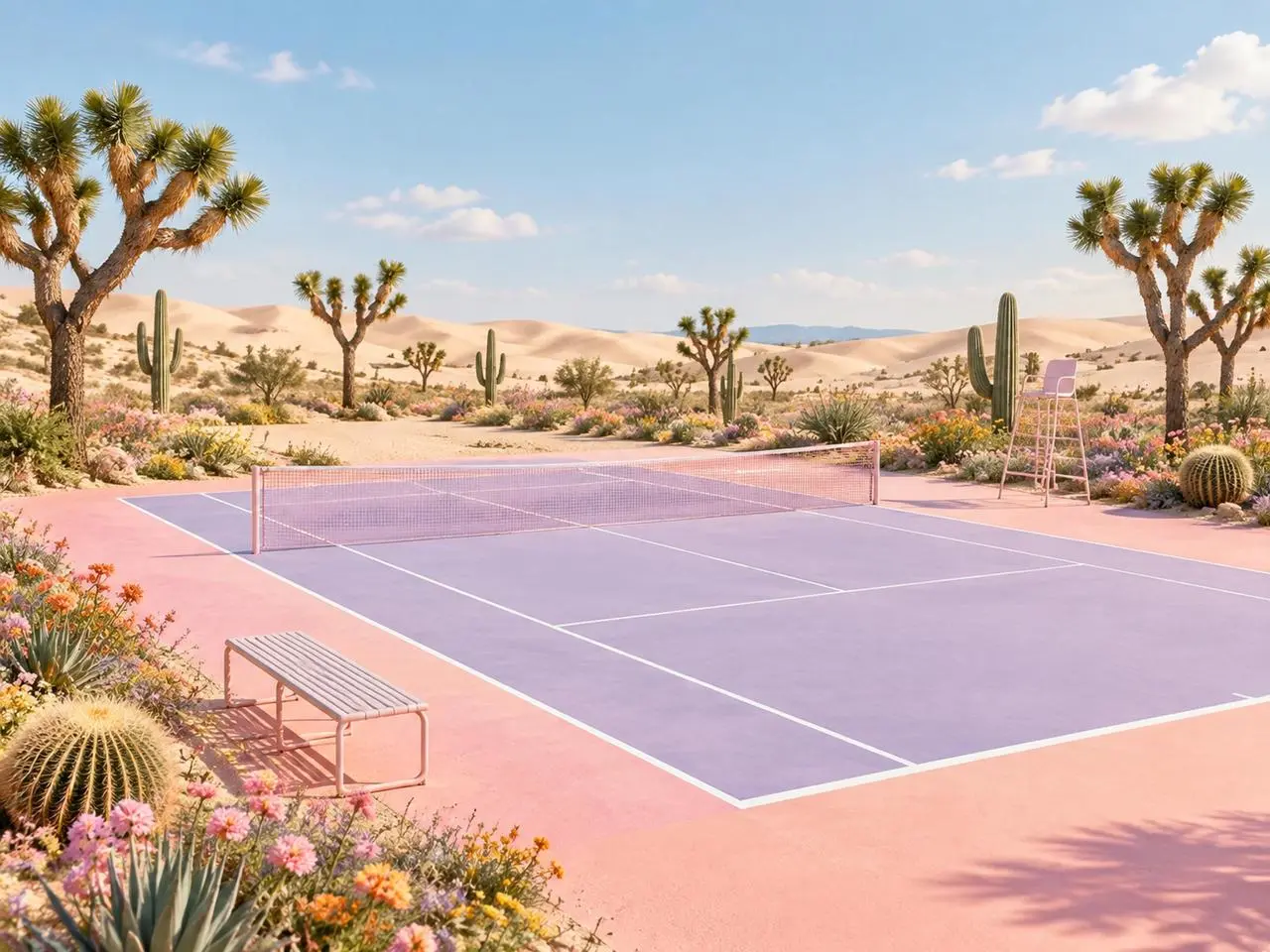
Resultado do WeShop: dar uma função definida a cada referência
Referência 1
Referência 2

Atribua uma função a cada referência

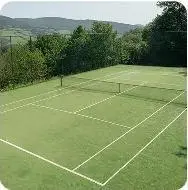
Nomeie o que cada imagem contribui antes de descrever a cena final. Neste exemplo: “Image 1 is the environment and botanical reference.” Compare as plantas do deserto com a primeira referência e a geometria da quadra com a segunda.

Use the two uploaded images as complementary visual references. REFERENCE ROLES: Image 1 is the environment and botanical reference. Use Image 1 to guide: - the open desert atmosphere - Joshua tree shapes and branching structure - dry natural terrain - scattered desert vegetation - spacious outdoor mood - warm arid landscape identity Image 2 is the composition and tennis-court structure reference. Use Image 2 to guide: - the camera angle - the overall court placement - court proportions - baseline and service-line geometry - the central net position - surrounding open space - the relationship between the court and the landscape Do not copy either image literally. Combine the environmental character of Image 1 with the tennis-court composition of Image 2 to create one coherent new scene. FINAL SCENE: Create a dreamy pastel tennis court located in a surreal desert landscape. The tennis court should use a refined pastel palette with: - soft blush pink outer areas - lavender and pale violet playing surfaces - clean white court lines - a subtle warm peach transition around the edges - a pale pink tennis net with realistic mesh texture Preserve believable tennis-court geometry. Keep the sidelines, baselines, service boxes, center marks, net height and court perspective visually coherent. ENVIRONMENT: Surround the court with rolling cream-colored and pale peach sand dunes. Add several Joshua trees inspired by Image 1, along with tall columnar cacti, round barrel cacti, desert succulents and small flowering plants. Scatter clusters of pink, coral, orange, yellow and lavender desert flowers around the edges of the court. Keep the central playing area clean and unobstructed. Place a simple metal bench near the foreground edge of the court and a minimal referee chair near one side of the net. The furniture should match the scene’s clean editorial styling without blocking the court. LIGHTING AND ATMOSPHERE: Use bright, soft natural daylight under a clear pale-blue sky. Add a few soft white clouds. Use gentle shadows, warm highlights and subtle atmospheric depth across the sand dunes. The mood should feel optimistic, imaginative, premium and calm. STYLE: High-end editorial landscape photography blended with polished surreal advertising art. Pastel color grading, clean commercial composition, realistic materials, precise perspective, crisp court details and refined botanical textures. The result should feel suitable for a sports-fashion campaign, lifestyle brand advertisement, social media post, website hero image or creative editorial. COMPOSITION: Use a wide landscape composition. Keep the tennis court as the central visual focus. Use desert plants and flowers to frame the foreground and side edges. Leave the sky and distant dunes relatively clean to prevent visual clutter. The scene must feel like one naturally designed environment, not a collage of two separate photographs. IMPORTANT: Do not add people or players. Do not add text, logos, signs, watermarks, brand names or promotional badges. Do not create extra tennis nets. Do not distort the court lines or perspective. Do not place cacti, flowers or furniture inside the active playing area. Do not reproduce the exact background from either reference image. Generate a new, coherent pastel desert tennis environment inspired by both references. High-resolution commercial quality, realistic lighting, precise geometry, premium AI-generated campaign visual.
Resultado do WeShop: descrever a mudança de material e estilo
Referência 1

Descreva a mudança de material

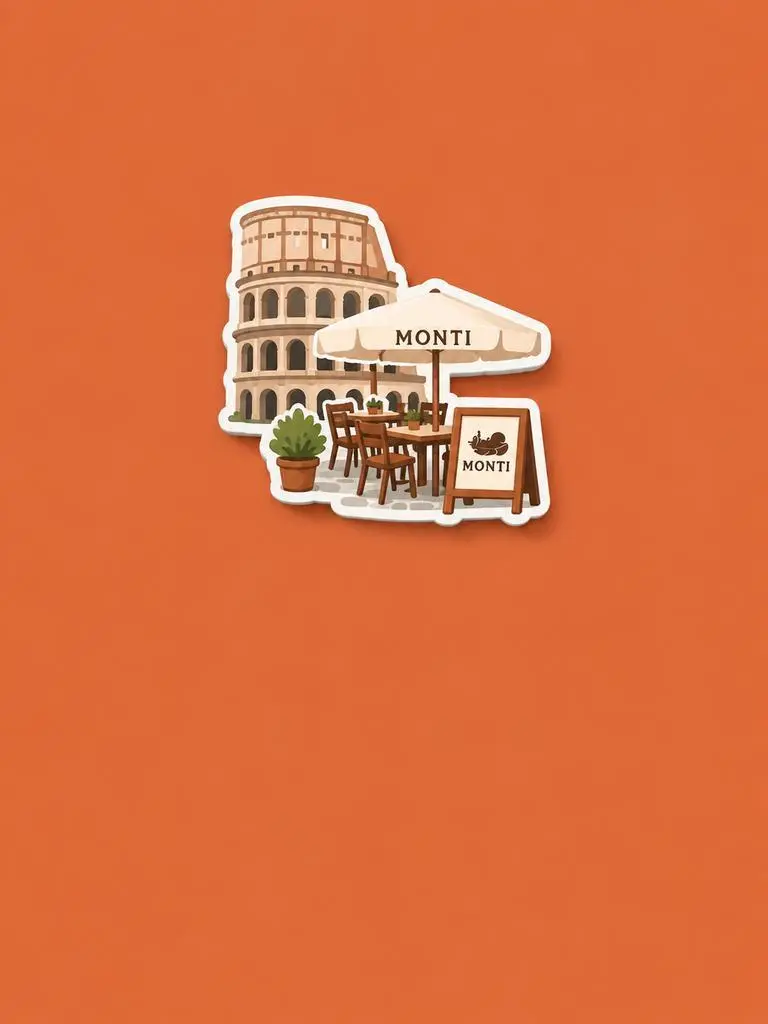
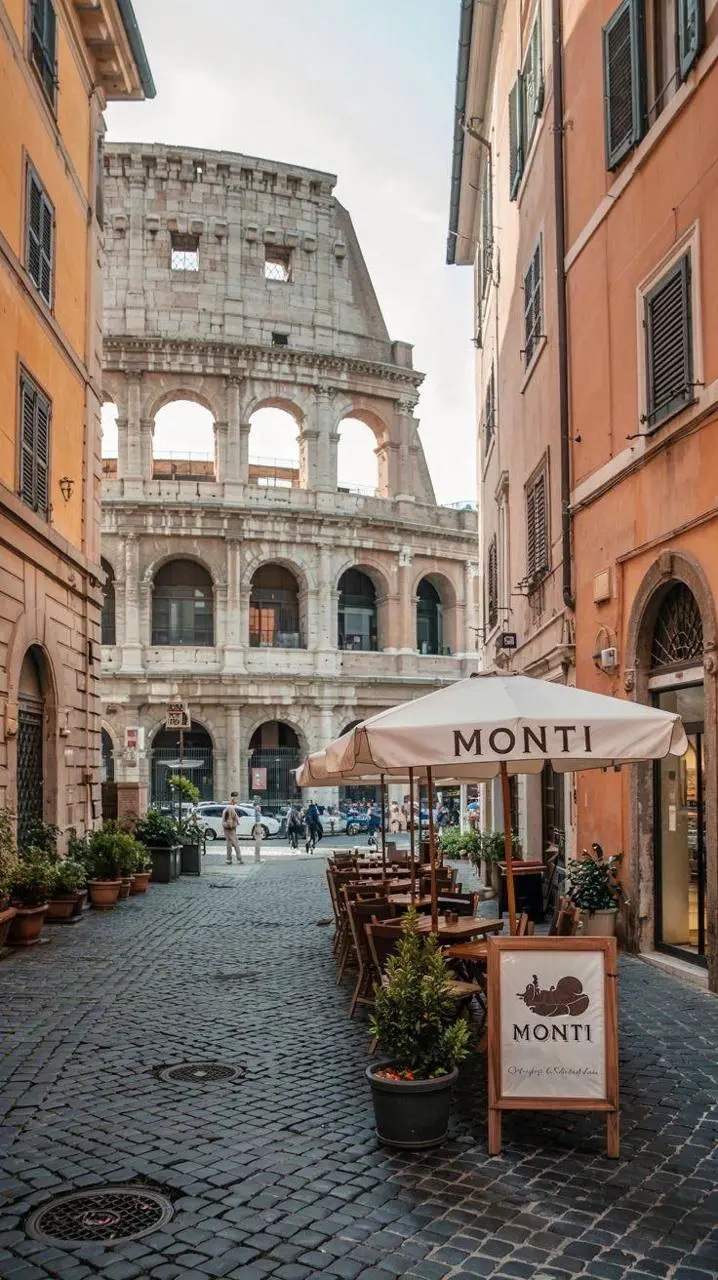
Nomeie o novo material ou tratamento e especifique quais características de origem preservar. Neste exemplo: “Retain the core outline and iconic features of the subject.” Procure o edifício e os assentos reconhecíveis reinterpretados como um ímã de lembrança em relevo.

Please generate a minimalist fridge magnet photography poster based on the real photo I provided. The overall style should reference "architectural fridge magnets" or "minimalist collage". 【Layout Structure】Horizontal composition, 3:2 ratio. Minimalist solid color background. 【Fridge Magnet Icon】Extract the most recognizable main subject from the provided photo (e.g., the dining table and chairs) and convert it into a minimalist "fridge magnet-style icon". Requirements: 1. Retain the core outline and iconic features of the subject. 2. Simple, clean shape, resembling a cute travel souvenir fridge magnet. 3. Add a slight 3D pop-up effect and a subtle drop shadow. 4. The edges must be clear, with a white or light-colored sticker-like border/stroke. 5. Moderately simplify the details; do not make the drawing too complex or hyper-realistic. 6. Place the icon in the upper center part of the image. 7. The icon should be relatively small and delicate, leaving plenty of negative space around it. 【Background Color】Extract the most prominent, memorable, and saturated color from the provided photo for the background. The background must be a solid, flat color—saturated, clean, and giving a travel postcard vibe. Do NOT use gradients, and do NOT add any complex patterns or background clutter.
Resultado do WeShop: separar o sujeito do layout
Referência 1
Referência 2
Referência 3

Separe o sujeito do layout

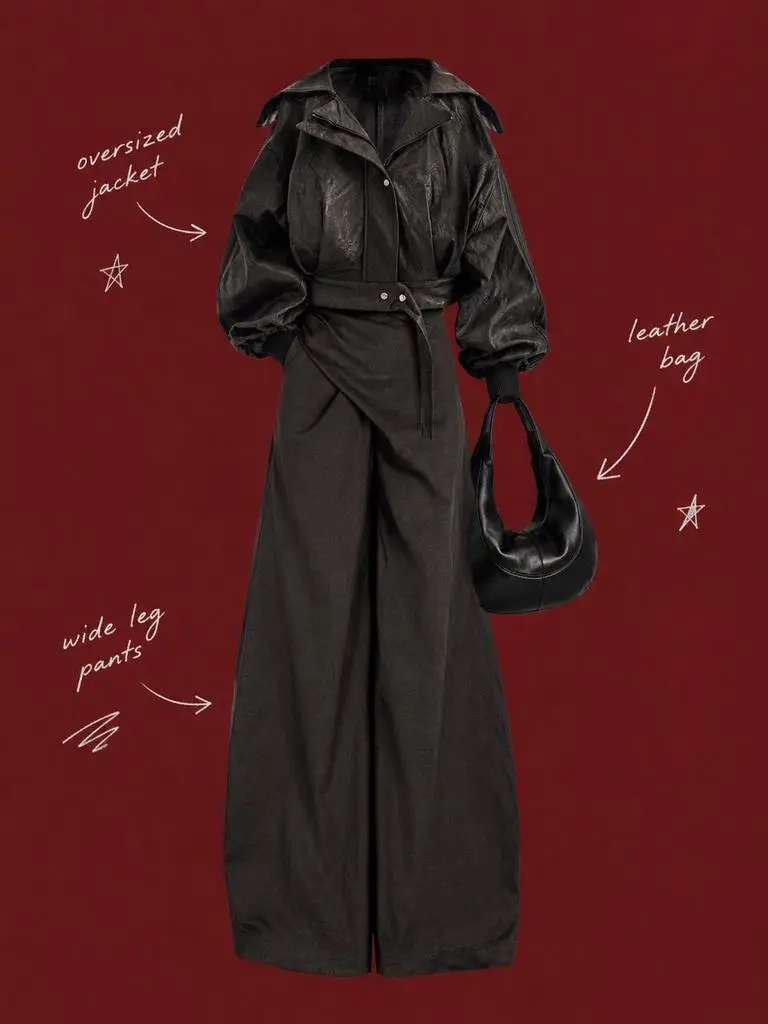
Descreva o sujeito preservado e o layout ao redor em instruções separadas. Neste exemplo: “Use a solid deep burgundy, dark brick-red, or muted oxidized-red background that fills the entire canvas.” Compare as referências de roupa com o recorte central e confira os rótulos espaçados ao redor.

Use my uploaded image as the main person or product asset to create a vertical, vintage fashion collage poster. Carefully cut out the subject and place it in the center of the composition. Preserve its recognizable clothing, pose, silhouette, proportions, colors, and important details without changing its identity. Present the subject as a clean magazine-style cutout layered directly onto the background. If the uploaded image features a person, the head may be cropped out or extend beyond the top edge so the visual focus remains on the outfit and body shape. If the subject is a product, keep it complete, clear, and easily recognizable. Use a solid deep burgundy, dark brick-red, or muted oxidized-red background that fills the entire canvas. Do not add a white border, white margins, a paper frame, or empty white space around the poster. Add only a few white handwritten English words, curved arrows, and casual fashion-sketch doodles on the left and right sides of the subject. The arrows may point toward clothing pieces, accessories, or other important details. The writing should look naturally hand-drawn, slightly irregular, and loosely arranged, like annotations in a fashion designer’s sketchbook. Keep these elements sparse and make sure they do not cover the subject. The overall visual language should resemble an independent fashion magazine, a clothing-design scrapbook, or an experimental late-20th-century fashion advertisement. Keep the layout minimal and clear, with one central cutout subject against the red background. Use an approximately 2:3 vertical aspect ratio. The subject should occupy around 75%–85% of the poster’s height and be positioned centrally, slightly toward the bottom. Keep the final image sharp and clearly defined. Do not add torn-paper edges, rough cutout edges, glue marks, tape, folds, stains, fading, film grain, scanning noise, blur, distressed textures, decorative badges, realistic scenery, complex props, modern interface elements, neon lighting, 3D rendering, or overly vivid colors.
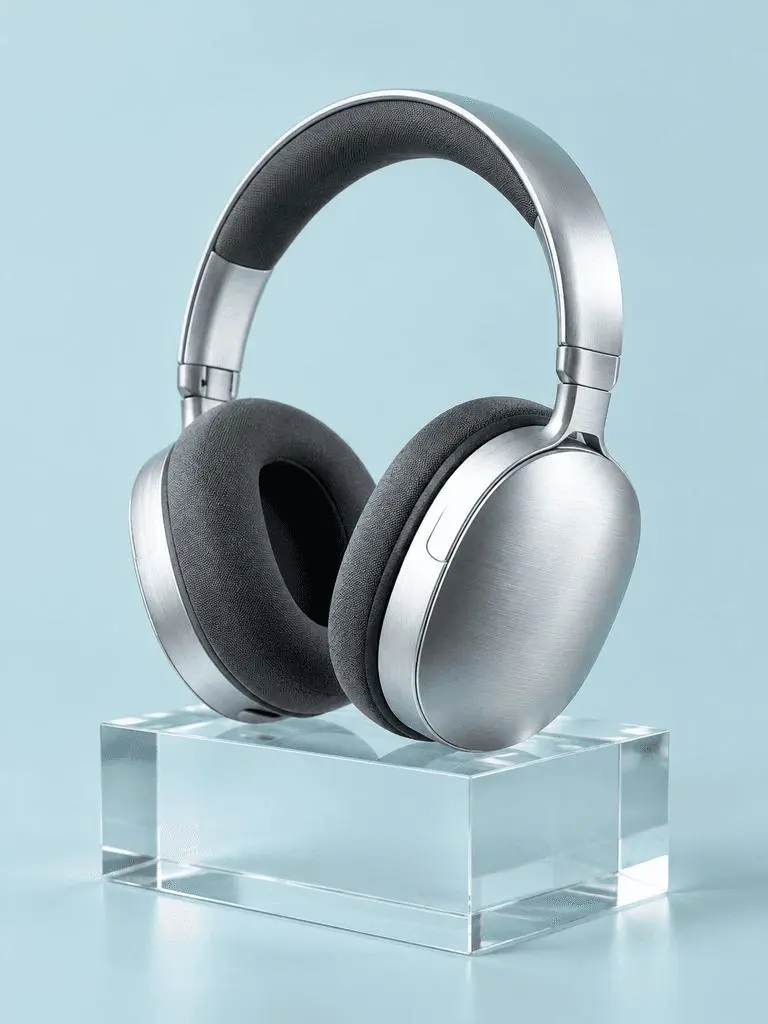
Resultado do WeShop: descrever materiais pela iluminação

Nomeie os materiais e sua iluminação

Associe cada superfície importante a um sinal visível de luz. Neste exemplo: “a broad softbox reflection across the metal”. Confira os fones com acabamento escovado, as almofadas de tecido, o bloco transparente e suas diferentes respostas à luz.

A photorealistic commercial product photograph of one unbranded pair of brushed-silver wireless over-ear headphones. The headphones rest on a clear rectangular glass block against a seamless pale-cyan background. Show fine metal brushing, soft charcoal fabric ear cushions, a realistic transparent block, a clean contact shadow, and a broad softbox reflection across the metal. Use an eye-level three-quarter camera angle and a restrained monochrome palette. One pair of headphones only, no people, letters, logos, packaging, border, or watermark. Vertical 3:4 composition with the whole product visible.
Resultado do WeShop: organizar primeiro plano, fundo e luz

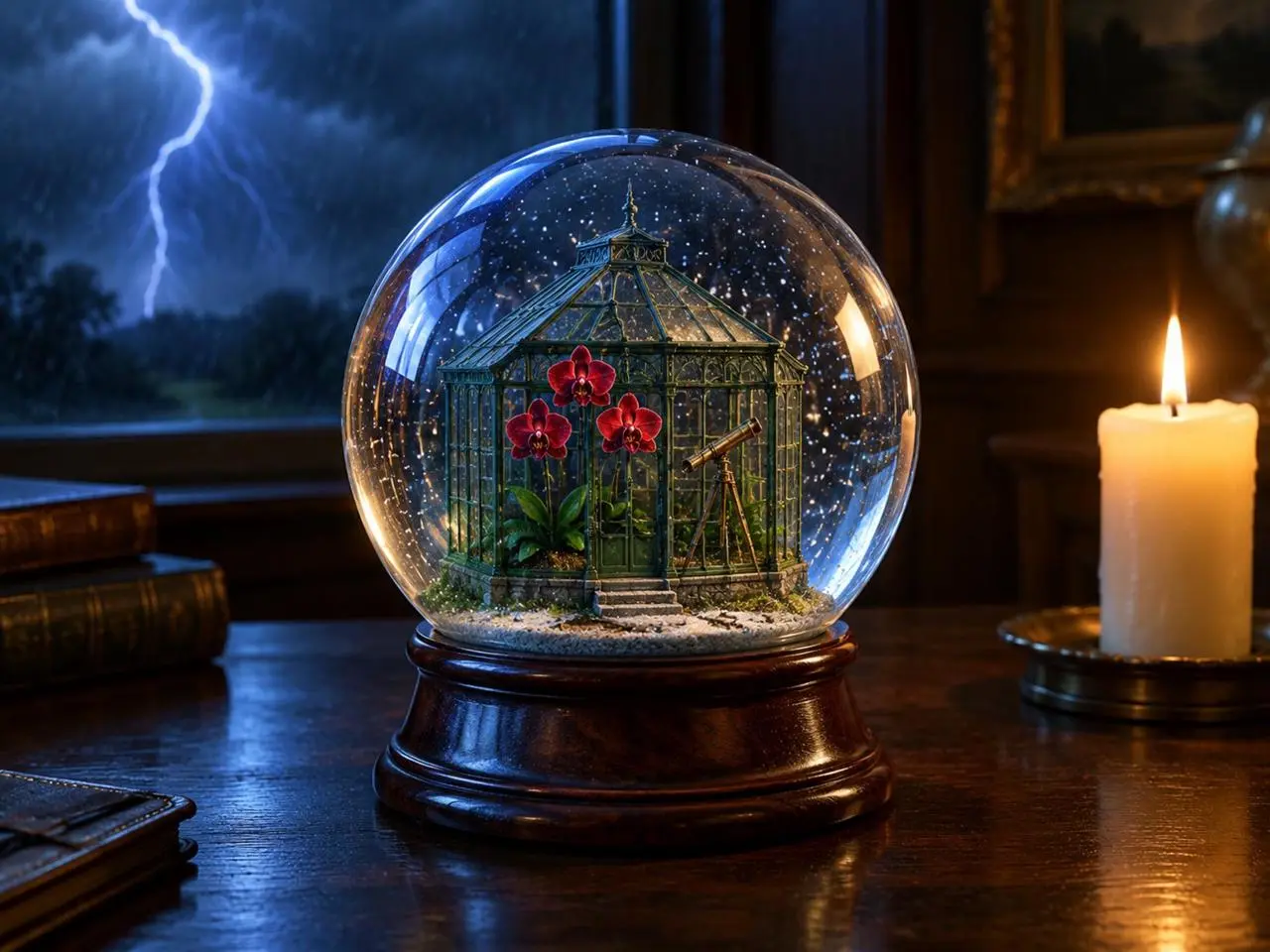
Posicione as fontes de luz

Dê posições claras ao objeto principal, ao acontecimento de fundo e às fontes de luz. Neste exemplo: “one lit ivory candle on the desk to the right of the globe”. Procure o globo à frente, o relâmpago atrás e a vela quente ao lado.

Create a finished 3:4 photorealistic editorial image of exactly one clear glass snow globe resting on a dark walnut desk during a thunderstorm. Inside the globe is one miniature Victorian greenhouse containing exactly three red orchids and one small brass telescope. Place a sharp lightning bolt in the upper-left background and one lit ivory candle on the desk to the right of the globe. Use realistic glass reflections and refractions, cool blue storm light from the left, warm candlelight from the right, shallow depth of field, and detailed natural materials. Keep the entire globe visible. No people, no extra flowers, no extra globes, no text, no logo, no watermark.
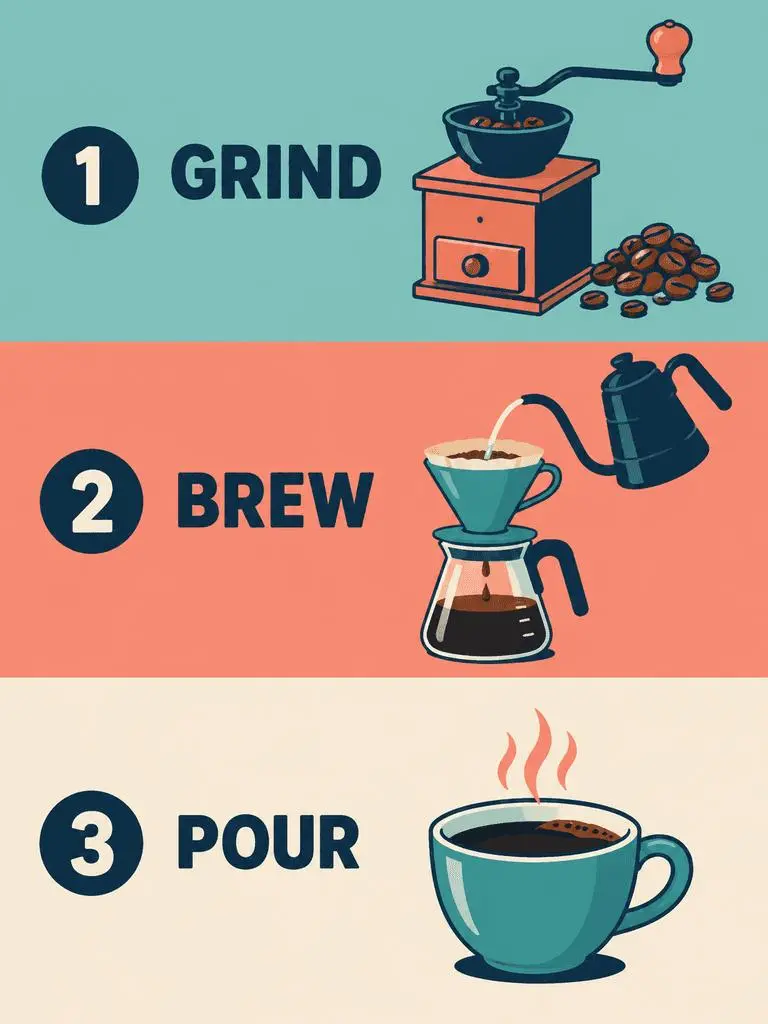
Resultado do WeShop: especificar a ordem dos painéis e os rótulos exatos

Especifique a ordem dos painéis e o texto exato

Em um design com vários painéis, indique a sequência e as palavras necessárias em cada um. Neste exemplo: “Panel 1 shows a simple hand grinder and coffee beans, with the exact heading 'GRIND'.” Confira GRIND, BREW e POUR em relação às ilustrações e à ordem de cima para baixo.

Create a clean flat-vector educational infographic in a vertical 3:4 layout with exactly three equal horizontal panels stacked from top to bottom. Panel 1 shows a simple hand grinder and coffee beans, with the exact heading 'GRIND'. Panel 2 shows a pour-over cone over a glass server and a kettle pouring water, with the exact heading 'BREW'. Panel 3 shows a single ceramic cup filled with coffee, with the exact heading 'POUR'. Place the number 1, 2, or 3 beside each corresponding heading. Use teal, coral, cream, and dark-navy colors, consistent line weights, generous spacing, and a left-to-right illustration-and-label arrangement within every panel. Keep the three panels distinct and correctly ordered. No extra text, border, photorealistic imagery, or watermark.
COMO USAR

Como usar GPT Image 2 no WeShop AI

Comece com a seleção GPT Image 2 e o caminho de entrada descrito abaixo. Confira as configurações disponíveis e os pontos antes de enviar.

Forneça a entrada para este modelo

Mantenha GPT Image 2 selecionado. Para um pôster, forneça as palavras e o layout desejados; para uma edição, envie as fontes e identifique suas funções antes de descrever a imagem final.

Confira as configurações e os pontos disponíveis

Rótulos de tamanho: 1K, 2K, 4K. Qualidade: baixa, média, alta. Proporções: auto, 1:1, 1:2, 2:1, 1:3, 3:1, 2:3, 3:2, 4:3, 3:4, 16:9, 9:16, 21:9, 9:21. São configurações selecionáveis, não dimensões fixas em pixels nem garantias de formato de arquivo. Confira as dimensões reais da saída original. Verifique os pontos exibidos e o acesso ao modelo no seu plano antes de enviar.

Abra e confira o resultado

Revise o texto do pôster e a ordem dos painéis. Em uma edição com referências, compare identidade preservada, geometria dos objetos e regiões alteradas com a origem sem presumir correspondência exata.

COMPARE OS MODELOS GPT IMAGE

GPT Image 2 ou GPT Image 2.5

GPT Image 2 é separado de 2.5 Flare e Sunburst. Flare tem um papel cotidiano voltado à rapidez, e Sunburst enfatiza geração e edição exigentes. O formulário atual GPT Image 2 lista qualidade baixa, média e alta, enquanto as entradas 2.5 também listam XHigh e Max. O posicionamento oficial, as configurações catalogadas do WeShop e o formulário selecionado atualmente são aspectos separados; não se sugere uma classificação medida de qualidade ou velocidade.

CritérioGPT Image 2GPT Image 2.5
Opções de modeloGPT Image 2Flare para rapidez; Sunburst para requisitos exigentes de qualidade
Criação e ediçãoPrompts de texto e edição guiada por imagensPrompts de texto e edição guiada por imagens
Foco de ediçãoImagens de entrada de alta fidelidade para geração e ediçãoA OpenAI relata melhorias na edição precisa e na preservação do sujeito nas duas variantes
Níveis de qualidade no WeShopBaixa, média, altaBaixa, média, alta, XHigh, Max
Tamanhos de imagem no WeShop1K, 2K, 4K1K, 2K, 4K
Formatos 4:5 e 5:4 no WeShopNão listados no formulário atualDisponíveis para Flare e Sunburst
Opções de modelo
GPT Image 2
GPT Image 2
GPT Image 2.5
Flare para rapidez; Sunburst para requisitos exigentes de qualidade
Criação e edição
GPT Image 2
Prompts de texto e edição guiada por imagens
GPT Image 2.5
Prompts de texto e edição guiada por imagens
Foco de edição
GPT Image 2
Imagens de entrada de alta fidelidade para geração e edição
GPT Image 2.5
A OpenAI relata melhorias na edição precisa e na preservação do sujeito nas duas variantes
Níveis de qualidade no WeShop
GPT Image 2
Baixa, média, alta
GPT Image 2.5
Baixa, média, alta, XHigh, Max
Tamanhos de imagem no WeShop
GPT Image 2
1K, 2K, 4K
GPT Image 2.5
1K, 2K, 4K
Formatos 4:5 e 5:4 no WeShop
GPT Image 2
Não listados no formulário atual
GPT Image 2.5
Disponíveis para Flare e Sunburst

Quando manter GPT Image 2

Use GPT Image 2 para designs guiados por texto, composições estruturadas ou edições com referências quando os resultados atenderem à sua descrição. Seu formulário do WeShop oferece qualidade baixa, média e alta.

Quando experimentar GPT Image 2.5

Considere Flare quando a velocidade de geração for prioridade ou Sunburst para uma descrição focada em qualidade, seguindo o posicionamento da OpenAI. Ambos também oferecem XHigh e Max no formulário atual do WeShop. Avalie as mesmas entradas representativas antes de mudar um fluxo estabelecido.

MAIS MODELOS DE IMAGEM

Explore mais modelos de imagem

Explore outras páginas de modelos e confira seus próprios exemplos e modos de criação disponíveis.

Perguntas frequentes

Perguntas frequentes sobre GPT Image 2

O que é o GPT Image 2?

GPT Image 2 é o modelo de geração e edição de imagens da OpenAI. Ele aceita texto e imagens para visuais novos e mudanças guiadas por referências.

Para que serve o GPT Image 2?

Use GPT Image 2 para designs guiados por texto, composições estruturadas ou transformações de referências. O pôster de jazz demonstra hierarquia textual planejada, enquanto o painel editorial e o estilo néon ilustram diferentes usos de imagens de origem.

Quais entradas o GPT Image 2 precisa receber?

Insira texto para uma composição nova ou envie imagens para uma edição com referências. Explique qual entrada fornece o sujeito, o ambiente ou o layout e indique o que deve mudar.

Quais configurações de tamanho e proporção estão disponíveis?

Rótulos de tamanho: 1K, 2K, 4K. Qualidade: baixa, média, alta. Proporções: auto, 1:1, 1:2, 2:1, 1:3, 3:1, 2:3, 3:2, 4:3, 3:4, 16:9, 9:16, 21:9, 9:21. São configurações selecionáveis, não dimensões fixas em pixels nem garantias de formato de arquivo. Confira as dimensões reais da saída original.

Como devo escrever um prompt para o GPT Image 2?

Nomeie o que cada imagem contribui antes de descrever a cena final. Neste exemplo: “Image 1 is the environment and botanical reference.” Compare as plantas do deserto com a primeira referência e a geometria da quadra com a segunda. Leia o prompt completo associado e as entradas reais no guia e adapte-os à sua tarefa.

Como o GPT Image 2 difere dos modelos relacionados?

GPT Image 2 é separado de 2.5 Flare e Sunburst. Flare tem um papel cotidiano voltado à rapidez, e Sunburst enfatiza geração e edição exigentes. O formulário atual GPT Image 2 lista qualidade baixa, média e alta, enquanto as entradas 2.5 também listam XHigh e Max.

O GPT Image 2 é gratuito e como o uso é cobrado?

A página de preços atual do WeShop não lista este modelo na avaliação gratuita. Confira o acesso dos planos pagos e a estimativa de pontos para a solicitação selecionada. Esta página não informa um preço fixo por solicitação nem transfere a cota de assinatura de outro fornecedor para o WeShop.

Quais limitações devo conferir?

Revise palavras necessárias, detalhes faciais, geometria do produto e o limite de cada edição. Uma instrução de preservar um detalhe não comprova por si só que a saída o manteve. Revise o texto do pôster e a ordem dos painéis. Em uma edição com referências, compare identidade preservada, geometria dos objetos e regiões alteradas com a origem sem presumir correspondência exata.

O que posso aprender com os exemplos desta página?

Os exemplos salvos do GPT Image 2 mostram estas cenas: Transferência de estilo para escultura de néon ; Desdobramento editorial a partir de uma referência ; Pôster de jazz com foco em tipografia. Confira cada resultado com seu prompt real e as entradas disponíveis. Um caso ilustra uma solicitação, não um resultado garantido nem uma medida de taxa de sucesso.