실사와 만화 캐릭터의 상호작용, 여우의 표정과 작은 움직임, 화면을 들고 있는 인물로 Hailuo 2.3을 살펴보세요. 각 저장 사례는 실제 프롬프트와 사용 가능한 입력을 유지합니다. 자신의 피사체에 맞게 요청을 수정하기 전에 결과를 확인하세요.
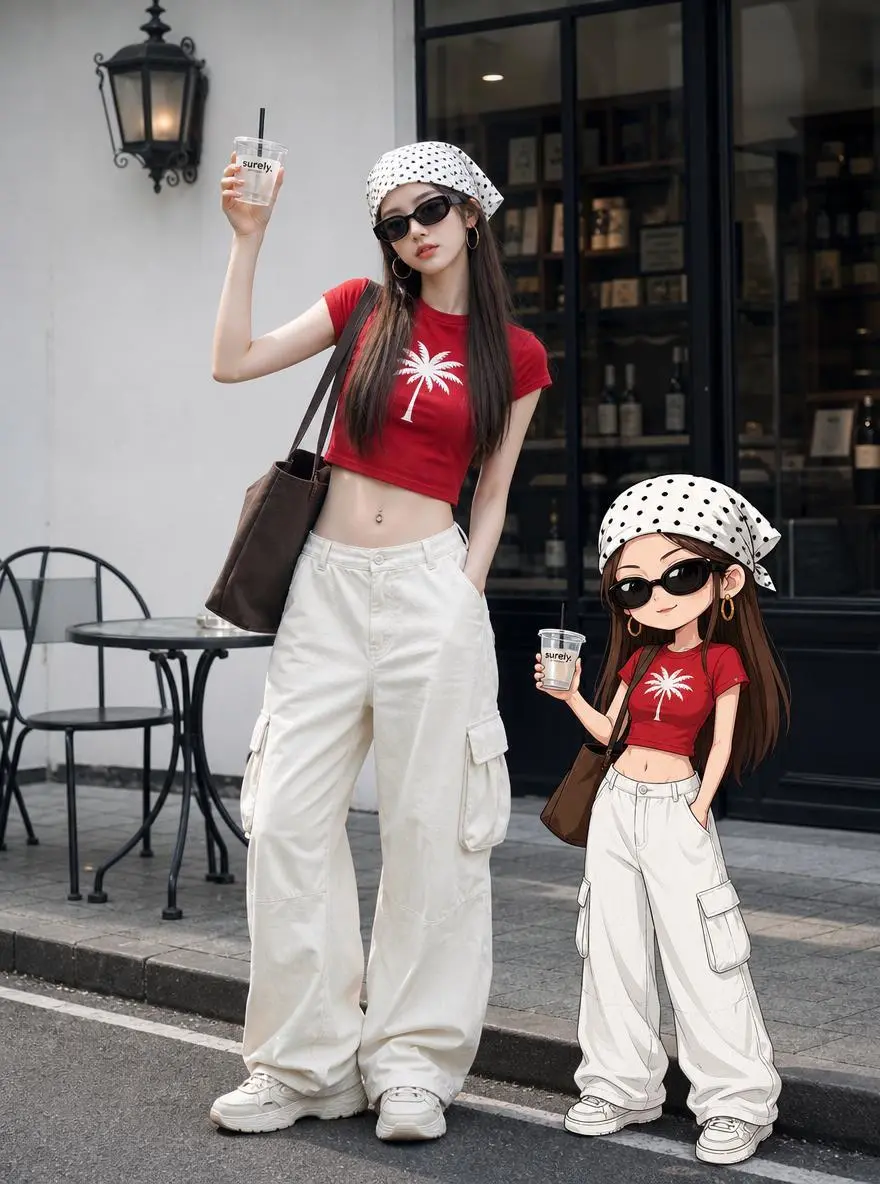
실사와 만화 캐릭터의 상호작용
실사 여성과 그에 대응하는 만화 캐릭터가 눈을 깜박이고 건배하며 장난스럽게 화난 반응을 보인 뒤 함께 걷는 장면으로 전환하도록 요청합니다. 출처에서 맞춘 의상이 보이지만 가족 관계를 입증하지는 않습니다. 실제로 생성된 상호작용을 지시문과 구분해 확인하세요.
The main character winks at the camera, smiles, clinks glasses, while the cartoon character stands in the opposite direction to the main character, pretending to be angry. The scene transitions, and they engage in a happy interaction, walking together towards the left side of the frame.
Snowflakes gently fall around the fox, it sniffs the air, then nuzzles deeper into the scarf with a content expression. Cinematic realistic style, gentle natural movement.
시작 이미지로 독특한 구도를 정하고 화면을 들고 있는 사람을 중심으로 인물 장면을 구성합니다.
A retro television displaying an alternate reality. The camera zooms directly into the TV screen. Suddenly all the toy monsters come alive and begin dancing chaotically. The Ultraman figure grows into a giant mechanical guardian. The screen glitches violently as multiple versions of the character emerge from different dimensions. Toys leap into the air and orbit around the floating television. The room transforms into a neon cyber-toy city. Reality folds and repeats recursively, creating an infinite screen-within-screen effect. Hyper dynamic camera movement, playful chaos, retro-futuristic aesthetics, cinematic toy universe, surreal storytelling, highly detailed animation.camera movement highly dynamic, cinematic motion blur, volumetric lighting, depth of field, realistic physics, ultra detailed, luxury fashion commercial, dramatic visual storytelling, 4K, 8K, blockbuster VFX, seamless animation
Hailuo 2.3은 신체 동작, 스타일 표현, 인물의 미세 표정을 위한 MiniMax 영상 모델 업데이트입니다.
이미지 기반 인물 연기, 작은 표정 변화, 스타일이 있는 애니메이션에 고려할 수 있습니다. 여우 예시는 냄새를 맡고 목도리에 코를 비비는 구체적인 동작을 확인할 수 있게 합니다. 모델 포지셔닝이 모든 몸짓이나 전환의 성공을 보장하지는 않습니다.
인물 연기
2.3 릴리스는 움직임과 작은 표정 변화를 강조합니다. 실제 같은 행동이라는 광범위한 주장보다 명확한 동작이 검토 대상으로 적합합니다.
스타일을 적용한 장면
이미지와 프롬프트로 사진 또는 일러스트 표현을 정한 다음 움직이는 동안 어떻게 표현되는지 확인하세요.
제작 방식
시작 입력 선택하기
현재 WeShop Hailuo 2.3 선택 항목에는 시작 프레임 생성이 표시됩니다. 시작 이미지 한 장을 업로드하고 이어지는 인물 또는 카메라 움직임을 설명하세요. 모델 이름만으로 참조 영상 편집을 추정하지 마세요.
시작 이미지 움직이기
피사체와 장면을 정하는 프레임을 업로드하세요. 이어지는 동작, 환경의 움직임 또는 카메라 연출을 설명하세요.
프롬프트 가이드
프롬프트로 Hailuo 2.3 연출하기
아래의 실제 Hailuo 2.3 프롬프트를 결과 및 사용한 참조 입력과 함께 살펴보세요. 각 설명은 확인할 특정 지시를 짚어 줍니다. 효과를 요청했다고 해서 생성된 모든 디테일이 일치한다는 보장은 없습니다.
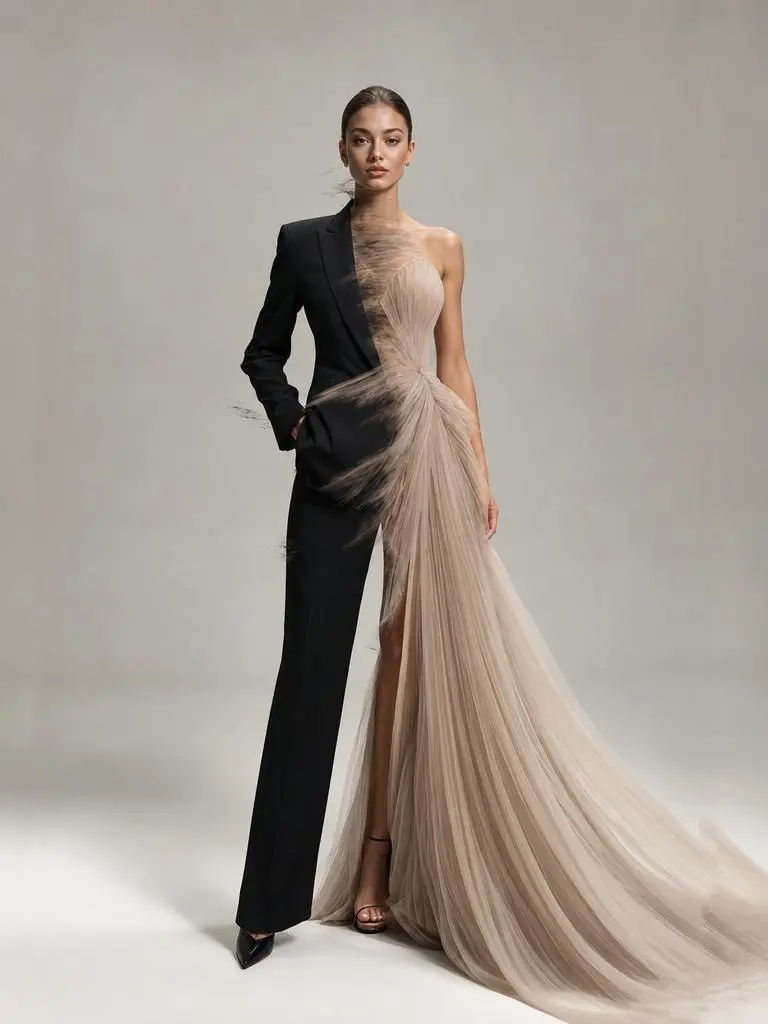
바뀔 의상과 유지할 인물 지정하기
실제 프롬프트는 서 있는 모델의 의상이 네 가지 스타일로 바뀌도록 요청합니다. 그대로 유지할 사람과 바뀔 의상은 역할이 다릅니다. 완벽하게 유지된다고 가정하지 말고 인물 정체성과 의상 전환을 확인하세요.
same fashion model standing still, outfit rapidly transforming between luxury suit, streetwear, couture dress, sportswear, seamless fashion transition, premium editorial photography, clean studio background, luxury fashion campaign, ultra realistic, vogue style, dramatic fashion transformation
시각 효과를 인물 변화와 연결하기
퍼져 나가는 에너지 파동이 SF 변신의 계기입니다. 파동 이후 어떤 인물 디테일이 바뀌어야 하는지 읽고 결과의 전환을 확인하세요. 단순한 배경 움직임이 아닙니다.
A circular energy pulse expands from the center of the frame. Where the pulse touches, the character's appearance upgrades to sci-fi style — clothing gains luminous circuit lines, lighting becomes cooler and sharper. The pulse fades outward leaving the transformed portrait. No facial changes, only texture and lighting shift.
시퀀스에 쇼트 순서 지정하기
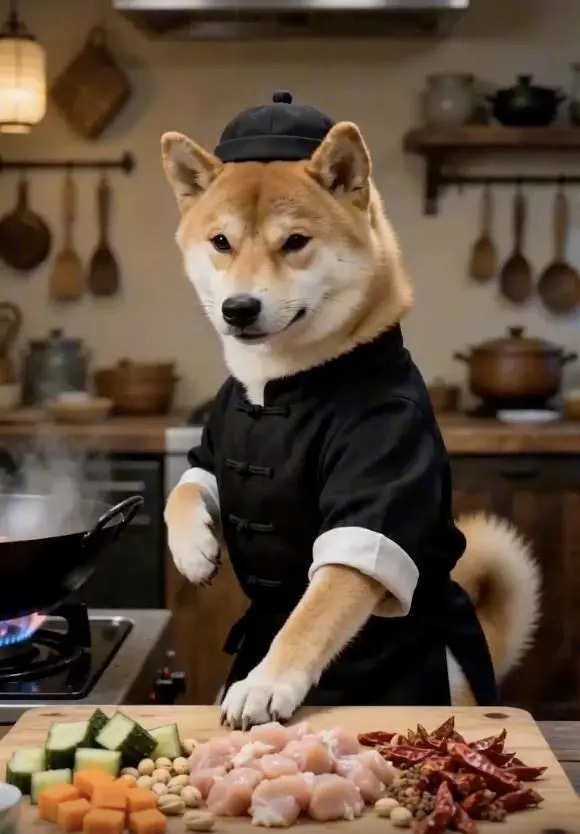
프롬프트는 시퀀스를 쇼트 또는 시간 범위로 나누고 각 단계에 동작을 지정합니다. 이 사례의 문구는 “0-2 seconds (Opening): Close-up quick push-in, wearing Chinese-style clothing standing in front of the stove, sinking qi to the dantian pressing the table with one hand, knuckles exerting force to sha”입니다.
0-2 seconds (Opening): Close-up quick push-in, wearing Chinese-style clothing standing in front of the stove, sinking qi to the dantian pressing the table with one hand, knuckles exerting force to shake the diced chicken, peanuts, and dried chili peppers in the bowl to fly into the air simultaneously, ingredients suspended in mid-air.
2-4 seconds (Starting stance): Spinning body to initiate the stance, right hand like a sword finger quickly pointing at the diced chicken in the air, finger wind accurately slicing through the meat fibers, diced chicken instantly cut into uniform small pieces, falling into the hot oil iron wok in an arc in mid-air.
4-6 seconds (Palm wind stir-frying): Sinking waist into a horse stance, both palms exerting energy quickly towards the iron wok from a distance, palm wind enveloping the diced chicken to rotate at high speed in the wok, stir-frying until it changes color, the meat is tender and not dry, evenly coated with glossy oil.
6-8 seconds (Flying cutting ingredients): Side kick, toes lightly picking up cucumbers and carrots on the chopping board, fruits and vegetables flying in the air, raising hand with a fast knife slashing like lightning, instantly cut into cubes, accurately falling into the wok to join the diced chicken.
8-10 seconds (Stir-frying kung fu): Holding the wok handle with one hand, exerting force with the wrist to perform the ultimate wok-tossing skill, the iron wok flying up and down, diced chicken, peanuts, and chili peppers intertwining and flying in the air, not spilling a single drop of broth, the movement is as chic as sword dancing, full of wok hei.The final large-arc spinning wok, drawing an afterimage in the air, ingredients steadily fall into the wok, accurately plating the bright red, fragrant and crispy Kung Pao Chicken into a white porcelain plate, the finished dish steaming, the camera freezes on a delicious close-up with a blurred background of a fist-clasping figure, the picture should be smooth, following the plot, must have close-ups.
사용 방법
Hailuo 2.3으로 첫 영상 만들기
Hailuo 2.3 선택 항목과 아래에 설명된 입력 경로로 시작하세요. 제출 전에 사용 가능한 설정과 포인트를 확인하세요.
이 모델에 필요한 입력 제공
시작 이미지를 업로드한 다음 움직이게 할 인물 동작, 표정 또는 카메라 움직임을 설명하세요. 이 2.3 선택 항목에 표시된 길이를 사용하세요.
이용 가능한 설정과 포인트 확인
길이: 6s, 10s. 선택 가능한 설정이며 고정 픽셀 크기나 파일 형식을 보장하지 않습니다. 실제 크기와 길이는 원본 결과에서 확인하세요. 제출 전에 표시된 포인트와 요금제의 모델 접근 권한을 확인하세요.
결과 열기 및 확인
클립 전체에서 얼굴 표정, 신체 움직임, 의상 연속성을 확인하세요. 의상 변신이나 타임코드 시퀀스를 요청했더라도 결과마다 확인해야 합니다.
표준 2.3은 문서에 설명된 인물 연기와 스타일 표현 중심 특성으로 고려할 수 있습니다. Fast는 효율 중심의 관련 이미지 기반 영상 옵션입니다. 같은 작업에 맞는지 판단할 때 비교 가능한 입력을 사용하세요. 공식 포지셔닝, 기록된 WeShop 설정, 현재 선택된 폼은 서로 구분되며 측정된 품질 또는 속도 순위를 뜻하지 않습니다.
비교 항목
Hailuo 02
Hailuo 2.3
Hailuo 2.3 Fast
모델 역할
물리적 움직임과 지시 기반 장면
인물 표정, 신체 동작, 스타일 표현
효율 중심의 이미지 기반 영상 버전
페이지에 기재된 입력
시작 이미지 애니메이션; 시작 및 종료 프레임 지정
시작 이미지 움직이기
시작 이미지 움직이기
현재 WeShop 옵션
길이: 6s, 10s
길이: 6s, 10s
길이: 6s, 10s
모델 역할
Hailuo 02
물리적 움직임과 지시 기반 장면
Hailuo 2.3
인물 표정, 신체 동작, 스타일 표현
Hailuo 2.3 Fast
효율 중심의 이미지 기반 영상 버전
페이지에 기재된 입력
Hailuo 02
시작 이미지 애니메이션; 시작 및 종료 프레임 지정
Hailuo 2.3
시작 이미지 움직이기
Hailuo 2.3 Fast
시작 이미지 움직이기
현재 WeShop 옵션
Hailuo 02
길이: 6s, 10s
Hailuo 2.3
길이: 6s, 10s
Hailuo 2.3 Fast
길이: 6s, 10s
Hailuo 2.3을 고려할 때
작업에 맞는 모델 선택
이미지 기반 인물 동작과 표정에는 표준 2.3을 고려하세요. 효율적인 반복이 중요하다면 동일한 대표 입력으로 Fast와 비교하세요.
Hailuo 2.3은 신체 동작, 스타일 표현, 인물의 미세 표정을 위한 MiniMax 영상 모델 업데이트입니다.
Hailuo 2.3은 어떤 작업에 활용하나요?
이미지 기반 인물 연기, 작은 표정 변화, 스타일이 있는 애니메이션에 Hailuo 2.3을 고려할 수 있습니다. 여우 예시는 냄새를 맡고 목도리에 코를 비비는 구체적인 동작을 확인할 수 있게 합니다. 모델 포지셔닝이 모든 몸짓이나 전환의 성공을 보장하지는 않습니다.
Hailuo 2.3에는 어떤 입력이 필요한가요?
현재 WeShop Hailuo 2.3 선택 항목에는 시작 프레임 생성이 표시됩니다. 시작 이미지 한 장을 업로드하고 이어지는 인물 또는 카메라 움직임을 설명하세요. 모델 이름만으로 참조 영상 편집을 추정하지 마세요.
어떤 길이와 형식 설정을 사용할 수 있나요?
길이: 6s, 10s. 선택 가능한 설정이며 고정 픽셀 크기나 파일 형식을 보장하지 않습니다. 실제 크기와 길이는 원본 결과에서 확인하세요.
Hailuo 2.3 프롬프트는 어떻게 쓰면 되나요?
실제 프롬프트는 서 있는 모델의 의상이 네 가지 스타일로 바뀌도록 요청합니다. 그대로 유지할 사람과 바뀔 의상은 역할이 다릅니다. 완벽하게 유지된다고 가정하지 말고 인물 정체성과 의상 전환을 확인하세요. 가이드의 전체 프롬프트와 실제 입력을 읽은 뒤 자신의 작업에 맞게 조정하세요.
Hailuo 2.3은 관련 모델과 어떻게 다른가요?
표준 2.3은 문서에 설명된 인물 연기와 스타일 표현 중심 특성으로 고려할 수 있습니다. Fast는 효율 중심의 관련 이미지 기반 영상 옵션입니다. 같은 작업에 맞는지 판단할 때 비교 가능한 입력을 사용하세요.
Hailuo 2.3은 무료인가요? 비용은 어떻게 정해지나요?
현재 WeShop 요금 페이지에서 요금제의 모델 이용 권한과 제공량을 확인하고 생성기에서 선택한 설정과 수량에 대한 예상 포인트를 확인하세요. 이 페이지는 요청당 고정 가격을 제시하거나 다른 제공업체의 구독 할당량을 WeShop에 적용하지 않습니다.
어떤 한계를 확인해야 하나요?
WeShop 2.3 항목은 이미지 기반입니다. 일반적인 영상 생성 설명에서 참조 영상 편집이나 네이티브 대화를 추정하지 마세요. 클립 전체에서 얼굴 표정, 신체 움직임, 의상 연속성을 확인하세요. 의상 변신이나 타임코드 시퀀스를 요청했더라도 결과마다 확인해야 합니다.
이 페이지의 예시에서 무엇을 배울 수 있나요?
저장된 Hailuo 2.3 예시는 실사와 만화 캐릭터의 상호작용, 여우의 표정과 작은 움직임, 화면을 들고 있는 인물을 보여 줍니다. 각 결과를 실제 프롬프트와 사용 가능한 입력과 함께 확인하세요. 사례는 하나의 요청을 보여 줄 뿐 결과 보장이나 성공률 벤치마크가 아닙니다.