












WeShop AI GPT Image 2でLinkedIn用のアメリカン・コーポレート・ヘッドショットを作成する方法:ステップバイステップガイド
カジュアルな自撮り写真や古い証明写真を、WeShop AIのGPT Image 2を使ってプレミアムなアメリカンコーポレートヘッドショットに変身させましょう。このチュートリアルでは、写真の準備、プロンプトの書き方、生成のコツ、LinkedInや学校プロフィールなどのプラットフォーム別の推奨設定をカバーします。
LinkedIn、Teams、あるいは自分のウェブサイトにおいても、プロフィール写真は多くの場合、あなたに対する第一印象を決定づけます。
しかし、多くの人の「プロフェッショナル写真」には同じ問題があります:まるで証明写真のように見えてしまうことです。
肌の不自然な美白、硬いポーズ、統一された青背景…「フォーマル」に見える一方で、リアリティや温かみに欠けています。
今回は、WeShop AIのGPT Image 2 AI画像生成を使って、カジュアルな自撮りや古い証明写真を、ワンクリックで「アメリカンコーポレートの傑作」に変える方法をお教えします。
再撮影や写真家の手配は不要です。あなたのLinkedInアバターも、「プロフェッショナルでありながら親しみやすい」高級感を手に入れられます。
はじめに:アメリカンコーポレートポートレートとは?
近年、欧米のインターネットで爆発的に広がった「アメリカンコーポレートポートレート」は、従来の証明写真とは全く異なります。
その特徴は:
- 自然でリラックスしたボディランゲージ
- 健康的でリアルな肌の質感
- プロフェッショナルでありながら冷たくない雰囲気
- Appleの公式サイトやNetflixの役員インタビューのような高級感のあるビジュアルスタイル
今は、スタジオもプロの写真家も必要ありません。
必要なのは普通の自撮り写真だけです。WeShop AI公式サイトのGPT Image 2画像生成を通して、まるでアメリカンドラマの主人公のようなコーポレートヘッドショットを作成できます。
このチュートリアルでは、ゼロから以下の方法を学びます:
- 適切な参照写真の選び方
- 高品質なプロンプトの書き方
- AIによる「偽顔」効果を避ける方法
- LinkedIn、Teams、Feishuなどのプラットフォームに適した高級アバターの生成方法
AIの初心者でも、このガイドに従って進められます。
準備
開始する前に、以下のものを用意してください:
- WeShop AIのアカウント
- 鮮明なポートレート自撮り写真、または古い証明写真
このチュートリアルで使用する機能
このチュートリアルでは、WeShop AIのGPT Image 2画像生成ツールを使用します:
詳細なステップバイステップガイド
ステップ1:「高品質な」参照写真を準備する
多くの人がAI画像生成で失敗する理由は、プロンプトが悪いからではなく:
アップロードする元の写真の品質が低すぎるからです。
AIがあなたの顔の特徴を保持するためには、まず「あなたの顔をはっきりと見る」必要があります。
推奨される写真の条件
アップロードする前に、写真が以下の条件を満たしていることを確認してください:
- 顔が隠れていない
- サングラスやマスクなし
- 前髪が目を覆っていない
- 顔の照明が均一
- 顔の特徴がはっきりしている
- 自然な撮影角度
最適な撮影角度
以下の角度をお勧めします:
- 正面顔
- やや横を向き、15°〜30°の範囲
推奨される撮影方法
最も簡単な撮影方法は:
昼間に窓際に立ち、スマートフォンのフロントカメラで自撮りすることです。
自然光が顔の輪郭をよりくっきりとさせ、AIが顔の構造をより正確に認識するのに役立ちます。
避けるべき例
以下のタイプの写真は、AIの結果が悪くなりやすいので避けてください:
- 過度な美顔フィルター
- 明らかな小顔フィルター
- 顔の半分が明るく、半分が暗い
- 下からのアングルの自撮り
- 顔の特徴が大きく歪む笑顔
- ナイトクラブや薄暗い環境での自撮り
アップロード手順
- WeShop AI公式サイトを開く
- GPT Image 2画像生成に移動
- 自撮り写真または古い証明写真をアップロード
ステップ2:「高級感のある」アメリカンコーポレートプロンプトを書く
多くの人がAIでプロフェッショナルなヘッドショットを生成できない理由は、AIが弱いからではなく:
プロンプトの説明が曖昧すぎるからです。
例えば:
- 「プロフェッショナルなヘッドショットを作って」
- 「高級感のある写真を生成して」
これらの説明は情報が少なすぎるため、AIが一貫して理想的な結果を生成できません。 正しいアプローチは、以下の点を正確に記述することです:
- キャラクターのアイデンティティと雰囲気
- 撮影角度
- 構図方法
- 照明効果
- キャラクターのポーズ
- 服装スタイル
- 背景環境
- 全体的な雰囲気
すぐに使えるプロンプトテンプレート
The poised and confident professional woman smiles, with her delicate and balanced facial features and warm, approachable eyes, conveying the image of a professional, trustworthy business leader.

Camera angle:
Straight-on, eye-level perspective using a standard professional portrait photography composition. Maintain a half-body framing that clearly showcases the upper body and shoulder lines.

Framing and depth:
Central composition with a clearly defined subject and a clean, pure background. Maintain visible color and spatial separation between the subject and the background. Use a sufficiently deep depth of field to keep all facial details sharply in focus.

Image quality:
High-definition commercial photography with high pixel density, delicate and realistic skin texture, uniform soft lighting, no visible noise, and the clean visual quality of a modern corporate promotional portrait.

Subject identity:
Preserve the identity and recognizable facial features of the person in the uploaded reference image. The person faces forward, looks directly into the camera, and keeps the head naturally upright.

Overall pose:
The subject stands upright in a frontal position. The shoulders are straight but relaxed, the body remains centered, and the overall posture appears dignified and professional.

Arm position:
The arms hang naturally at both sides of the body. The shoulder lines are symmetrical, with no exaggerated or cross-body movements.

Pose dynamics:
The body remains relaxed and still, without unnecessary tension. The posture communicates confidence, professionalism, and understated authority.

Makeup:
Professional workplace makeup with subtle earth-toned eyeshadow, naturally defined eyelashes, soft and clean eyebrows, coral-toned lip color, and realistic matte skin. Avoid excessive retouching.

Emotional tone:
A professional leader who combines authority with friendliness. The gaze should feel determined yet gentle, conveying confidence, credibility, and leadership.

Apparel:
A dark navy fine-spun wool-blend suit jacket with clean tailoring and moderate shoulder structure. Underneath, a simple pure white V-neck silk blouse with a smooth and refined collar.

Hair:
Side-parted long wavy hair with smooth, glossy strands. The ends curl outward naturally. The hairstyle should look polished, voluminous, and appropriate for a professional corporate portrait.

Environment interaction:
The subject remains visually independent from the background, with no physical interaction with surrounding objects. Keep the portrait clean and focused entirely on the person.

Background:
A pure white or soft neutral corporate background with no decorations, text, furniture, or distracting objects.

Lighting:
Use a large frontal softbox as the main light source, producing even and diffused illumination across the face. Add subtle ambient fill light to maintain natural skin tones and clear colors. Keep a very soft shadow below the eyes and delicate contour lighting along the cheeks to enhance facial depth.

Realism requirements:
Maintain high-resolution commercial portrait details and realistic skin texture. Do not apply excessive skin smoothing or artificial beauty filters.

All lighting and shadows must follow the logic of professional studio portrait photography. Avoid the cheap, flat, and overly processed appearance of traditional ID photos.

Style:
Minimalist professional corporate portrait, modern personal branding photography, elegant cool tones, premium executive profile image.

Negative prompt:
3D rendering, anime, cartoon, illustration, excessive beauty filters, plastic skin, over-smooth face, stiff pose, unnatural facial expression, distorted facial features, uneven lighting, blurry image, incorrect body proportions, messy background, complex background objects, low-resolution details, dull low-saturation appearance, cheap photo studio style
プロンプト最適化のコツ
キャラクターにもっと「アメリカンドラマ感」を出したい場合は、プロンプトに以下を追加:
Inspired by premium executive portraits from the Apple official website, with natural expressions, authentic skin texture, and cinematic corporate photography.
全体的に若々しいスタイルにしたい場合は、以下を追加:
Add a subtle sense of relaxed confidence and playful modern energy while maintaining a professional appearance.
キャラクターを会社の役員のように見せたい場合は、以下を追加:
The subject has a mature, calm, and stable presence, resembling the founder or senior executive of a Silicon Valley technology company.
ステ���プ3:生成して最適な写真を選択する
写真をアップロードし、プロンプトを入力したら、ページの[生成]ボタンをクリックします。
一度に複数の画像を生成し、以下の基準で最適な結果を選ぶことをお勧めします:
- 顔の特徴が本人に似ているか
- 目が自然に見えるか
- 肌の色がリアルか
- 肩や首のプロポーションが正常か
- 服のディテールが完全か
- 背景がきれいか
- 全体的な雰囲気がプロフェッショナルな立場に合っているか
サンプル結果
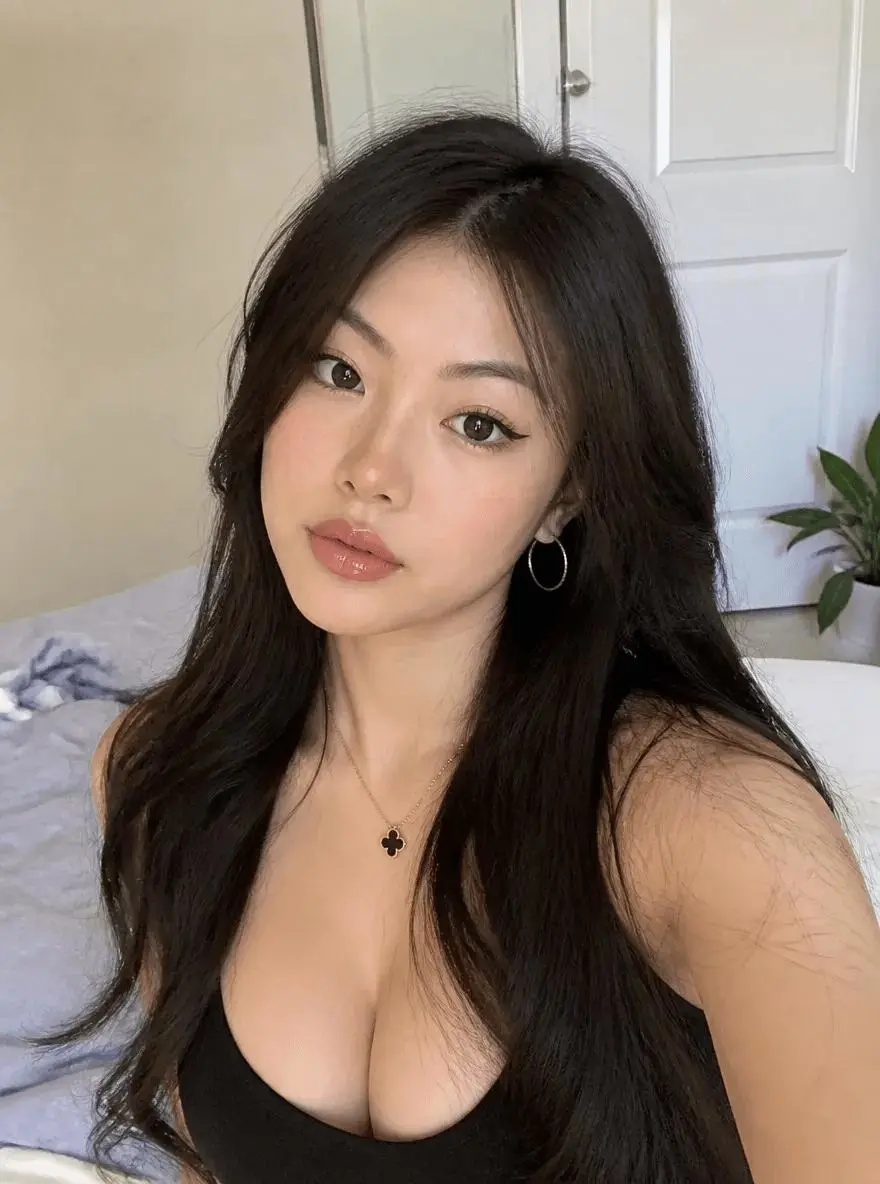
|
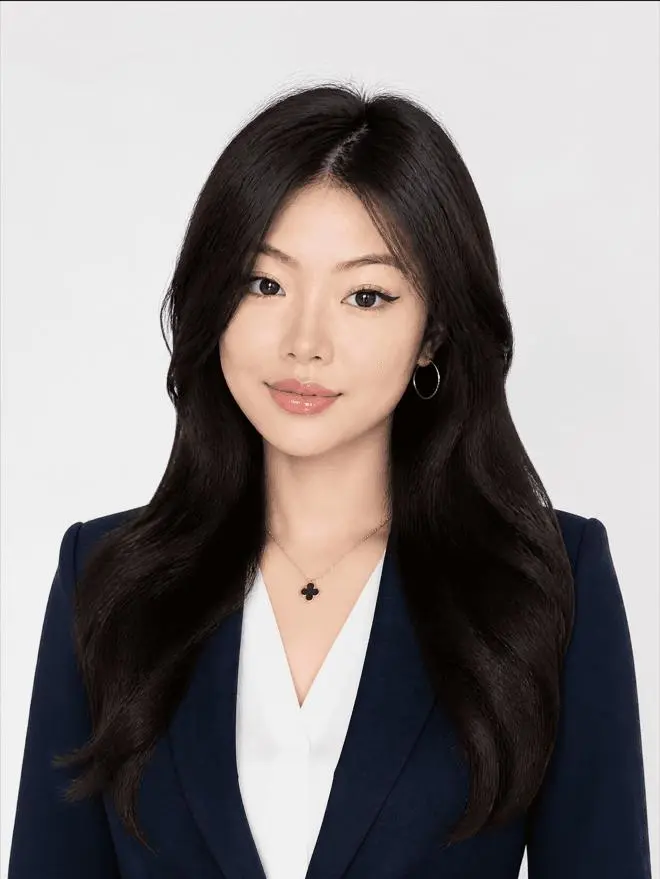
|
高度なコツとFAQ
Q1:古い証明写真を使用できますか?
はい。
元の写真に以下のような問題があっても:
- 青い背景
- 照明が悪い
- ただのTシャツだけ
AIは以下のことを行えます:
- 自動的に背景を置き換える
- 服を変更する
- 照明を再構築する
- 全体の色調を調整する
- キャラクターのオーラを最適化する
本当に重要なのは:
顔が十分に鮮明であることです。
Q2:生成された写真が私に似ていないのはなぜですか?
通常、2つの理由があります。
理由1:元の写真が十分に鮮明でない
解決策:
- より高解像度の自撮り写真に交換する
- 自然光を使って撮影するようにする
- 目、鼻、口などの重要な顔の特徴が隠れていないことを確認する
- 美顔加工が強くかかった画像や、大幅に圧縮された画像をアップロードしない
理由2:プロンプトがアイデンティティの保持を明確に要求していない
プロンプトに以下を追加:
Strictly preserve the person's identity, facial structure, eye shape, nose shape, mouth shape, face proportions, and recognizable personal features from the uploaded image.
さらに以下を追加してもよい:
Do not beautify the face into a different person. Do not significantly alter facial proportions or identity.
Q3:AIの「偽顔」効果を減らすにはどうすればよいですか?
プロンプトで以下の点を明示的に強調できます:
Realistic skin texture, visible natural pores, subtle facial asymmetry, natural under-eye details, realistic hair strands, and authentic photographic lighting.
また、ネガティブ制約を追加:
Avoid plastic skin, excessive smoothing, artificial facial symmetry, beauty filter effects, wax-like skin, and over-retouched studio photography.
Q4:異なるプラットフォームに適したバージョンを生成できますか?
もちろん可能です。
プラットフォームに応じて、画像のアスペクト比、構図範囲、キャラクターのオーラを調整できます。
LinkedIn ヘッドショット
推奨スペック
- アスペクト比:1:1
- 構図:胸から上または肩から上
- 背景:無地または薄いグレー
- 雰囲気:プロフェッショナルで信頼でき、親しみやすい
- 視線:カメラをまっすぐ見る
サンプル結果
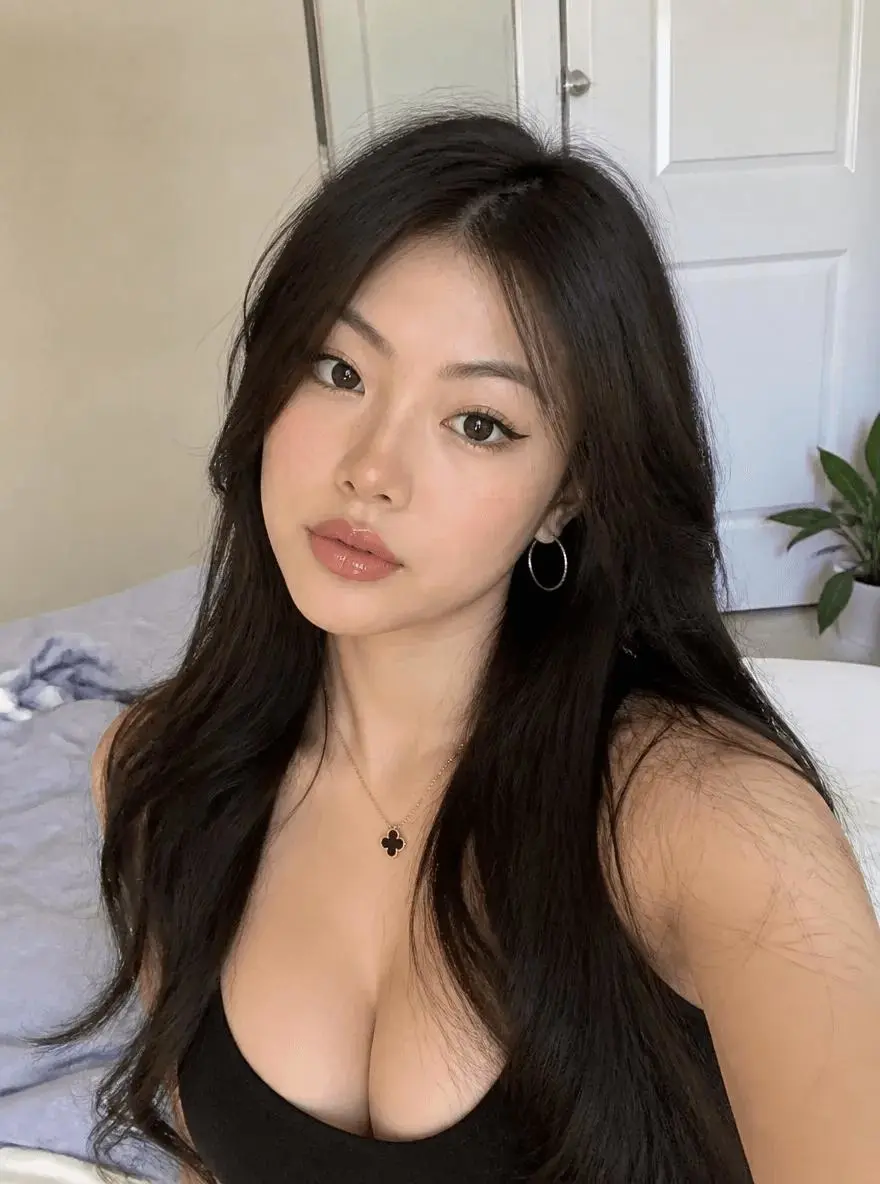
|
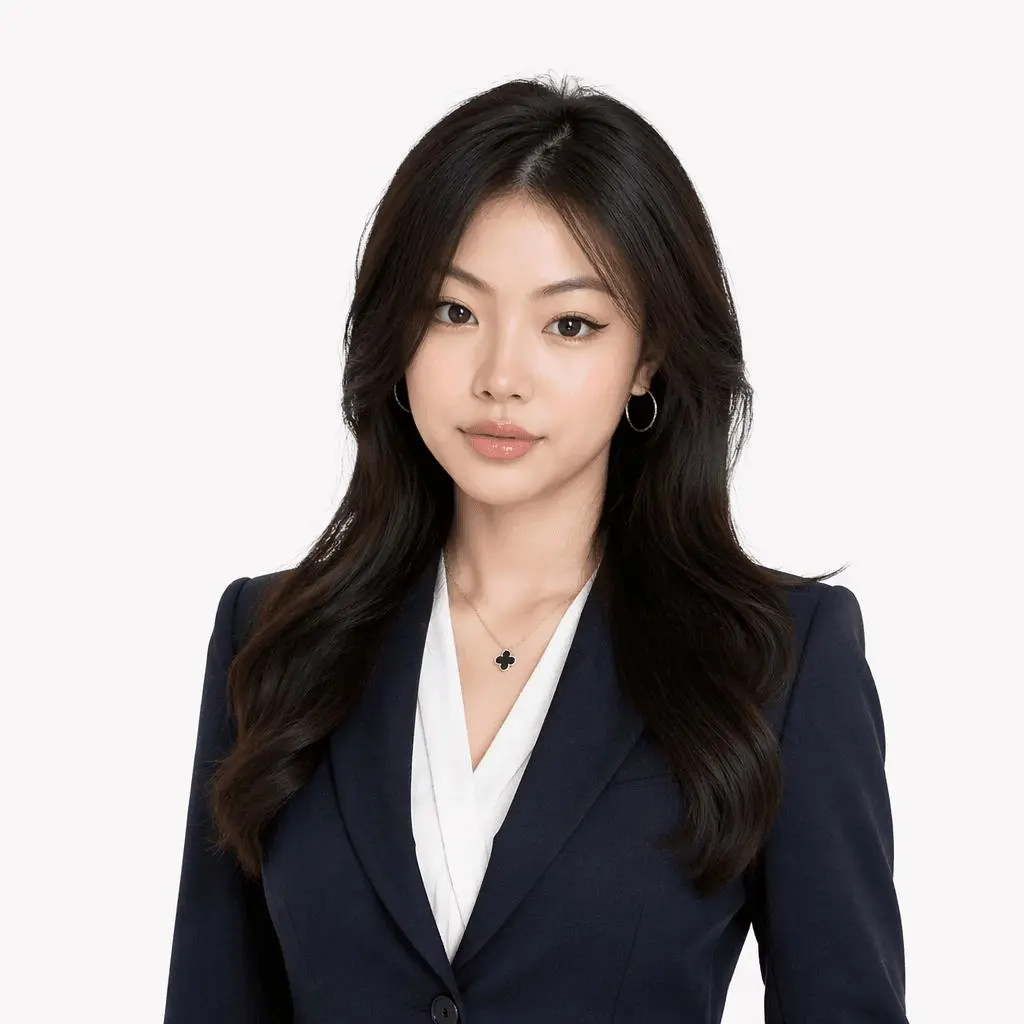
|
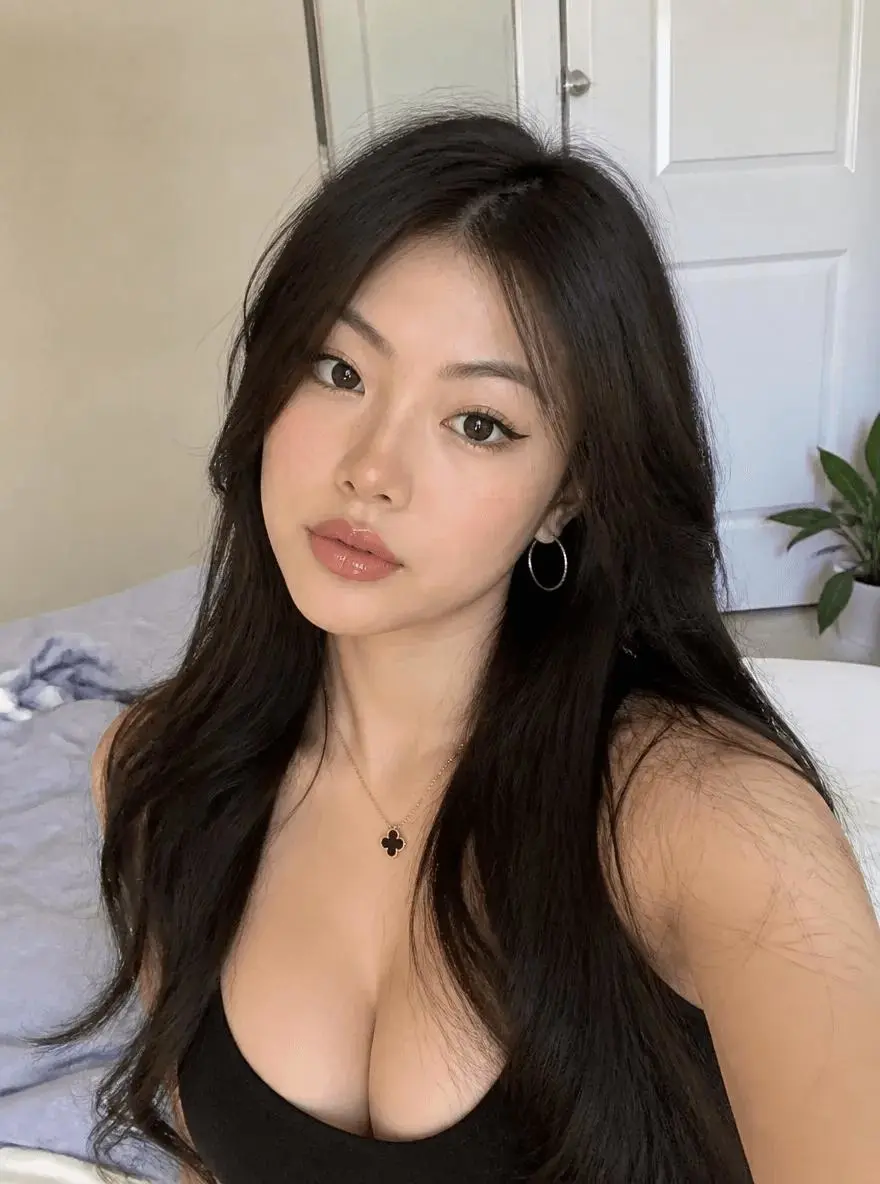
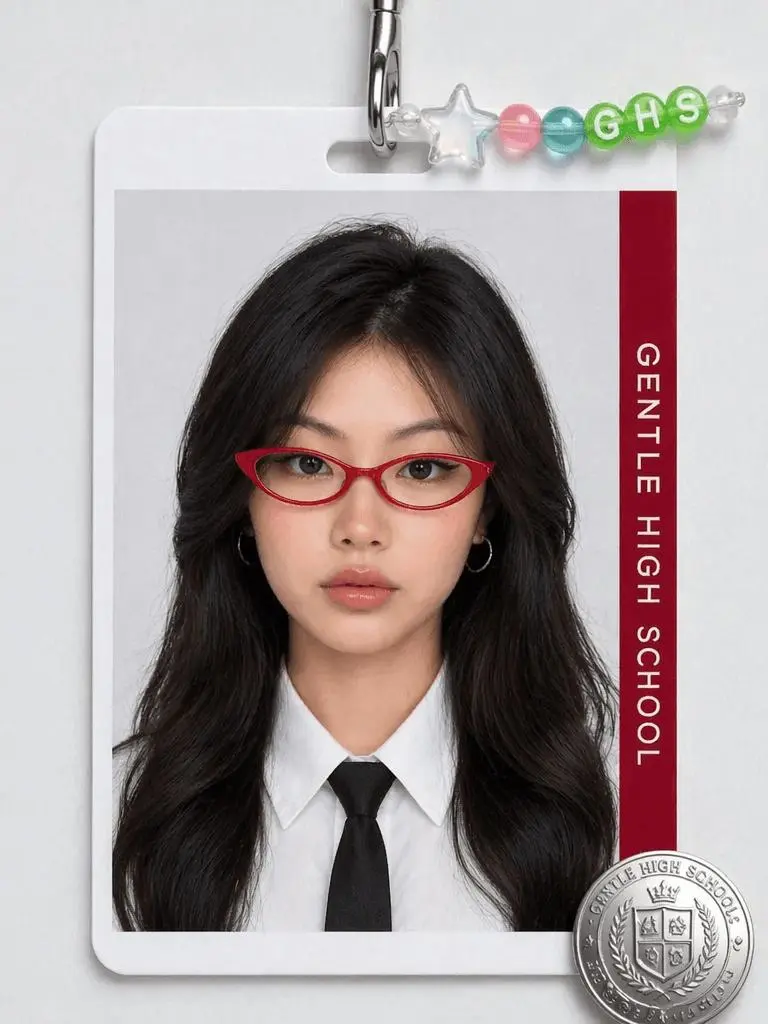
学校のIDやキャンパスプロフィール写真
推奨スペック
- 構図:半身または胸から上
- 表情:自然でリラックス
- 服装:シンプルで日常的
- 背景:明るい無地背景
- スタイル:カジュアルでビジネス過ぎない
サンプル結果
|
|
まとめ
多くの人がプロフィール写真の影響力を過小評価しています。
しかし、今日のリモートワーク、ソーシャルリクルーティング、オンラインコミュニケーションの世界では:
あなたのアバターは「デジタル名刺」となっています。
良いプロフェッショナルヘッドショットは、見た目が良いだけでなく、以下のことも伝えます:
- プロフェッショナリズム
- 自信
- 信頼性
- 美的感覚
- 個人ブランドのポジショニング
今や、WeShop AI GPT Image 2を使えば、以下のものは必要ありません:
- 写真スタジオに行くこと
- 事前にメイクやスタイリングをすること
- プロの撮影に数千円を費やすこと
- 複雑なレタッチソフトを学ぶこと
必要なのは:
- 自撮り写真1枚
- プロンプト1つ
- AI生成1回
そして、アメリカンドラマの役員のようなオーラを持つ、本当に高級なコーポレートヘッドショットを手に入れられます。
今すぐ生成を開始
- WeShop AIに登録またはログイン
- 鮮明な自撮り写真をアップロード
- この記事のプロンプトをコピー
- 適切な画像アスペクト比を選択
- 最初のアメリカンコーポレート傑作を生成
今すぐ体験:
WeShop AI GPT Image 2でプロフェッショナルヘッドショットを生成
あなたのキャリアや個人のポジショニングに応じて、さらに異なるスタイルをカスタマイズできます:
- 役員スタイルのプロンプト
- Apple公式サイトスタイルのプロンプト
- 投資銀行エリートスタイルのプロンプト
- シリコンバレー起業家スタイルのプロンプト
- 女性リーダーシップスタイルのプロンプト
- 韓国企業スタイルのプロンプト
- アメリカ映画スタイルのLinkedIn用プロンプト