


Introduction
Today’s fashion e‑commerce demands more than static product photos. Shoppers crave realism, interactivity, and confidence in fit, material, and scale. Brands that combine high‑quality AI commercial imaging with responsive AI 3D generator tools gain a decisive edge in conversion, retention, and cross‑platform storytelling. WeShop AI and Tripo Studio together close the gap between inspiration, visualization, and immersive presentation. This guide shows you how to turn simple apparel shots into high‑conversion e‑commerce assets and interactive image to 3D model outputs that elevate every customer journey—seamlessly integrating the strengths of both platforms to create a cohesive visual production process that saves time, reduces costs, and drives results.
Why WeShop + Tripo Redefines Fashion Visual Production
Traditional fashion imaging relies on photoshoots, sample production, travel, and lengthy retouching—costly, slow, and inflexible. Even strong 2D images leave buyers uncertain about drape, volume, and real‑world appearance, leading to higher return rates and lower customer confidence. WeShop AI and Tripo AI solve these pain points by combining their core strengths, creating a seamless visual production pipeline:
- WeShop AI’s 2D Expertise: Delivers professional, versatile 2D visuals as the foundation—including AI model try‑on, background replacement, lighting control, and marketplace-ready assets—all with consistent brand styling.
- Tripo AI’s 3D Capabilities: Transforms finalized 2D assets into immersive 3D via intuitive image to 3D model generation, clean topology for web/AR/mobile, segmentation, texturing, and batch processing for scaling catalogs.
Together, they eliminate disjointed tools, streamlining every step from capture and enhancement to visualization, 3Dization, and final publication—turning static visuals into interactive experiences that resonate with shoppers.
From WeShop AI Visuals to Tripo 3D Assets – A Seamless Process
The transition from 2D to 3D is straightforward when leveraging WeShop and Tripo together, with each platform complementing the other to ensure quality and efficiency. This seamless workflow is designed to eliminate the complexity of traditional 2D-to-3D conversion, requiring no advanced design expertise and significantly reducing production time. Below is a clear, actionable 5-step workflow—each step concise yet actionable—with additional context and benefits detailed at the start and end to provide a complete overview of the process and its value.
- Craft Detailed Prompts for WeShop AI: Input specific prompts to generate custom clothing concept designs. Include key details like apparel type, fabric, color, and lighting to ensure accuracy. A well-crafted prompt (e.g., “high-waisted spandex leggings, bright lighting, white background”) ensures the 2D output is optimized for 3D conversion.

- Refine 2D Visuals in WeShop: Use WeShop’s AI Model Try-On to add realism and visualize the design on diverse body types. Adjust lighting to be even and neutral, tweak the background for clarity, and refine the pose to highlight key features. This step ensures 2D visuals are consistent and ready for 3D integration.
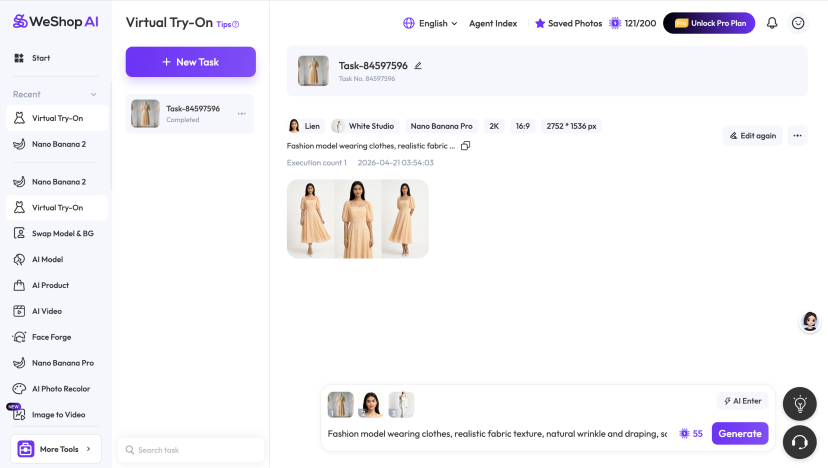
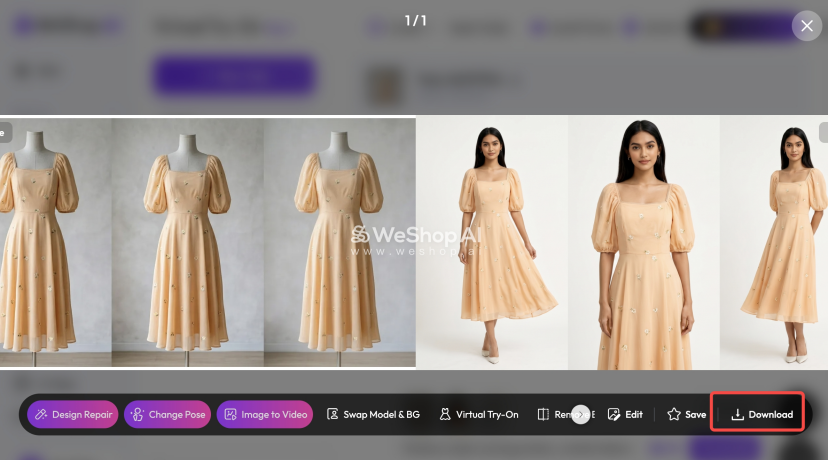
- Export High-Res 2D Views: Export high-resolution front, side, and detail views of the refined 2D designs. Use PNG format to maintain clarity, as multiple clear views are critical for Tripo’s image to 3D model function. This step is quick and ensures the 3D conversion is accurate.
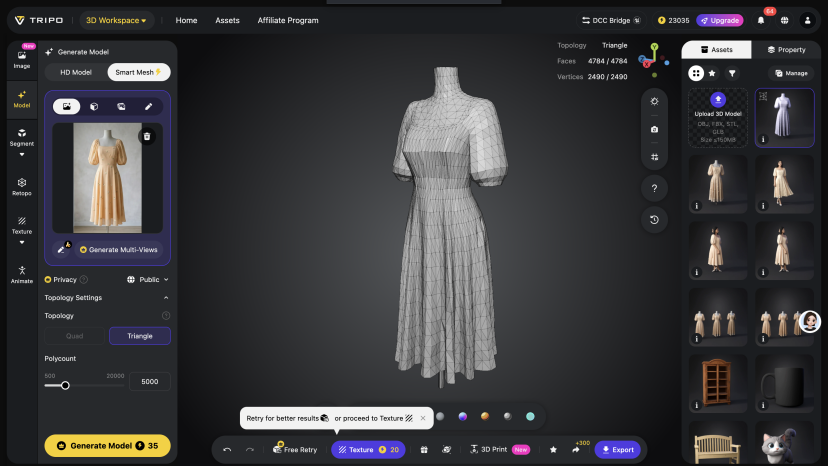
- Generate 3D Base Mesh in Tripo: Import the WeShop-generated images into Tripo Studio and use its image to 3D model function to create a base mesh. Apply AI segmentation to separate distinct layers or trims, ensuring the 3D mesh matches the 2D concept’s shape and details.
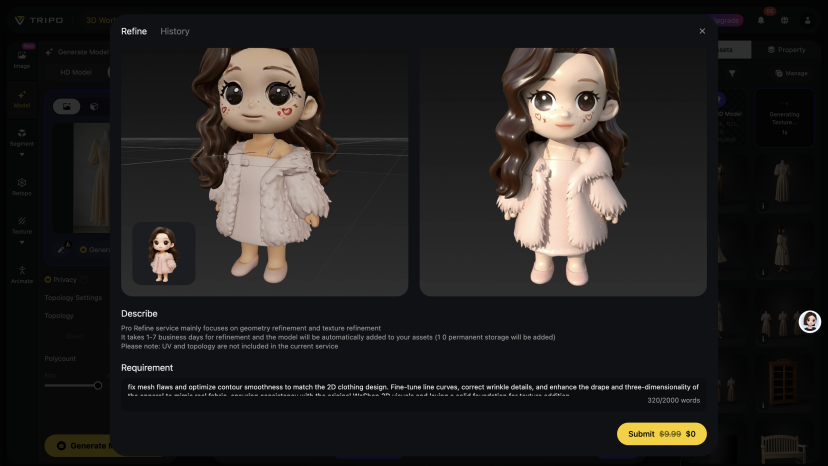
- Optimize 3D Mesh Details in Tripo: Make refined adjustments to the generated 3D base mesh, fix mesh flaws, and optimize contour smoothness to ensure the apparel’s fit matches the 2D design. Use Tripo’s mesh editing tools to fine-tune line curves and correct wrinkle details, making the 3D model more consistent with the drape and three-dimensionality of real clothing, laying the foundation for subsequent texture addition.
- Add Textures & Export: Enhance the 3D model with fabric textures and any logo details using Tripo’s editing tools. Export the final 3D asset in web/AR-friendly formats (GLB, OBJ, FBX) to ensure it’s ready for e-commerce, AR try-on, or further editing.
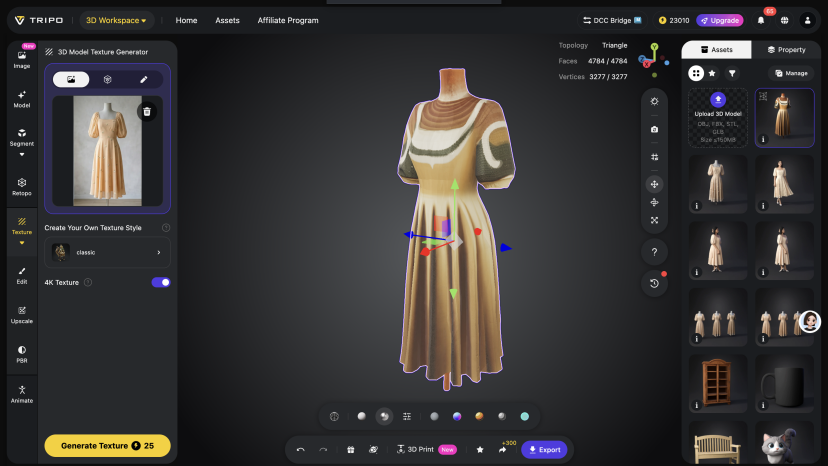
This streamlined 5-step workflow eliminates the need for disjointed tools, advanced design skills, or costly photoshoots, making 2D-to-3D conversion accessible to brands and creators of all sizes. By focusing on simplicity in each step and leveraging the complementary strengths of WeShop and Tripo, users can consistently produce high-quality, production-ready 3D assets in a fraction of the time required by traditional methods—saving costs, reducing revisions, and ensuring visuals align with brand goals.
Use Cases That Drive Real Business Results
The combination of WeShop and Tripo delivers tangible business value across multiple fashion e-commerce scenarios, addressing key pain points and unlocking new opportunities. While the use cases are diverse, three stand out for their impact on conversion and efficiency:
- AR Try-On & Virtual Showrooms: Embed Tripo-generated 3D garments into web AR viewers, letting shoppers rotate/zoom to visualize fit/scale—reducing return rates and boosting engagement.
- Omnichannel Content Scaling: WeShop creates social/banner/product page visuals; Tripo turns the same assets into 3D previews, 3D-printable merch, and in-game items—one source, unlimited outputs.
- Faster DTC Collection Launches: Cut sampling/photoshoot costs; launch lines weeks earlier using AI visuals and image to 3D model outputs to test colors/fits without physical production.
Pro Tips for Superior Quality & Speed
To maximize the value of the WeShop and Tripo partnership, keep these key tips in mind—they’ll ensure your 2D-to-3D workflow is efficient and produces high-quality results:
- Use sharp, front-facing product images in WeShop for accurate image to 3D model conversion (clear details = better 3D meshes).
- Keep lighting neutral during 2D creation to preserve material colors in 3D—avoid over-filtered images that distort textures.
- Use Tripo’s low-poly generation for fast-loading web/AR experiences, and save reusable templates in both platforms to streamline workflows.
The Future of Fashion Visualization
AI is shifting fashion e-commerce from static to interactive, and the partnership between WeShop and Tripo is at the forefront of this evolution. WeShop delivers the professional 2D foundation that brands need to connect with shoppers, while Tripo turns that foundation into immersive 3D experiences that drive engagement and conversion. Together, they support emerging trends like virtual try‑on, personalized styling, 3D commerce, and metaverse integration—helping brands stay ahead of the competition and meet the changing demands of modern shoppers. Brands that adopt this combo now will not only streamline their visual production processes but also lead the next era of online shopping.
Conclusion
WeShop AI and Tripo Studio empower fashion creators, marketers, and brands to build complete visual ecosystems without heavy software or big budgets. From AI‑enhanced commercial photos to responsive AI 3D generator outputs, every step is streamlined, scalable, and conversion‑focused. By integrating the strengths of both platforms, brands can turn their 2D visions into immersive 3D experiences that resonate with shoppers, reduce costs, and drive growth. Whether you’re a small DTC brand or a large fashion retailer, this partnership provides the tools you need to stand out in a crowded market—start transforming your fashion visuals today.
