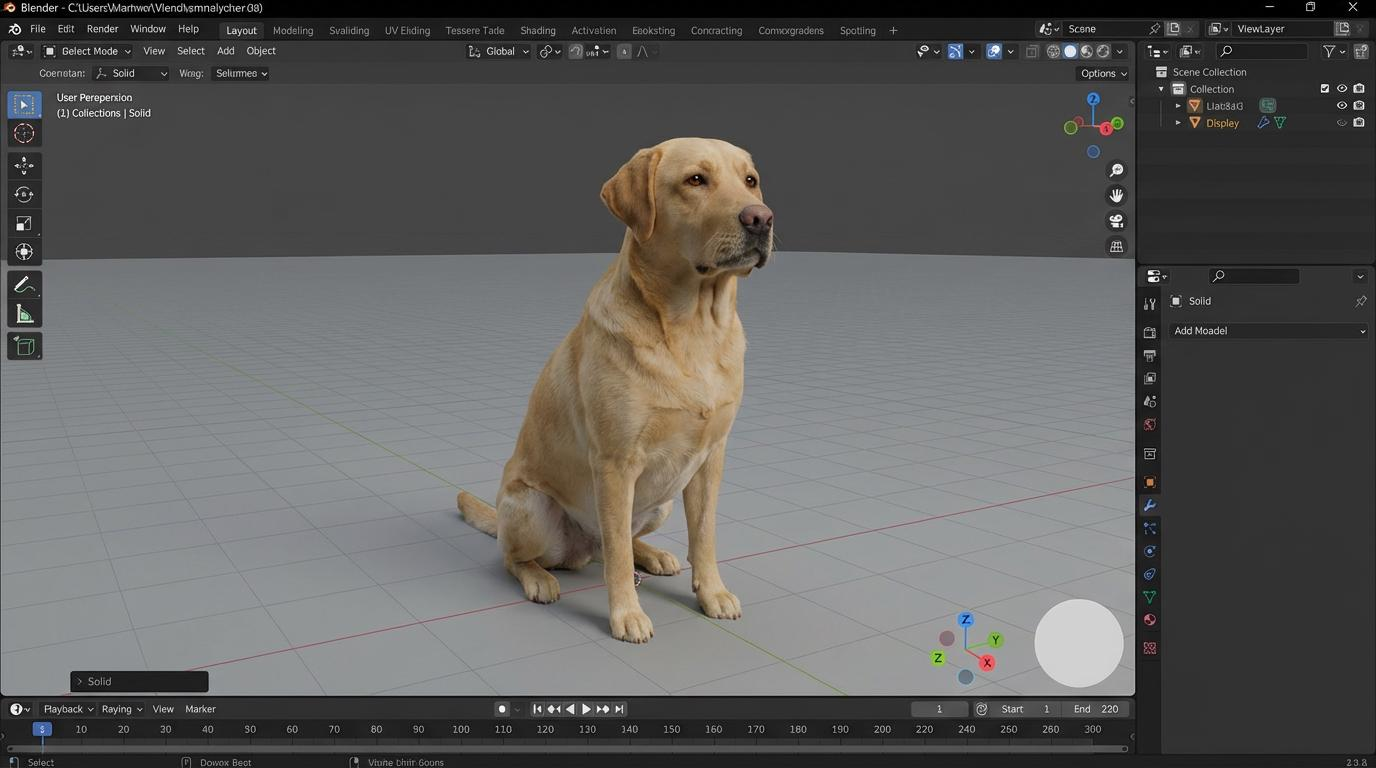
A 3D out of screen effect makes a character appear to cross the edge of a phone and enter the viewer’s space. The image can feel bold and cinematic. However, the effect only works when the phone, character, hand, and foreground overlap in a clear order. A long prompt alone will not fix weak depth.
This tutorial shows creators, game studios, ecommerce teams, and social marketers how to build the effect with WeShop AI. You will create the main still in GPT Image 2. Then, if you need motion, you can animate the approved image with Image to Video AI Generator.
The workflow uses an original or licensed character. Therefore, it is safer for brand campaigns than copying a famous movie, anime, comic, or game character.
Quick Answer
To create this effect, first design a clean 9:16 poster in GPT Image 2. Place a large phone in the center. Next, make the character’s torso cross the screen edge. Bring one hand or foot close to the camera. Then, add contact shadows, broken-screen details, and a simple fictional social interface.
After generation, check the image at 100% size. Fix the face, hands, feet, phone border, and text before making more versions. Finally, animate only the approved still. This order reduces random changes and keeps the visual easier to control.
What Makes a 3D Out of Screen Effect Work?
A convincing 3D out of screen effect needs more than a wide-angle pose. It needs several depth cues that support the same visual story.
| Depth cue | What the viewer should see | Common failure |
|---|---|---|
| Screen crossing | The torso clearly passes through the screen plane | The character only stands in front of the phone |
| Foreground scale | One hand, fist, shoe, or prop looks much larger | Every body part has the same visual size |
| Occlusion | The hand overlaps the phone bezel while part of the body remains behind it | The phone and character look pasted together |
| Contact shadow | A shadow falls where the character crosses the screen | No shadow connects the virtual and real spaces |
| Camera logic | The body follows one low or ultra-wide camera angle | The hand, head, and legs use conflicting angles |
| Background separation | The phone remains easy to read against the scene | Particles and objects hide the main silhouette |
In other words, the effect is a composition problem first. The model needs a clear subject, a clear screen boundary, and a clear foreground object. Extra sparks cannot replace those basics.
How to Create a 3D Out of Screen Effect in WeShop AI
Use the shortest practical workflow: create one strong still, review it, repair only the failed areas, and animate it only if the campaign needs video.
Step 1: Prepare an Original Character and Campaign Goal
Start with a short creative brief. Define who the character is, what action they take, and where the asset will appear. For example, an original streetwear mascot may jump from a fictional profile page for a product launch. A game studio may use its licensed hero for a teaser poster.
If you use a reference image, make sure you own it or have permission to upload it. Also, choose a clean image with the full face, costume, and key props visible. Avoid a source with cropped hands, heavy blur, or several people.
Write down these five decisions before generating:
Final platform and aspect ratioeffect is the most stunning! Remember to like and bookmark this tutorial to avoid losing it next time~
Original or licensed character description
Phone orientation and screen content
Foreground body part or prop
Lighting and background mood
Step 2: Write a 3D Out of Screen Effect Prompt
Open GPT Image 2 in WeShop AI and describe the image in visual order. Start with format and composition. Then, define the phone, character action, depth cues, camera, lighting, and exclusions.
Do not rely on words such as “masterpiece,” “viral,” or “8K.” They do not explain the scene. Instead, state which body part crosses the screen and what overlaps the phone bezel.
A useful prompt should answer these questions:
- Is the final asset vertical, square, or wide?
- Is the phone upright, tilted, or lying on a surface?
- Which part of the character remains inside the screen?
- Which hand, foot, or prop reaches toward the camera?
- Where should shadows and broken-screen details appear?
- Which areas must remain clean for a headline or logo?
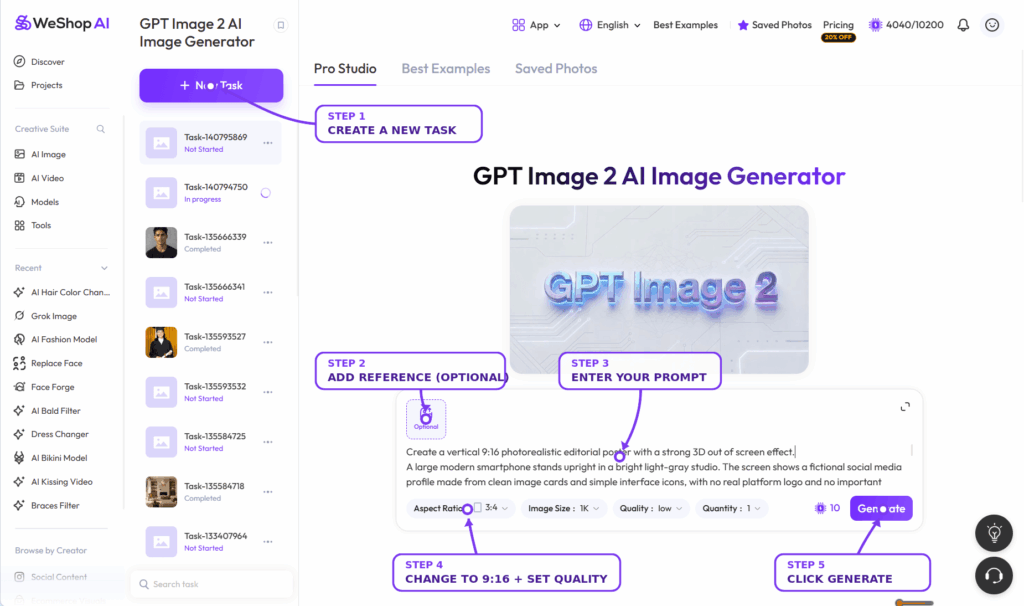
Step 3: Generate One Clear Base Composition
Generate the first result and judge the large shapes before looking at small details. The phone should be easy to identify. The screen edge should remain visible. In addition, the character must cross that edge rather than float in front of it.
Do not generate many random versions at once. First, choose the composition that gives the best depth. Then, refine that direction. This approach makes it easier to keep the character, costume, and campaign style consistent.
If the result feels flat, revise one instruction at a time. For example, specify that the wrist overlaps the near bezel, the torso remains partly inside the screen, and a shadow falls onto the outer phone frame.
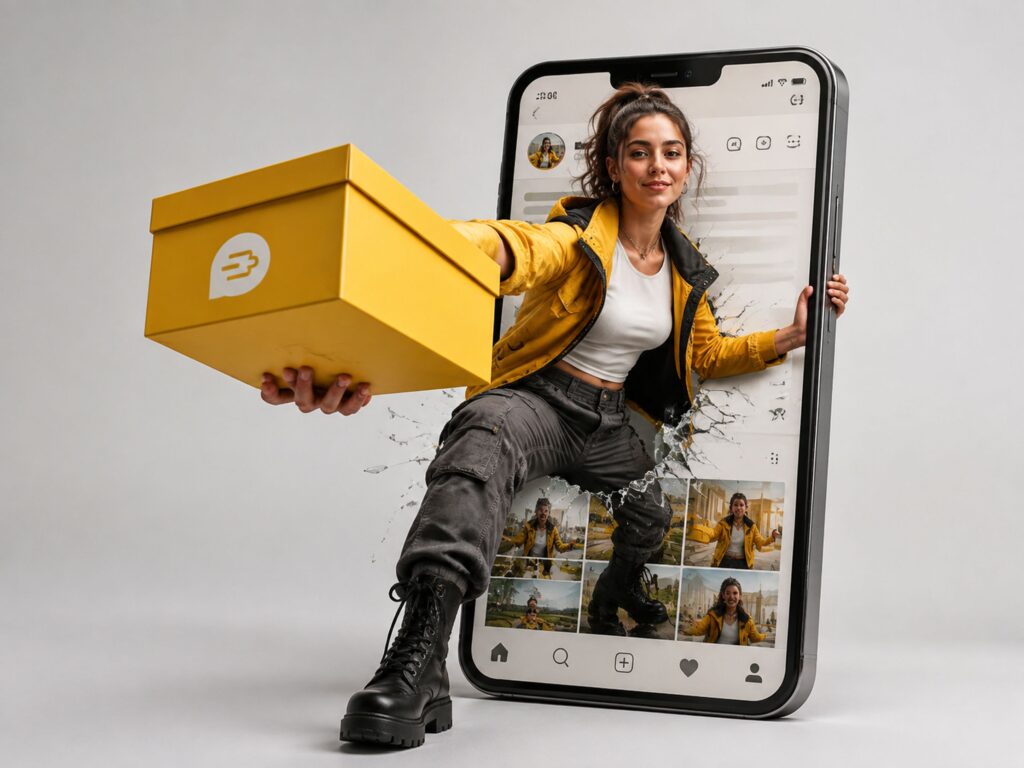
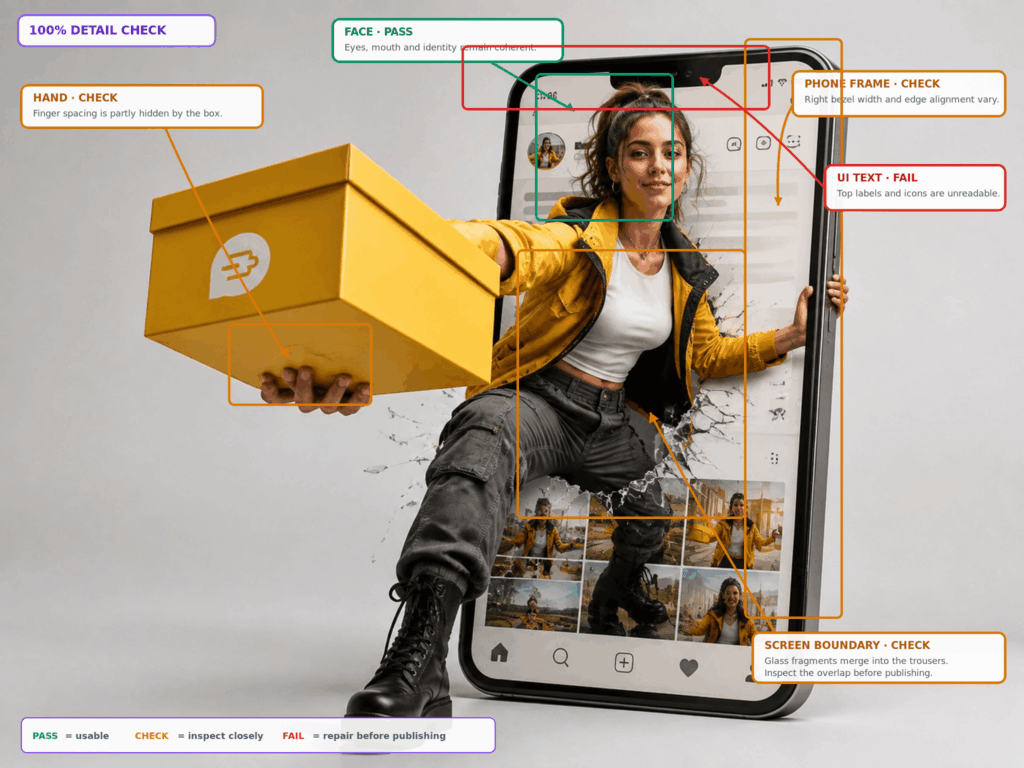
Step 4: Review the 3D Out of Screen Effect at 100%
Zoom in before downloading or animating the image. First, inspect the face and eyes. Next, check every visible finger, foot, costume edge, and object connection. Then, review the phone bezel, screen cutout, reflections, shadows, and interface text.
The foreground hand may be large because of perspective. However, it should still have a clear wrist, correct finger count, and a believable connection to the arm. Likewise, the near foot should follow the same camera direction as the torso.
Use Hand/Feet Fixer only when anatomy is the main failure. Use Design Repair when a selected region needs a reference-based correction. If the first image already passes review, skip these tools.
Step 5: Turn the 3D Out of Screen Effect Into Video
If you need a Reel, Short, or ad clip, upload the approved still to Image to Video AI Generator. Keep the motion prompt short. Ask for one main character action and one camera move.
For example, the character can push farther through the screen while the camera makes a slow pullback. Small particles may drift outward. Meanwhile, the phone should stay stable, and the face, costume, hands, and interface should remain consistent.
Avoid asking for a jump, spin, camera orbit, explosion, hand reach, and background transformation in the same clip. Too many events can weaken anatomy and screen continuity.
Motion prompt example:
The original character moves one step forward through the phone screen. The near fist advances slightly toward the camera while the phone remains fixed. Add a slow camera pullback, subtle glass movement, stable face and costume details, consistent hands, and no new objects or text.
Copyable Prompt Template for a 3D Out of Screen Effect
Replace the square brackets with your own original or licensed material.
Create a vertical 9:16 cinematic poster featuring an original [character description]. A large smartphone stands upright in the center of a [background description]. The phone displays a fictional social profile with simple interface blocks and no real platform logo. The character is moving through the phone screen: the back leg and part of the torso remain inside the display, while the upper body and [left fist/right hand/boot/prop] cross the bezel into the real foreground. The foreground element is close to the camera with controlled wide-angle foreshortening. Show clear overlap with the phone frame, a contact shadow on the bezel, subtle cracked-glass details at the crossing point, and realistic depth. Use [lighting], [color palette], and a clean area at [top/bottom] for campaign text. Keep the face, hands, feet, costume, and phone geometry coherent. No extra fingers, duplicated limbs, warped screen edges, real social-media logos, celebrity likenesses, copyrighted characters, or unreadable headline text.
Prompt Anatomy
This template works because each sentence has one job. The format controls the canvas. The phone description builds the frame. The body position creates the crossing point. The overlap and shadow create depth. Finally, the exclusion list protects anatomy, layout, and rights.
For a brand mascot, add the approved color palette and costume reference. For a product campaign, replace the reaching hand with a licensed prop or product package. Still, keep the foreground element connected to the character so the scene does not look like a collage.
Optional Motion Prompt
Use a separate prompt for animation. Do not repeat the full image prompt. Describe only what should move, what should remain fixed, and how the camera behaves.
Preserve the source composition. The character moves slightly farther through the screen, the foreground prop approaches the lens, and small fragments drift outward. Keep the phone fixed, the face stable, the costume unchanged, and the background motion minimal. Use a slow camera pullback with no scene cut.
Common Problems and Practical Fixes
The Character Stays Inside the Screen
The prompt may describe the idea but not the screen crossing. State that the torso intersects the screen plane. Also, name the body parts on each side of the bezel. Add a contact shadow where the body crosses the frame.
The Hand or Foot Looks Deformed
Use a clenched fist, gloved hand, boot, or solid prop when an open palm creates unstable fingers. Reduce the amount of motion. Then, regenerate or repair only the failed area. Do not sharpen a structurally incorrect hand and expect it to become correct.
The Social Interface Text Breaks
Keep generated interface text short and nonessential. Use simple bars, icons, thumbnails, and fictional labels. If exact campaign copy matters, reserve a clean area and add the final text in a layout tool after generation. Garbled text should not be treated as a finished design feature.
The Depth Feels Flat
Increase the size difference between the foreground element and the head. Make the phone edge visible behind the crossing body. Moreover, add a cast shadow, slight lens perspective, and one object that passes in front of the bezel.
Commercial Uses for the 3D Out of Screen Effect
The 3D out of screen effect can support more than fan art. Brands can use an original mascot to introduce a product drop. Game teams can launch a licensed character skin. Creative agencies can build a fictional app campaign. Ecommerce teams can also place a product package or campaign prop in the foreground while the model remains tied to the phone scene.
For TikTok, Reels, and Shorts, start with a vertical composition. For a feed post, rebuild the layout for square or 4:5 framing instead of cropping away the hand or phone. In every version, keep enough safe space for captions, logos, and interface controls added by the platform.
Create channel variants only after the base 3D out of screen effect passes review. Otherwise, one anatomy or branding error will spread across the full campaign set.
Copyright and Brand Safety
Do not assume that a popular character is free to use because an AI tool can generate it. Movie, anime, game, comic, celebrity, and brand assets may be protected by copyright, trademark, publicity, or contract rights.
For commercial work, use one of these safer inputs:
- An original character created for your brand
- A mascot your company owns
- A licensed character with documented campaign rights
- A fictional person who does not imitate a real celebrity
- Product images and logos your team is allowed to upload
Also, use a fictional social interface unless you have a reason and permission to show a real platform design. Avoid false follower counts, endorsements, or profile details that could mislead viewers.
3D Out of Screen Effect Quality Checklist
Before publishing, confirm that:
- The character clearly crosses the phone’s screen plane.
- The foreground hand, foot, or prop connects to the body.
- Fingers, joints, facial features, teeth, and costume details are coherent.
- The phone bezel, camera cutout, reflections, and screen edges remain stable.
- Shadows and overlap support one camera angle.
- The interface uses no accidental real logo or misleading account data.
- Important text is readable and placed in a safe area.
- The character, references, logos, and products are owned or licensed.
- The vertical, square, or wide export fits its final channel.
- The animated version preserves the approved still instead of redesigning it.
Final Recommendation
Build the still before the motion. A strong 3D out of screen effect comes from controlled overlap, clear depth, correct anatomy, and a readable phone frame. Therefore, start with GPT Image 2, refine one base composition, and inspect it at 100% size.
If the still passes review, use Image to Video AI Generator for a short, focused motion. Keep the phone stable and limit the clip to one character action and one camera move. Most importantly, use original or licensed character material so the final asset is suitable for real campaigns.
Frequently Asked Questions
Can Beginners Create This Effect?
Yes. The workflow does not require manual 3D modeling. However, beginners still need to describe the screen boundary, foreground scale, and camera direction clearly. They must also inspect anatomy and text before publishing.
What Aspect Ratio Should I Use?
Use 9:16 when the main destination is a full-screen vertical video or Story. Use 4:5 for many feed placements and 1:1 for square assets. Choose the destination first so the phone and foreground element remain inside the safe area.
Can I Animate the Final Poster?
Yes. Upload the approved still to Image to Video AI Generator. Ask for one controlled action, such as a small step through the phone, plus one camera movement. Avoid a long list of competing actions.
Why Do Hands Fail in Wide-Angle Images?
The hand is large, close to the camera, and strongly distorted by perspective. That makes its shape harder to keep stable. A fist, glove, boot, or prop often gives the model a simpler form to render.
Can I Use a Famous Character?
Personal experimentation and commercial publishing involve different risks. For brand, advertising, ecommerce, or paid social use, choose an original or licensed character and confirm the relevant rights before publication.
Go to WeShop AI For Exploration: