












使用 GPT Image 2.5 製作 3D 手機躍出海報
瞭解如何運用 GPT Image 2.5 製作 3D 手機躍出海報,包含五個以參考圖為基礎的場景、構圖技巧及可直接使用的英文提示詞。
如何使用 GPT Image 2.5 製作 3D 手機躍出海報
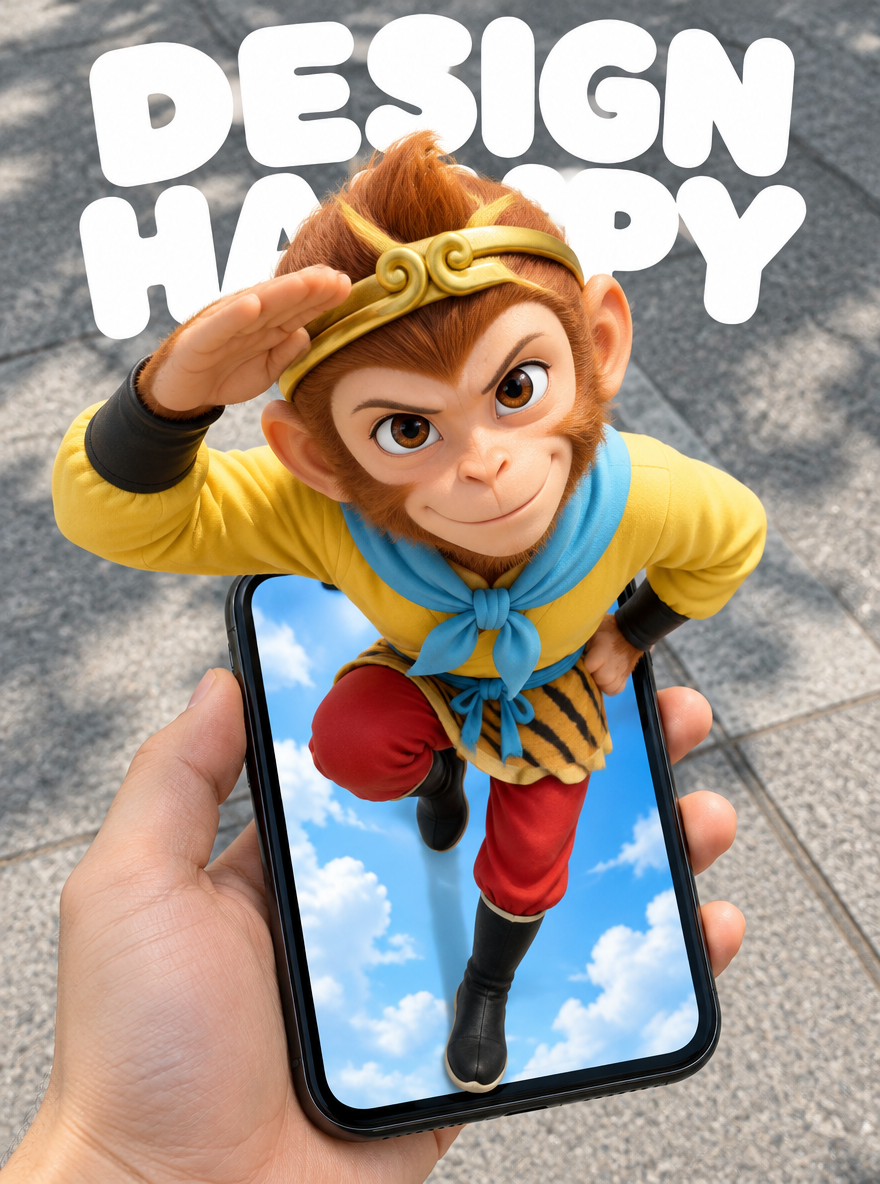
孫悟空的頭部與肩膀延伸到手機框外,而紅色褲腿仍留在充滿天空的螢幕內。握著手機的手則屬於另一個空間:真實的人行道。這三個層次將平面的顯示畫面轉化為一道門口的幻象。
本教學適合製作社群媒體海報的設計師與時尚內容創作者。其中包含五張使用 WeShop GPT Image 2.5 Flare 生成的圖片,以及每張圖片所使用提示詞的英文版本。目標不只是將人物放進手機中,而是在讓一個完整連續的人物跨越螢幕邊界的同時,保留參考姿勢。
五個手機躍出場景
| 1 — 孫悟空主視覺 | 2 — 藍髮夏日時尚 |
|---|---|
 |  |
| 3 — 坐在紅色梯子上的男子 | 4 — 草地上的碎花洋裝 |
|---|---|
 |  |
| 5 — 街頭服飾與耳機 |
|---|
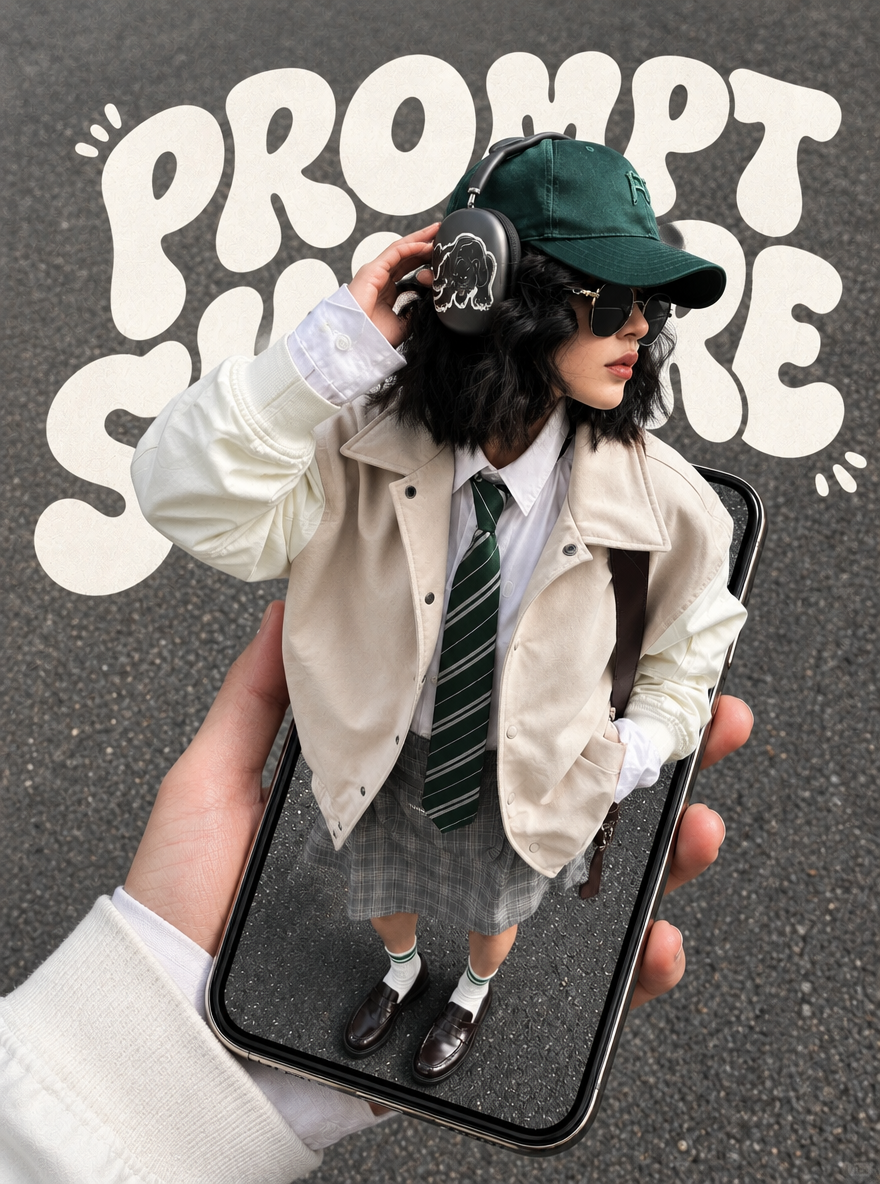 |
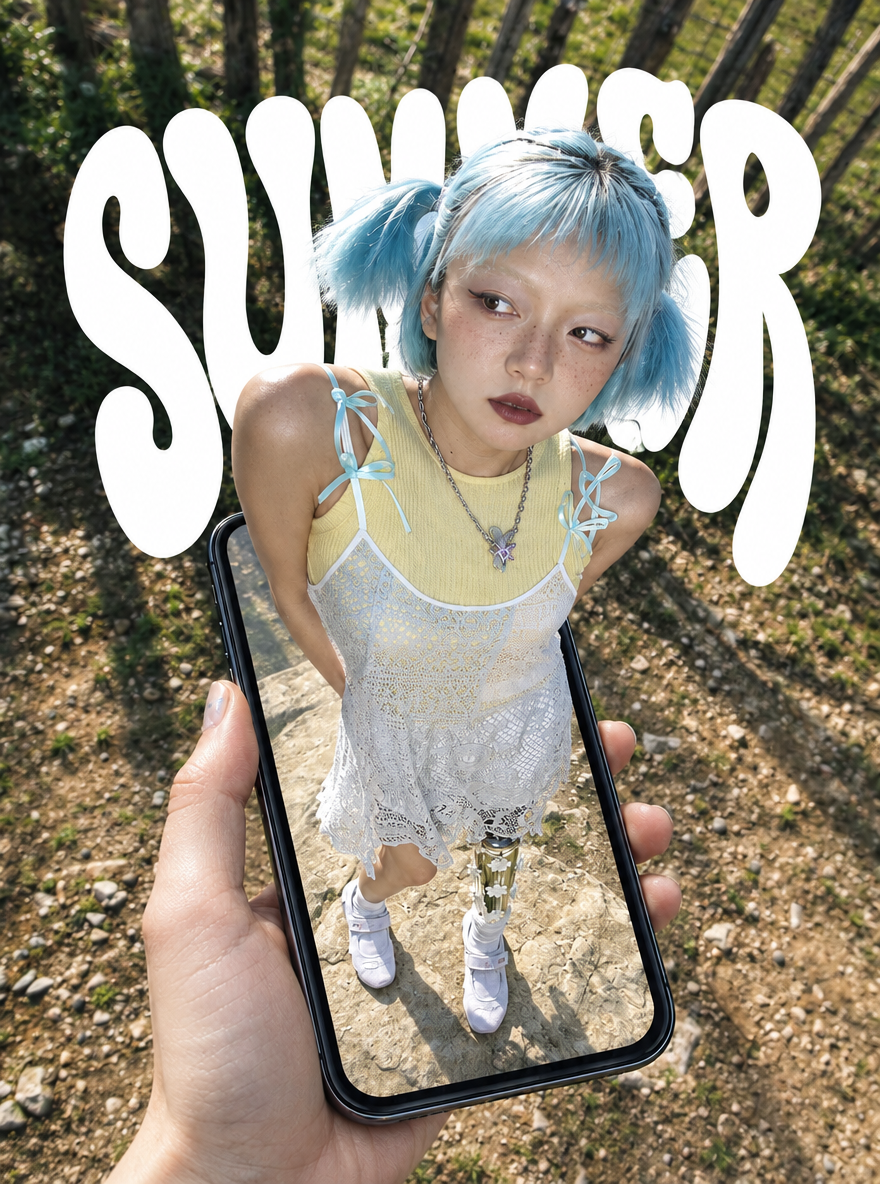
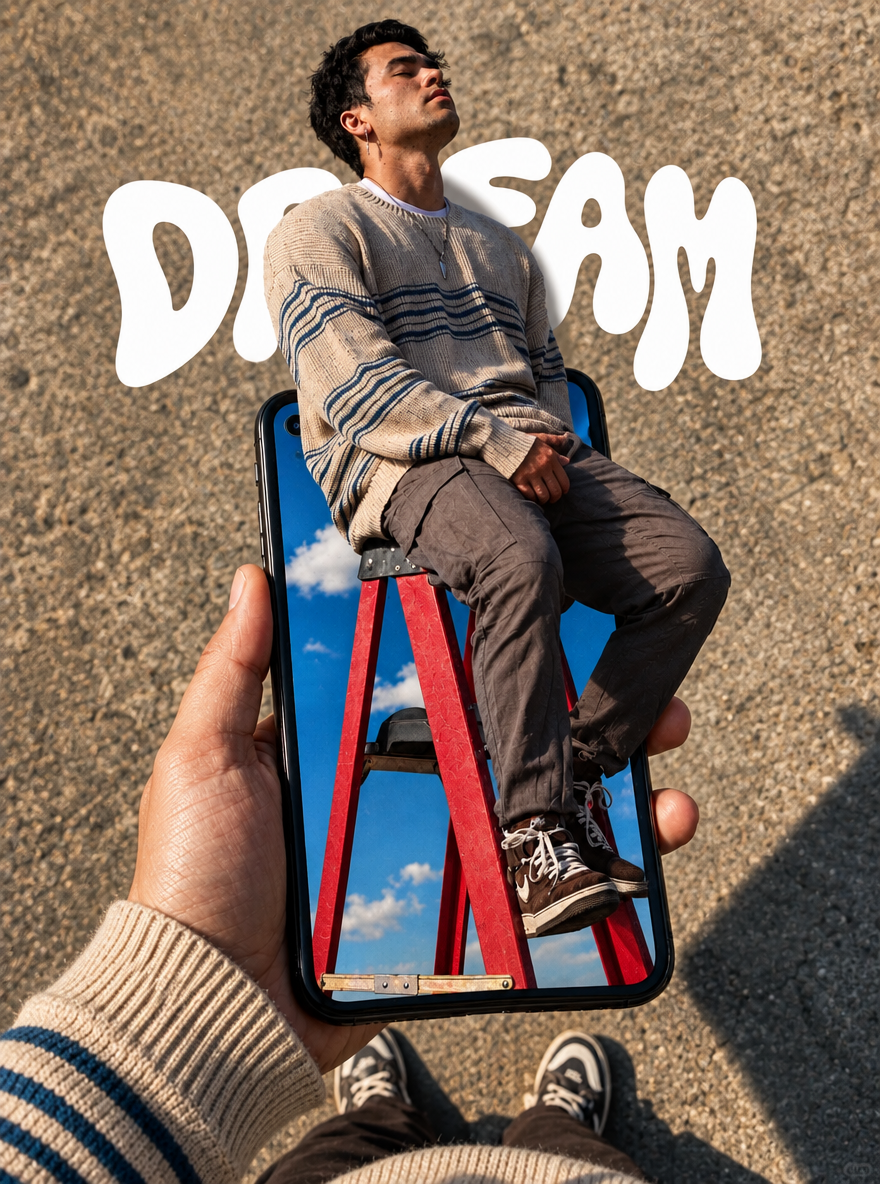
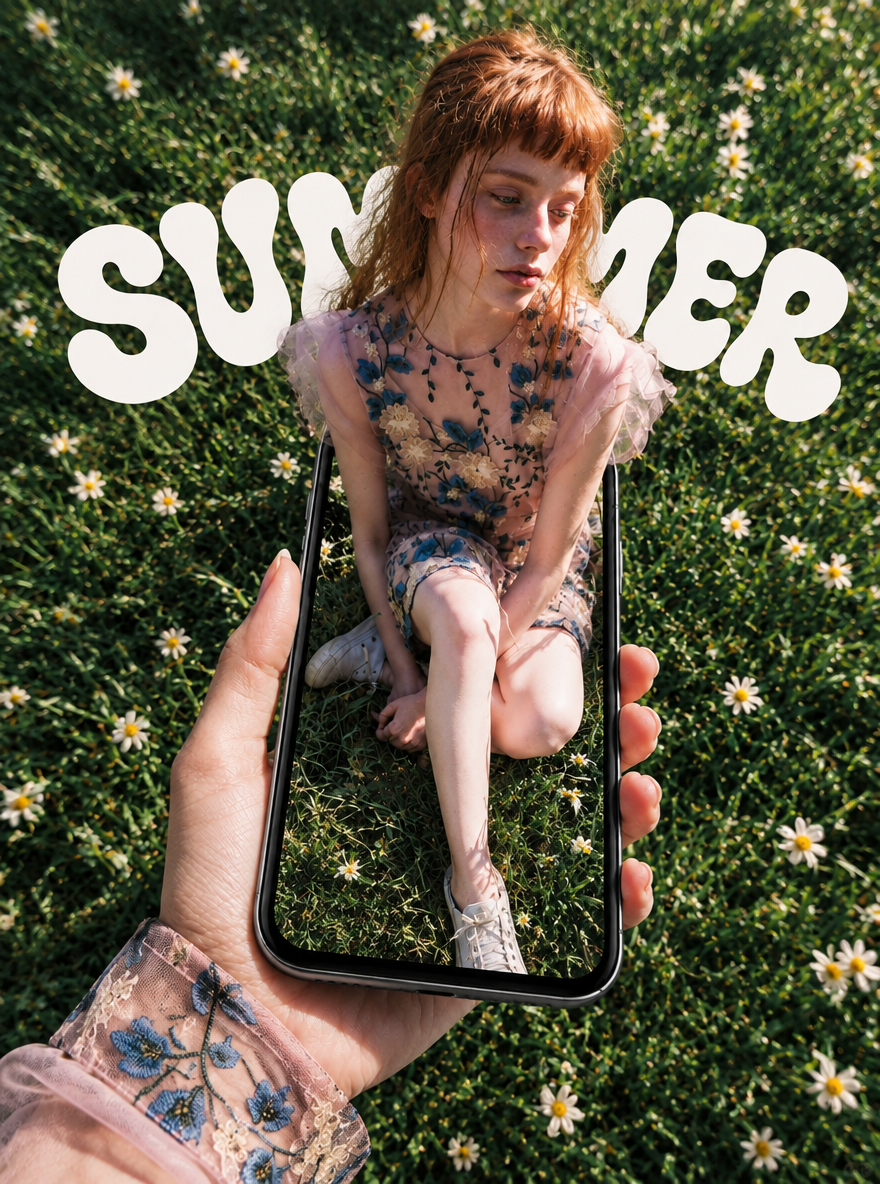
孫悟空是主視覺。其餘四個場景分別呈現藍髮時尚造型、紅色梯子、草地上的碎花洋裝,以及搭配耳機的街頭服飾。上述每張圖片皆為全新生成的 AI 成果,並非原始貼文中的圖片。
將螢幕化為一道門
手機框架建立了這個幻象。頭部與肩膀位於框架前方,雙腿向後延伸至螢幕內,並保留部分框架在身體兩側可見。相較於「3D」或「超現實」等風格詞彙,這些明確的重疊關係更容易描述與評估。
俯視視角可增加距離感。靠近鏡頭的頭部與肩膀應顯得較大,較遠的雙腳則應顯得較小。身體仍須自然連接。請一併描述姿勢、握手機的手部位置,以及手機傾斜角度,以維持透視的一致性。
本系列採用兩種背景處理方式。孫悟空與坐在梯子上的男子,將真實地面與螢幕內的藍天形成對比。時尚場景則在手機內外使用相似的林地、草地或柏油路紋理。第一種處理強調傳送門效果;第二種則強調人物從連續場景中走出來的感覺。
在人物後方放置大型字樣。DESIGN HAPPY、SUMMER、DREAM 與 PROMPT SHARE 作為海報元素,部分字母會被主體遮住。若文字承載必須清楚閱讀的資訊,請另外檢查,或在最終排版時再加入。
準備參考圖並生成
選擇能清楚呈現姿勢、服裝與輪廓的參考圖。選定主視覺後,請分別生成各個場景。不要在同一則提示詞中混入五種不同姿勢。請確認您擁有使用參考素材所需的權利。
本系列是透過官方 WeShop OpenAPI 生成,而非在網站上點擊「生成」。每張參考圖都先上傳至圖片素材端點,並將回傳的 URL 納入 params.images。若要在 WeShop GPT Image 工具中重現此概念,請以對應的參考圖與提示詞作為起點。請確認目前介面中的模型與設定標籤。
| 本系列使用的設定 | 實際值 |
|---|---|
| 模型 | GPT Image 2.5 Flare,gpt-image-2.5-flare |
| Agent | gpt-image,v1.0 |
| 輸入內容 | 每個場景各使用一張參考圖與一則完整提示詞 |
| 要求的長寬比 | 3:4 |
| 要求的圖片尺寸 | 1K |
| 品質 | low |
| 每次執行的圖片數量 | 1 |
| 五張輸出的實際尺寸 | 880 × 1184 像素 |
3:4 與 1K 為請求設定,並不保證檔案尺寸完全一致。此處列出的實際像素尺寸是從生成檔案中讀取的。上傳、執行、輪詢及模型參數皆記載於官方 WeShop API 文件中。
上傳對應的參考圖、輸入完整提示詞、明確選擇模型,然後只提交一次。請等待該次執行完成,而不要在執行期間重複提交。先檢查螢幕邊緣的重疊效果,再檢視手部、身體連接、道具與文字。
各場景的英文提示詞
以下英文提示詞為生成本系列所用中文提示詞的翻譯。它們保留了原指令中的姿勢、構圖、造型與限制條件。每個完整區塊都應搭配相對應的參考圖使用。這些是根據視覺分析重新撰寫的提示詞,並非原作者的原始提示詞;新的生成結果可能有所不同。
1 孫悟空主視覺
保留抬起手臂與彎曲膝蓋的姿勢,同時將外部背景替換為真實人行道。
Using the reference image as the basis, create a vertical 3:4 POV surreal phone pop-out poster. The main character is the Monkey King, Sun Wukong. Preserve the classic animated design shown in the reference: a monkey face, golden headband, yellow top, light-blue scarf, red trousers, and black boots. Keep the original pose: one arm raised and bent beside the head, the other hand at the waist, one leg lifted with the knee bent, and the other leg extending toward the bottom of the phone screen. Do not change the pose to ordinary standing or swinging a staff.

Use a first-person, top-down, wide-angle viewpoint. A hand enters from the lower left holding a black iPhone XR. Place the slightly tilted phone in the lower half of the composition, with its entire body visible and a realistic size relative to the hand. The character's head and shoulders are closer to the camera and appear larger, while the lower body becomes smaller with distance, creating strong foreshortening.

The phone screen is a doorway into another space. The Monkey King's head, shoulders, chest, and raised arm clearly extend outside the screen, overlapping the phone's top edge and parts of its side edges; the legs extend into the space inside the screen. Keep the entire body continuous and complete. Use frame occlusion, contact shadows, and depth inside the screen to create a clear 3D pop-out illusion. This must not look like a flat image displayed on the phone or a separate figure floating above it.

Outside the phone, show a real urban sidewalk with gray concrete, natural daylight, and soft shadows. Inside the phone screen, retain a bright blue sky and white clouds, creating a contrast between a virtual world and the real ground. Render the hand and phone with photographic realism. Preserve the Monkey King's classic animated outlines and colors while adding dimensional shading and depth.

At the top of the composition, retain large rounded white lettering that reads exactly "DESIGN" and "HAPPY" on two lines. Keep the lettering behind the character, naturally overlapped by the head and shoulders, without covering the face, gesture, or phone.

Make the image clean, playful, and visually striking as a social media poster. Show only one Monkey King, one hand holding the phone, and one phone. Do not add other characters, interface buttons, or extra text. Avoid duplicate limbs, malformed fingers, disconnected body parts, incorrect perspective, and conflicting light directions.
2 藍髮夏日時尚
利用傾斜的頭部與肩膀強化螢幕重疊效果,同時保留黃色、白色與淺藍色的服裝配色。
Use the pose and composition of the input reference to create a vertical 3:4 POV surreal fashion photography phone pop-out poster. The subject is a clearly adult young woman with short light-blue twin ponytails, freckles, and a silver necklace. She wears a pale-yellow tank top layered beneath a white lace slip dress, light-blue ribbon bows on the shoulder straps, and white sneakers. Preserve her leaning upper body, hands held behind her back, and slightly turned head. Use a top-down, wide-angle view from the phone holder's perspective, with the head and shoulders appearing larger and the feet smaller with distance.

A realistic hand enters from the lower left holding a black iPhone XR, with a naturally proportioned, fully visible rounded body. The woman's head, shoulders, and chest emerge from the phone screen as a spatial doorway, overlapping the phone's top edge. Her legs and feet below the skirt remain deeper inside the screen. Keep one continuous, complete figure. Use frame occlusion, consistent daylight, contact shadows, and depth inside the screen to create the 3D pop-out illusion. Do not simply paste a complete flat photograph onto the screen, and do not generate a second person or phone.

The exterior background is a real sunlit woodland path with soil, gravel, tree trunks, and deep-green vegetation. Keep the ground inside the screen compatible with the exterior woodland in lighting and color. Use high-quality photographic realism with clear skin, hair, lace, and phone-glass details and a striking social media fashion aesthetic. Retain enormous rounded white lettering reading "SUMMER" in the upper background, behind the subject and naturally overlapped by her head and shoulders. Keep the upright phone and shoes fully visible. Do not add extra text or interface elements. Avoid malformed hands, duplicate limbs, disconnected body parts, and inconsistent shadows.
3 坐在紅色梯子上的男子
坐姿與紅色梯子提供了深度線索。手機內的天空與手機外的沙色地面形成對比。
Use the seated pose and phone composition in the input reference to generate a vertical 3:4 photographic POV phone pop-out poster. An adult man with short black hair and a silver earring wears a beige sweater with dark-blue horizontal stripes, gray-brown trousers, and brown lace-up sneakers. He sits on a red stepladder with his hands resting together between his legs, his head tilted upward, and his eyes closed in a relaxed pose. Preserve the seated pose from the reference; do not make him stand.

Use a first-person, downward-looking viewpoint. A hand wearing a matching striped knit sleeve enters from the lower left and holds a black iPhone XR. Place the fully visible, realistically proportioned phone in the lower half of the frame. The man's head, shoulders, chest, and parts of his thighs clearly extend beyond the screen boundary and overlap the top edge of the phone. The red ladder and lower legs occupy the space inside the screen, with a continuous body and a structurally plausible ladder. Use wide-angle foreshortening, contact shadows, phone-frame occlusion, and the ladder's depth to create the 3D pop-out effect. Do not make this a flat photograph inside the screen or a separate figure floating in midair.

Outside the screen, show real rough sandy-colored pavement. The phone holder's shoes may appear slightly along the bottom edge. Inside the screen, show a vivid blue sky and white clouds, contrasting with the real ground. Use warm daylight, natural fabric textures, and clear hand and phone details. Retain rounded white lettering reading "DREAM" in the upper background behind the man. Do not add extra text, other people, phone interface elements, or watermarks. Avoid extra fingers, misaligned legs and feet, a disconnected ladder, and excessive cropping of the phone.
4 草地上的碎花洋裝
讓手機內外的草地與雛菊保持相似,並在握手機的手部袖子上重複碎花細節。
Use the reference image for the seated pose, phone composition, and color palette to generate a vertical 3:4 POV surreal photography poster. The subject is a clearly adult red-haired woman with short orange-red bangs and naturally loose hair. She wears a pink short-sleeved floral embroidered dress and light-colored casual shoes. She sits on the grass with her legs bent and crossed, one lower leg extending toward the bottom of the frame, her hands near her knees, and her gaze softly directed down and to the side. Preserve the reference pose in a natural, nonsexual fashion editorial photograph.

Use a first-person, top-down, wide-angle view. A hand wearing a matching pink floral sleeve enters from the lower left holding a black iPhone XR. Keep the entire phone body visible and realistically sized relative to the hand. The woman's head, shoulders, and upper body extend beyond the phone screen and overlap its top edge, while her lower body remains inside the screen. Keep one continuous figure. Use front-to-back frame occlusion, daylight, contact shadows, and foreshortening to establish a strong 3D pop-out illusion through the screen doorway. This must not look like a flat screenshot or a floating figure.

Show natural green grass and small white daisies both inside and outside the phone. Keep the textures consistent while maintaining a clear difference in depth. Use angled warm sunlight, realistic skin and embroidered fabric details, and natural shadows. Retain rounded white lettering reading "SUMMER" in the upper background behind the subject. Do not add extra text, interface elements, or people. Avoid malformed fingers, fused legs, duplicate faces, disconnected body parts, and an incorrect phone frame.
5 街頭服飾與耳機
觸碰耳機的手跨越手機邊緣。綠色帽子與領帶讓整體服裝配色更協調。
Using the input reference, create a vertical 3:4 POV surreal street-fashion photography phone pop-out poster. The subject is a clearly adult young woman with short wavy black hair, a dark-green baseball cap, black sunglasses, and large black over-ear headphones. She wears an off-white sleeveless jacket over a white shirt, a green diagonally striped tie, a gray plaid skirt, white ankle socks, and black loafers. Preserve the pose with one hand raised beside the headphones, the other hand in a pocket, and her head turned to the side.

Use a first-person, high-angle, downward-looking wide-angle view. A realistic hand in a white sleeve enters from the lower left holding a black iPhone XR. Place the slightly tilted phone in the lower half of the frame, with its entire rounded frame visible and its size appropriate to the hand. The subject's head, shoulders, chest, and raised arm extend dimensionally outside the screen and overlap the phone's top and side edges. Her legs and feet below the skirt recede into the phone. Keep one continuous figure, with a larger head close to the camera and smaller feet farther away. Use phone-edge occlusion, contact shadows, and realistic light to establish the 3D pop-out illusion. Do not make this a flat portrait inside the screen or a complete floating figure.

Use real gray fine-grained asphalt for the background, with matching pavement inside the screen. Maintain consistent soft natural light and detailed clothing, headphones, and phone-glass textures. In the upper background, place large rounded white lettering that reads exactly "PROMPT" and "SHARE" on two lines. Keep the lettering behind the subject and naturally overlapped by the head and shoulders. Do not add other text, watermarks, phone interface elements, a second person, or a second phone. Avoid duplicate fingers, broken headphones, abnormal legs and feet, and incorrect perspective.
檢查生成結果
五個結果皆保留了人物與手機框架之間的主要重疊效果。姿勢與服裝也都與各自的參考圖保持相近。孫悟空圖片營造出真實人行道與充滿天空的螢幕之間預期的對比,但右臂略有裁切。若要將其用於需要更寬安全邊界的封面,請先調整取景。
手機硬體並非精確的產品重現。雖然提示詞指定 iPhone XR,但梯子圖片顯示了不正確的挖孔式鏡頭。這些圖片旨在展示視覺效果;不應將其視為準確的 iPhone XR 產品照片。
部分字樣被人物遮住。這有助於強化海報的層次感,但不保證文字能完整閱讀。發布前請檢查重要文字。參考圖能協助保留姿勢與外觀,但無法證實身份,也無法確保每一項服裝細節都被精確重現。