
language

English

Sign In

Our new Virtual Try-On just launched. Try it now!
close
Steal the Look! Click to Replicate it with Your Product!

Wan Animate AI Video Generator – Create Character Animation and Replacement Videos Online

Wan Animate AI Video Generator is an easy-to-use video maker and video generation model that helps users create ai videos from character images, reference images, reference footage, and text inputs in just a few clicks. As a powerful image to video ai tool, it supports character animation, character replacement, face swap, dance imitation, style transfer, and audio integration while keeping motion and expressions more natural. For many creators, an ai video generator depends on how well it follows creative intent, handles motion, and simplifies the entire video creation process.

Real-World Use Cases for Wan Animate AI Video Generator

Creating Character Performance Videos from a Single Image in 3 Simple Steps

A creator wanted to turn a still character image into a lively performance without building a complex animation pipeline. By uploading 1 character image and 1 reference video, they used Wan Animate AI as an image to video ai solution to generate motion-driven video clips with natural body movement, expressive facial reenactment, and better scene consistency. In one test workflow, this helped them turn ai generated images into stunning ai generated videos in under 5 minutes, explore 3 to 5 versions of each video idea more quickly, and create videos for short-form content, stylized animation, and social media with more high quality videos and less manual work.
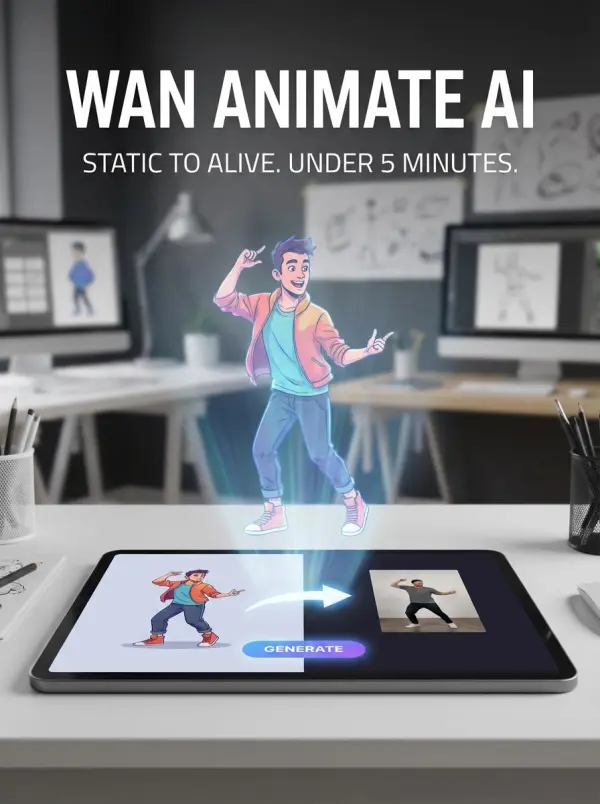
wan video animate by weshop ai

Replacing Characters in Videos for Social Media and Marketing with a Fun Mascot Twist

“Can we make this campaign video more fun without filming it again?” a marketing manager asked. A creator suggested using Wan Animate AI video generation to replace the person in the original clip with a playful brand mascot while keeping the original motion, expressions, and overall scene flow. They uploaded a character image and a reference clip, then created a polished replacement video with matched lighting, facial expression transfer, and more natural integration into the target scene.When the first version came back, the team laughed and said, “This is exactly the kind of thing people will remember.” The new version felt more eye-catching and brand-friendly, which helped speed up creator content, campaign videos, and commercial storytelling work.
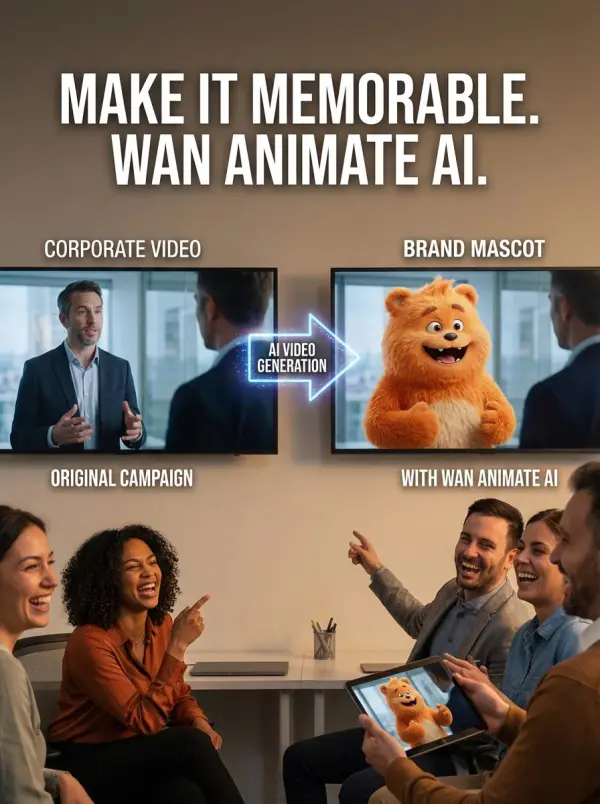
wan video animate by weshop ai
Previous
Next

Key Features of the Wan Animate AI Video Generator

Unified Character Animation and Replacement

Wan Animate AI combines character animation and replacement in one workflow, helping users generate high quality videos with minimal effort. This unified system works across different scenarios, from short clips to commercial projects, and supports seamless integration into existing pipelines. It is useful for teams that want high quality visuals and ai generated visuals without heavy technical expertise.

Move Mode and Mix Mode for Different Tasks

The platform offers Move Mode for animation and Mix Mode for replacement, giving users more control over motion and scene use. This makes it easier to adapt content to a preferred style, fit a specific aspect ratio, and create engaging videos for social media content, educational content, or branded media. It also supports advanced features often associated with premium plans.

Skeleton-Driven Motion Control

Wan Animate uses skeleton guidance to create smoother, more realistic motion across scenes. This helps users turn a character image and reference clip into high quality results that feel more natural, especially in dance imitation and action-heavy sequences. The technology is useful for existing content, creator workflows, and short-form storytelling that needs accurate movement with minimal effort.

Facial Feature Reenactment and Identity Consistency

The system tracks facial features from the source image and transfers expressions more consistently across frames. This helps maintain identity while producing engaging videos with better emotion and stronger continuity. It is especially useful when users want ai generated visuals that match a preferred style, support social media content, and still feel polished enough for commercial projects.

Intelligent Relighting and Scene Integration

Auxiliary relighting technology helps the character blend into the original scene more naturally by adjusting color tone, illumination, and environmental lighting. This improves scene consistency and makes the final output look more polished for social media, branded content, and commercial use.

What You Can Do with Wan Animate AI

Animate a Character from a Single Image

Use Wan Animate AI to turn one character image into a moving clip by matching it with a reference performance. This is useful for creators who want to generate high quality animation with minimal effort instead of manual editing. It works well for social media content, educational content, and engaging videos that need realistic motion and high quality results.

Replace a Person in a Video with a Character

The platform can replace a person in source footage with a new character while preserving motion and expression flow. This makes it useful for existing content, branded edits, and commercial projects that need ai generated visuals with seamless integration. Users can also adjust aspect ratio, choose a preferred style, and download outputs in various formats.

Create Dance Imitation and Motion Transfer Videos

Wan Animate AI works especially well for dance imitation, body movement transfer, and performance clips that need natural rhythm. It helps users create engaging videos with realistic motion, strong timing, and high quality visuals from a simple image and clip pairing. This reduces reliance on technical expertise while still delivering advanced features and high quality results.

Build Commercial and Promotional Video Assets

Wan Animate AI can also support commercial projects, ads, promo clips, and branded storytelling that need strong visual consistency. Teams can create high quality visuals, add sound effects, adapt scenes to different scenarios, and export in various formats for easier publishing. This makes it useful for businesses that want generate high quality results with less manual production effort.

Frequently Asked Questions About Wan Animate AI Video Generator

What is Wan Animate AI?

Wan Animate AI is an AI-powered video generation platform that creates character animation and character replacement videos from images, videos, and prompts. It is designed to help users generate polished video content with natural motion, expressions, and scene consistency.

How does Wan Animate AI work?

Users typically upload a character image and a reference video, then choose a workflow such as character animation or character replacement. The system uses motion control, facial reenactment, and relighting technology to generate a new video.

Does Wan Animate AI support face swap and dance imitation?

Yes. Based on the materials you provided, Wan Animate AI supports face swap technology, dance imitation, and broader character performance generation using reference video input.

What video formats and output settings are supported?

The provided materials say common input formats include MP4 and MOV, while output videos are generated in MP4 format. The platform also mentions output resolutions such as 480p and 720p with frame rates ranging from 5 to 60 fps.

Is there a free trial available?

Yes. New users receive 20 free credits upon registration, which can be used to test the platform’s AI video generation features before upgrading.

Can I use the generated videos commercially?

Yes. The provided materials state that videos generated with Wan Animate AI can be used for commercial purposes, with users retaining rights to their generated content subject to the platform’s terms.

Can I use Wan Animate AI for TikTok, Reels, or Shorts?

Yes. Wan Animate AI is well suited for short-form social media content such as TikTok videos, Instagram Reels, and YouTube Shorts, especially when you want eye-catching motion and fast production.

What happens if my first result looks weird?

That usually means the input image, reference motion, or scene match could be improved. A clearer character image, a better-aligned reference video, or a different workflow choice can often produce a much better result on the next try.

Do I own the generated videos?

The platform says generated videos can be used commercially, but usage rights should still be understood according to the platform’s terms.

Explore More AI Tools

Our new Virtual Try-On just launched. Try it now!
close

GPT Image 2 AI Image Generator

Create High Quality Images, Text Rich Visuals, and Product Photography

Nano Banana 2

Google’s Next-Gen AI Image Model for Instant Professional Creativity

Virtual Try-On

Try On Clothes Online with AI Virtual Try Technology

Swap Model & BG

Realistic Model & Background Swapping Online with AI

AI Model

Showcase clothing with a variety of models

AI Product

Create stunning product images with few clicks from anywhere

AI Video

Create and publish videos from a photo or description—instantly, in any style.

Face Forge

AI Face Morph & Face Swap Generator Online

Nano Banana Pro

Conversational editing, precisely consistent.

Product Recoloring

Recolor Image Online Free - Color Changer in WeShop AI

AI Image to Video Generator

Turn Images into Stunning AI Videos for Free

To Mannequin

Convert real model photos into mannequin displays

Change Pose

Change poses, switch between various model poses, making the clothing display more natural

Remove Background

Removing background with lightning speed and ease

AI Photo Enhancer

Enhance Photo Quality Online with Free AI

Relight

Relight your images automatically and efficiently

Expand Image

Expand images & backgrounds to fit any platform

Magic Eraser

Remove unwanted objects from your photos with AI

Hand/Feet Fixer

Regenerate natural-looking hands and feet in AI-generated images

Design Repair

Upload an image, highlight the area you wish to fix, and upload a target reference image

Outfit Generator

Create AI clothes styling from any model photo, garment, or style prompt.

AI Clothing Piece Generator

Create Professional Flatlay Clothing Images From Any Photo or Idea

Watermark Video Remover Free Online

Remove Watermark from Video

AI Video Enhancer

Enhance Video Quality Online with AI

Replace Face in Video Online Free

AI Video Face Swap for Realistic Clips

Seedream 5.0

Try the Latest Smart Image Creation Model Online

Seedance 2.0

A Multi-Modal AI Video Creative Engine for Cinematic Storytelling

Sora 2

Next Generation AI Video Generator with Realistic Physics & Storytelling

Wan AI Video Generator

Advanced AI Image & Video Generation Model

Midjourney Image Generator

Use Midjourney v7 to Create AI-Generated Images

Kling 3.0

AI Director Video Model with 4K Cinematic Storytelling

Qwen Image Edit

A Revolutionary Tool for Seamless Image Editing

Z-Image AI Image Generator

Create High-Quality Images from Text Instantly

FireRed Image Edit

Open Source AI Image Editing Model for High Fidelity Edits

Grok Imagine AI Image Generator

Create High-Resolution Images from Text with Aurora AI

Grok Imagine AI Video Generator

Create Cinematic AI Videos with Native Audio & Scene Control

Hailuo AI Video Generator

Create Cinematic AI Videos from Text or Images

Veo 3 AI Video Generator

Create Cinematic Videos from Text or Images

Vidu Q3 AI Video Generator

Create Cinematic Short Videos with Turbo and Pro Modes

idea
helper





















