language

English

Steal the Look! Click to Replicate it with Your Product!

Video to Video AI Generator – Transform Existing Videos with AI Style Transfer

Video to Video AI Generator is an online AI video transformation tool that helps users restyle existing videos into new visual looks while preserving original motion, timing, structure, and composition. With AI video style transfer, prompt-based video editing, motion-preserving processing, scene transformation, mood control, lighting changes, texture generation, and temporal consistency, users can convert footage into anime style, cinematic film looks, fantasy worlds, vintage aesthetics, cyberpunk scenes, painterly animation, or photorealistic alternate versions. It is useful for social media creators, filmmakers, advertisers, ecommerce teams, artists, and marketers who want to reimagine video content without reshoots, complex VFX, or heavy post-production.

Real-World Use Cases for Video to Video AI Generator

Restyling Social Media Clips for Fresh Content

A social media creator named Lina Brooks had several short clips that performed well, but she wanted fresh versions for TikTok, Instagram Reels, and YouTube Shorts. Instead of filming again, she used a Video to Video AI Generator to apply new visual styles to the same source video. She tested anime style, vintage film grain, neon cyberpunk lighting, and soft cinematic color grading while keeping the original motion and pacing. This helped her create multiple versions from one clip and keep her content feed active.
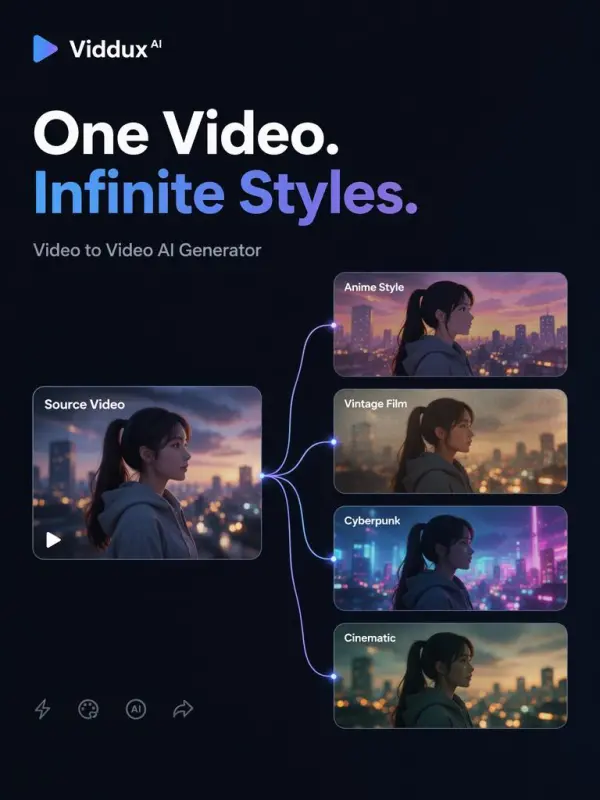
Diverse video styles by weshop

Transforming Campaign Footage for Ad Variations

A marketing team called Northline Creative needed several campaign visuals from one product video. The original footage showed a model walking with a bag in a clean studio, but the team wanted different moods for seasonal ads. Using video-to-video AI, they changed the scene into a rainy city street, a warm sunset background, and a high-fashion editorial look. The tool preserved the model’s movement and product composition while giving each ad a distinct visual direction.
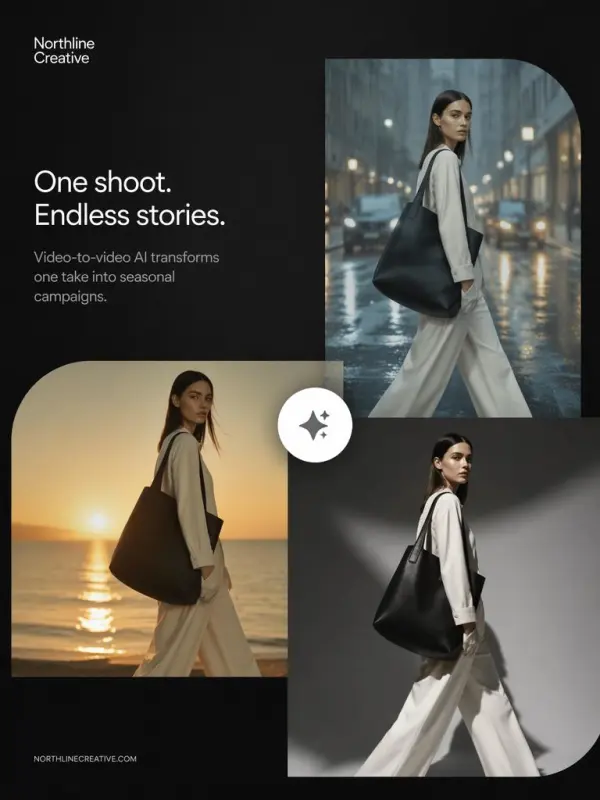
different product video styles
Previous
Next

Key Features of Video to Video AI Generator

Transform Existing Videos with AI

Video to Video AI Generator lets users upload an existing video and transform it into a new visual style with a text prompt. Instead of applying a simple filter, the AI analyzes motion, scene structure, lighting, and subject details, then rebuilds the footage with a fresh aesthetic while keeping the original timing and composition.

AI Video Style Transfer

The tool supports AI video style transfer for anime, cartoon, oil painting, watercolor, claymation, cyberpunk, fantasy, vintage film, cinematic, realistic, and other visual directions. Users can describe the target look and let the system apply consistent styling across frames, helping the transformed video feel intentional rather than like a basic overlay effect.
Motion-Preserving Video Processing

Motion-Preserving Video Processing

A strong video-to-video AI tool should preserve original motion, gestures, camera movement, and scene timing. This means walking, dancing, product movement, hand gestures, and transitions can remain recognizable while the look changes. Motion preservation helps the final output feel natural, coherent, and closer to the original source video.

Scene and Mood Transformation

Users can change the mood, environment, lighting, weather, color palette, and background of a video with prompt-based instructions. A sunny street can become a rainy cyberpunk alley, a studio clip can become a fantasy landscape, or a clean product shot can become a luxury campaign scene. This gives creators more visual flexibility.
video to video ai workflow

Efficient Online Workflow

The workflow is simple: upload a source video, describe the style or transformation, choose settings, preview the generated result, and download the final video. This makes video restyling accessible for creators, agencies, artists, and businesses that need quick visual experiments without advanced editing tools or expensive production workflows.

What You Can Do with Video to Video AI Generator

Convert Videos into Anime or Cartoon Style

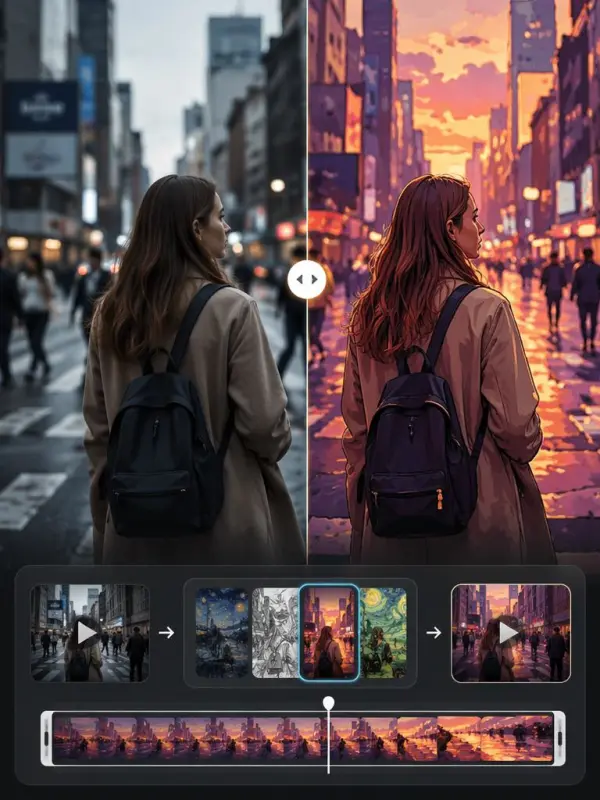
Upload a real video and convert it into anime, cartoon, comic, or illustrated style while keeping the original movement and composition. This is useful for social media edits, fan-style content, character videos, music clips, and creative storytelling. Clear prompts can guide the final look, colors, atmosphere, and animation feel.

Create Cinematic and Vintage Video Looks

Use Video to Video AI Generator to give ordinary footage a cinematic, vintage, or film-inspired aesthetic. Describe VHS grain, Super 8 warmth, noir shadows, analog blur, dramatic lighting, or editorial color grading. This helps creators make music videos, fashion films, trailers, and social clips feel more stylish without manual color grading.

Restyle Product and Brand Videos

Brands can upload product footage and generate different campaign styles from one source clip. A clean product video can become luxury, futuristic, seasonal, playful, or cinematic depending on the prompt. This is useful for ecommerce visuals, product launches, ad testing, landing pages, and social media marketing.

Transform Scenes and Backgrounds

Creators can use video-to-video AI to change the scene environment, background, weather, or atmosphere. A simple indoor clip can become an outdoor landscape, a modern room can become a sci-fi lab, or a city street can become a fantasy world. This helps test concepts without location shoots or set design.

Generate Multiple Creative Variations

From one source video, users can generate multiple style variations for different audiences, platforms, and campaign ideas. This makes it easier to test visual directions, compare aesthetics, and repurpose content for TikTok, Instagram Reels, YouTube Shorts, ads, websites, and presentations without rebuilding every version manually.

Frequently Asked Questions About Video to Video AI Generator

What is Video to Video AI Generator?

Video to Video AI Generator is an AI-powered tool that transforms an existing video into a new visual style or scene while preserving the original motion, structure, timing, and composition.

How does video-to-video AI work?

Video-to-video AI analyzes the source video frame by frame, understands motion and scene structure, then regenerates the footage based on a text prompt or style direction. The goal is to change the look while keeping movement coherent.

Can I change a video into anime style?

Yes. You can upload a source video and describe an anime style, cartoon style, or illustrated look. The AI can restyle the footage while preserving the original motion and timing.

Can I use text prompts to edit videos?

Yes. Many video-to-video AI workflows support prompt-based video editing. You can describe changes such as lighting, scene mood, background, color palette, style, weather, or artistic direction.

Will the original motion stay the same?

A good video-to-video AI generator is designed to preserve original gestures, movement, timing, and composition. Results may vary depending on video quality, motion complexity, prompt clarity, and transformation strength.

What is temporal consistency?

Temporal consistency means the video remains visually stable across frames. Good temporal consistency reduces flickering, style drift, and sudden changes, making the transformed video look smoother and more professional.

What styles can I apply?

Common styles include anime, cartoon, oil painting, watercolor, cyberpunk, fantasy, vintage film, claymation, cinematic, realistic, noir, 3D render, comic book, and many other creative aesthetics.

Can I use it for marketing videos?

Yes. Video to Video AI Generator is useful for product ads, ecommerce videos, social media campaigns, brand storytelling, campaign variations, fashion films, and promotional content.

Do I need editing skills?

No. The workflow is designed for simple online use. Users upload a video, enter a prompt, choose settings, generate the result, preview it, and download the transformed clip.

Can I use transformed videos commercially?

Commercial use depends on the platform license, the source video rights, music rights, model terms, and final export policy. For safer use, upload videos you own or have permission to modify and review usage terms before publishing.

Explore More AI Tools

Our new Virtual Try-On just launched. Try it now!
close

HappyHorse AI Video Generator

Create Cinematic Text-to-Video and Image-to-Video Content

GPT Image 2 AI Image Generator

Create High Quality Images, Text Rich Visuals, and Product Photography

Nano Banana

Google's Next-Gen AI Image Model for Instant Professional Creativity

AI Video Generator

Turn Images into Stunning AI Videos for Free

Virtual Try-On

Try On Clothes Online with AI Virtual Try Technology

Swap Model & BG

Realistic Model & Background Swapping Online with AI

AI Fashion Model

Showcase clothing with a variety of models

AI Product

Create stunning product images with few clicks from anywhere

Face Forge

AI Face Morph & Face Swap Generator Online

Product Recoloring

Recolor Image Online Free - Color Changer in WeShop AI

To Mannequin

Convert real model photos into mannequin displays

Change Pose

Change poses, switch between various model poses, making the clothing display more natural

Remove Background

Removing background with lightning speed and ease

AI Photo Enhancer

Enhance Photo Quality Online with Free AI

Relight

Relight your images automatically and efficiently

Expand Image

Expand images & backgrounds to fit any platform

Magic Eraser

Remove unwanted objects from your photos with AI

Hand/Feet Fixer

Regenerate natural-looking hands and feet in AI-generated images

Design Repair

Upload an image, highlight the area you wish to fix, and upload a target reference image

Outfit Generator

Create AI clothes styling from any model photo, garment, or style prompt.

Video Agent

Create and publish videos from a photo or description—instantly, in any style.

AI Clothing Piece Generator

Create Professional Flatlay Clothing Images From Any Photo or Idea

Watermark Video Remover Free Online

Remove Watermark from Video

AI Video Enhancer

Enhance Video Quality Online with AI

Replace Face in Video Online Free

AI Video Face Swap for Realistic Clips

Seedream 5.0

Try the Latest Smart Image Creation Model Online

Seedance 2.0

A Multi-Modal AI Video Creative Engine for Cinematic Storytelling

Sora 2

Next Generation AI Video Generator with Realistic Physics & Storytelling

Wan AI Video Generator

Advanced AI Image & Video Generation Model

Midjourney Image Generator

Use Midjourney v7 to Create AI-Generated Images

Kling O1 AI Video Generator

Create Cinematic Videos with Omni One Control

Kling 3.0 Omni

Create Multimodal Videos with Native Audio ---

Kling 3.0

AI Director Video Model with 4K Cinematic Storytelling

Kling Motion Control

Create Realistic Motion Videos from Reference Images and Videos

Qwen Image Edit

A Revolutionary Tool for Seamless Image Editing

Z-Image AI Image Generator

Create High-Quality Images from Text Instantly

FireRed Image Edit

Open Source AI Image Editing Model for High Fidelity Edits

Grok Imagine AI Image Generator

Create High-Resolution Images from Text with Aurora AI

Grok Imagine AI Video Generator

Create Cinematic AI Videos with Native Audio & Scene Control

Hailuo AI Video Generator

Create Cinematic AI Videos from Text or Images

Veo 3 AI Video Generator

Create Cinematic Videos from Text or Images

Vidu Q3 AI Video Generator

Create Cinematic Short Videos with Turbo and Pro Modes

Imagen 4

Create Photorealistic Images and Accurate Text Visuals with AI

HiDream AI Image Generator

Create Stunning AI-Generated Images Online

Sulphur2

Create Cinematic AI Videos from Text and Images

idea
helper